When the Safety-First AI Lab Leaves the Front Door Open
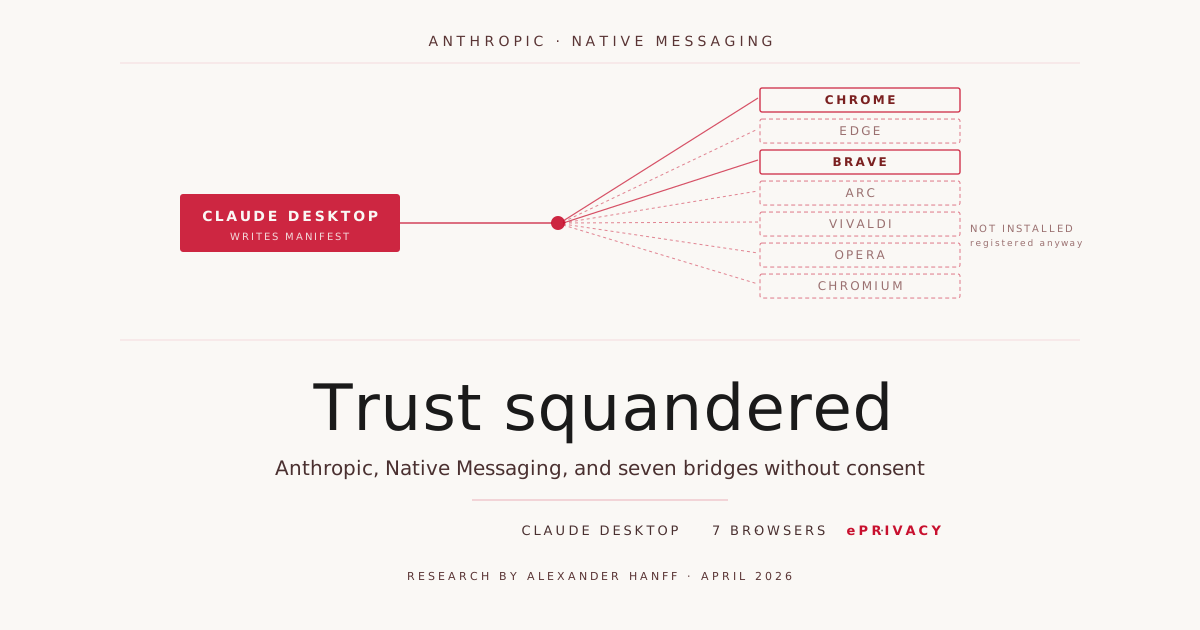
For years, Anthropic has positioned itself as the serious, safety-conscious AI lab. A finding on a MacBook is now putting that self-image seriously into question. What happened, why it’s a problem, and why the company is squandering something that can’t be bought in the AI industry.
An unusual file in a browser directory
On April 18, 2026, privacy consultant Alexander Hanff publishes a blog post with a blunt headline: “Anthropic secretly installs spyware when you install Claude Desktop.” While debugging his own native-messaging helper in Brave, Hanff stumbles upon a file he didn’t install:
~/Library/Application Support/BraveSoftware/Brave-Browser/
  NativeMessagingHosts/com.anthropic.claude_browser_extension.json
The file is what’s called a Native Messaging manifest. It tells Chromium-based browsers to invoke a local executable as soon as a browser extension with one of the listed IDs requests it. Three extension IDs are pre-authorized in the file. The executable being called sits at /Applications/Claude.app/Contents/Helpers/chrome-native-host and runs, when activated, with the full privileges of the logged-in user — outside the browser sandbox.
Take a moment to let that sink in: Hanff had never installed a Claude browser extension. He had only installed Claude Desktop, Anthropic’s Mac application. That application had, without asking, written into the configuration directory of a browser made by an entirely different vendor and prepared a bridge there that can be activated later.
What Hanff’s audit uncovered
Hanff reproduced the behavior on a second machine and documented his findings. They are uncomfortably precise:
Claude Desktop drops the manifest file not in one but in seven browser directories — Chrome, Edge, Brave, Arc, Vivaldi, Opera, and Chromium. On his test machine only Brave and Chrome were actually installed. For the other four browsers, the NativeMessagingHosts directories were created by Claude Desktop itself. Anyone who installs one of those browsers later will have the bridge active from the very first launch.
The files are byte-identical — an MD5 checksum across all seven returns the same hash seven times. The manifests are rewritten on every launch of Claude Desktop. Hanff counts 31 install events in his Claude Desktop logs. Delete the file, and it’s back the next time the app starts.
Particularly awkward: Anthropic’s public documentation states that the Chrome integration only supports Chrome and Edge — Brave, Arc, and other Chromium browsers are explicitly excluded in the official docs. The file gets written into all seven anyway. The shipped behavior and the documented behavior do not match.
The macOS provenance metadata confirms that the files were written by Claude Desktop — these metadata cannot be forged by an application, the operating system sets them. The executable itself is signed with Anthropic PBC’s Developer ID certificate (team identifier Q6L2SF6YDW) and shipped through the regular Claude Desktop distribution channel. So this isn’t a test build, not an accidental artifact of a development environment, but a deliberate design choice in the as-shipped state.
What the bridge can do once it’s activated
The bridge itself does nothing while dormant. It waits for a paired extension. That’s the argument Anthropic will predictably hide behind: technically, nothing’s happening. So let’s look at what does happen once the bridge is activated — drawing on Anthropic’s own documentation. Anthropic itself describes the capabilities of the Claude browser extension:
- Claude opens new tabs for browser tasks and shares the browser’s login state, so any site the user is already signed into is accessible.
- Live debugging with direct read access to console errors and DOM state.
- Data extraction from web pages, locally storable.
- Task automation: data entry, form filling, multi-site workflows.
- Session recording as GIF.
Translating that into everyday terms: if an online banking page is open, that’s within the bridge’s capability scope. If we’re on the patient portal of a health insurance provider, that’s within scope. If an admin is logged into the console of a production system, that’s within scope. The bridge runs outside the browser sandbox, with the user’s privileges, and shows up in no system UI as a running process or permission entry — Native Messaging hosts are invoked by the browser via stdio and are invisible in the macOS permission model.
Anthropic itself notes in its launch blog for Claude for Chrome that prompt injection is a central security challenge. The numbers cited: 23.6% attack success rate without mitigations, 11.2% with current mitigations. Read that again: roughly one in nine attack attempts using prepared web pages succeeds — and that is the state-of-the-art figure published by Anthropic itself. The bridge is preinstalled on every system where Claude Desktop is installed. On a successful prompt injection, the path runs through the extension, through the bridge, into a helper binary with user privileges outside the sandbox.
The eleven points where you keep getting stuck
Walking through Hanff’s analysis as a checklist, several places stand out — each problematic on its own, and together they form a clear pattern:
An application writes across vendor boundaries into another vendor’s application directory, without informing or asking the user. There is no opt-in, no checkbox, no settings dialog showing the registered integrations. Removing the file is significantly more involved than installing it — you have to know that Native Messaging hosts exist, where they live on macOS, that ~/Library/Application Support has been hidden by default since 2011, and you have to open a terminal. The file is automatically restored. It gets written into browsers that are not supported per Anthropic’s own documentation. It gets written into browsers that aren’t installed. It authorizes extensions the user has not installed. There is no UI at any level that makes this integration visible.
Each one of these on its own would be cause for discussion. Together, they add up to what the privacy world calls a dark pattern: a design that systematically undercuts user agency without containing a literal lie.
Anthropic stays silent
This is where we’d love to insert a statement from Anthropic. There isn’t one. The Register asked for comment and got no answer. Malwarebytes asked for comment and got no answer. Hanff himself got no answer and felt forced to send a cease-and-desist letter to Anthropic — an escalation that is not normally the first step in a dialogue between security researchers and vendors.
As of today, more than two weeks after the original post, there is no technical explanation from Anthropic, no legal positioning, no announcement of a patch, no correction of the documentation. In 2026, that’s a remarkable finding.
The legal dimension, briefly and painfully
Hanff argues that the behavior violates Article 5(3) of the ePrivacy Directive 2002/58/EC. The article is, at its core, not complicated: storing information on, or accessing information already stored on, a user’s device is only permissible with their clear and informed consent — unless it is strictly necessary for the provision of the requested service.
“Strictly necessary” is the crux here. Claude Desktop functions completely without preinstalling browser bridges in seven browsers — the “Claude in Chrome” feature is a separate, optional extension. So the strict-necessity defense falls away. The consent requirement kicks in. There is no consent. Under European data protection law, that’s a violation — and not a gray-zone one, but a fairly clear one.
On top of that, writing into another vendor’s application directory may, depending on jurisdiction, also fall under criminal computer-misuse law. Hanff specifically points to Article 337C of the Maltese criminal code. In Germany, a discussion around § 202a StGB (data espionage) and § 303a StGB (data alteration) wouldn’t be far-fetched, even though those provisions are primarily aimed at classical attacks. More interesting is the GDPR itself: Article 25 mandates Privacy by Design and Privacy by Default. A bridge that’s enabled by default, can’t be turned off, and isn’t documented across vendor boundaries is the opposite of that.
Why Anthropic of all companies stands to lose here
At this point one could say: incidents like this happen, every major software vendor has had episodes like it. The specific note in this story is who’s producing it.
Since its founding, Anthropic has positioned itself as the serious, safety-conscious, ethically reflective address of the AI industry. The company emerged as a split-off from OpenAI, with the founding rationale, in essence: we will do this more carefully, more deliberately, with Constitutional AI and Responsible Scaling Policies. The company’s marketing, the publications of its alignment team, the public stance against military use of its own models — all of it draws from a self-image that places safety and trustworthiness at the core of identity.
If you position yourself that way, you set the bar high. And rightly so — because in the AI industry, trust really is the currency people pay with.
We’re giving an AI application access to our code, our customer tickets, our emails, our calendars, our internal documents. With Claude Code, we’re giving the application shell access. With Claude in Chrome, we’re giving it our browser login state. We do that because we trust the company behind it to be careful. We don’t do it because we can audit the technical details of every component — nobody has the time. We do it because we believe the company has audited.
This is exactly the trust that gets damaged by the behavior documented here. Not because something terrible is happening while the bridge is dormant — it isn’t. But because, at a point where the company should have asked, it chose not to ask. Because, in a situation where it should have documented, it chose not to document. Because, in a configuration where the shipped behavior diverges from the documented line, it chose not to correct that. And because, in response to a security disclosure where the professionally expected reaction is a timely statement, it chose to remain silent.
That’s the spot where something is lost that can’t be bought back with the next model release.
What the industry should learn from this
The incident is not a one-off, but a harbinger. Agentic AI systems acting in the browser, the file system, the shell, calendars, and mail accounts are the category in which the AI industry is currently planning its next growth phase. The architecture for that is being decided in these months — Native Messaging bridges, MCP servers, browser extensions, desktop helpers, filesystem connectors. The behavior we accept now will set the norm for what’s considered self-evident in five years.
If we accept that a desktop app silently writes into another vendor’s browser directories, we also accept that the next application will. If we accept that undocumented bridges are preinstalled in software we never installed, we accept that for the next generation too. If we accept that a company simply stays silent on substantive security questions, we accept that as an industry norm.
What we need instead are the basics Hanff lists at the end of his article — and not one of them is surprising: first-install dialogs with real opt-in. Pull instead of push, meaning bridges only when the corresponding extension is actually installed. Strict scope limitation to the browser the user consented to. Visibility of all registered system integrations in the application’s settings. Complete documentation of every point at which the application reaches into the system. A re-consent prompt for users who unintentionally installed bridges with older versions. A first-connect prompt at the moment of actual activation.
None of this is innovative. All of it has been the standard for serious desktop software for years. That we have to demand it from a company that has put “safe AI” on its banner is the actual punchline of the story.
What we as users can do right now
If you’ve installed Claude Desktop and want to check the behavior on your own machine, you can do so with a one-line command:
find ~/Library/Application\ Support \
  -name "com.anthropic.claude_browser_extension*"
The output shows in which browser directories the manifest file has been placed — including ones you’ve never opened. Deleting the file isn’t enough; it gets rewritten the next time Claude Desktop launches. More robust options are to uninstall Claude Desktop in favor of Claude Code (which uses a separate, documented bridge), or to set chflags uchg on the emptied file to block its restoration — the latter is a workaround, not a fix.
If that’s too granular, the political route remains: file a complaint with the responsible data protection authority. In Germany that’s the state-level Landesdatenschutzbehörde, depending on the federal state; at European level there are mechanisms for cross-border procedures. These authorities exist precisely for cases like this, and they respond to an increased number of identical complaints.
Where we stand
We have a security researcher presenting a reproducible finding. We have independent confirmations by Malwarebytes, The Register, Golem, and other international tech press. We have a clear violation of the wording of Article 5(3) of the ePrivacy Directive. We have a cease-and-desist letter. And, on the other side, we have consistent silence from Anthropic.
A company that sees itself as the spearhead of safe AI would have responded long ago. A statement, a technical clarification, an announcement that the behavior will change — anything. Instead the company stays silent and hopes the story will disappear under the pressure of the next model releases.
It won’t. In this industry, trust is the only currency that can’t be replaced by marketing. And anyone who squanders it doesn’t notice in the next quarter — but at the next serious security incident, when the question comes up whether the company will, again, stay silent.
Translated with the help of Claude.
Sources
- Alexander Hanff: “Anthropic secretly installs spyware when you install Claude Desktop”, thatprivacyguy.com, 2026-04-18
- Alexander Hanff: “Anthropic issued with a Cease and Desist”, thatprivacyguy.com
- The Register: “Claude Desktop changes software permissions without consent”, 2026-04-20
- Malwarebytes Labs: “Researcher claims Claude Desktop installs ‘spyware’ on macOS”
- Anthropic: “Use Claude Code with Chrome (beta)”
- Anthropic: “Claude for Chrome”
- Directive 2002/58/EC, Art. 5(3) — ePrivacy Directive
