Container machine: Apple's Quiet Shot at Docker Desktop
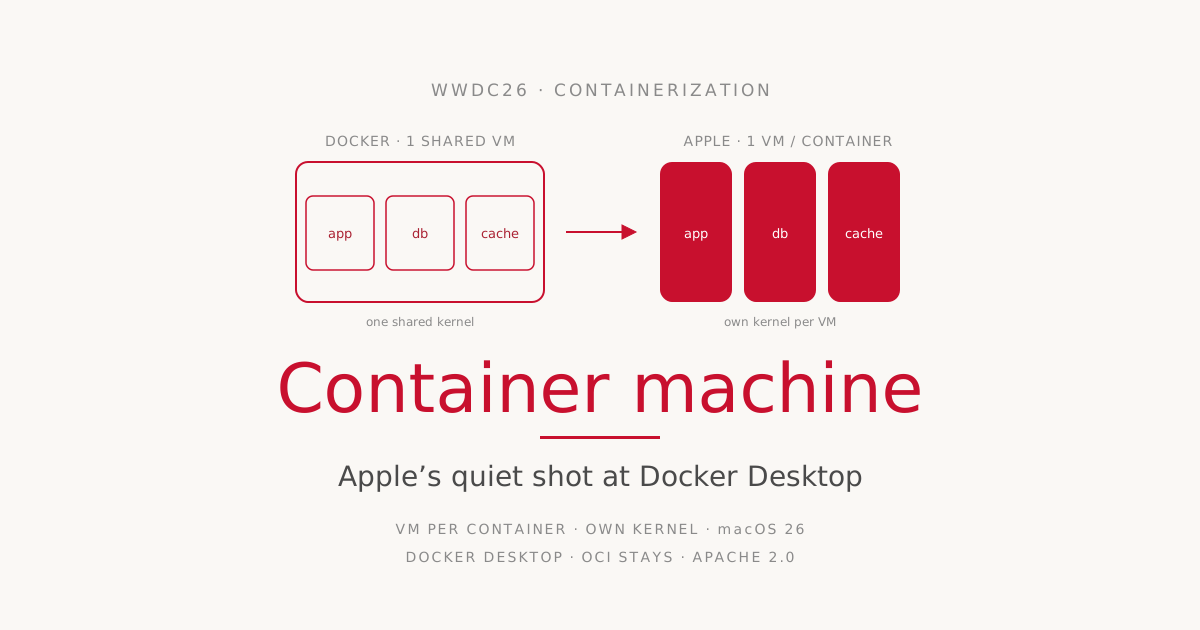
At WWDC26, Apple introduces „Container machine", a feature that looks small at first glance: a persistent Linux environment on the Mac, fast and lightweight like a container, durable like a virtual machine.1 At second glance it is the second building block of a strategy Apple started in 2025, and it has a clear aim. Apple is building the local container workflow on the Mac itself, around Docker Desktop.
The question „is Apple killing Docker now" is the wrong one. The more interesting question is which layer of the Docker stack Apple attacks, which one it deliberately adopts, and why the Mac of all places is where Docker Desktop is most exposed.
Two years, two building blocks
The starting point is a year back. At WWDC25, Apple open-sourced the Containerization project, a framework written in Swift for running Linux containers on macOS, licensed under Apache 2.0 and optimized for Apple Silicon.2 Containerization provides APIs for storage, networking, execution, and a Linux init system. Alongside it came the container CLI tool, which handles image creation, distribution, and lifecycle management, exactly the jobs people on the Mac have so far used Docker Desktop, Colima, or Podman for.
Containerization works with OCI-compatible images from standard registries. An image built with container can be pushed to any normal registry. This is the first important point: Apple does not reinvent the format, it adopts the industry standard. That is not a detail but the precondition for the whole thing to be interoperable at all.
container sets strict requirements. It runs only on Apple Silicon and officially only on macOS 26. The project documentation is unusually blunt about it: „We do not support older versions of macOS and the container maintainers typically will not address issues that cannot be reproduced on macOS 26."2 The project is also still pre-1.0, and minor releases may introduce breaking changes.
Container machine is the second building block, built on the same foundation. While a classic container is meant for a single application and disappears once its work is done, Container machine targets something else: a Linux environment that stays.
One VM per container
The architectural difference from Docker is the real story, and it explains almost everything else.
Docker Desktop starts a single Linux VM on the Mac. The Docker daemon runs in that VM, and all containers run side by side inside that one VM, in the same kernel, in the same user space. The VM’s overhead is amortized across all containers, but so is the kernel they share.
Apple goes the opposite way. Each container gets its own lightweight virtual machine, directly via Apple’s Virtualization.framework. Each of these micro-VMs runs a minimal init system called vminitd, plus a purpose-optimized Linux kernel and a minimal root filesystem. The result is sub-second start times despite full VM isolation. A ps aux on the host shows only the container processes, the rest is cleanly sandboxed.3
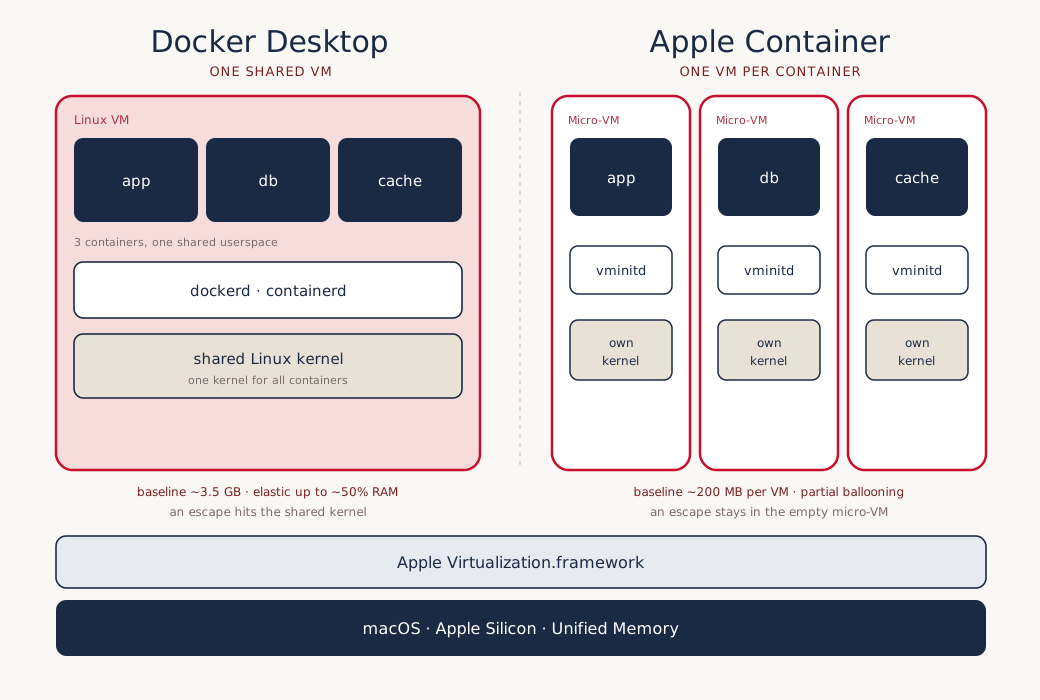
The trade-off is out in the open. Isolation against amortization:
| Docker Desktop | Apple Container | |
|---|---|---|
| Model | one shared Linux VM | one micro-VM per container |
| Kernel | shared across all containers | isolated per container |
| Baseline (empty VM) | ~3.5 GB overhead, once | ~200 MB overhead, per container |
| Memory under load | elastic up to ~50% host RAM (default limit) | held per VM, ballooning only partial |
| Networking | port forwarding out of the VM | own IP per container |
| License | proprietary parts, paid above a threshold | Apache 2.0, open |
The numbers come from third-party analyses4, not from official Apple benchmarks, and they describe baselines, not total usage. They mean the overhead of the empty VM; the running application’s memory comes on top in both models. Important here: Docker’s VM is not rigid. Its limit defaults to half of host RAM, and actual usage grows elastically with the load up to that ceiling.5 A Supabase stack of about a dozen services easily occupies 5 GB and more in the shared VM, which is expected and not at odds with the low baseline.
Apple’s scaling problem therefore lies elsewhere than a simple per-container surcharge suggests. First, the fixed VM overhead multiplies: twenty micro-VMs carry twenty kernels and twenty init systems where Docker shares a single kernel. Second, and this weighs more, the Virtualization.framework supports memory ballooning only partially.6 A micro-VM hardly returns unused memory to the host. According to The Register, memory defaults to half of system RAM and „cannot be released back to the host" without restarting the VM.7 Docker’s one elastic VM claims memory on demand and gives it back, while Apple’s fleet of individual VMs holds onto it.
For the typical local dev loop with two or three containers, Apple’s model wins on isolation and start time. For dense multi-service stacks the advantage tends to reverse, not because Docker is leaner, but because Apple multiplies the fixed overhead and returns memory less readily.
On security the case is clearer. A dedicated VM per container means hardware-backed isolation instead of a shared kernel. An escape from one container does not land in the shared kernel of all the others, but in an empty micro-VM. This is where Apple plays its favorite argument, security and privacy, and here it holds up technically.
Container machine is Apple’s answer to WSL
Container machine takes this architecture and turns one property up: persistence. Each Container machine runs in its own lightweight VM and uses the same OCI image format as a container, with Alpine or Ubuntu as a starting point, for example. Unlike an ephemeral application container, it keeps its state. What you install with apt or apk, what you build, what you configure, persists into the next session.
The decisive part is the integration into macOS, and it goes further than it first sounds:
- Automatic user mapping. A Container machine mirrors the macOS username and the current working directory.
whoamiin the Container machine returns the same name as on the Mac,pwdthe same path. - Shared filesystem. Project files are available without copying or syncing. In Apple’s demo, a Vapor web application is edited in Xcode on the Mac, built and run under Linux in the Container machine, and the result opened in Safari on the Mac. An icon file changed in Icon Composer shows up after a browser reload without anything being copied into the Linux environment.1
- Enter from anywhere. The Linux environment can be entered from any terminal;
container machine runwith no further arguments starts an interactive shell.
Apple’s own formula for it: „fast and lightweight, like a container, and persistent like a virtual machine."1 Anyone who knows Windows recognizes the pattern at once. This is Apple’s version of WSL, the Windows Subsystem for Linux, which on the other platform has long become a fixed part of everyday development. The Register draws exactly this parallel in its write-up and calls it a „WSL-ish thing" for Mac developers.7
Why this hurts Docker
So far this sounds like a nice developer tool. The attack on Docker lies not in the technology alone but in where Apple aims.
Docker Desktop has been commercially awkward since the license change. Companies with more than 250 employees or over 10 million US dollars in annual revenue have to pay. Docker Business costs 24 US dollars per user per month. For a team of 50 developers that is about 12,600 US dollars a year, for 200 developers roughly 50,400 US dollars.8 That is a line item every procurement department notices.
On top comes the reputation as a resource hog. The always-running VM, several gigabytes of RAM at idle, CPU spikes during image builds, and on the Mac the long-known weakness in filesystem performance of volume mounts. These three pain points, license costs, resource hunger, and the Mac filesystem, are the reasons teams have long been migrating to alternatives.
So Apple is not aiming at empty space but at an already contested market. OrbStack is widely seen as the fastest and cleanest Docker Desktop alternative on the Mac, Podman is daemon-less and rootless, Colima and Lima are open source and established, and Rancher Desktop is free under Apache 2.0 with no employee threshold.9 Into this list Apple now writes a name with an advantage none of the others can offer: it comes from the maker of the operating system and the hardware, and talks directly to the Virtualization.framework, without an emulation layer.
The gaps
Apple is not shipping a finished product but an architecture under construction, and the gaps are real.
macOS 26 only, Apple Silicon only. Anyone on macOS 15 or using Intel Macs is left out or gets reduced functionality. Apple explicitly addresses only the latest release.2
Networking between containers. On macOS 15, container-to-container communication is not fully supported, a problem for any multi-service architecture of web server plus database. Only macOS 26 smooths this over.3 So anyone running classic Compose stacks locally hits a wall early.
No Docker Compose, no Swarm. There is no confirmed Compose equivalent and no orchestration in the Docker sense. For single containers and individual Linux environments that is enough, for orchestrated local stacks it is not.
Memory cannot be released. The Register calls the most serious flaw the fact that a Container machine’s memory defaults to half of system RAM and „cannot be released back to the host" without restarting the VM.7 On a 16 GB notebook that is noticeable.
No GUI apps, poor discoverability. Graphical Linux applications are not supported; for X11 forwarding you have to install XQuartz separately. And the project, per The Register, sits „tucked away on GitHub rather than being presented as part of macOS". In the outlet’s hands-on, Swift debugging also failed while .NET debugging worked. Its verdict: Apple „has work to do both on features and documentation".7
Attack on Docker or on Docker Desktop?
Here the precision the „Bye Docker" headline lacks pays off.
Docker is not one thing but three. First, an image format and an ecosystem of registries, the way software is packaged and distributed. Second, a CLI and a daemon that build and run containers locally. Third, Docker Desktop, the commercial Mac and Windows product that brings this runtime conveniently to the developer’s machine.
Apple targets the third layer and adopts the first. The OCI format stays, the registries stay, images from the Docker world keep running. What Apple replaces is the local runtime on the Mac, exactly the part Docker charges for and the part most criticized technically. That is not an attack on Docker as a standard, but on Docker Desktop as a product.
That is exactly why „Apple kills Docker" would be the wrong conclusion. Container machine in truth competes less with the Docker daemon than with Lima, Colima, OrbStack, and with WSL as a model. It is Apple’s attempt to make the local Linux workflow on the Mac so native that the external dependency becomes unnecessary. For the individual developer with two or three containers who wants a durable Linux environment, that is already attractive today. For teams with orchestrated multi-service stacks, Compose files, and mixed hardware, Docker stays in place for the time being.
More fitting than a declaration of war is the picture of a shift announced in advance. Apple builds the layer that was most expensive and most disliked into the operating system, leaves the rest of the ecosystem untouched, and waits. Once macOS 26 closes the networking gap and a Compose equivalent arrives, the quiet shot becomes a loud one. Until then, Container machine is what Apple rarely builds this openly: a developer tool with exactly one competitor in view, without naming it.
Apple Developer, „Discover container machines", WWDC26 Session 389. https://developer.apple.com/videos/play/wwdc2026/389/ ↩︎ ↩︎ ↩︎
Apple, the
containerproject on GitHub (README anddocs/technical-overview.md), Apache 2.0, macOS 26 requirement and the quote on version support. https://github.com/apple/container ↩︎ ↩︎ ↩︎Janakiram MSV, „Apple Containers on macOS: A Technical Comparison With Docker", The New Stack. https://thenewstack.io/apple-containers-on-macos-a-technical-comparison-with-docker/ ↩︎ ↩︎
Mehdi Ouazza, „Apple’s new Container engine (Bye Docker?)" — source of the overhead magnitudes (~200 MB per micro-VM versus ~3.5 GB for the shared Docker VM). https://blog.mehdio.com/p/apples-new-container-engine-bye-docker ↩︎
„How to Configure Docker Desktop Memory and CPU Limits on macOS", OneUptime, Feb. 2026 — Docker Desktop’s VM memory limit defaults to about 50% of host RAM, elastic up to the limit. https://oneuptime.com/blog/post/2026-02-08-how-to-configure-docker-desktop-memory-and-cpu-limits-on-macos/view ↩︎
Apple Developer Documentation, „memoryBalloonDevices" (Virtualization framework) — only partial ballooning support for returning memory to the host. https://developer.apple.com/documentation/virtualization/vzvirtualmachineconfiguration/memoryballoondevices ↩︎
Tim Anderson, „Apple gives Mac devs a WSL-ish thing to call their own", The Register, 11 June 2026. https://www.theregister.com/devops/2026/06/11/apple-gives-mac-devs-a-wsl-ish-thing-to-call-their-own/5254153 ↩︎ ↩︎ ↩︎ ↩︎
Docker Desktop license and pricing model (Docker Business 24 USD/user/month; paid above 250 employees or 10 million USD annual revenue). Summary: DevsOperative, „Docker Desktop License Changes and Alternatives". https://www.devsoperative.com/blogs/docker-desktop-changes ↩︎
„Docker Desktop Alternatives: Escape Licensing Fees & Boost Local Dev Performance", Qovery Blog — overview of OrbStack, Podman, Colima, Lima, and Rancher Desktop. https://www.qovery.com/blog/4-best-docker-desktop-alternatives ↩︎
