AWS Cloud Practitioner 01: Cloud Fundamentals and Global Infrastructure
In this series we work through the material for the AWS Certified Cloud Practitioner (CLF-C02) exam in eleven parts, from the basic terms to exam strategy, and in every part we try something out in our own AWS account. The exam is aimed at beginners. According to the Exam Guide, coding, architecture design, troubleshooting, implementation and load testing are explicitly outside what candidates are expected to do. What counts is that we can match terms, services and responsibilities with confidence.
The exam in numbers
The key facts come from the Exam Guide and the certification page (as of October 25, 2026):
| Item | Value |
|---|---|
| Questions | 65, of which 50 are scored and 15 unscored |
| Duration | 90 minutes |
| Scoring | scaled from 100 to 1,000, passing score 700 |
| Fee | 100 USD, plus taxes where applicable |
| Location | test center (Pearson VUE) or online proctored |
| Retake after failing | after 14 calendar days, unlimited attempts, full fee each time |
The 15 unscored questions are not marked. We can’t tell which ones they are, so we treat every question equally seriously. Scoring follows a compensatory model. We don’t have to pass each domain individually, what matters is the total score.
Wrong answers cost no points, but an unanswered question counts as wrong. Guessing is therefore always worth it. Besides multiple choice with one correct answer there is multiple response, where two or more of five or more options are correct. According to the After-Testing Policy, anyone who has passed cannot retake the same exam version for two years.
The material is split across four domains with fixed weights:
| Domain | Weight | Parts of this series |
|---|---|---|
| Cloud Concepts | 24 % | 01, 11 |
| Security and Compliance | 30 % | 01, 02, 08 |
| Cloud Technology and Services | 34 % | 03 to 07, 09 |
| Billing, Pricing, and Support | 12 % | 10 |
A successor, CLF-C03, is not announced on the official page, and CLF-C02 is listed there without an end date (as of October 25, 2026).
The German language version of the exam is being discontinued after December 31, 2026, as is the Italian one. Anyone who sits the exam later reads the questions in English or in one of the other offered languages.
Cloud computing as a rental model
At its core, cloud computing means that we don’t buy and run compute, storage and networking ourselves. We rent them when we need them and pay for what we use. The Exam Guide distinguishes three deployment models (Task 3.1): cloud (everything runs at the provider), on-premises (everything in your own data center, often also called private cloud) and hybrid (a combination of both, for example when a company keeps legacy systems in its own data center and builds new applications in the cloud).
Five characteristics from the widely used NIST definition set cloud computing apart from classic hosting:
| Characteristic | Meaning |
|---|---|
| On-demand self-service | order resources yourself, without talking to the provider |
| Broad network access | access over the network, from different devices |
| Resource pooling | many customers share the same hardware, kept separate from each other (multi-tenancy) |
| Rapid elasticity | add capacity quickly and release it again |
| Measured service | usage is measured and billed exactly as measured |
AWS states the benefits as six points in the whitepaper Overview of Amazon Web Services, and they often come back word for word in exam questions:
| Original wording (whitepaper) | Meaning |
|---|---|
| trade fixed expense for variable expense | We pay variable instead of fixed costs, so OPEX instead of CAPEX. |
| benefit from massive economies of scale | We benefit from economies of scale, because AWS buys hardware in volumes that no single company reaches. |
| stop guessing capacity | We no longer have to guess capacity, because we can adjust it afterwards. |
| increase speed and agility | We gain speed and agility. |
| stop spending money running and maintaining data centers | We save ourselves the cost of running our own data centers. |
| go global in minutes | We are present worldwide within minutes, because Regions on several continents are ready. |
Billing is based on compute, storage and outbound data transfer (Data Transfer OUT). Inbound data transfer is free. Part 10 covers the pricing models in detail.
The service models differ in how much the provider takes off our hands:
| Model | We manage | Example |
|---|---|---|
| IaaS (Infrastructure as a Service) | operating system, runtime, application, data | Amazon EC2 |
| PaaS (Platform as a Service) | application and data | AWS Elastic Beanstalk |
| SaaS (Software as a Service) | only usage and our data | finished applications such as web mail |
On its page about Types of Cloud Computing, AWS itself calls IaaS, PaaS and SaaS the traditional classification, and by SaaS it mostly means finished end-user applications that the provider operates completely. This gradation returns further down in the Shared Responsibility Model.
Scalability, elasticity, high availability
Scalability, elasticity and high availability sound similar but mean different things.
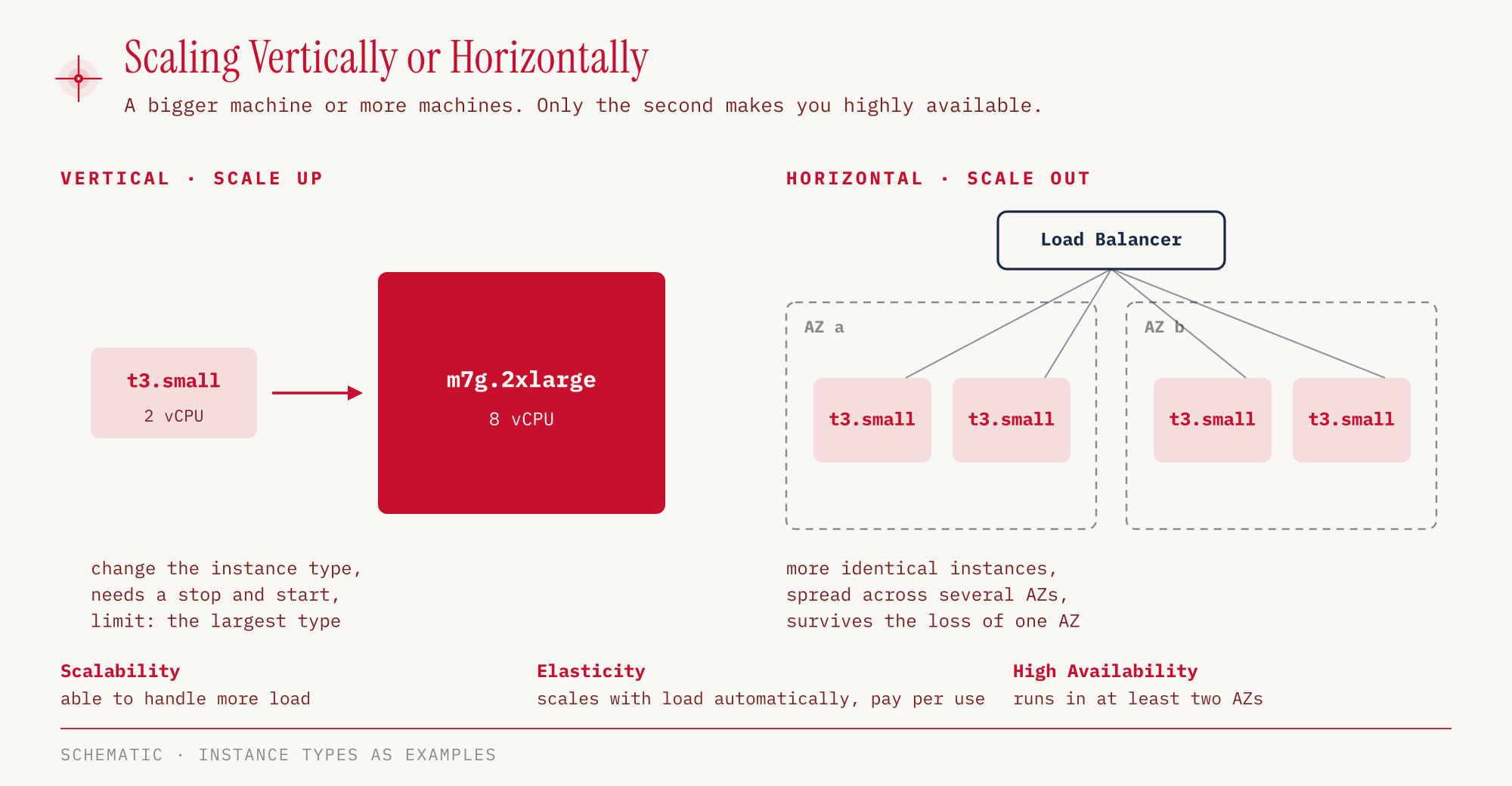
Scalability means that a system can handle more load when we make it bigger. This works vertically or horizontally. With vertical scaling (scale up), a single machine gets more CPU and memory, for example through a larger instance type. That is simple, but it ends at the largest available machine, and the application still runs in a single place. With horizontal scaling (scale out), more machines of the same kind are added, and a load balancer spreads the load across them.
Elasticity goes one step further. The system scales automatically with the actual load, up and down, and we pay only for what is running at the moment. On AWS this is typically handled by Auto Scaling, which we set up in Part 03. A shop that needs ten times as many servers on Black Friday as in February is the textbook example.
High availability means that a system survives the failure of a data center. To get there, it runs in at least two Availability Zones. Horizontally scaled servers spread across several zones deliver both at once. Fault tolerance is the stricter requirement. A fault-tolerant system stays available when a component fails, because redundant components stand by and take over its work almost seamlessly.
Agility doesn’t belong in this group, as it has nothing to do with load. It means that we can provision resources in minutes instead of weeks and therefore try things out and discard them faster.
| Term | Question behind it | Typical mechanism |
|---|---|---|
| Scalability | Can the system handle more load? | larger instance or more instances |
| Elasticity | Does it adapt automatically to the load? | Auto Scaling, pay per use |
| High availability | Does it survive the failure of a data center? | running in at least two AZs |
| Agility | How quickly are new resources available? | provisioning via console or API in minutes |
Regions, Availability Zones and Local Zones
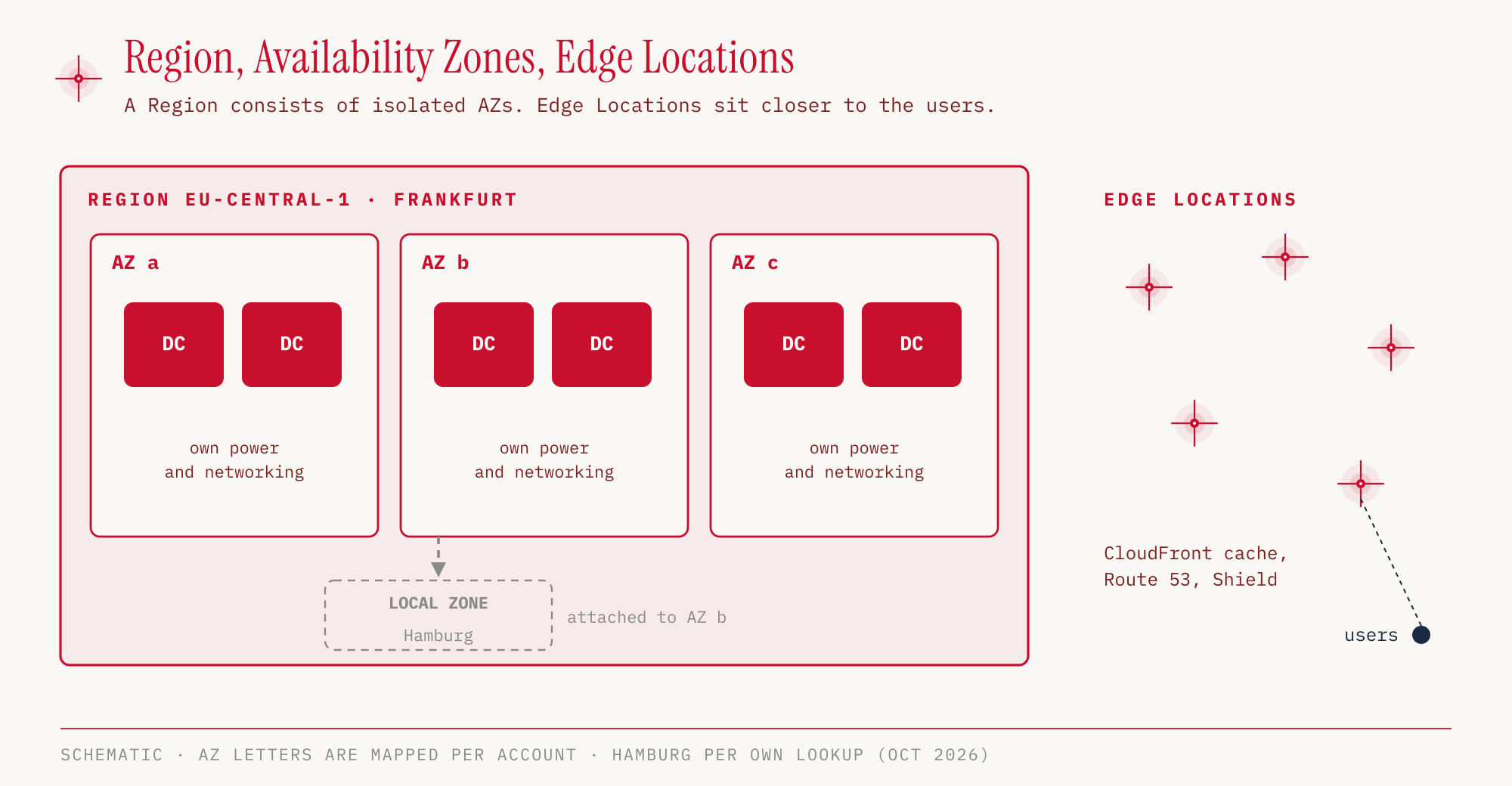
The AWS global infrastructure has several levels. A Region is a geographic location such as eu-central-1 (Frankfurt). Each Region consists of several Availability Zones (AZs), and each AZ of one or more data centers. In Task 3.2 the Exam Guide states that AZs do not share single points of failure. That is why running in two AZs is enough for high availability.
We choose a Region by four criteria: compliance and data sovereignty, latency to the customers, availability of the services we need, and price. Most services are region-scoped, so an EC2 instance in Frankfurt exists only there. A few services are global, including IAM, Route 53 and CloudFront. AWS WAF is a special case, because it works globally in front of CloudFront but regionally in front of an Application Load Balancer or API Gateway. According to Task 3.2, we use several Regions for disaster recovery, business continuity, lower latency or data sovereignty.
Edge locations sit outside the Regions. There, CloudFront delivers content close to the user, and Part 06 covers that in detail.
For cases where the nearest Region is too far away, there are extensions:
| Offering | What it is | Exam relevance |
|---|---|---|
| AWS Outposts | AWS racks in your own data center; the customer is responsible for physical security | in scope |
| Local Zones | extension of a Region closer to the users | not listed in the Exam Guide |
| AWS Wavelength | AWS in a telecom provider’s data center, at the edge of the 5G network | not exam-relevant according to the Exam Guide |
Local Zones are not part of the exam material, but we will still see one in the hands-on. For Frankfurt there is a Local Zone in Hamburg.
The Shared Responsibility Model
AWS and the customer share responsibility for security in the cloud. AWS is responsible for the Security OF the Cloud, meaning data centers, global network, hardware and virtualization. We are responsible for the Security IN the Cloud, meaning everything we set up on that infrastructure. Where the boundary lies depends on the service. Task 2.1 requires exactly this assignment per service, and the Exam Guide names RDS, Lambda and EC2 as examples.
With EC2 we rent a virtual machine. From the operating system upward, everything is ours, including installing security updates. With RDS, AWS runs the database including the operating system and patches the engine, while we manage database users, network access and data. With S3 we no longer see a server at all, we only configure buckets and their access.
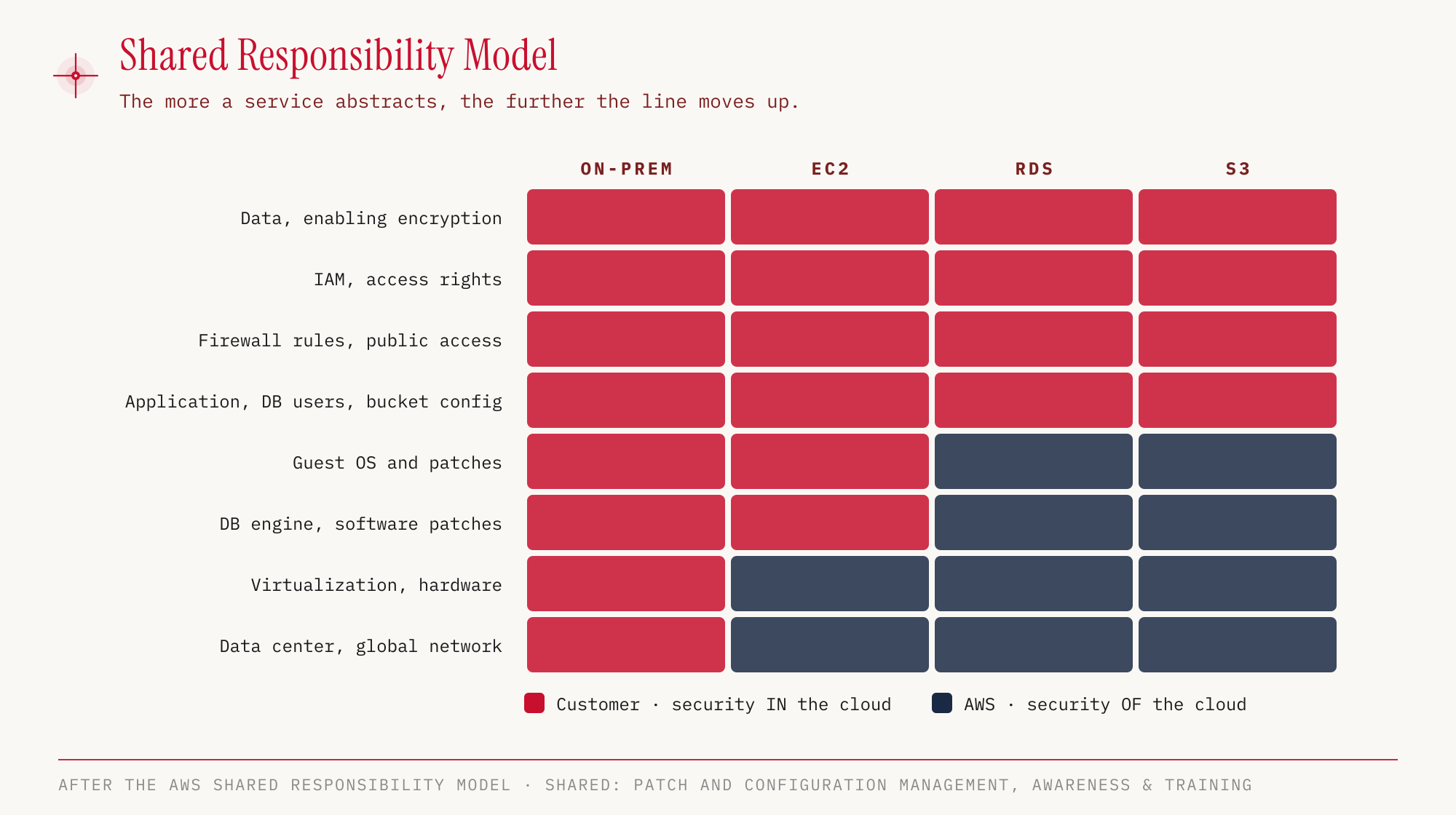
The more abstract a service is, the higher the boundary moves. Data and access permissions always stay with the customer. A publicly readable S3 bucket is therefore not a security problem of AWS but a misconfiguration by the customer.
Some areas are shared by both sides, each for its own layer: patch management, configuration management and awareness & training. For patching, for example, AWS takes care of the infrastructure, and on EC2 we take care of our guest operating systems.
Your Own Demo Account
For the hands-on sections of this series we need an AWS account that nothing important depends on. The best option is a fresh account that we secure right away and then never use with the root user again.
Creating the account
AWS offers two ways to sign up. Sign up for AWS (new) uses an existing Google, GitHub, Apple or Amazon login and sets up a preconfigured project. According to AWS, this option is still being rolled out to a limited number of new customers. For this series we take the classic path, Sign up for AWS (advanced), which creates an account with its own root user, the kind of account the exam assumes.
To sign up we need:
- an email address that becomes the root user’s login and can be used to reset its password
- an account name; for personal accounts AWS suggests the pattern firstname-lastname-purpose
- a strong password of 8 to 128 characters from at least three character types
- contact details, a valid payment method and a phone number that can receive a code by SMS or call
During sign-up we choose the account plan. The Free plan incurs no charges, comes with 100 USD in credits and lets us earn up to another 100 USD. It ends after six months or when the credits are used up; after that the account is closed unless we upgrade to the Paid plan. The Free plan is enough for this series, details are in Part 10. As support plan we choose Basic, which is free. Activation usually takes a few minutes but can take up to 24 hours according to AWS.
Securing the root user
Right after the first sign-in as root user we enable MFA. AWS now requires this for all account types; MFA has to be set up within 14 days of the first console sign-in. Passkeys or FIDO security keys are the most secure option, but an authenticator app on a phone works too. The root user can have up to eight MFA devices, so a second one as a backup makes sense.
We do not create access keys for the root user. We protect the root user’s email address like a password, because whoever controls it can reset the root password. Then we sign out as root user and only use it for the few tasks that only it can do (Part 02).
Creating an admin user
For everyday work we create an IAM user with console access in the IAM console, for example admin. We put the user into a group Admins with the AWS managed policy AdministratorAccess attached. Then we sign in as this user and enable MFA for it as well. From here on we only work with this user.
In the console: IAM → IAM users → Create user. We enter the User name, check “Provide user access to the AWS Management Console” and go through Set permissions (Add user to group, Create group if needed) and Review and create to Retrieve password. The password is either Autogenerated or Custom. With “Users must create a new password at next sign-in” the user has to change it at the first sign-in.
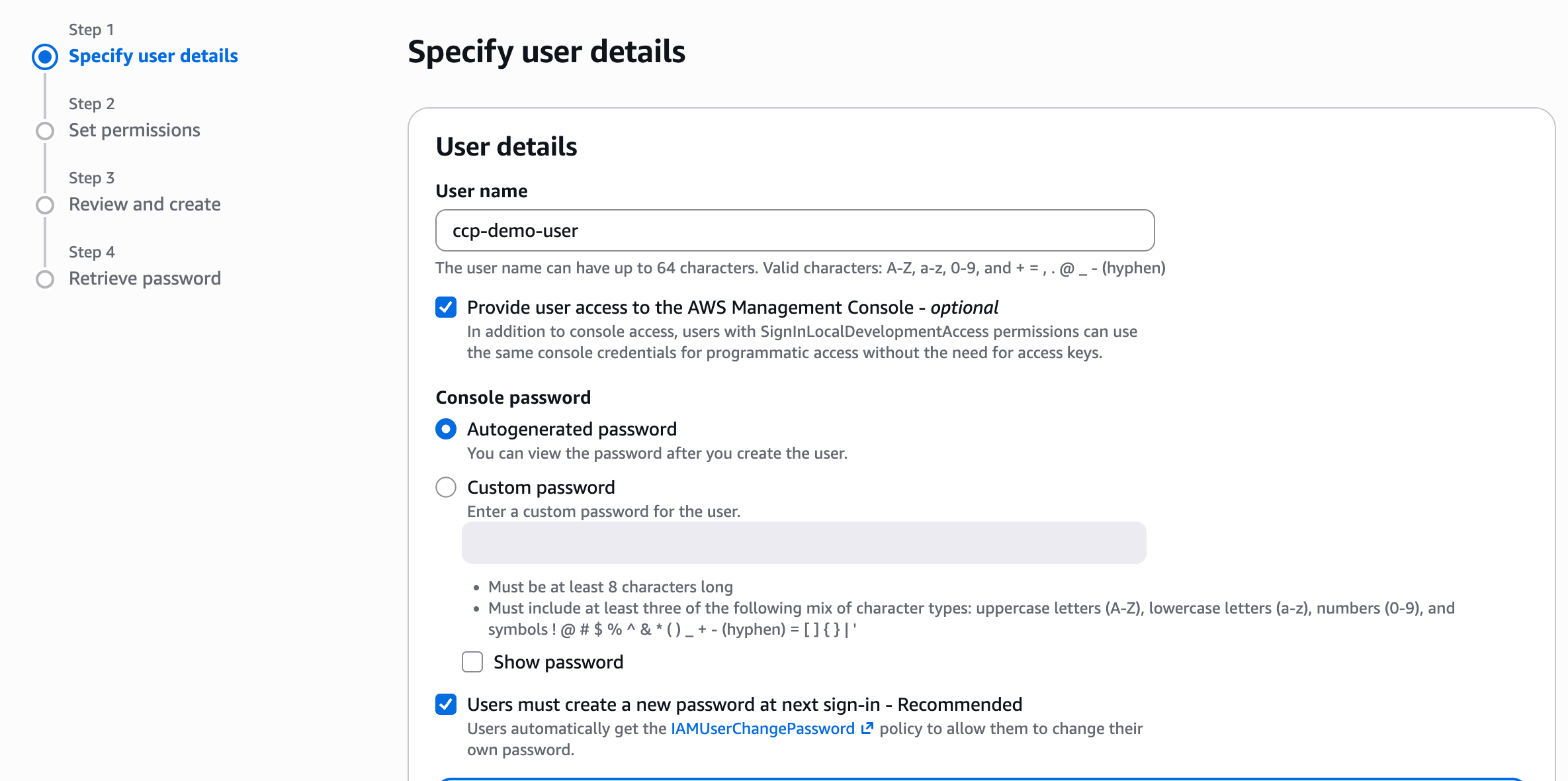
For human users AWS actually recommends IAM Identity Center. For a single demo account it is not a good fit, though. The variant without AWS Organizations, the so-called account instance, does not support permission sets and therefore gives no access to the account itself. The full variant requires AWS Organizations, and an account on the Free plan is automatically upgraded to the Paid plan when it joins an organization. For several accounts Identity Center is the right choice, more on that in Part 02 and Part 10.
Connecting the CLI
The commands in this series run with the AWS CLI. From version 2.32.0 on it signs in with aws login through the browser, using the same credentials as the console. The CLI only receives temporary credentials, refreshes them every 15 minutes and keeps the session for up to 12 hours. We no longer need long-term access keys on disk.
aws --version
aws login
aws configure set region eu-central-1
aws sts get-caller-identity
aws login opens the browser, where we pick the session of our admin user. get-caller-identity then shows who the CLI is acting as. The ARN must end in :user/admin, not in :root. The AdministratorAccess policy already covers the permission needed for aws login. For restricted users there is the AWS managed policy SignInLocalDevelopmentAccess.
Hands-on
Let’s look at the global infrastructure in the demo account. Both commands only read, they create nothing and cost nothing. The prerequisite is the CLI we just set up, signed in as the admin user.
First we count the Regions. With --all-regions, the ones that are not enabled for our account show up as well:
aws ec2 describe-regions --all-regions --region eu-central-1 \
  --query "length(Regions)"
34

aws ec2 describe-regions --all-regions --region eu-central-1 \
  --query "length(Regions[?OptInStatus=='opt-in-not-required'])"
17
In the console: AWS Global View → Regions and Zones → Regions, where each Region shows “Enabled by default” or “Not opted in”; opting in works through “Enable region”.
Of 34 Regions, 17 are active by default. The other 17 have the status not-opted-in. These opt-in Regions have to be enabled explicitly before we can create resources there. They include, for example, eu-central-2 (Zurich), eu-south-1 (Milan), il-central-1, me-central-1, mx-central-1, ca-west-1 and ap-southeast-5 to ap-southeast-7.
Now the Availability Zones of the Frankfurt Region:
aws ec2 describe-availability-zones --all-availability-zones --region eu-central-1 \
  --filters Name=zone-type,Values=availability-zone \
  --query "AvailabilityZones[].[ZoneName,ZoneId]" --output text
eu-central-1a   euc1-az2
eu-central-1b   euc1-az3
eu-central-1c   euc1-az1
In the console: EC2 → Dashboard → Zones, or alternatively AWS Global View → Regions and Zones → Availability Zones.
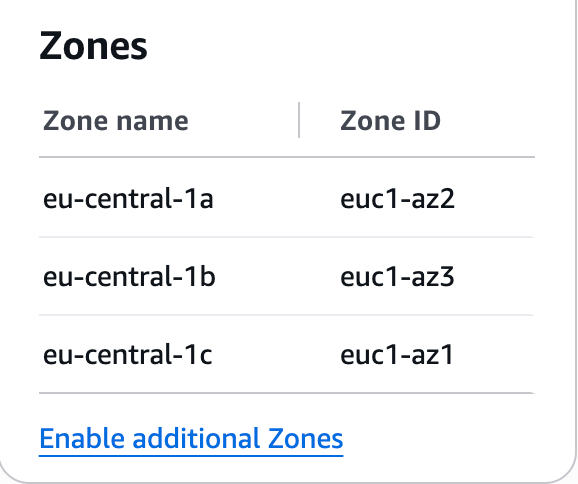
Frankfurt has three AZs. The second column stands out. The zone name (eu-central-1a) is mapped to the physical zones differently for each account, whereas the zone ID (euc1-az2) identifies the same zone everywhere. If two accounts want to place their resources in the same physical AZ, they have to agree on the zone ID, not the name.
Finally, the Local Zones attached to Frankfurt:
aws ec2 describe-availability-zones --all-availability-zones --region eu-central-1 \
  --filters Name=zone-type,Values=local-zone \
  --query "AvailabilityZones[].[ZoneName,OptInStatus,ParentZoneName]" --output text
eu-central-1-ham-1a   not-opted-in   eu-central-1b
eu-central-1-waw-1a   not-opted-in   eu-central-1b
eu-central-1-ath-1a   not-opted-in   eu-central-1a
eu-central-1-ist-1a   not-opted-in   eu-central-1c
In the console: AWS Global View → Regions and Zones → Local Zones, searching for “eu-central-1-”. Instead of the parent AZ, the console shows the parent Region.
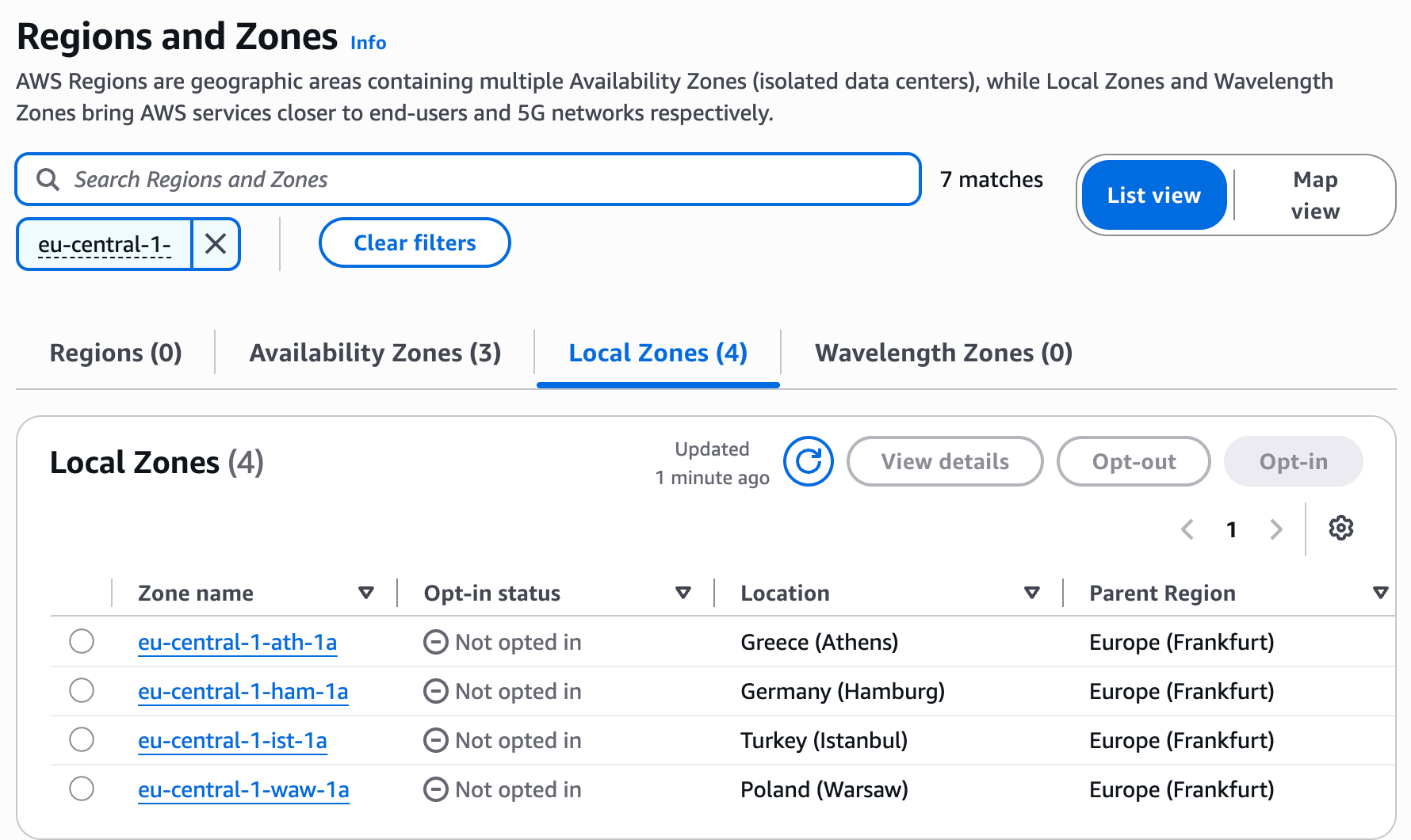
Four Local Zones belong to the Frankfurt Region: Hamburg, Warsaw, Athens and Istanbul. None of them is enabled, as Local Zones are opt-in too. The ParentZoneName column shows which AZ of the Region the Local Zone is attached to, Hamburg for example to eu-central-1b.
There is nothing to clean up, because both commands only read. We deliberately don’t enable any opt-in Region or Local Zone. In later parts we create resources that can incur costs once the Free Tier ends or is exceeded, and there the matching delete command is at the end each time.
For the exam
| Keyword in the question | Answer |
|---|---|
| scale automatically with load, pay only for usage | Elasticity |
| handle more load | Scalability |
| survive the failure of a data center | High availability, at least two AZs |
| keep running almost seamlessly when a component fails | Fault tolerance |
| resources in minutes instead of weeks | Agility |
| turn fixed costs into variable costs | trade fixed expense for variable expense (CAPEX → OPEX) |
| lower prices through AWS’s purchasing power | economies of scale |
| choose a Region | compliance/data sovereignty, latency, service availability, price |
| AWS hardware in your own data center | AWS Outposts |
| data must not leave your own data center, but you still want AWS services and APIs | AWS Outposts |
| who patches the guest operating system on EC2 | the customer |
| who patches the database engine on RDS | AWS |
| bring your own license or have it included in the price (Task 1.4) | BYOL (bring your own license) versus License Included |
| adjust instance size to actual demand (Task 1.4) | Rightsizing |
Typical traps:
- Mixing up elasticity and scalability. The signal word for elasticity is “automatically” or “on demand”, while scalability only asks about the ability to handle more load.
- Reading agility as a scaling term. Agility is about speed of provisioning, not capacity.
- Placing data or IAM with AWS. Data, encryption and access permissions stay with the customer for every service, including S3 and RDS.
- Equating an AZ with one data center. An AZ consists of one or more data centers, a Region of several AZs.
- Leaving questions blank. Unanswered is always wrong, and guessing costs nothing. This also applies to multiple response with two or more correct options.
Sources
- AWS: Exam Guide AWS Certified Cloud Practitioner (CLF-C02), accessed on October 25, 2026
- AWS: Exam Guide, Domain 1: Cloud Concepts
- AWS: Exam Guide, Domain 2: Security and Compliance
- AWS: Exam Guide, Domain 3: Cloud Technology and Services
- AWS: In-scope services and out-of-scope services
- AWS: AWS Certified Cloud Practitioner, certification page, accessed on October 25, 2026
- AWS: Certification Policies, After Testing
- AWS: Six advantages of cloud computing and Types of Cloud Computing
- AWS: Regions and Availability Zones
- AWS Architecture Blog: What to Consider when Selecting a Region for your Workloads
- AWS: AWS WAF FAQs (global rules on CloudFront, regional ones on ALB, API Gateway, AppSync)
- AWS: AWS Outposts racks FAQs (physical security with the customer, local data processing and data residency)
- AWS whitepaper: Availability and Beyond, Fault tolerance and fault isolation
- AWS: Shared Responsibility Model
- AWS: Sign up for AWS (advanced)
- AWS: Sign up for AWS (new)
- AWS: Choosing a plan (Free and Paid plan)
- AWS: MFA for the root user
- AWS: Organization and account instances of IAM Identity Center
- AWS: CLI sign-in with aws login
The next part is about identities and permissions: AWS Cloud Practitioner 02: IAM explains users, groups, policies and roles, and shows why the root user stays in the drawer for everyday work.