AWS Cloud Practitioner 03: Compute
AWS offers compute in many forms. It comes as a virtual machine that we rent by runtime, as a container without a server of our own, or as a function that runs only when an event arrives. The exam rarely asks about configuration details, but very often about which service and which purchase option fit a described scenario. We build up that mapping in this part, and at the end we create a Lambda function in our own account and measure its cold start.
EC2 as a toolkit for virtual servers
Amazon EC2 (Elastic Compute Cloud) is the classic way to get compute on AWS. An instance is made up of a few building blocks. The AMI (Amazon Machine Image) provides the operating system and preinstalled software, the instance type determines CPU and memory, and on top come storage, a security group as a firewall and optionally user data. User data is a boot script that runs once with root permissions when the instance first starts, for example to install packages.
AMIs come from several sources. AWS provides public AMIs, we create our own from a configured instance (Part 04), and in the AWS Marketplace third-party vendors offer preconfigured AMIs, some with paid software.
Instance types follow a fixed naming scheme. In m5.2xlarge, m stands for the class, 5 for the generation and 2xlarge for the size within the class. For the exam it is enough to match the families to their use cases.
| Family | Typical use |
|---|---|
| General Purpose | balanced load, web servers, code repositories, small to medium databases |
| Compute Optimized | batch processing, media transcoding, HPC, dedicated game servers |
| Memory Optimized | in-memory databases, analysis of large data sets in RAM |
| Storage Optimized | high local I/O, databases with high throughput, data processing |
On top of that comes Accelerated Computing with GPUs or other accelerators, for graphics and machine learning for example.
The security group knows only allow rules and is stateful. An allowed inbound connection can therefore reply automatically, without us needing an outbound rule for it. By default, inbound traffic is blocked and outbound traffic is open. This gives a popular diagnostic question. If a connection attempt runs into a timeout, the security group is usually blocking it. If you get connection refused instead, the packet arrived, but no application is listening on the port.
A few ports are worth knowing by heart: 22 for SSH and SFTP, 21 for FTP, 80 for HTTP, 443 for HTTPS and 3389 for RDP (Windows Remote Desktop). EC2 Instance Connect opens an SSH session directly in the browser, but it also needs port 22 in the security group.
With EC2, the Shared Responsibility Model leaves a lot of the work with us. We maintain the guest operating system including security patches, the installed software, the security group rules, permissions through IAM and our data. AWS is responsible for hardware, network and data centers, which includes replacing faulty servers.
Anyone who runs a database on EC2 themselves takes on patches, backups and high availability. The Exam Guide expects us to be able to weigh this option against a managed database (Task 3.4). We know the shift in responsibility from the Shared Responsibility Model in Part 01, and the managed databases follow in Part 05.
Purchase options: discount in exchange for commitment
The same instance can cost very different amounts, depending on how we buy it. In Task 4.1 the Exam Guide names seven purchase options. The more we commit, or the more uncertainty we accept, the bigger the discount compared with On-Demand.
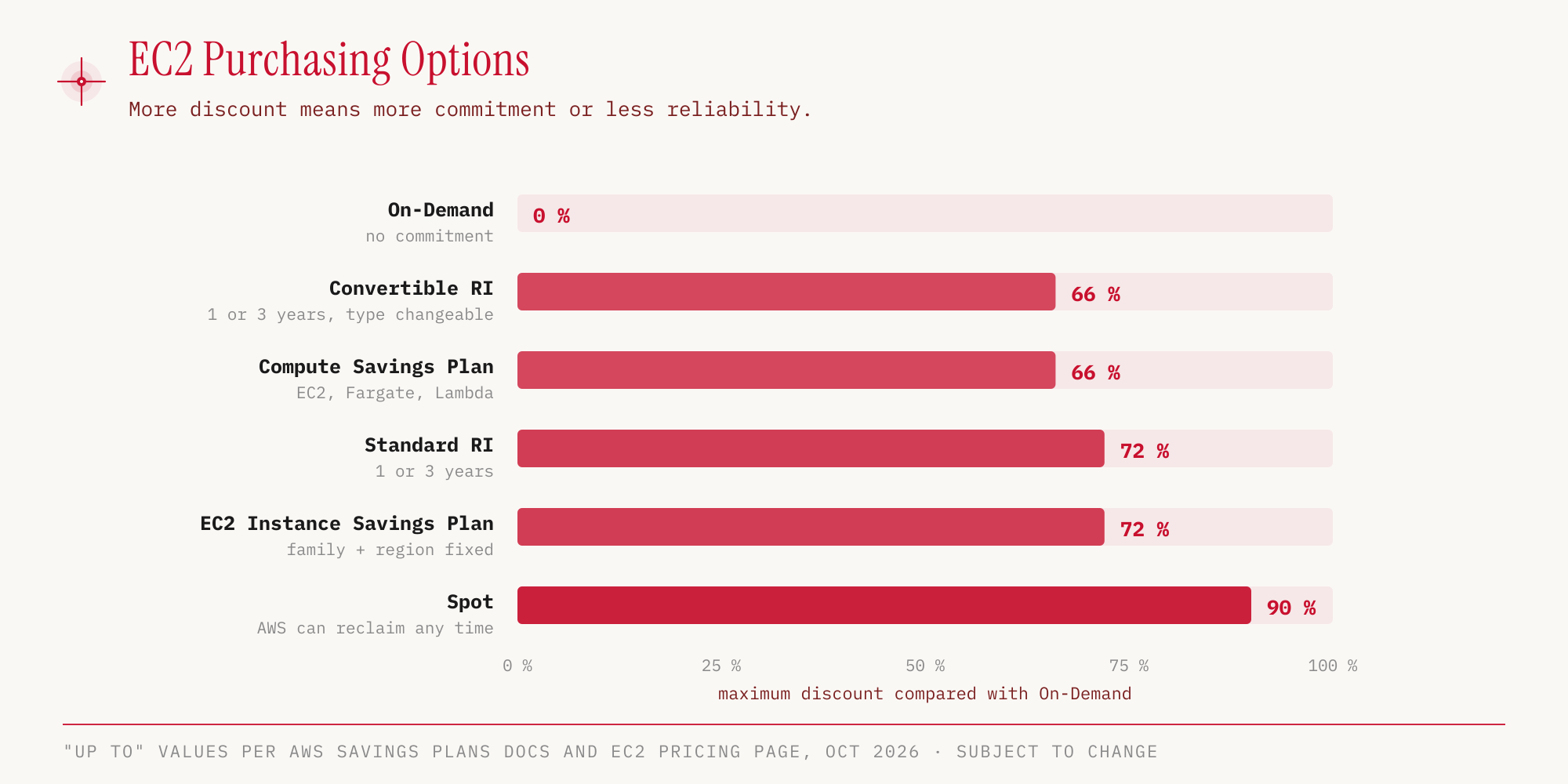
The maximum values come from the Savings Plans documentation and the EC2 pricing page (as of October 25, 2026). They are snapshots that AWS can change at any time, and the exam doesn’t ask for the percentages but for the order and the fitting scenario.
| Option | When it fits |
|---|---|
| On-Demand | short, unpredictable load; Linux and Windows are billed per second, with a minimum of 60 seconds |
| Reserved Instances | steady load over 1 or 3 years, such as a database; payment No, Partial or All Upfront; Standard RIs can be resold on the RI Marketplace, Convertible RIs cannot |
| Savings Plans | steady load with a commitment to an hourly amount instead of to an instance; Compute Savings Plans also apply to Fargate and Lambda |
| Spot Instances | fault-tolerant work such as batch, analysis, image processing; AWS can reclaim the instance at any time, so never for critical jobs or databases |
| Dedicated Host | a whole physical server for us, with visibility into sockets and cores; for licenses tied to sockets or cores (BYOL), and compliance |
| Dedicated Instance | hardware that we share with no other AWS customer, but without control over placement on the host |
| Capacity Reservation | guaranteed capacity in a specific AZ; costs the On-Demand price even if we don’t use it, with no term commitment |
According to the Exam Guide, Reserved Instances are flexible within limits and are shared between accounts in AWS Organizations through consolidated billing (Task 4.1). Also, Savings Plans don’t guarantee capacity. Anyone who needs both combines them with an On-Demand Capacity Reservation, according to the AWS documentation. Confusing a discount with a capacity guarantee is a typical trap.
Anyone bringing their own licenses (BYOL) to Dedicated Hosts keeps track of them with AWS License Manager. The service manages software licenses across AWS and on premises and tracks how many of them are in use.
Elastic Load Balancing distributes, Auto Scaling adjusts the number
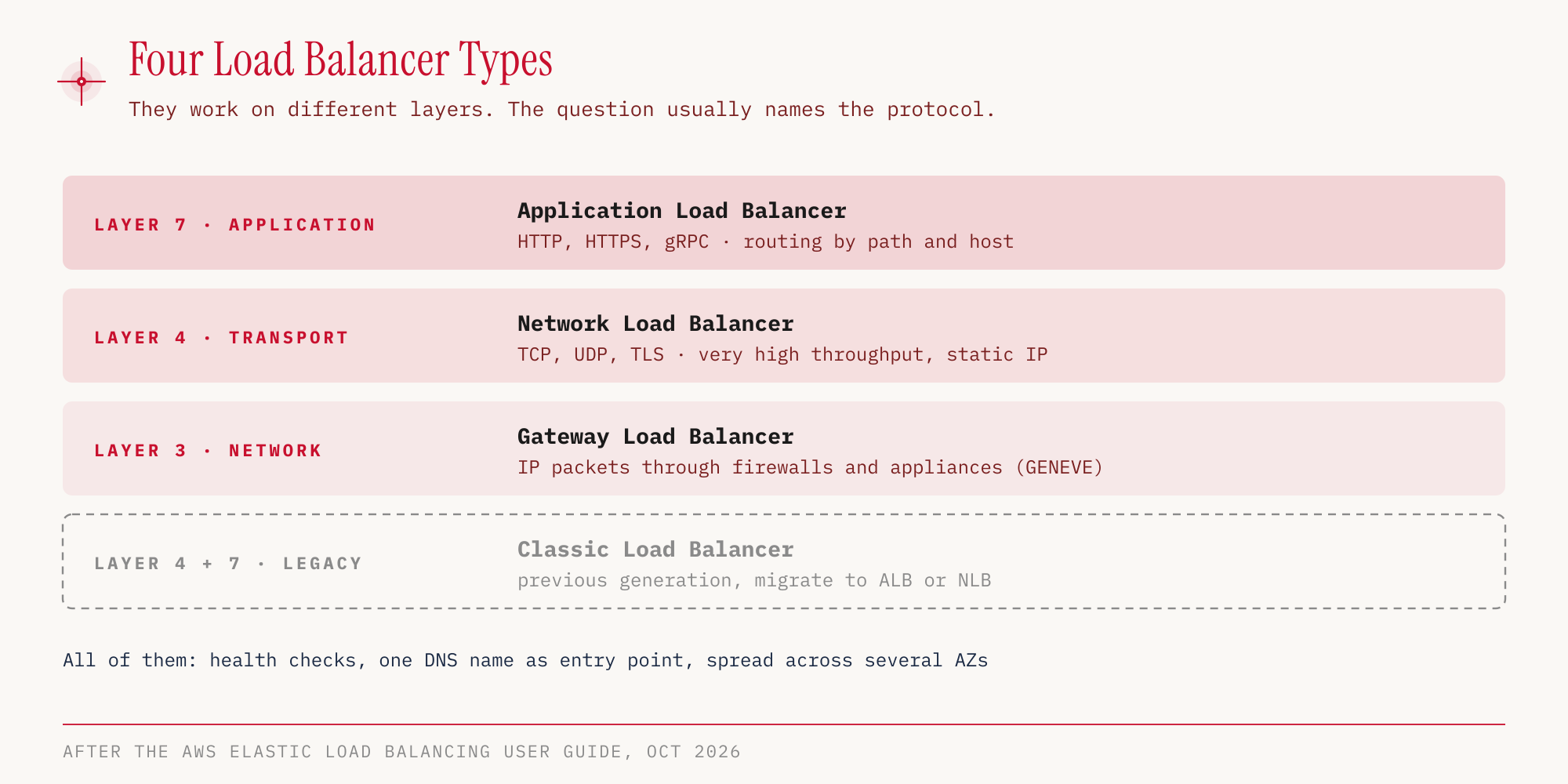
A single instance is a single point of failure. Once we spread several instances across several AZs, we need a shared entry point in front of them. That is the job of Elastic Load Balancing (ELB). A load balancer distributes the requests, uses a health check to see which instances are healthy, can terminate SSL/TLS and provides a single DNS name that clients talk to.
AWS offers four types, which differ in the network layer they decide on.
| Type | Layer | Typical keyword |
|---|---|---|
| Application Load Balancer (ALB) | Layer 7 | HTTP/HTTPS, web applications, routing by path or host |
| Network Load Balancer (NLB) | Layer 4 | TCP/UDP, extreme performance |
| Gateway Load Balancer (GWLB) | Layer 3 | firewalls and other virtual appliances from third parties |
| Classic Load Balancer (CLB) | older generation | migration to ALB or NLB recommended |
The Classic Load Balancer still exists. On August 15, 2022, only EC2-Classic, the old network platform, ended, and with it the CLBs that ran in it. CLBs in a VPC continue to exist, but AWS recommends migrating to ALB or NLB.
All types are reachable through their DNS name; a custom domain goes in front via a Route 53 alias (Part 06). The Network Load Balancer additionally has one static IP address per AZ, and a public NLB can use an Elastic IP. That is why we can also address it directly by IP, for example when a customer’s firewall only lets approved addresses through. The IPs of an Application Load Balancer change, so we always address it by its DNS name.
For routing it is the other way round. The ALB reads host and path of a request on layer 7 and can send shop.example.com and api.example.com to different target groups. The NLB only sees IP address, port and protocol on layer 4. According to the docs its listeners can spread traffic across several target groups by weight, and on a dual-stack NLB rules can separate IPv4 from IPv6. It cannot route by host or path. Even with a TLS listener it only uses SNI to pick the right certificate, it cannot distribute by domain.
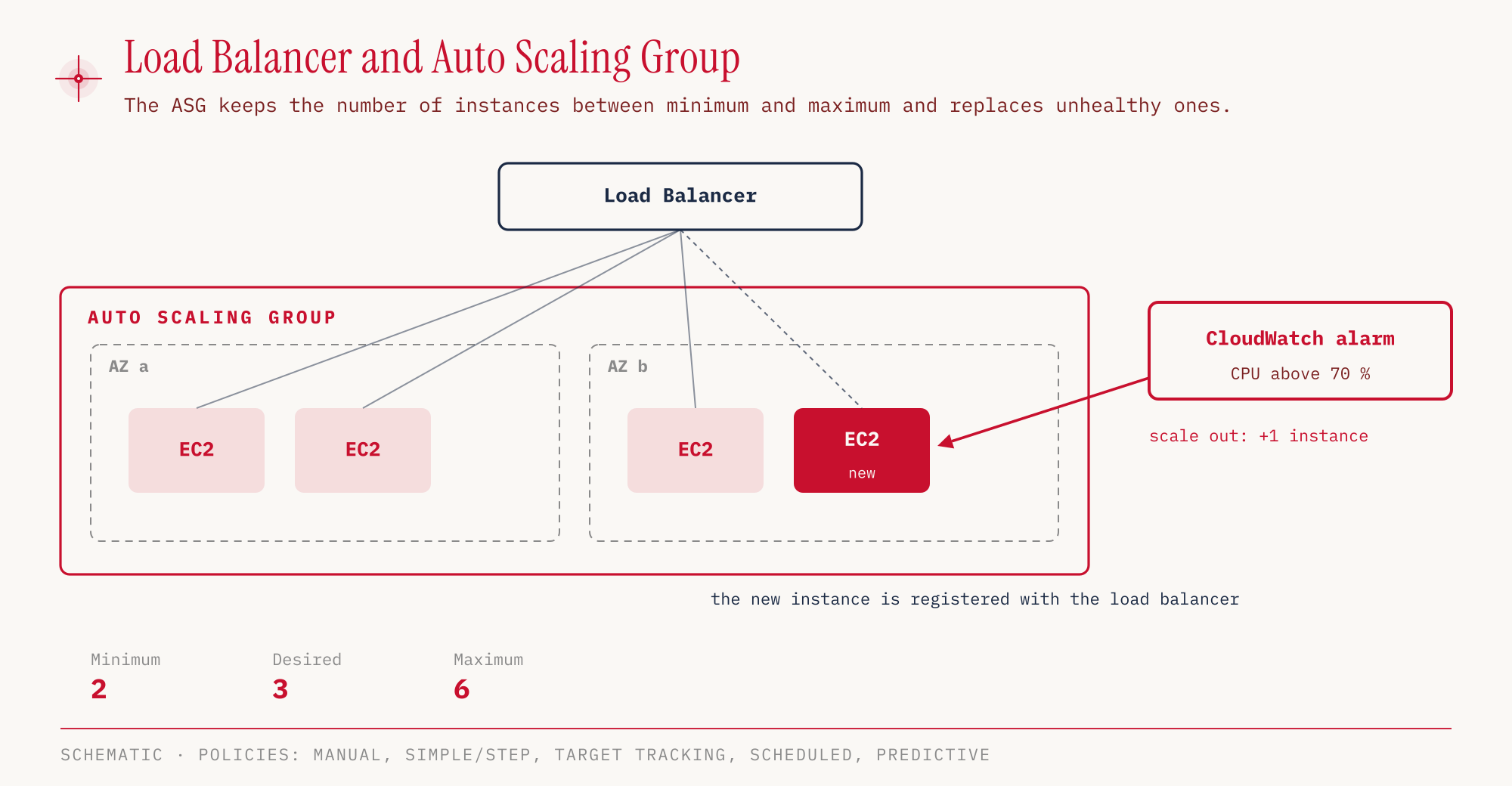
The load balancer only distributes the load across existing instances. How many there are is decided by the Auto Scaling group (ASG). We set a minimum, a desired and a maximum number. The ASG replaces unhealthy instances, starts new ones when needed and registers them with the load balancer. This is the elasticity from Part 01 in technical form.
| Scaling strategy | Trigger |
|---|---|
| Manual | we change the desired number by hand |
| Simple / step scaling | a CloudWatch alarm crosses a threshold |
| Target tracking | a target value is maintained, such as CPU at 40 % |
| Scheduled | known patterns, such as more capacity every Monday at 9 a.m. |
| Predictive | forecast by machine learning from past load |
Lambda computes only when something happens
With EC2 we pay for an instance as long as it runs, whether it is working at the moment or not. AWS Lambda turns that around. We only upload code, and AWS runs it as soon as an event arrives. Servers, patches and scaling are AWS’s job. This is called serverless, even though servers are of course still running, just not ours.
The typical example is image processing after an upload.
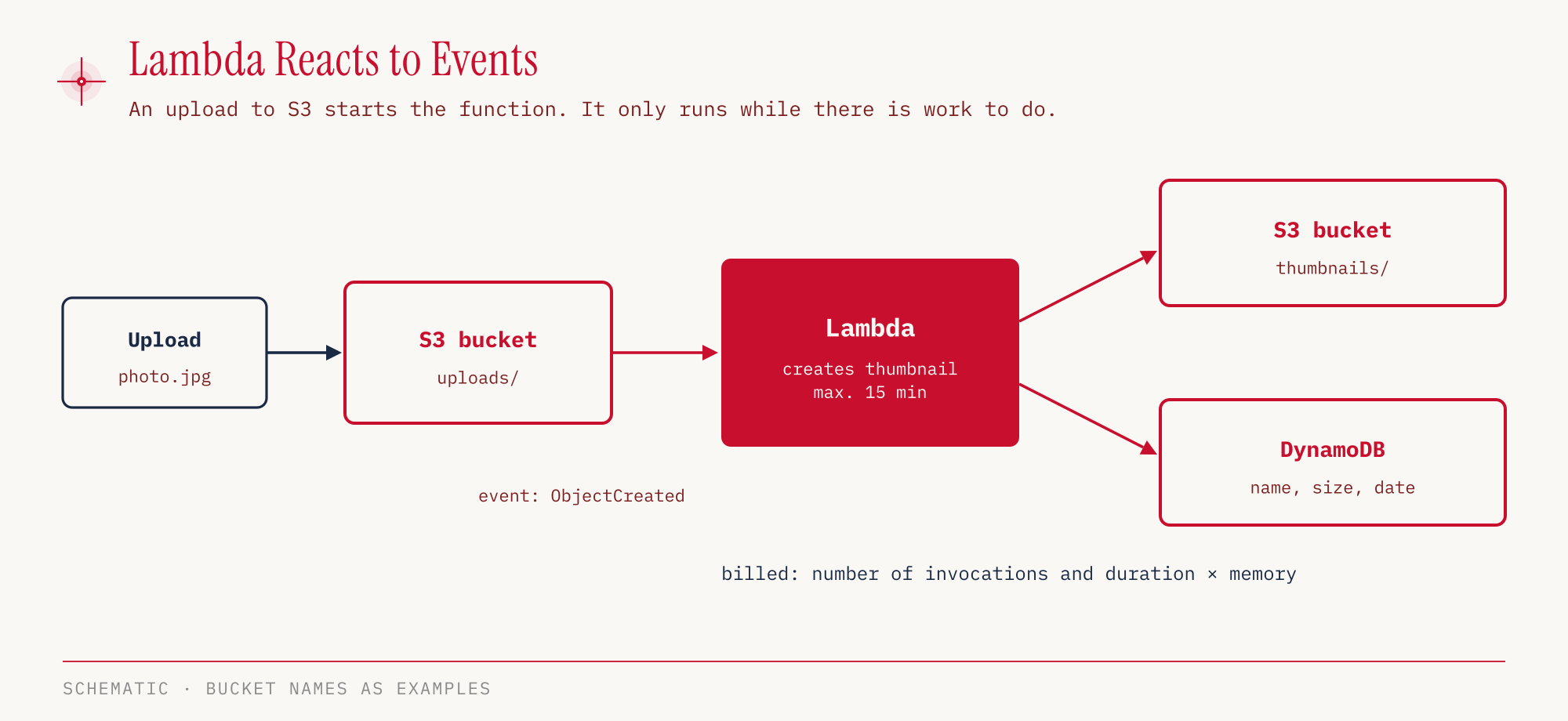
Lambda has hard limits. An execution may last at most 15 minutes, and memory goes up to 10,240 MB (Lambda quotas, as of October 25, 2026). Billing is per invocation and by duration times allocated memory, measured in GB-seconds. 1 million invocations and 400,000 GB-seconds per month are permanently free according to AWS, in the Free Plan and the Paid Plan alike. Lambda allocates CPU power in proportion to the configured memory, so more memory also means more compute (AWS Knowledge Center).
Anyone who needs an API for a Lambda function puts Amazon API Gateway in front of it. It provides serverless REST, HTTP and WebSocket APIs and is the usual front door for Lambda backends. For a scheduled job, a cron replacement, Amazon EventBridge triggers the function on a schedule instead.
Containers with ECS, Fargate and EKS
Between your own instance and the function lie containers. A Docker image bundles an application and its dependencies and runs the same everywhere. AWS offers several services for this, with similar names and clearly separated jobs.
| Service | Memory aid |
|---|---|
| Amazon ECS | orchestrate Docker containers, in EC2 mode on instances that we provision ourselves |
| AWS Fargate | run containers serverless, no EC2 instances to manage |
| Amazon EKS | managed Kubernetes, on EC2 or Fargate |
| Amazon ECR | private registry for Docker images |
| AWS Batch | batch jobs as a Docker image, on EC2, Spot or Fargate, even if they run longer than Lambda allows |
| Amazon Lightsail | simple virtual servers and ready-made stacks at a predictable flat price, without automatic scaling |
The most common mix-up concerns ECS and Fargate. ECS is the orchestrator, Fargate is a mode of operation in which AWS provides the underlying servers. Kubernetes in the question almost always leads to EKS. Lightsail is the answer when someone with no cloud experience wants a simple web server quickly, with predictable costs.
Hands-on
We create a small Python function, invoke it twice and read the billing from the logs. The function needs an IAM role so that Lambda may write to CloudWatch Logs. How roles and temporary credentials work is explained in Part 02. We use the CLI because, unlike clicks in the console, commands can be repeated. The Exam Guide asks about this distinction between a one-off operation and a repeatable process (Task 3.1).
The code in index.py (the German test strings “Welt” and “Hallo” mean “world” and “hello”):
def handler(event, context):
    name = event.get('name', 'Welt')
    print('Aufruf fuer', name)
    return {'message': f'Hallo {name}', 'memory_mb': context.memory_limit_in_mb, 'remaining_ms': context.get_remaining_time_in_millis()}
memory_mb is returned as a string, and remaining_ms is the remaining time until the timeout in milliseconds.
The trust policy trust.json allows the Lambda service to assume the role.
{
  "Version": "2012-10-17",
  "Statement": [{
    "Effect": "Allow",
    "Principal": { "Service": "lambda.amazonaws.com" },
    "Action": "sts:AssumeRole"
  }]
}
Create the role, package the code, create the function:
aws iam create-role --role-name ccp-demo-lambda-role \
  --assume-role-policy-document file://trust.json
aws iam attach-role-policy --role-name ccp-demo-lambda-role \
  --policy-arn arn:aws:iam::aws:policy/service-role/AWSLambdaBasicExecutionRole

zip fn.zip index.py

# The role ARN contains our own account ID, so we look it up
ROLE_ARN=$(aws iam get-role --role-name ccp-demo-lambda-role \
  --query Role.Arn --output text)

aws lambda create-function --function-name ccp-demo-hello \
  --runtime python3.13 --architectures arm64 \
  --memory-size 128 --timeout 10 \
  --handler index.handler \
  --role "$ROLE_ARN" \
  --zip-file fileb://fn.zip \
  --region eu-central-1
In the console: Lambda → Event Functions → Create Event Function → Author from scratch → Function name, Runtime → Additional settings → ARM64 architecture → Create Event Function. Python 3.13 is listed in the Runtime dropdown under “Other supported”. The console creates the execution role itself (ccp-demo-hello-role-… with its own policy AWSLambdaBasicExecutionRole-…), so trust.json and the two iam commands are not needed there. We then enter the code in the Code tab and click Deploy. In the console the file is called lambda_function.py and the handler lambda_function.lambda_handler, so the function in the code is lambda_handler instead of handler.
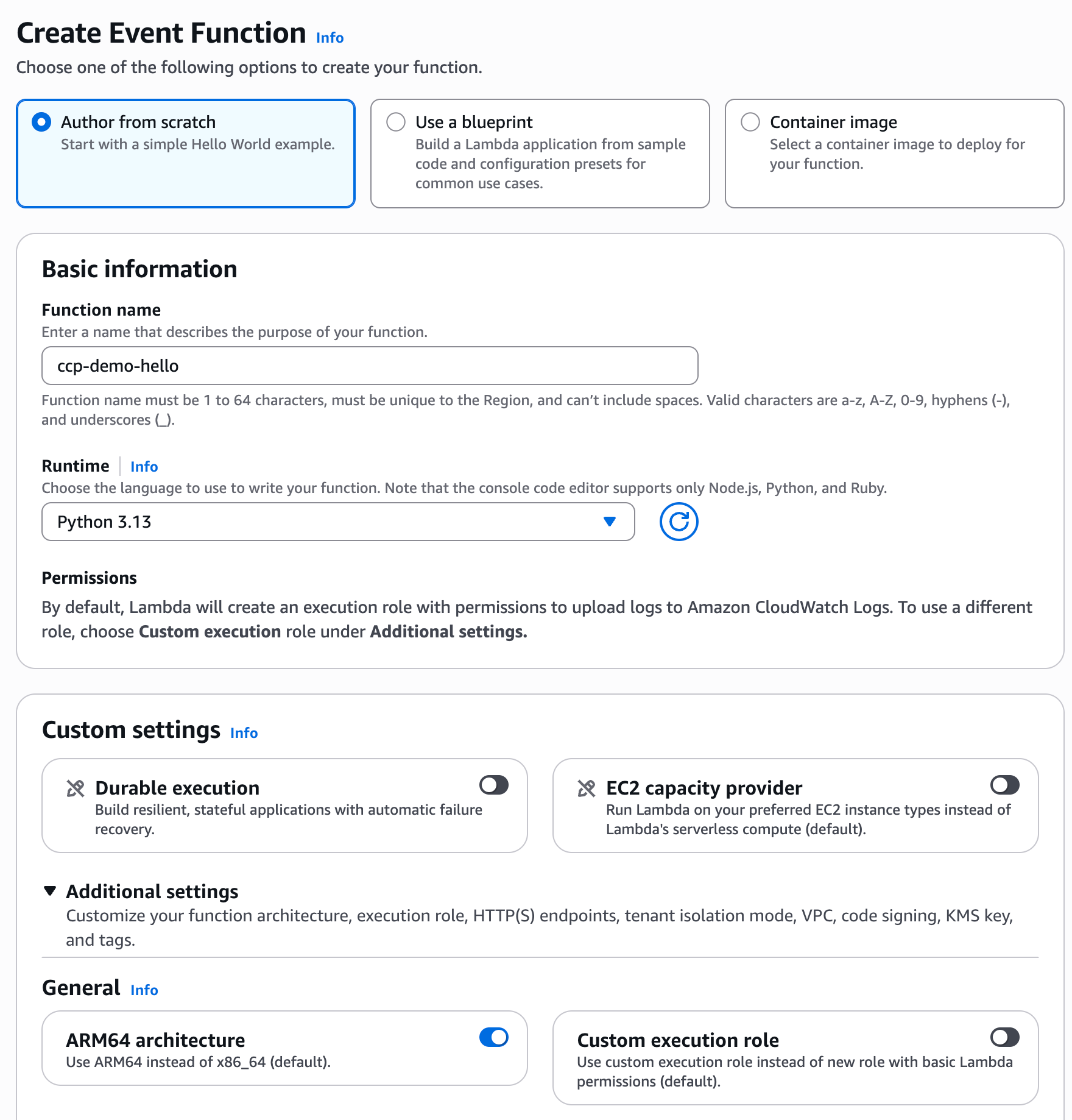
Now we invoke the function:
aws lambda invoke --function-name ccp-demo-hello \
  --cli-binary-format raw-in-base64-out \
  --payload '{"name":"rotecodefraktion"}' \
  response.json --region eu-central-1
cat response.json
{
    "StatusCode": 200
}
{"message": "Hallo rotecodefraktion", "memory_mb": "128", "remaining_ms": 10000}
The output is shortened, as the CLI also reports the executed version. A second invocation with {"name":"CLF-C02"} also returned status 200. Measured at the client, the first invocation took 725 ms and the second 539 ms. More interesting is what Lambda itself logs and bills.
aws logs filter-log-events \
  --log-group-name /aws/lambda/ccp-demo-hello \
  --filter-pattern "?INIT_START ?REPORT" \
  --query 'events[].message' --output text --region eu-central-1
INIT_START Runtime Version: python:3.13.mainlinev2.v43 ...
REPORT ... Duration: 2.03 ms  Billed Duration: 68 ms  Memory Size: 128 MB  Max Memory Used: 35 MB  Init Duration: 65.38 ms
REPORT ... Duration: 1.62 ms  Billed Duration: 2 ms ...
The output is shortened, and we leave out request IDs and further fields.
In the console: Test tab → Create new event → Event name, Event JSON → Test. Under “Executing function: succeeded” and Details we find Response, Duration, Billed duration, Init duration and the last 4 KB of the Log output; the “logs” link leads to the CloudWatch log group.
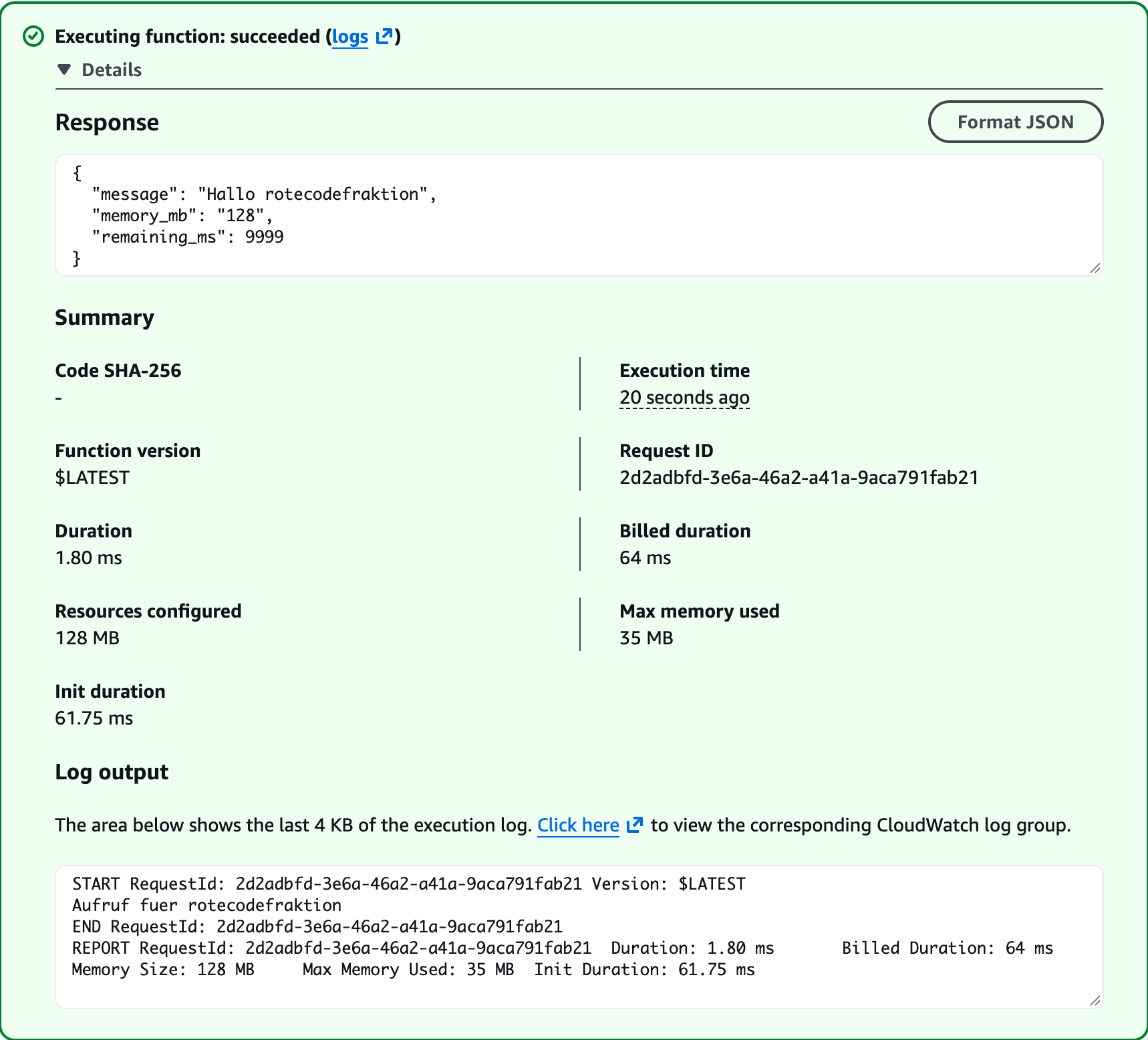
The screenshot comes from a second run, also a cold start, hence the slightly different times.
The first invocation was a cold start. Lambda first had to spin up an execution environment and load the Python runtime, as the INIT_START line and the init duration of 65.38 ms show. The actual code ran for only 2.03 ms. Still, 68 ms were billed, so init phase and runtime together.
Since August 1, 2025, according to the AWS Compute Blog, AWS also bills the init phase for ZIP functions with managed runtimes.
On the second invocation the environment was still warm, there was no init phase, and 2 ms were billed. At 128 MB this doesn’t matter within the Free Tier. For functions with a lot of memory and many cold starts, the init phase becomes a line item on the bill.
Clean up so that nothing is left behind:
aws lambda delete-function --function-name ccp-demo-hello --region eu-central-1
aws logs delete-log-group --log-group-name /aws/lambda/ccp-demo-hello --region eu-central-1
aws iam detach-role-policy --role-name ccp-demo-lambda-role \
  --policy-arn arn:aws:iam::aws:policy/service-role/AWSLambdaBasicExecutionRole
aws iam delete-role --role-name ccp-demo-lambda-role
If we created the function in the console, we delete the automatically created role ccp-demo-hello-role-… and its policy AWSLambdaBasicExecutionRole-… instead of ccp-demo-lambda-role (IAM → Roles and IAM → Policies).
At this scale, the function stays within the free tier. Resources that we leave running longer or invoke more often can incur costs once the Free Tier expires or is exceeded.
For the exam
| Keyword in the question | Answer |
|---|---|
| short-term, unpredictable load, no commitment | On-Demand |
| steady load over 1 or 3 years, fixed instance type | Standard Reserved Instance or EC2 Instance Savings Plan |
| discount that also covers Fargate and Lambda | Compute Savings Plan |
| fault-tolerant, may be interrupted, cheapest possible | Spot Instances |
| license per socket or core, compliance requires own server | Dedicated Host |
| hardware not shared with other customers, no visibility into sockets and cores | Dedicated Instance |
| manage bring-your-own licenses (BYOL) and track their use | AWS License Manager |
| preconfigured image from a third-party vendor | AMI from the AWS Marketplace |
| Who applies guest OS patches and maintains security group rules on an EC2 instance? | the customer |
| Who replaces faulty server hardware under EC2? | AWS |
| capacity guaranteed in an AZ, no term commitment | Capacity Reservation |
| routing by path or host (domain), HTTP/HTTPS | Application Load Balancer |
| static IP address, e.g. for a customer’s firewall allowlist | Network Load Balancer (or Global Accelerator in front of an ALB) |
| TCP/UDP, extreme performance | Network Load Balancer |
| integrate third-party firewall appliances | Gateway Load Balancer |
| adjust the number of instances to load automatically | Auto Scaling group |
| code without servers, event-driven, under 15 minutes | AWS Lambda |
| serverless REST or WebSocket API in front of Lambda | Amazon API Gateway |
| many batch jobs as a Docker image, longer than 15 minutes | AWS Batch |
| containers without EC2 management | AWS Fargate |
| Kubernetes | Amazon EKS |
| private Docker registry | Amazon ECR |
| simple web server at a flat price | Amazon Lightsail |
| connection runs into a timeout | check the security group |
Typical traps:
- Savings Plans don’t reserve capacity. Guaranteed capacity comes only with a Capacity Reservation.
- Only the NLB has static IP addresses, only the ALB routes by domain. Both are reachable by DNS name.
- The Classic Load Balancer is not shut down. What was shut down in 2022 was EC2-Classic.
- Spot is never the answer for databases or critical jobs, even though it is the cheapest option.
- Lambda ends after 15 minutes. Longer jobs belong to AWS Batch, Fargate or EC2.
- Lambda doesn’t run just any Docker image. A container image for Lambda needs a runtime interface client that talks to the Lambda service, and it must sit in an Amazon ECR repository in the same Region. Anyone who wants to run an existing image unchanged ends up with ECS or Fargate.
- ECS is not automatically serverless. Only with Fargate does the management of instances go away.
Sources
- Exam Guide CLF-C02, Domains 3 and 4
- In-scope services CLF-C02
- Comparing Savings Plans and Reserved Instances
- Amazon EC2 Pricing
- Amazon EC2 On-Demand Pricing
- Migrating from a Classic Load Balancer
- Classic Load Balancer, Document History
- Lambda quotas
- AWS Lambda Pricing and Free Tier
- AWS Compute Blog: Lambda bills the INIT phase
- Selling Reserved Instances in the RI Marketplace
- Capacity Reservations: pricing and billing
- EC2 user data
- Network Load Balancer: DNS name and IP addresses
- Network Load Balancer: listeners
- Gateway Load Balancer
- Differences between EC2 and Lightsail
- Shared Responsibility Model
- EC2 User Guide: paid AMIs in the AWS Marketplace
- AWS License Manager User Guide
- Knowledge Center: reducing Lambda costs (memory and CPU)
- Lambda Developer Guide: function from a container image
The next part is about storage, from EBS and EFS to the S3 storage classes.