AWS Cloud Practitioner 04: Storage
Every application needs a place for its data, and AWS offers not one service for this but a whole family. There are disks that attach to exactly one EC2 instance, file systems that many instances use at the same time, and an object store that serves files in practically any quantity through an API. In the CLF-C02 exam these services mostly show up as matching questions, where a short scenario asks for the right storage. Let’s look at how EBS, Instance Store, EFS, FSx and S3 work, what we use them for, and where the typical mix-ups are.
Block, file, object
Storage services can be sorted by how a program accesses the data. Block storage behaves like a hard disk, and the operating system creates its own file system on it. File storage is a ready-made file system on the network that several machines mount at the same time. Object storage knows neither disks nor directory trees. It stores individual objects under a key.
| Type | Services | Who accesses it | Typical use |
|---|---|---|---|
| Block | EBS, Instance Store | one EC2 instance | operating system, database on EC2 |
| File | EFS, FSx | many instances at once | shared directories |
| Object | S3 | anyone with permission, through the API | backups, media, logs, static websites |
Anyone who can tell these three types apart can already solve a large share of the storage questions by elimination.
EBS and Instance Store attach to one instance
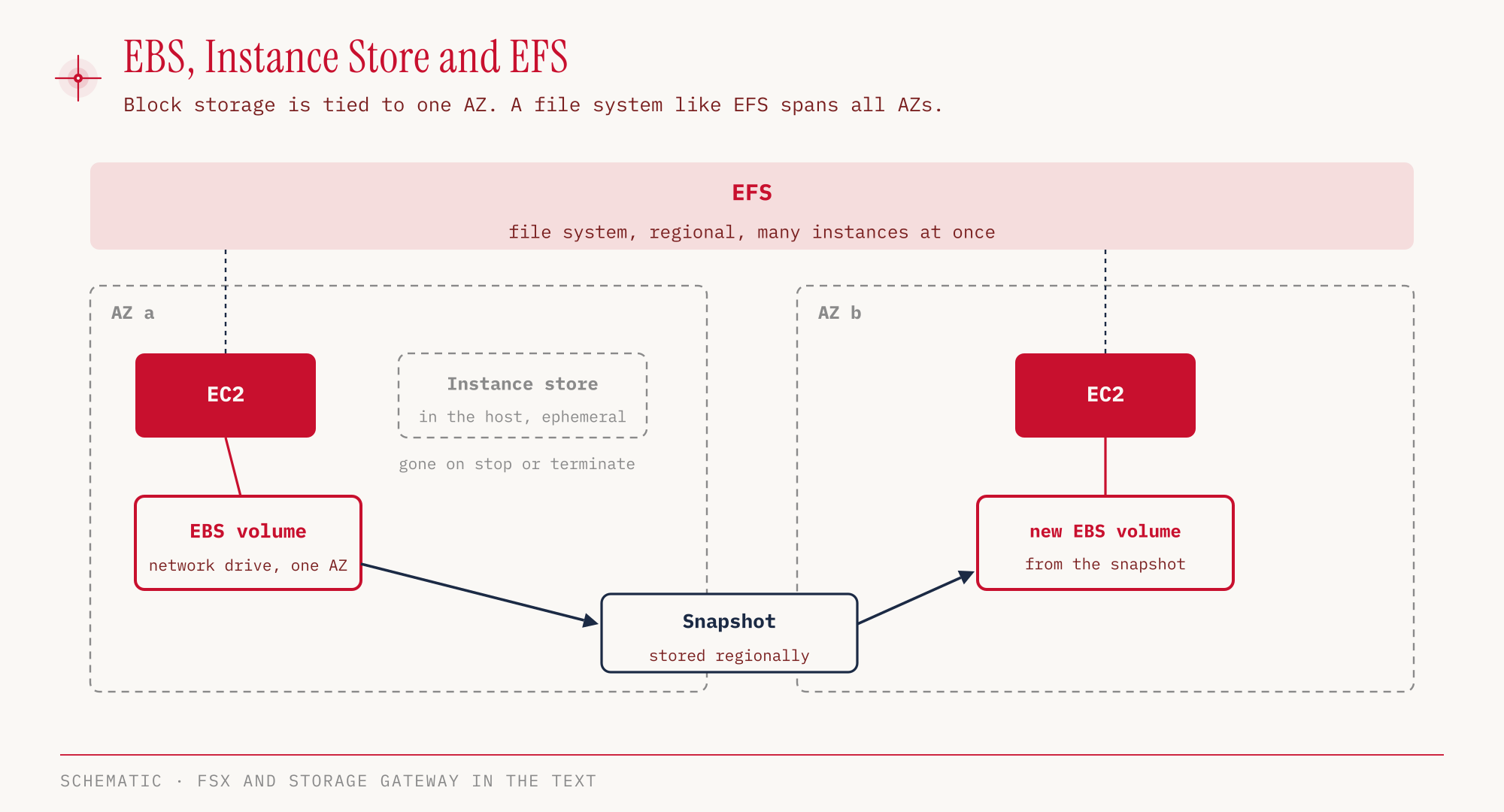
Amazon EBS (Elastic Block Store) is a network drive. The instance sees it like a built-in hard disk, but the data lives on the network of the Availability Zone and therefore survives stopping or terminating the instance. An EBS volume belongs to exactly one Availability Zone. An instance in eu-central-1a cannot attach a volume from eu-central-1b. To move data to another AZ, we create a snapshot and build a new volume from it in the target AZ.
EBS bills the provisioned size, not the space actually used. A 100 GB volume costs the full amount even if only 10 GB are stored on it.
Snapshots also serve as backups. For snapshots that are rarely needed there is EBS Snapshots Archive. According to AWS, the archive costs 0.0125 US dollars per GB and month instead of 0.05 US dollars in the standard tier, which is 75 percent less. In return there is a minimum duration of 90 days, and a restore takes 24 to 72 hours and costs 0.03 US dollars per GB (us-east-1, as of October 2026, prices are snapshots in time). The Recycle Bin protects against accidentally deleted snapshots and lets us restore them.
When an instance is terminated, the attribute Delete on Termination decides what happens to the volumes. By default, a root volume created at launch is deleted along with the instance, while volumes attached afterwards stay.
The Instance Store is the opposite model. It sits physically in the host machine the instance runs on, which gives very low latency and high I/O. It survives a reboot. If the instance is stopped, hibernated or terminated, the data is gone. It is therefore only suitable for data that can be recreated at any time.
| EBS | Instance Store | |
|---|---|---|
| Location | network drive in one AZ | disk in the host |
| Stop or terminate | data stays (except root volume with Delete on Termination) | data is lost |
| Move to another AZ | through a snapshot | not supported |
| Strength | durable, can be backed up with snapshots | maximum performance |
From a configured instance we can create an AMI (Amazon Machine Image), a preconfigured image with operating system and software from which new EC2 instances start (for EC2 itself see part 03). AMIs are per Region and can be copied to other Regions. EC2 Image Builder automates building, testing and distributing such images.
EFS and FSx share files
An EBS volume attaches to one instance. If several instances should see the same files, we need a file system on the network. Amazon EFS (Elastic File System) is a managed file system for Linux instances that is created at Region level. Instances from several AZs mount it at the same time. Unlike EBS, EFS only charges for the storage actually used, and we don’t set a size up front.
EFS also has cheaper classes for rarely used files. According to AWS, EFS Infrequent Access is up to 95 percent cheaper than EFS Standard, and EFS Archive is up to another 50 percent cheaper than Infrequent Access, which makes it up to 97 percent below Standard (Archive: 0.008 US dollars per GB and month in us-east-1, as of October 2026). A lifecycle policy moves files automatically. By default, they move to Infrequent Access after 30 days without access and to Archive after 90 days.
Amazon FSx provides well-known file systems from other vendors as a managed service. For the exam, FSx for Windows File Server matters most, with SMB, NTFS and Active Directory integration. If a scenario mentions a “Windows file share”, this is the right answer, not EFS. FSx for Lustre, for high-performance computing on Linux, is not relevant for the exam according to the Exam Guide.
AWS Storage Gateway connects your own data center to storage in AWS. The variants fall into three groups: File Gateway (as S3 File Gateway or FSx File Gateway), Volume Gateway and Tape Gateway. The Tape Gateway replaces tape libraries. In this context the Exam Guide mentions “cached file systems”. Frequently used data sits in the local cache, the full data set in AWS.
The storage category of the in-scope list also includes AWS Backup, which bundles backups of various AWS services in one place, and AWS Elastic Disaster Recovery. We cover disaster recovery in detail in part 11.
The Shared Responsibility Model from part 01 applies to storage as well. AWS runs the hardware and infrastructure of the storage services. Setting up snapshots and backups, choosing encryption and protecting our own data remain our job, according to the Shared Responsibility Model for Resiliency. That includes accepting that data in the Instance Store can be lost. In S3, versioning, bucket policies, replication and the choice of storage class are likewise configuration on the customer side.
S3 stores objects, not files
Amazon S3 (Simple Storage Service) is the service that appears most often in the exam. Data lives there as objects in buckets. A bucket belongs to a Region, but in the classic global namespace its name must be unique worldwide. Since March 2026, buckets can optionally be created in an Account Regional Namespace, where a name suffix made of account ID and Region ensures uniqueness. Names may be 3 to 63 characters long and contain lowercase letters, digits, periods and hyphens, no underscores, and a name must not look like an IP address.
Every object has a key, and this key is the full path, for example notizen/lernplan.txt. There are no real folders. The console only displays prefixes before the slash as folders. A single object can be up to 50 TB. A single upload with PUT handles up to 5 GB, beyond that multipart upload is required, and AWS recommends it from 100 MB.
S3 is designed for a durability of eleven nines (99.999999999 percent), in all storage classes. Durability describes how unlikely data loss is. Availability, meaning how reliably we can reach the data at any time, differs by class. This distinction is a typical exam trap.
Bucket access, deny beats allow
S3 checks every access against two kinds of policies. IAM policies are user-based, they attach to users, groups and roles (see part 02). Bucket policies are resource-based and attach to the bucket itself. With them we make a bucket public, enforce encryption or allow another AWS account to access it.
Evaluation follows a fixed order. An explicit deny in any policy always wins. If there is none, within the same account a single allow from the IAM policy or the bucket policy is enough. If neither allows the action, it is implicitly denied. For access from another account, both sides must agree, the owner’s bucket policy and the IAM policy in the other account. We saw this in part 02 in the policy simulation, when s3:PutObject came back as implicitDeny for a read-only user.
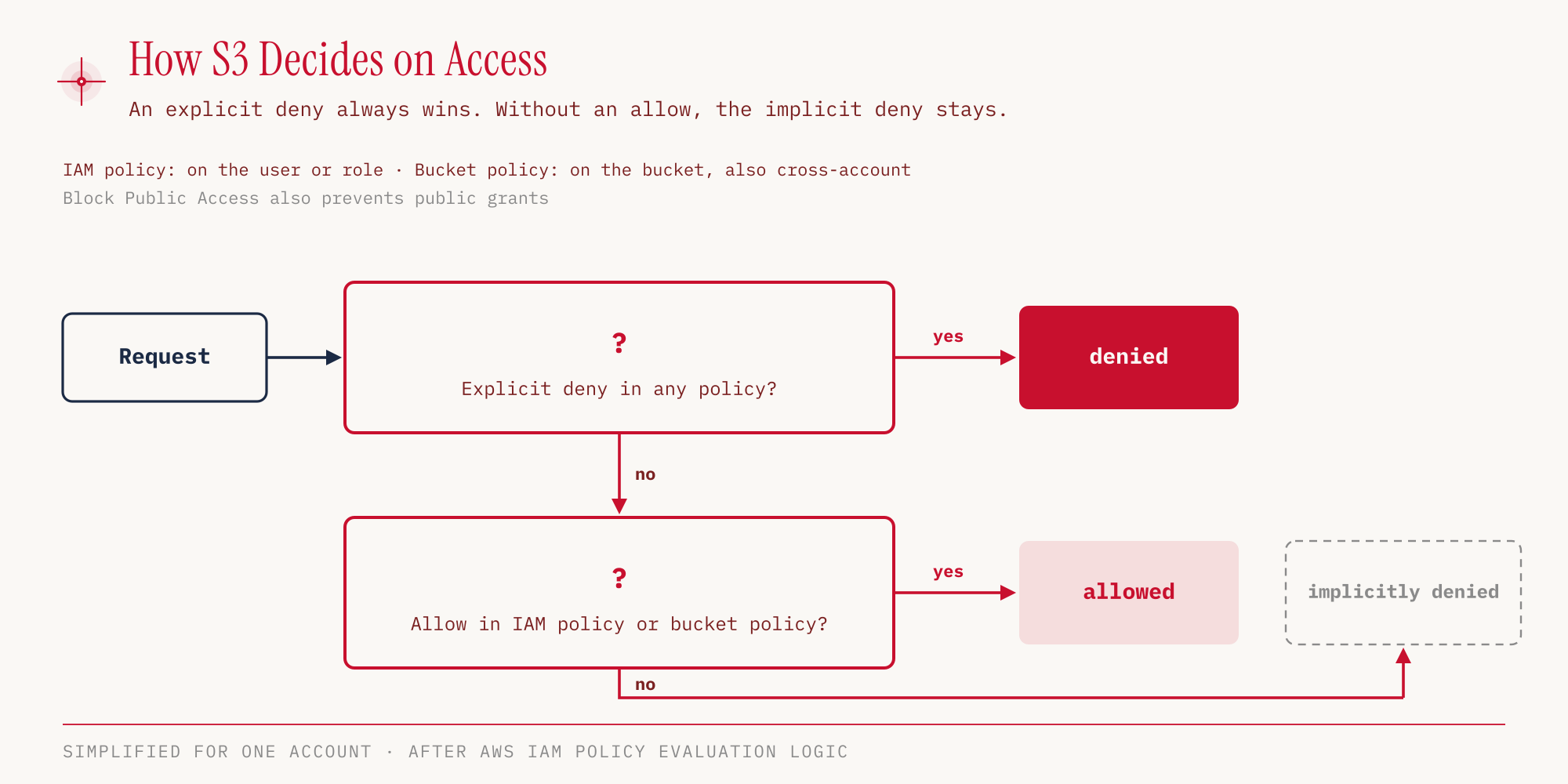
Above everything sits S3 Block Public Access. It consists of four switches that prevent public sharing even if a policy would allow it, and can be set for individual buckets, for the whole account, or through AWS Organizations for an entire organization. For new buckets all four are turned on. In the hands-on section below, S3 therefore simply rejects a public bucket policy.
Storage classes, cheap to store and expensive to retrieve
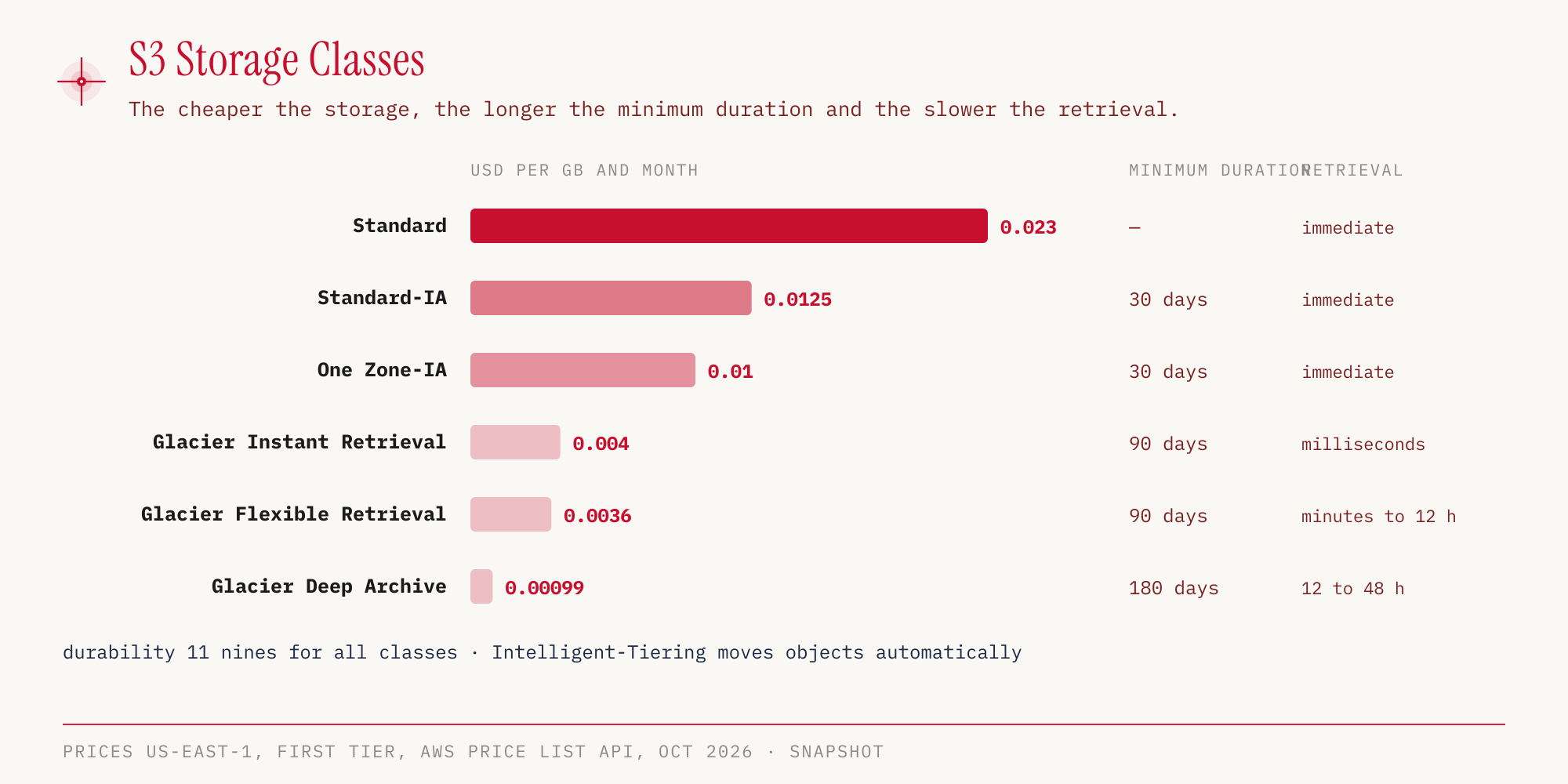
S3 offers several storage classes that differ in price, minimum duration and retrieval time. The minimum duration means an object is billed for at least that long, even if we delete it earlier. The prices below are storage prices per GB and month in us-east-1, as of October 2026, and therefore a snapshot in time. Retrieval fees and request costs come on top.
| Class | Notes |
|---|---|
| S3 Standard | 99.99% availability |
| S3 Intelligent-Tiering | price, minimum duration and retrieval time depend on the tier, no retrieval fee, per-object monitoring fee |
| S3 Standard-IA | for infrequent access |
| S3 One Zone-IA | one AZ only, 99.5% availability |
| S3 Glacier Instant Retrieval | 99.9% availability, billed for at least 128 KB |
| S3 Glacier Flexible Retrieval | three retrieval options |
| S3 Glacier Deep Archive | cheapest class |
The cheaper the storage, the longer the minimum duration and the slower or more expensive the retrieval. One Zone-IA saves money because the data sits in only one AZ. If that AZ fails, the data is unreachable. Intelligent-Tiering is the answer when the access pattern is unknown. The class moves objects between its tiers by itself and charges no retrieval fee, but it does cost a monitoring fee per object.
With Glacier Flexible Retrieval we choose the retrieval speed ourselves. Expedited takes 1 to 5 minutes, Standard 3 to 5 hours, Bulk 5 to 12 hours, and Bulk retrievals are free. With Deep Archive, a Standard retrieval takes up to 12 hours and a Bulk retrieval up to 48 hours.
The older, standalone service Amazon Glacier with its vaults has not accepted new customers since December 15, 2025. The S3 Glacier storage classes are not affected.
For workloads with very low latency there is also S3 Express One Zone. The data sits in a directory bucket in a single AZ, and access times are in the single-digit millisecond range. The class is intended for latency-critical applications, for example in analytics and machine learning. It does not appear as a separate service in the scope list but falls under S3.
We switch between classes manually or automatically with lifecycle rules. A rule can move objects to a cheaper class after a given number of days, or delete them.
Versioning, replication and static websites
With versioning, S3 keeps every version of an object. Versioning is turned on per bucket. Deleting without specifying a version then removes nothing, S3 merely sets a delete marker as the newest version. The older versions remain retrievable until we delete them deliberately. This protects against accidental deletion and overwriting.
Versioning is also a prerequisite for replication. Cross-Region Replication (CRR) copies objects to a bucket in another Region, Same-Region Replication (SRR) to a bucket in the same Region. Both work asynchronously. According to AWS, CRR serves, for example, to meet compliance requirements for copies in distant Regions or to give users in another Region lower-latency access. SRR is the choice for aggregating logs from several buckets into one, for live replication between production and test accounts, or when data sovereignty requires the data to stay in the same Region.
S3 can also serve a static website. If the website responds with HTTP 403, the bucket policy that allows public reads is usually missing. As long as Block Public Access is active, S3 does not even accept such a policy, as the hands-on section shows next.
Hands-on
Let’s create a bucket, turn on versioning, delete an object and get it back, add a lifecycle rule, and finally try to make the bucket public. In the global namespace bucket names are unique worldwide, so we use a random suffix. If you follow along, pick your own name. The shortened outputs come from our demo account on October 25, 2026.
S3 bills for storage and requests, so even a small bucket can cause costs outside the Free Tier. That is why we clean up completely at the end.
First the bucket and its defaults.
aws s3api create-bucket --bucket ccp-demo-edf11cfc \
  --region eu-central-1 \
  --create-bucket-configuration LocationConstraint=eu-central-1

aws s3api get-public-access-block --bucket ccp-demo-edf11cfc --region eu-central-1
{
    "PublicAccessBlockConfiguration": {
        "BlockPublicAcls": true,
        "IgnorePublicAcls": true,
        "BlockPublicPolicy": true,
        "RestrictPublicBuckets": true
    }
}
aws s3api get-bucket-encryption --bucket ccp-demo-edf11cfc --region eu-central-1 \
  --query 'ServerSideEncryptionConfiguration.Rules[0].ApplyServerSideEncryptionByDefault.SSEAlgorithm' \
  --output text
# AES256

aws s3api get-bucket-ownership-controls --bucket ccp-demo-edf11cfc --region eu-central-1 \
  --query 'OwnershipControls.Rules[0].ObjectOwnership' --output text
# BucketOwnerEnforced
Without any action on our part, the new bucket is private, encrypted with SSE-S3 (AES256), and ACLs are disabled (BucketOwnerEnforced). The full response of get-bucket-encryption also contains BlockedEncryptionTypes with SSE-C. Encryption with customer-provided keys is therefore blocked by default on new buckets. SSE-S3 is server-side encryption, so S3 encrypts the data only after receiving it. With client-side encryption we encrypt the data ourselves before the upload, for example with the Amazon S3 Encryption Client, and AWS never sees it in plaintext. We go deeper into encryption in part 08.
In the console: S3 → General purpose buckets → Create bucket → Bucket type General purpose → Bucket name → Create bucket; the console also asks for the Bucket namespace, and we stay with the Global namespace. In the form we find Object Ownership “ACLs disabled (recommended)”, “Block all public access” and Default encryption SSE-S3. Unlike with the CLI, we turn on versioning right when creating the bucket there (Bucket Versioning “Enable”).
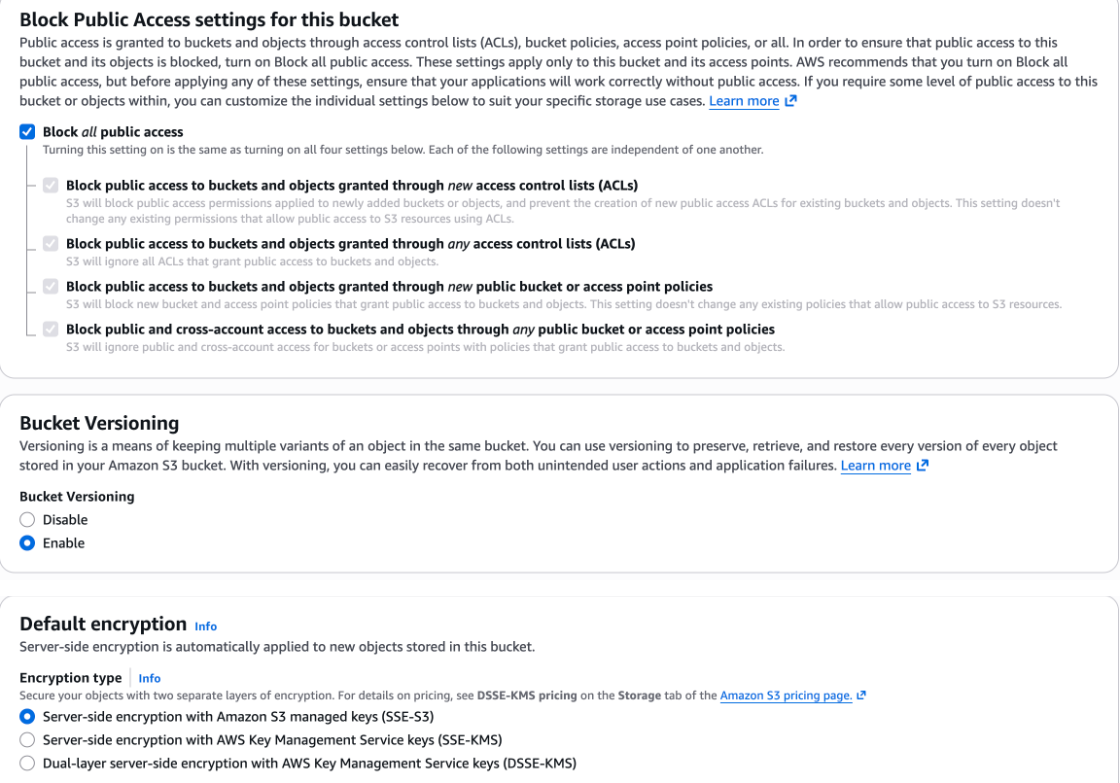
Now we turn on versioning, write to the same key twice and delete it.
aws s3api put-bucket-versioning --bucket ccp-demo-edf11cfc --region eu-central-1 \
  --versioning-configuration Status=Enabled

printf '%s' 'Version 1: IAM wiederholen' > lernplan.txt
aws s3api put-object --bucket ccp-demo-edf11cfc --region eu-central-1 \
  --key notizen/lernplan.txt --body lernplan.txt

printf '%s' 'Version 2: S3 und EBS wiederholen' > lernplan.txt
aws s3api put-object --bucket ccp-demo-edf11cfc --region eu-central-1 \
  --key notizen/lernplan.txt --body lernplan.txt

aws s3api delete-object --bucket ccp-demo-edf11cfc --region eu-central-1 \
  --key notizen/lernplan.txt

aws s3api list-object-versions --bucket ccp-demo-edf11cfc --region eu-central-1 \
  --query 'Versions[].[Size, IsLatest]' --output text
# 33    False
# 26    False

aws s3api list-object-versions --bucket ccp-demo-edf11cfc --region eu-central-1 \
  --query 'DeleteMarkers[].IsLatest' --output text
# True
In the console: Bucket → Objects tab → notizen/ → Show versions.
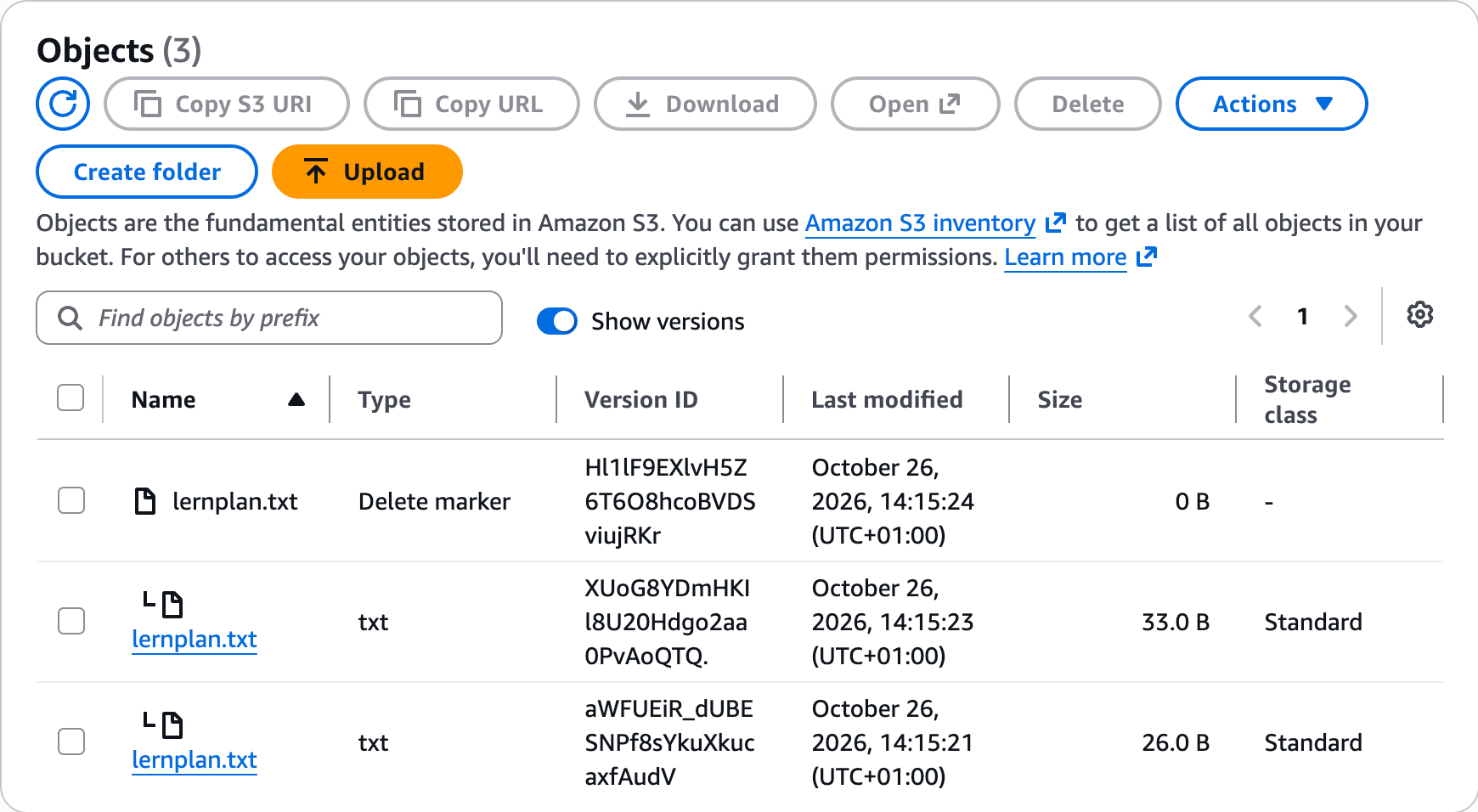
The test sentences are German study notes: “Version 1: IAM wiederholen” means “review IAM”, “Version 2: S3 und EBS wiederholen” means “review S3 and EBS”.
Both versions are still there, and the newest version is the delete marker. A normal retrieval therefore fails, while a retrieval with the version ID returns the old version.
aws s3api get-object --bucket ccp-demo-edf11cfc --region eu-central-1 \
  --key notizen/lernplan.txt aktuell.txt
# An error occurred (NoSuchKey) when calling the GetObject operation: ...

V1=$(aws s3api list-object-versions --bucket ccp-demo-edf11cfc --region eu-central-1 \
  --query 'Versions[?Size==`26`].VersionId' --output text)
aws s3api get-object --bucket ccp-demo-edf11cfc --region eu-central-1 \
  --key notizen/lernplan.txt --version-id "$V1" alt.txt
cat alt.txt
# Version 1: IAM wiederholen
In the console: click the version → Download or Open. Alternatively we delete the Delete marker there.
The lifecycle rule moves everything under notizen/ to Standard-IA after 30 days, to Glacier Instant Retrieval after 90 days, and deletes older versions 30 days after they were replaced. The file lifecycle.json:
{
  "Rules": [
    {
      "ID": "lernnotizen",
      "Status": "Enabled",
      "Filter": { "Prefix": "notizen/" },
      "Transitions": [
        { "Days": 30, "StorageClass": "STANDARD_IA" },
        { "Days": 90, "StorageClass": "GLACIER_IR" }
      ],
      "NoncurrentVersionExpiration": { "NoncurrentDays": 30 }
    }
  ]
}
aws s3api put-bucket-lifecycle-configuration --bucket ccp-demo-edf11cfc \
  --region eu-central-1 --lifecycle-configuration file://lifecycle.json
S3 accepts the rule without output.
In the console: Bucket → Management tab → Lifecycle rules → Create lifecycle rule. The rule’s detail view shows the timeline Day 0, Day 30 Standard-IA, Day 90 Glacier Instant Retrieval and, for older versions, Day 30 permanently deleted.
Finally, the attempt to make the bucket readable for everyone ("Principal": "*") with a bucket policy. The file public-read.json:
{
  "Version": "2012-10-17",
  "Statement": [
    {
      "Effect": "Allow",
      "Principal": "*",
      "Action": "s3:GetObject",
      "Resource": "arn:aws:s3:::ccp-demo-edf11cfc/*"
    }
  ]
}
aws s3api put-bucket-policy --bucket ccp-demo-edf11cfc --region eu-central-1 \
  --policy file://public-read.json
# An error occurred (AccessDenied) when calling the PutBucketPolicy operation:
# ... public policies are prevented by the BlockPublicPolicy setting in S3 Block Public Access
In the console: Bucket → Permissions tab → Bucket policy → Edit. With Block Public Access on, the console shows the note “Public access is blocked because Block Public Access settings are turned on for this bucket”.
Block Public Access takes effect before the policy is even saved. For a public static website we would have to loosen this protection for the bucket deliberately.
For cleanup, delete-bucket is not enough as long as versions and delete markers remain in the bucket. We collect them and delete them together.
aws s3api list-object-versions --bucket ccp-demo-edf11cfc --region eu-central-1 \
  --query '{Objects: [Versions[].{Key: Key, VersionId: VersionId}, DeleteMarkers[].{Key: Key, VersionId: VersionId}][]}' \
  --output json > delete.json

aws s3api delete-objects --bucket ccp-demo-edf11cfc --region eu-central-1 \
  --delete file://delete.json

aws s3api delete-bucket --bucket ccp-demo-edf11cfc --region eu-central-1

rm lernplan.txt alt.txt lifecycle.json public-read.json delete.json
For the exam
| Keyword in the question | Answer |
|---|---|
| disk for an EC2 instance, data should survive a stop | EBS |
| highest performance, temporary data | Instance Store |
| move a volume to another AZ | EBS snapshot |
| shared file system for many Linux instances across AZs | EFS |
| Windows file share, SMB, Active Directory | FSx for Windows File Server |
| connect own data center to S3, replace tape library | Storage Gateway (Tape Gateway) |
| control backups of several services centrally | AWS Backup |
| access pattern unknown | S3 Intelligent-Tiering |
| archive, but retrieval in milliseconds | S3 Glacier Instant Retrieval |
| accessed about once a quarter, but then immediately | S3 Glacier Instant Retrieval |
| cheapest long-term archive, retrieval within 48 hours is fine | S3 Glacier Deep Archive |
| protection against accidental deletion in S3 | Versioning |
| copy objects to another Region | Cross-Region Replication (versioning required) |
| aggregate logs from several buckets in one Region | Same-Region Replication |
| bucket must never become public | S3 Block Public Access |
| give another AWS account access to a bucket | Bucket policy |
| AWS must never see the data unencrypted | client-side encryption |
| Who sets up snapshots and backups? | the customer |
Typical traps:
- Mixing up durability and availability. Durability is the same in all S3 classes (eleven nines), only availability differs.
- Wanting to use EBS across AZs. EBS is tied to one AZ, EFS is regional. The way into another AZ is a snapshot.
- Choosing Instance Store for durable data. After stop or terminate the data is gone.
- Overlooking the minimum duration. Anyone who deletes objects in Glacier Deep Archive after one month still pays for 180 days.
- Equating the Glacier service with the Glacier storage classes. Only the old vault service stopped accepting new customers, the S3 storage classes remain.
- Assuming S3 protects the data on its own. AWS takes care of durability and infrastructure, while turning on versioning and choosing encryption options is the customer’s job.
- Estimating EBS costs by used space. EBS charges for the provisioned size, EFS only for the storage used.
Sources
- AWS Certified Cloud Practitioner (CLF-C02) Exam Guide
- CLF-C02 In-Scope Services
- CLF-C02 Out-of-Scope Services
- Amazon EBS Snapshots FAQs
- Amazon EFS Features
- Amazon S3 Pricing
- Amazon S3 User Guide: Glacier storage classes
- Amazon S3 Glacier Instant Retrieval
- Amazon S3 User Guide: Objects
- Amazon S3 FAQs
- Amazon Glacier Pricing
- Amazon S3 User Guide: Comparing storage classes
- Amazon S3 User Guide: Bucket naming rules
- AWS News Blog: Account regional namespaces for S3
- Amazon S3 Block Public Access
- Knowledge Center: Cross-account access to S3
- EC2 User Guide: Instance store data persistence
- EC2 User Guide: Preserving volumes when an instance terminates
- Amazon EBS Pricing
- Amazon EFS Pricing
- Shared Responsibility Model
- Reliability Pillar: Shared Responsibility Model for Resiliency
- Amazon S3 User Guide: Replication
- Amazon S3 User Guide: Client-side encryption
Part 05 covers databases and analytics, from RDS and Aurora to DynamoDB and Redshift.