AWS Cloud Practitioner 05: Databases and Analytics
AWS offers a dedicated service for almost every form of data, from the classic relational database to the key-value store to the data warehouse. In the CLF-C02 exam this does not appear as detailed knowledge but as a matching question. A requirement is stated in the text, and the matching service is what we are looking for. For each service, what matters is what it is built for and what it is commonly confused with. At the end we create a DynamoDB table and see what a read costs.
Relational databases as a managed service
Running a relational database on your own EC2 instance is possible. But then we take care of the operating system, patches, backups and resilience ourselves. Amazon RDS (Relational Database Service) takes exactly this work off our hands. We choose an engine, an instance size and the storage, and AWS runs everything underneath. RDS currently supports Db2, MariaDB, Microsoft SQL Server, MySQL, Oracle and PostgreSQL (RDS User Guide, as of October 25, 2026).
The price of the convenience is control. We cannot reach the server under an RDS database through SSH, since the operating system is part of what AWS is responsible for. This is shared responsibility in practice. AWS takes care of hardware, operating system and patches of the database software, and we remain responsible for our data, access permissions and network rules. Automatic backups with point-in-time restore are included.
This leads to the trade-off that the Exam Guide names explicitly in Task 3.4, namely when a database on EC2 fits and when a managed service does. Our own database on EC2 remains the choice when we need access to the operating system or want to run an engine that RDS does not offer. In all other cases, RDS is the better fit because AWS takes over the operations work.
RDS is the typical tool for OLTP (Online Transaction Processing), meaning many small reads and writes such as orders, bookings or user accounts. It is not built for analyzing millions of rows, which is what Redshift is for.
Amazon Aurora is AWS’s own relational engine, compatible with MySQL and PostgreSQL. It runs under the RDS umbrella but has its own storage layer that grows automatically. The upper limit depends on the version and is 256 TiB (from Aurora PostgreSQL 17.5, 16.9 and 15.13 as well as Aurora MySQL 3.10), while older versions stop at 128 TiB (Aurora Limits, as of October 25, 2026). A rule of thumb is enough for the exam. RDS means “familiar engine, operated by AWS”, Aurora means “cloud-optimized engine from AWS, MySQL- or PostgreSQL-compatible”.
With Aurora Serverless, Aurora adjusts compute capacity to the load automatically, measured in Aurora Capacity Units (ACUs). This suits sporadic or hard-to-predict load where we do not want to plan an instance size in advance (Aurora Serverless).
| Feature | RDS | Aurora |
|---|---|---|
| Engines | Db2, MariaDB, SQL Server, MySQL, Oracle, PostgreSQL | MySQL- and PostgreSQL-compatible |
| Storage | fixed size, can be extended | grows automatically, up to 256 TiB (depends on version) |
| Read replicas | 3 to 15, depending on engine | up to 15 |
| Access to the operating system | no | no |
Multi-AZ for resilience, read replicas for read load
Multi-AZ and read replicas both create a second copy of the database. In the exam they are constantly confused.
Multi-AZ protects against failure. RDS keeps a standby instance in a second Availability Zone and replicates every write to it synchronously. If the primary instance or its entire AZ fails, the standby takes over automatically, and the application keeps connecting to the same endpoint. In the classic Multi-AZ setup with one standby instance, nobody reads from the standby. It just waits.
Read replicas distribute read load. Replication is asynchronous, so a replica can briefly lag behind the primary instance. In return, the application may read from it and so relieve the main database, for example for reports or heavily read product catalogs. Replicas are also possible in other Regions. This shortens read latency for nearby users and keeps a copy ready for disaster recovery.
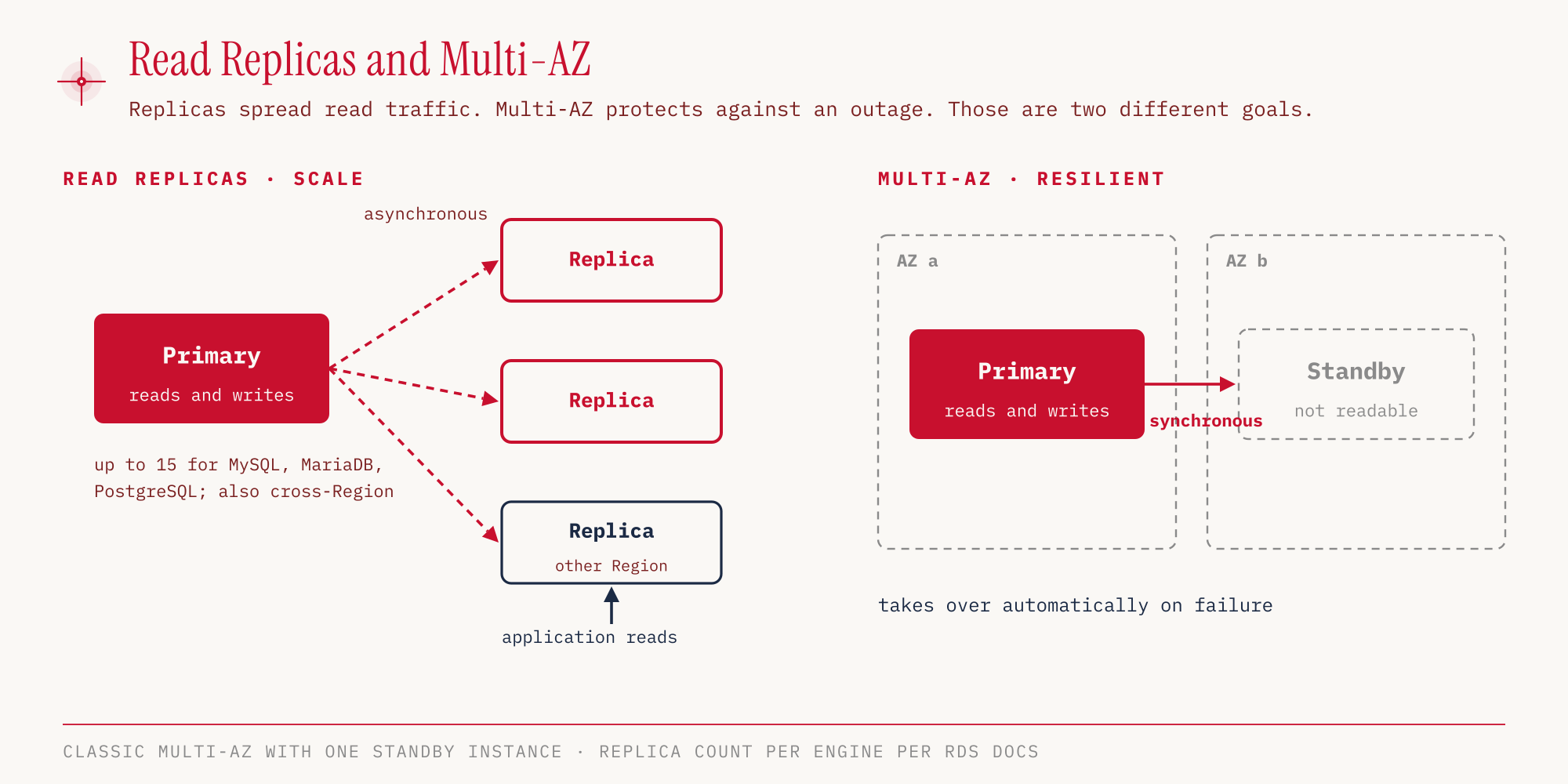
The often quoted number “up to 15 read replicas” does not apply to every engine. According to the AWS CLI reference for create-db-instance-read-replica and the Aurora User Guide (as of October 25, 2026), it looks like this:
| Engine | Read replicas per source | Cross-Region |
|---|---|---|
| MySQL, MariaDB, PostgreSQL | up to 15 | yes |
| Aurora | up to 15 | yes |
| Oracle | up to 5 | yes |
| SQL Server | up to 5 | no |
| Db2 | up to 3 | yes |
For the exam the rule of thumb “up to 15” is enough, as long as it is clear that Oracle, SQL Server and Db2 are lower.
| Multi-AZ | Read replicas | |
|---|---|---|
| Purpose | high availability, automatic failover | read scaling, disaster recovery across Regions |
| Replication | synchronous | asynchronous |
| Readable | no (classic setup) | yes |
| Location | other AZ, same Region | same or other Region |
Caches and key-value stores
Not every query has to go all the way to the database. Amazon ElastiCache is a managed in-memory cache with the engines Valkey, Redis OSS or Memcached (ElastiCache docs). It sits in front of a database such as RDS and answers repeated read requests from memory. This relieves the database and shortens response time. The application has to talk to the cache itself.
Amazon DynamoDB follows a different model. The serverless NoSQL database stores key-value and document data. There is no instance to choose and no table structure with fixed columns. Each item only needs its key, and all other attributes are free-form. Reads go through the key, with single-digit millisecond latency even for large data volumes. DynamoDB cannot do complex joins across several tables, and for that RDS remains the choice.
These additions regularly appear in exam questions:
- DAX (DynamoDB Accelerator) is a cache that works exclusively for DynamoDB and brings eventually consistent reads from the millisecond range into the microsecond range (DynamoDB docs). If the question says “DynamoDB” and “cache”, DAX is meant, not ElastiCache.
- Global Tables replicate a DynamoDB table across several Regions, and writes are allowed in every Region (active-active).
Billing differs depending on the mode. In On-Demand mode we pay per request and do not have to plan capacity. In Provisioned mode we reserve read and write capacity in advance. In the hands-on section we use On-Demand.
Analytics on large data volumes
An analysis reads a few columns across a very large number of rows. For this there is OLAP (Online Analytical Processing) and dedicated services.
Amazon Redshift is the data warehouse of AWS. It stores data in columns and spreads queries across many nodes in parallel (Massively Parallel Processing). Queries use SQL. In a question we recognize Redshift by keywords such as “data warehouse”, “OLAP” or “business analysis of historical data”.
Amazon Athena takes a different path. There is no cluster, Athena runs SQL queries directly on files in Amazon S3. Billing is by the amount of data scanned, according to an AWS whitepaper 5 USD per TB, with a minimum of 10 MB per query. DDL statements and failed queries are free. This is a snapshot for us-east-1 as of October 25, 2026, and prices change. Anyone who stores data in columnar formats such as Parquet and compressed scans less and saves 30 to 90 percent according to the same source. A typical use case is log files that AWS services already write to S3, such as CloudTrail logs, load balancer logs or VPC Flow Logs (Athena docs).
The other analytics services in the exam can be matched by their job:
| Service | Job |
|---|---|
| Amazon EMR | managed clusters for big data frameworks such as Hadoop and Spark |
| AWS Glue | serverless ETL (Extract, Transform, Load) and Data Catalog, which describes table schemas for Athena and other services |
| Amazon Quick Sight | BI dashboards and visualizations |
| Amazon Kinesis | real-time data streams (covered in part 07) |
| Amazon OpenSearch Service | search and log analytics |
The name deserves a second look. The Exam Guide now writes “Amazon Quick Sight” with a space, and the service is part of the new Amazon Quick Suite (AWS Blog). Until the rename it was called Amazon QuickSight.
We remember the difference between Redshift and Athena through operations. Redshift is a warehouse into which we load data and that runs permanently. Athena queries data where it already lives and only costs money when we query.
Specialized databases and migration
Some data shapes have their own engines:
- Amazon DocumentDB stores JSON documents and is compatible with MongoDB. If “MongoDB” appears in the question, this is the answer.
- Amazon Neptune is a graph database for highly connected data, such as social networks, fraud detection or knowledge graphs.
Amazon Timestream for LiveAnalytics has not accepted new customers since June 20, 2025, and AWS names Timestream for InfluxDB as the alternative (Timestream docs). For Amazon Managed Blockchain, AWS has announced the end of the service: from October 29, 2026 there are no new customers, and it is shut down on September 29, 2027 (Managed Blockchain docs). Neither is on the in-scope list of the Exam Guide, so they are hardly relevant for the exam. Amazon Keyspaces, Amazon MemoryDB and Amazon MSK are also explicitly out of scope.
Anyone who wants to bring an existing database to AWS uses the AWS Database Migration Service (DMS). It migrates both homogeneously (Oracle to Oracle) and heterogeneously (Oracle to PostgreSQL) while the source database keeps running. For heterogeneous migrations, the schema and code of the database have to be translated into the new engine. This is handled by the AWS Schema Conversion Tool (SCT), which the Exam Guide explicitly names in Task 3.4.
Hands-on
Let’s create a DynamoDB table for flashcards. The partition key thema (topic) groups the cards, and the sort key frage_id (question ID) distinguishes them within a topic. We use On-Demand mode so that no capacity is reserved in advance. Outside the Free Tier even small tables can cause costs, so we delete the table at the end.
aws dynamodb create-table \
  --table-name ccp-demo-lernkarten \
  --attribute-definitions AttributeName=thema,AttributeType=S AttributeName=frage_id,AttributeType=S \
  --key-schema AttributeName=thema,KeyType=HASH AttributeName=frage_id,KeyType=RANGE \
  --billing-mode PAY_PER_REQUEST \
  --region eu-central-1

aws dynamodb wait table-exists --table-name ccp-demo-lernkarten --region eu-central-1
aws dynamodb describe-table --table-name ccp-demo-lernkarten \
  --query 'Table.TableStatus' --region eu-central-1
"ACTIVE"
In the console: DynamoDB → Tables → Create table → Table name, Partition key, Sort key → Create table; with “Default settings”, On-demand is already preselected.
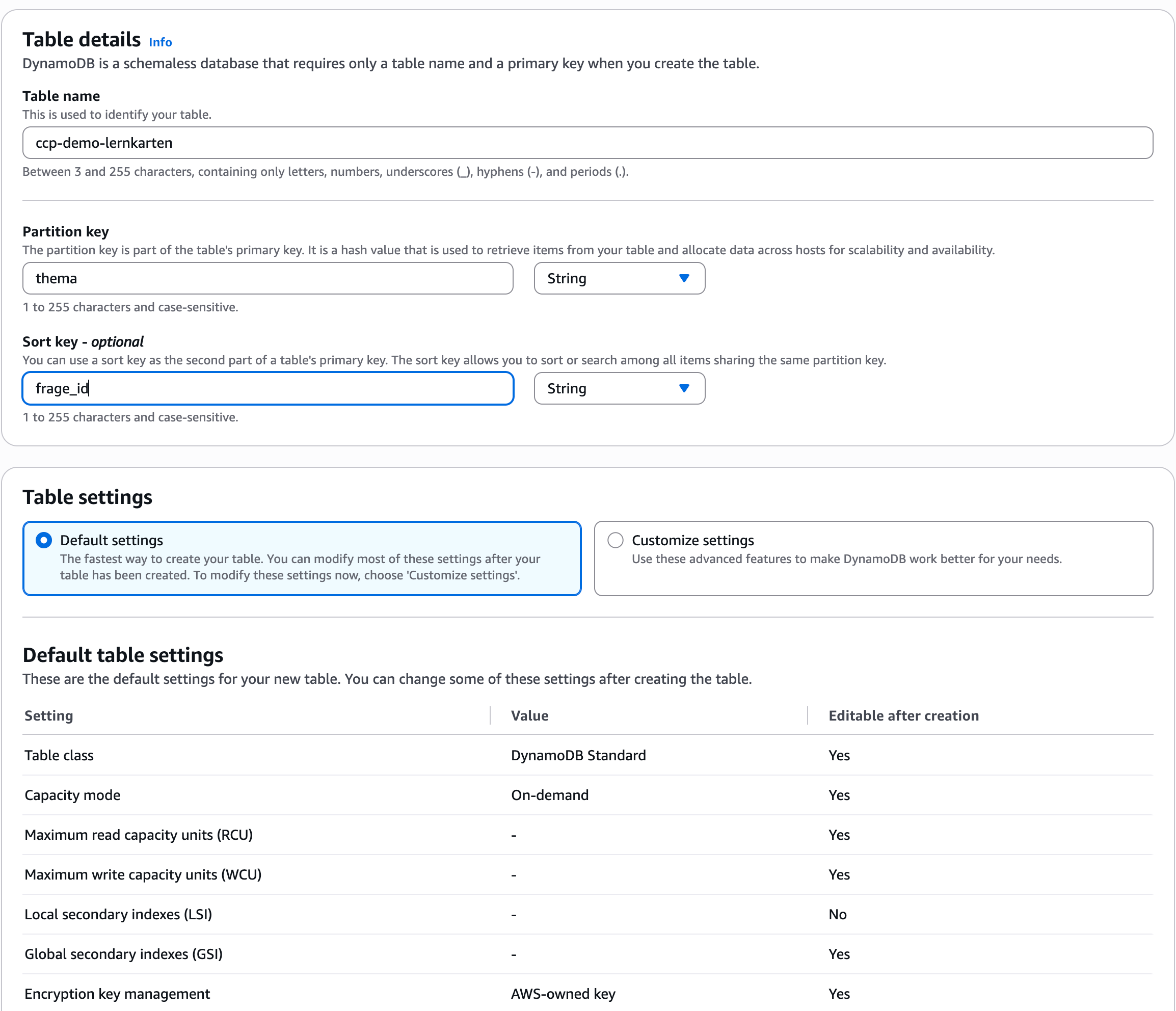
The table was active after six seconds. Let’s write three flashcards into it, two on databases (“Datenbanken”) and one on security:
aws dynamodb put-item --table-name ccp-demo-lernkarten --region eu-central-1 \
  --item '{"thema":{"S":"Datenbanken"},"frage_id":{"S":"q1"},"antwort":{"S":"Athena"}}'
aws dynamodb put-item --table-name ccp-demo-lernkarten --region eu-central-1 \
  --item '{"thema":{"S":"Datenbanken"},"frage_id":{"S":"q2"},"antwort":{"S":"DAX"}}'
aws dynamodb put-item --table-name ccp-demo-lernkarten --region eu-central-1 \
  --item '{"thema":{"S":"Security"},"frage_id":{"S":"q1"},"antwort":{"S":"CloudTrail"}}'
Now we read one card twice, once in the default mode (eventually consistent) and once with --consistent-read. With --return-consumed-capacity, DynamoDB reports how much the access consumed:
aws dynamodb get-item --table-name ccp-demo-lernkarten --region eu-central-1 \
  --key '{"thema":{"S":"Datenbanken"},"frage_id":{"S":"q1"}}' \
  --return-consumed-capacity TOTAL --query 'ConsumedCapacity.CapacityUnits'

aws dynamodb get-item --table-name ccp-demo-lernkarten --region eu-central-1 \
  --key '{"thema":{"S":"Datenbanken"},"frage_id":{"S":"q1"}}' \
  --consistent-read \
  --return-consumed-capacity TOTAL --query 'ConsumedCapacity.CapacityUnits'
0.5
1.0
The consistent read costs twice as much. In return it guarantees that we see the most recently written state. The default mode can still return an older state shortly after a write. For most applications it is enough, and it is cheaper.
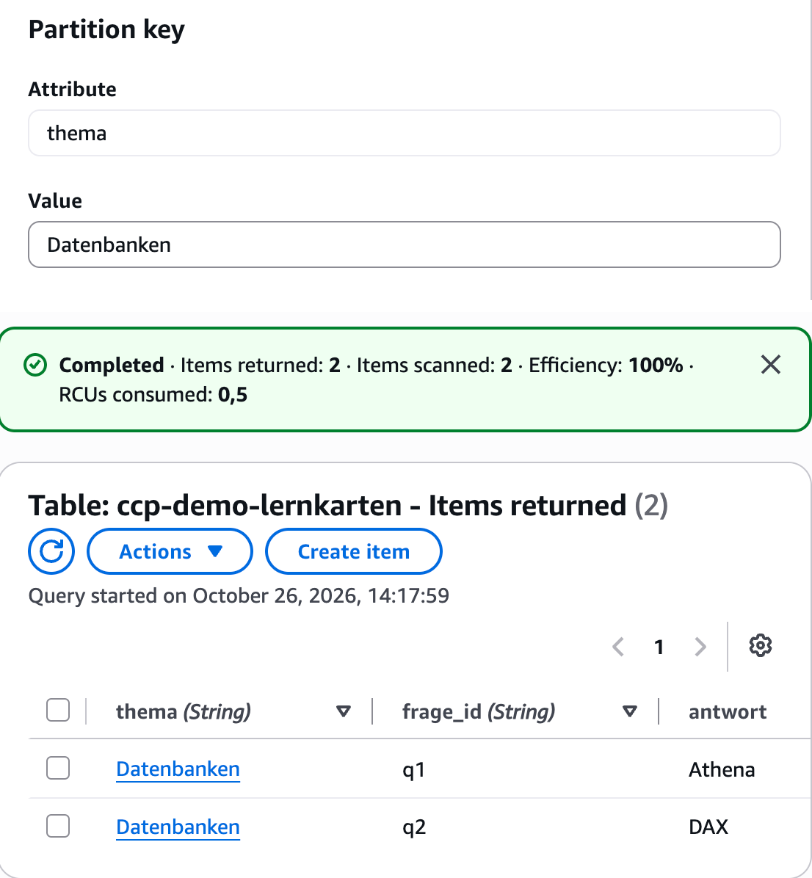
Finally, we query all cards of a topic. A query on the partition key returns all items with that key, sorted by the sort key:
aws dynamodb query --table-name ccp-demo-lernkarten --region eu-central-1 \
  --key-condition-expression "thema = :t" \
  --expression-attribute-values '{":t":{"S":"Datenbanken"}}' \
  --return-consumed-capacity TOTAL \
  --query '{Count: Count, CapacityUnits: ConsumedCapacity.CapacityUnits}'
{
    "Count": 2,
    "CapacityUnits": 0.5
}
Two items, half a capacity unit. The security card is left out because its partition key does not match.
In the console: DynamoDB → Explore items → select the table → Query → Partition key Value → Run.
Cleanup:
aws dynamodb delete-table --table-name ccp-demo-lernkarten --region eu-central-1
For the exam
| Keyword in the question | Answer |
|---|---|
| relational database, OLTP, no operational effort | Amazon RDS |
| access to the operating system (SSH) or an engine that RDS does not offer | database on EC2 |
| MySQL- or PostgreSQL-compatible, cloud-optimized, storage grows automatically | Amazon Aurora |
| Aurora with sporadic, unpredictable load, no capacity planning | Aurora Serverless |
| high availability, automatic failover to another AZ | RDS Multi-AZ |
| distribute read load, copy in another Region | Read replicas |
| in-memory cache in front of a database | Amazon ElastiCache |
| serverless, NoSQL, key-value, milliseconds | Amazon DynamoDB |
| cache for DynamoDB, microseconds | DAX |
| DynamoDB writable in several Regions | DynamoDB Global Tables |
| data warehouse, OLAP, columnar | Amazon Redshift |
| Hadoop, Spark | Amazon EMR |
| SQL directly on S3, serverless, pay per scan | Amazon Athena |
| ETL, Data Catalog | AWS Glue |
| dashboards, BI | Amazon Quick Sight |
| MongoDB-compatible | Amazon DocumentDB |
| graph, social networks, fraud detection | Amazon Neptune |
| migrate a database, source stays online | AWS DMS |
| translate schema to another engine | AWS SCT |
Typical traps:
- Multi-AZ or read replicas. Multi-AZ is synchronous and serves failover, read replicas are asynchronous and serve reading.
- ElastiCache instead of DAX. If the question is explicitly about a cache for DynamoDB, DAX is the answer.
- Redshift instead of Athena. If the data is already in S3 and should be queried without infrastructure, Athena is meant.
- Analyzing log files in S3. If CloudTrail, load balancer or VPC Flow Logs in S3 should be analyzed with SQL without setting up infrastructure, that is Athena as well.
- SSH into RDS. We cannot reach the operating system of an RDS instance. If the question asks for SSH or full control over the server, the database runs on EC2.
- “Up to 15 read replicas” for all engines. Oracle and SQL Server allow 5, Db2 only 3.
- Old service names. QuickSight is called Quick Sight in the Exam Guide, and Timestream and Managed Blockchain are not on the in-scope list.
Sources
- Exam Guide CLF-C02: https://docs.aws.amazon.com/aws-certification/latest/cloud-practitioner-02/cloud-practitioner-02.html
- Exam Guide, Domain 3 (Task 3.4, 3.7): https://docs.aws.amazon.com/aws-certification/latest/cloud-practitioner-02/cloud-practitioner-02-domain3.html
- In-scope services: https://docs.aws.amazon.com/aws-certification/latest/cloud-practitioner-02/clf-02-in-scope-services.html
- Out-of-scope services: https://docs.aws.amazon.com/aws-certification/latest/cloud-practitioner-02/clf-02-out-of-scope-services.html
- Amazon RDS User Guide: https://docs.aws.amazon.com/AmazonRDS/latest/UserGuide/Welcome.html
- Amazon RDS FAQ: https://aws.amazon.com/rds/faqs/
- AWS CLI,
create-db-instance-read-replica: https://docs.aws.amazon.com/cli/latest/reference/rds/create-db-instance-read-replica.html - Aurora Limits: https://docs.aws.amazon.com/AmazonRDS/latest/AuroraUserGuide/CHAP_Limits.html
- Aurora Replicas: https://docs.aws.amazon.com/AmazonRDS/latest/AuroraUserGuide/aurora-replicas-adding.html
- Aurora Serverless: https://docs.aws.amazon.com/AmazonRDS/latest/AuroraUserGuide/aurora-serverless-v2.html
- ElastiCache, engine selection: https://docs.aws.amazon.com/AmazonElastiCache/latest/dg/SelectEngine.html
- DynamoDB Accelerator (DAX): https://docs.aws.amazon.com/amazondynamodb/latest/developerguide/DAX.html
- Amazon Athena in the whitepaper “Big Data Analytics Options”: https://docs.aws.amazon.com/whitepapers/latest/big-data-analytics-options/amazon-athena.html
- Athena, querying AWS service logs: https://docs.aws.amazon.com/athena/latest/ug/querying-aws-service-logs.html
- Amazon Quick Suite: https://aws.amazon.com/blogs/business-intelligence/reimagine-business-intelligence-amazon-quicksight-evolves-to-amazon-quick-suite/
- Timestream for LiveAnalytics, availability: https://docs.aws.amazon.com/timestream/latest/developerguide/AmazonTimestreamForLiveAnalytics-availability-change.html
- Managed Blockchain, document history: https://docs.aws.amazon.com/managed-blockchain/latest/ethereum-dev/ethereum-developer-guide-doc-history.html
The next part moves on to the network, with VPC, subnets, security groups and the services that deliver content worldwide.