AWS Cloud Practitioner 06: Networking and Global Delivery
Every EC2 instance, every RDS database and every load balancer lives in a network that we tailor ourselves. This network is called a Virtual Private Cloud (VPC), and on top of it come services that connect, filter and name networks and bring content quickly to users. In the Exam Guide this belongs to the largest domain, Cloud Technology and Services, at 34 percent. The exam does not require network planning, but it likes to ask which building block solves which problem and which two building blocks look alike.
The VPC as your own network in the Region
A VPC is a logically isolated network within a Region. It gets an address range in CIDR notation, for example 172.31.0.0/16, and is divided into subnets. A subnet always lives in exactly one Availability Zone. Anyone who wants to build for resilience therefore creates subnets in several AZs and spreads the instances across them, as described in part 01.
Every account comes with a ready-made default VPC in each Region. In eu-central-1 it has the range 172.31.0.0/16 and one subnet in each of the three AZs. That is enough for first experiments. For production workloads you usually create your own VPC with deliberately chosen subnets.
The route table makes a subnet public
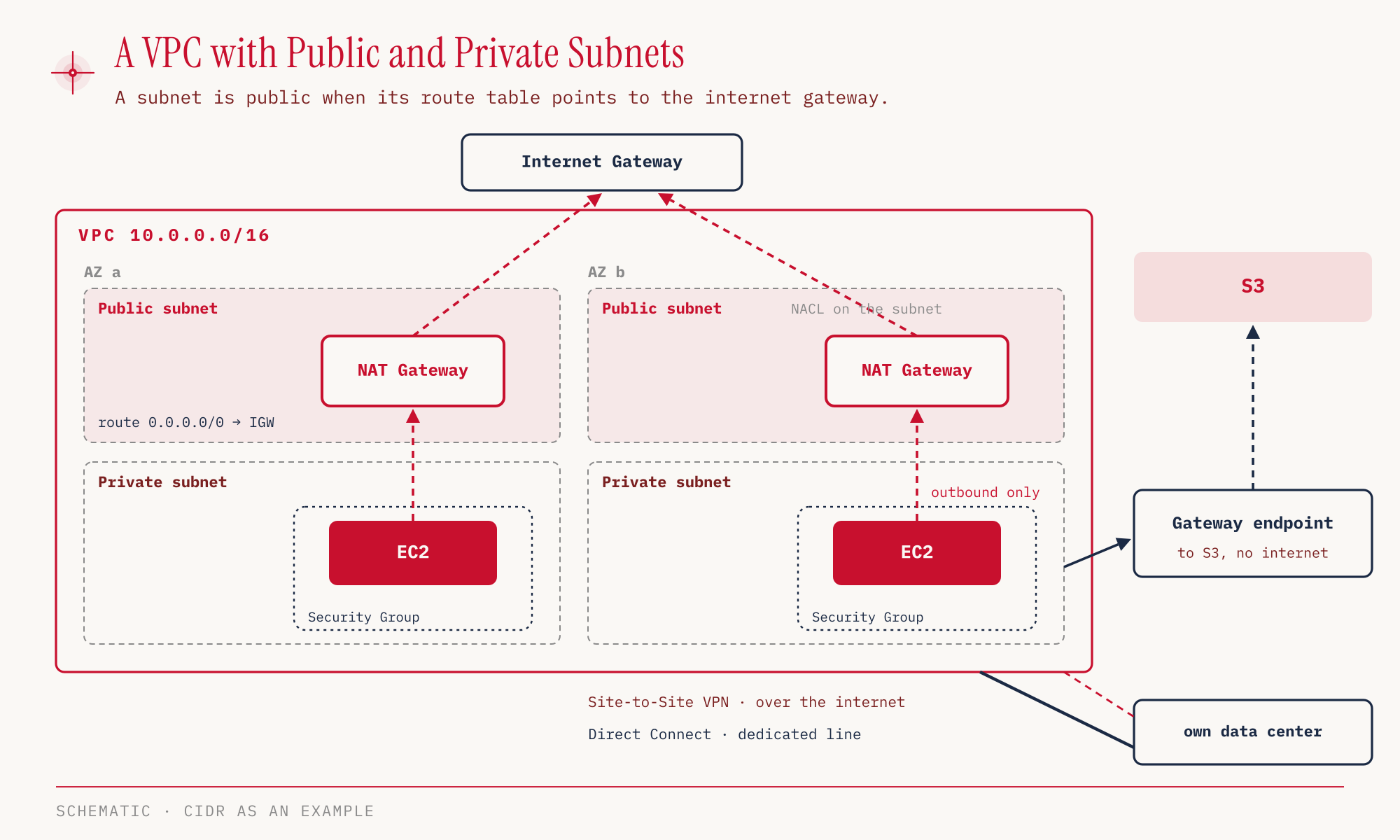
A subnet is not public because of its name. It is public if its route table contains a route to the internet gateway (IGW). The internet gateway attaches to the VPC and is the door to the outside. Without this route the subnet is private, and instances in it cannot be reached from the internet.
Private instances often still need a way out, for example for software updates. This is what the NAT gateway is for. It sits in a public subnet, and the route table of the private subnet sends internet traffic there. Traffic is therefore outbound only, and connections from outside do not come in. The NAT gateway is a service managed by AWS. The alternative is a NAT instance, an EC2 instance whose availability and scaling we look after ourselves (VPC docs). This is exactly the distinction the exam asks about: the internet gateway for both directions, the NAT gateway only for outbound traffic from private subnets.
Public addresses cost money. Since February 1, 2024, AWS charges 0.005 USD per hour for every public IPv4 address, even if it is attached to a running instance. Only your own addresses brought in through BYOIP are exempt (AWS News Blog, price as of October 25, 2026, a snapshot in time). At 730 hours that works out to about 3.65 USD per address and month. The Free Tier credit of 750 hours of public IPv4 now only applies in the legacy Free Tier for accounts created before July 15, 2025 (AWS re:Post). The automatically assigned public IPv4 address of an instance changes when we stop and start the instance again, while the private address is kept (AWS re:Post, EC2 docs). An Elastic IP, by contrast, is a fixed public IPv4 address that survives a stop and start, and it falls under the same fee.
NACL and security group filter at two levels
We know the security group from part 03 as a firewall directly at the instance. One level up sits the network ACL (NACL), which filters traffic at the subnet. Both check traffic against rules, but they work quite differently.
| NACL | Security group | |
|---|---|---|
| Level | subnet | instance or network interface (ENI) |
| Rules | ALLOW and DENY | ALLOW only |
| State | stateless, the return path needs its own rule | stateful, the response is allowed automatically |
| Reference | IP addresses only | IP addresses and other security groups |
The most important difference is in the State row. A security group remembers that a connection was initiated from the inside and lets the response back without another rule. A NACL remembers nothing. Anyone who allows inbound port 443 must also explicitly allow the outbound response in the NACL.
This leads to the typical division of labor. Actively blocking a specific IP address can only be done by the NACL, because only it knows DENY rules. The security group instead describes who may come in at all, and it can refer to other security groups. For example, we can specify that the database only accepts traffic from the instances of the web tier, without naming a single IP address.
For the exam, the Exam Guide in Task 3.5 also names Amazon Inspector as a building block for VPC security, alongside NACL and security group. Part 08 covers Inspector in detail.
VPC Flow Logs add visibility to the filters. They record the IP traffic of a VPC, a subnet or a single ENI and write it to S3, CloudWatch Logs or Firehose. Anyone who wants to know why a connection is rejected looks there.
Connecting VPCs to each other and to the data center
Once there is more than one VPC or your own data center joins in, the networks have to be connected. AWS offers several building blocks for this, which differ in reach and effort.
| Building block | Purpose | Characteristic |
|---|---|---|
| VPC peering | connect two VPCs privately | CIDR ranges must not overlap, not transitive |
| Transit Gateway | hub-and-spoke for thousands of VPCs in a Region and on-prem | transitive |
| VPC endpoint, gateway | private access to S3 and DynamoDB | only these two services |
| VPC endpoint, interface | private access to AWS services | most services, including S3 and DynamoDB |
| PrivateLink | share your own service with thousands of VPCs | Network Load Balancer on the provider side, ENI on the consumer side |
| Site-to-Site VPN | connect data center to the VPC | encrypted over the internet, quick to set up |
| Direct Connect | connect data center to AWS | physical private line, not over the internet |
| Client VPN | single computer into the VPC | OpenVPN-based |
Not transitive is the keyword for peering. If VPC A and B are peered and B and C are too, A and C still cannot talk to each other. With three VPCs that is manageable, but with fifty the network of individual connections becomes hard to follow. The Transit Gateway solves this by attaching all VPCs and the on-prem connection to one central hub, through which they communicate transitively.
Gateway endpoint and interface endpoint both allow an instance in a private subnet to reach an AWS service without going through the internet gateway or NAT gateway. The gateway type exists only for S3 and DynamoDB. It costs nothing extra, but it cannot be used from your own data center, over Transit Gateway, or from peered VPCs in other Regions (VPC docs). The paid interface type is offered by most services, S3 and DynamoDB included. With S3 and DynamoDB we can therefore choose between both types, while all other services are reachable only through an interface endpoint (DynamoDB docs). PrivateLink reverses the perspective. Here the goal is not access to AWS services, but offering your own service privately to other VPCs.
For connecting your own data center, VPN and Direct Connect are the options. The Site-to-Site VPN is quickly set up and runs encrypted over the public internet. The connection has two ends. On the AWS side it terminates at a virtual private gateway attached to the VPC, or at a Transit Gateway. On the data center side sits the customer gateway, the resource AWS uses to describe the VPN device on premises (Site-to-Site VPN docs). Direct Connect is a physical line that has to be ordered and activated first. If the question says “immediately” or “quickly”, the answer is VPN, and if it says “private, not over the internet”, it is Direct Connect. The in-scope list names AWS VPN as an umbrella term and Site-to-Site VPN and Client VPN individually.
Route 53 translates names and distributes traffic
Amazon Route 53 is the DNS service of AWS and, as mentioned in part 01, a global service. It resolves names to addresses and decides which address a user gets. The exam asks about record types and routing policies.
| Record | points to |
|---|---|
| A | an IPv4 address |
| AAAA | an IPv6 address |
| CNAME | another hostname |
| Alias | an AWS resource, such as a load balancer or a CloudFront distribution |
The routing policy determines by which rule Route 53 answers. Simple just returns the stored value, without a health check. Weighted distributes traffic by weights, for example 90 to 10 for a careful rollout. Latency sends users to the Region with the lowest latency. Failover redirects to a backup target as soon as the primary target is no longer healthy. There are also Geolocation, Geoproximity, IP-based and Multivalue Answer (Route 53 docs).
CloudFront and Global Accelerator at the edge
CloudFront and Global Accelerator both work at the edge locations from part 01 and are therefore often confused. Both are protected against DDoS attacks by AWS Shield. Their purpose is still quite different.
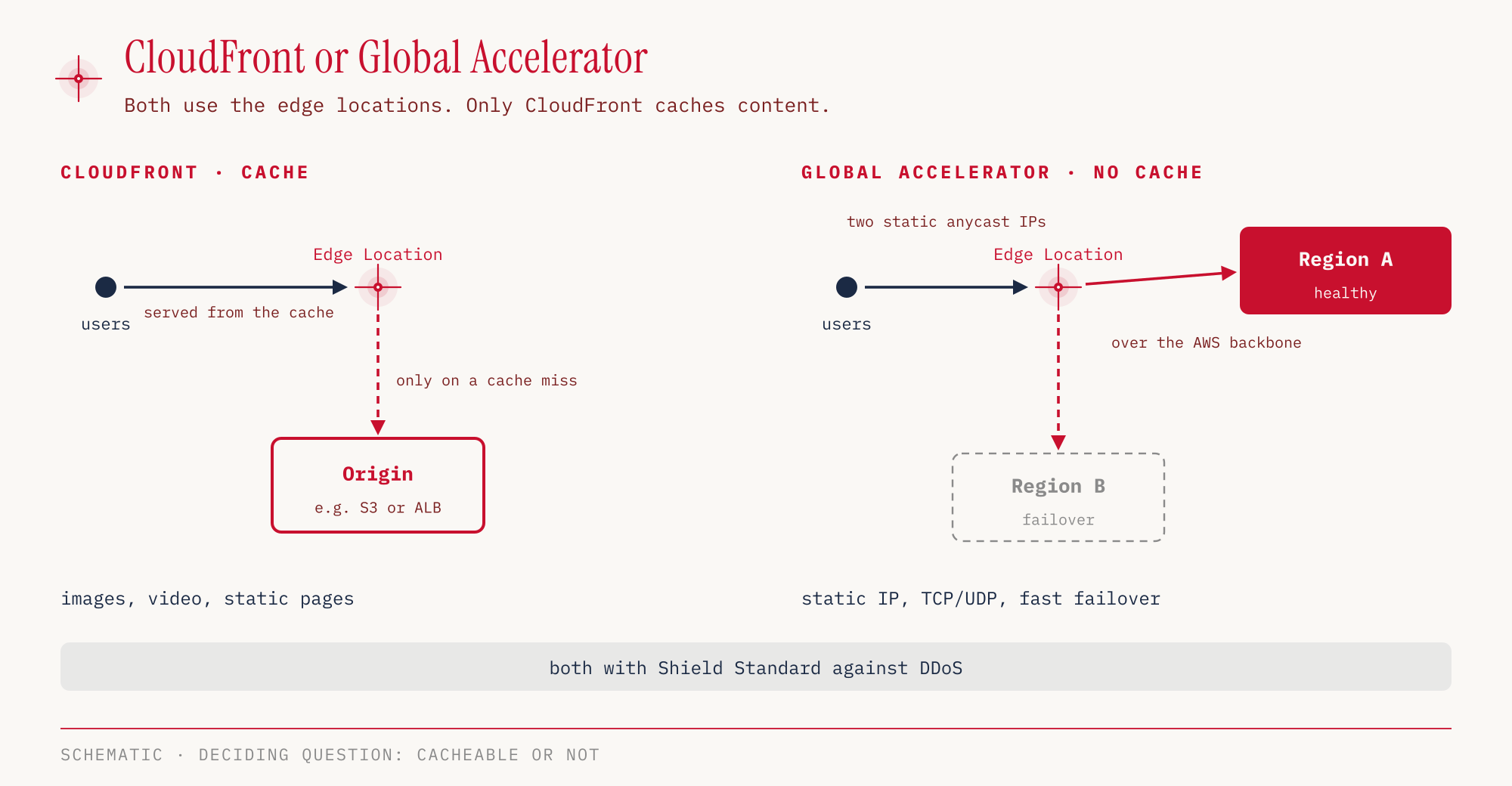
Amazon CloudFront is a content delivery network. It stores content for a defined time (TTL) in the edge locations and serves it from there. This suits anything that can be cached, such as images, videos and static web pages. AWS Global Accelerator caches nothing. It gives an application static IP addresses and routes traffic through the nearest edge location to the right endpoint. It fits when fixed IPs are needed, when the protocol is not HTTP, or when failover between Regions should be deterministic.
| Requirement | Service |
|---|---|
| deliver images, video, static website quickly worldwide | CloudFront |
| static IP addresses for a global application | Global Accelerator |
| accelerate non-HTTP traffic | Global Accelerator |
| deterministic failover between Regions | Global Accelerator |
| speed up large uploads to S3 from far away | S3 Transfer Acceleration |
The third edge service is S3 Transfer Acceleration. It speeds up uploads into an S3 bucket by having the upload arrive at the nearest edge location instead of directly in the distant Region.
Another mix-up concerns CloudFront and S3 Cross-Region Replication (CRR) from part 04. CloudFront caches globally, but only for the duration of the TTL. CRR copies new objects automatically and asynchronously to one or more buckets in other Regions, where they stay permanently as their own copy (S3 User Guide). Anyone who wants low latency for readers worldwide uses CloudFront. Anyone who needs a second copy in another Region uses CRR.
Some networking services are explicitly on the out-of-scope list according to the Exam Guide and are therefore not relevant for the exam, including VPC Lattice, Cloud Map, Network Access Analyzer and Ground Station.
Hands-on
Let’s look at the default VPC in eu-central-1 and then create a security group. Both are free. Costs arise once an instance with a public IPv4 address or an Elastic IP is added. The outputs are shortened and IDs truncated.
First the VPC itself and its subnets.
VPC_ID=$(aws ec2 describe-vpcs --region eu-central-1 \
  --filters Name=is-default,Values=true \
  --query 'Vpcs[0].VpcId' --output text)

aws ec2 describe-vpcs --region eu-central-1 --vpc-ids "$VPC_ID" \
  --query 'Vpcs[].CidrBlock' --output text
172.31.0.0/16
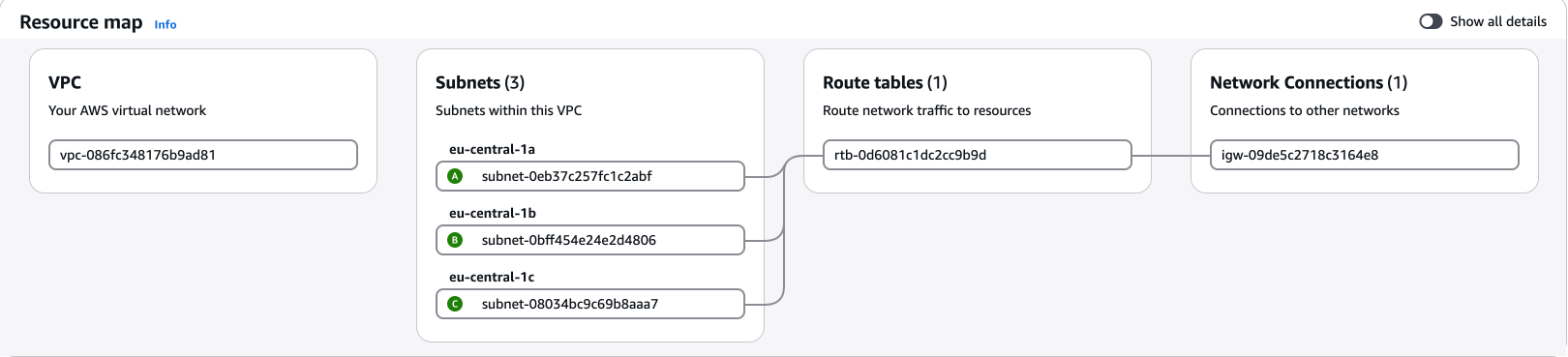
In the console: VPC → Your VPCs → click the VPC ID; the details list IPv4 CIDR, Default VPC, Main route table and Main network ACL, and the Resource map tab shows how the parts connect.
aws ec2 describe-subnets --region eu-central-1 \
  --filters Name=vpc-id,Values="$VPC_ID" \
  --query 'Subnets[].[AvailabilityZone,CidrBlock,MapPublicIpOnLaunch]' \
  --output text
eu-central-1a   172.31.16.0/20   True
eu-central-1b   172.31.32.0/20   True
eu-central-1c   172.31.0.0/20    True
In the console: VPC → Subnets.
One subnet per AZ, and all of them assign a public address automatically at launch. The route table shows why they are public.
aws ec2 describe-route-tables --region eu-central-1 \
  --filters Name=vpc-id,Values="$VPC_ID" \
  --query 'RouteTables[].Routes[].[DestinationCidrBlock,GatewayId]' \
  --output text
172.31.0.0/16   local
0.0.0.0/0       igw-…
In the console: VPC → Route tables.
The first route keeps traffic inside the VPC, the second sends everything else to the internet gateway. This second line is what makes the default subnets public.
The default NACL lets everything through.
aws ec2 describe-network-acls --region eu-central-1 \
  --filters Name=vpc-id,Values="$VPC_ID" Name=default,Values=true \
  --query 'NetworkAcls[].Entries[].[Egress,RuleNumber,RuleAction]' \
  --output text
False   100     allow
False   32767   deny
True    100     allow
True    32767   deny
In the console: VPC → Network ACLs.
Rule 100 allows all traffic, inbound (Egress False) as well as outbound (Egress True). Rule 32767 is the asterisk rule at the end, which denies everything not allowed before. With the default NACL it practically never applies. The default security group of the same VPC allows inbound traffic only from members of the same security group and outbound everything to 0.0.0.0/0. It can be queried like this:
aws ec2 describe-security-groups --region eu-central-1 \
  --filters Name=vpc-id,Values="$VPC_ID" Name=group-name,Values=default
In the console: VPC → Security groups.
The inbound rule is the reference to another security group from the table above, here to itself.
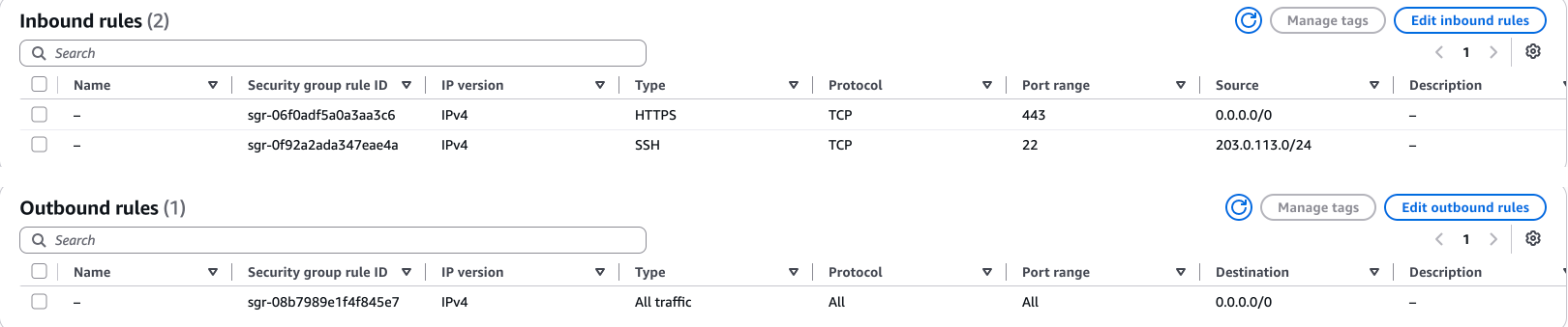
Let’s create our own security group for a web server. HTTPS may come from anywhere, SSH only from a specific network. For the example we use 203.0.113.0/24, an address range reserved for documentation.
SG_ID=$(aws ec2 create-security-group --region eu-central-1 \
  --group-name ccp-demo-web --description "CCP Demo Webserver" \
  --vpc-id "$VPC_ID" --query GroupId --output text)

aws ec2 authorize-security-group-ingress --region eu-central-1 \
  --group-id "$SG_ID" --protocol tcp --port 443 --cidr 0.0.0.0/0

aws ec2 authorize-security-group-ingress --region eu-central-1 \
  --group-id "$SG_ID" --protocol tcp --port 22 --cidr 203.0.113.0/24

aws ec2 describe-security-groups --region eu-central-1 --group-ids "$SG_ID" \
  --query 'SecurityGroups[].IpPermissionsEgress[].[IpProtocol,IpRanges[0].CidrIp]' \
  --output text
-1 0.0.0.0/0
We did not create an egress rule. AWS set it automatically on creation, and protocol -1 stands for all traffic. It would not even be needed for the responses to inbound HTTPS requests, because the security group is stateful.
In the console: VPC → Security groups → Create security group (alternatively EC2 → Network & Security → Security Groups); the detail page splits the rules into the tabs Inbound rules and Outbound rules.
Finally, we check whether any Elastic IPs are lying around in the account that would cause fees.
aws ec2 describe-addresses --region eu-central-1 \
  --query 'length(Addresses)'
0
In the console: VPC → Elastic IPs.
Cleanup here is a single command. We leave the default VPC in place.
aws ec2 delete-security-group --region eu-central-1 --group-id "$SG_ID"
For the exam
| Keyword in the question | Answer |
|---|---|
| subnet reachable from the internet | route to the internet gateway in the route table |
| private instance needs updates from the internet | NAT gateway |
| actively block a single IP address | NACL (DENY rule) |
| firewall at instance level, stateful | Security group |
| connect two VPCs privately | VPC peering |
| many VPCs and on-prem centrally, transitive | Transit Gateway |
| reach S3 or DynamoDB without the internet | Gateway endpoint |
| offer your own service privately to other VPCs | PrivateLink |
| quick and encrypted to the data center | Site-to-Site VPN |
| VPN endpoint on the AWS side | Virtual private gateway (or Transit Gateway) |
| VPN endpoint in your own data center | Customer gateway |
| private line, not over the internet | Direct Connect |
| employee laptop into the VPC | Client VPN |
| capture IP traffic for analysis | VPC Flow Logs |
| users to the Region with the lowest latency | Route 53 latency routing |
| cache static content worldwide | CloudFront |
| static IPs, non-HTTP protocol, failover between Regions | Global Accelerator |
| speed up uploads to S3 from far away | S3 Transfer Acceleration |
Typical traps:
- Mixing up stateless and stateful. The NACL is stateless and needs a rule for the return path, the security group is stateful.
- Peering for many VPCs. Peering is not transitive. As soon as the question mentions many VPCs or a central hub, Transit Gateway is meant.
- Gateway endpoint for every service. The gateway type exists only for S3 and DynamoDB, everything else needs an interface endpoint.
- NAT gateway for inbound traffic. The NAT gateway only lets private instances out, not in.
- Global Accelerator as a cache. Global Accelerator speeds up the connection but caches no content. Caching is CloudFront.
Sources
- AWS Certified Cloud Practitioner (CLF-C02), Exam Guide: https://docs.aws.amazon.com/aws-certification/latest/cloud-practitioner-02/cloud-practitioner-02.html
- Exam Guide, Domain 3 (Cloud Technology and Services, Task 3.5): https://docs.aws.amazon.com/aws-certification/latest/cloud-practitioner-02/cloud-practitioner-02-domain3.html
- In-scope services: https://docs.aws.amazon.com/aws-certification/latest/cloud-practitioner-02/clf-02-in-scope-services.html
- Out-of-scope services: https://docs.aws.amazon.com/aws-certification/latest/cloud-practitioner-02/clf-02-out-of-scope-services.html
- AWS News Blog, public IPv4 address charge: https://aws.amazon.com/blogs/aws/new-aws-public-ipv4-address-charge-public-ip-insights/
- AWS re:Post, optimizing IPv4 usage and Free Tier: https://repost.aws/knowledge-center/vpc-optimize-ipv4-usage
- AWS re:Post, public IP after stop and start: https://repost.aws/knowledge-center/ec2-recover-ip-address
- EC2, instance state changes: https://docs.aws.amazon.com/AWSEC2/latest/UserGuide/ec2-instance-lifecycle.html
- NAT gateways and NAT instances compared: https://docs.aws.amazon.com/vpc/latest/userguide/vpc-nat-comparison.html
- Gateway endpoints, limitations: https://docs.aws.amazon.com/vpc/latest/privatelink/vpc-endpoints-ddb.html
- Interface endpoints for DynamoDB: https://docs.aws.amazon.com/amazondynamodb/latest/developerguide/privatelink-interface-endpoints.html
- Site-to-Site VPN, how it works: https://docs.aws.amazon.com/vpn/latest/s2svpn/how_it_works.html
- VPC Flow Logs to Firehose: https://docs.aws.amazon.com/vpc/latest/userguide/flow-logs-firehose.html
- Transit Gateway in the whitepaper “Building a Scalable and Secure Multi-VPC Network Infrastructure”: https://docs.aws.amazon.com/whitepapers/latest/building-scalable-secure-multi-vpc-network-infrastructure/transit-gateway.html
- Client VPN with OpenVPN clients: https://docs.aws.amazon.com/vpn/latest/clientvpn-user/connect.html
- Route 53 routing policies: https://docs.aws.amazon.com/help-panel/Route53/latest/console/record-routing-policy.html
- Global Accelerator, static anycast IPs: https://docs.aws.amazon.com/cli/latest/reference/globalaccelerator/index.html
- S3 replication: https://docs.aws.amazon.com/AmazonS3/latest/userguide/replication.html
Part 07 covers the services that decouple applications through messages, roll out infrastructure as code and monitor operations, from SQS and SNS through CloudFormation to CloudWatch and CloudTrail.