AWS Cloud Practitioner 07: Integration, Deployment and Monitoring
So far we have met the building blocks one by one: compute, storage, databases and networking. This part is about what happens between the blocks and what comes after the build. Messaging services connect applications without tying them tightly together, templates build infrastructure reproducibly, and a handful of monitoring services answer what is running right now and who changed what. On top of that come services for virtual desktops, IoT devices, web frontends and email. In the exam these topics appear in Domain 2 (monitoring and auditing, Task 2.2) and Domain 3 (application integration and developer tools, Task 3.8), usually as a matching question of the form “keyword → service”.
Decoupling instead of calling directly
If a web shop calls the shipping service directly after every order, the two systems are glued together. If shipping goes down, the order fails too. If a load spike arrives, shipping has to absorb it at the very same moment. Messaging services put a buffer in between. The shop drops off a message and is done, and shipping picks it up when it has capacity.
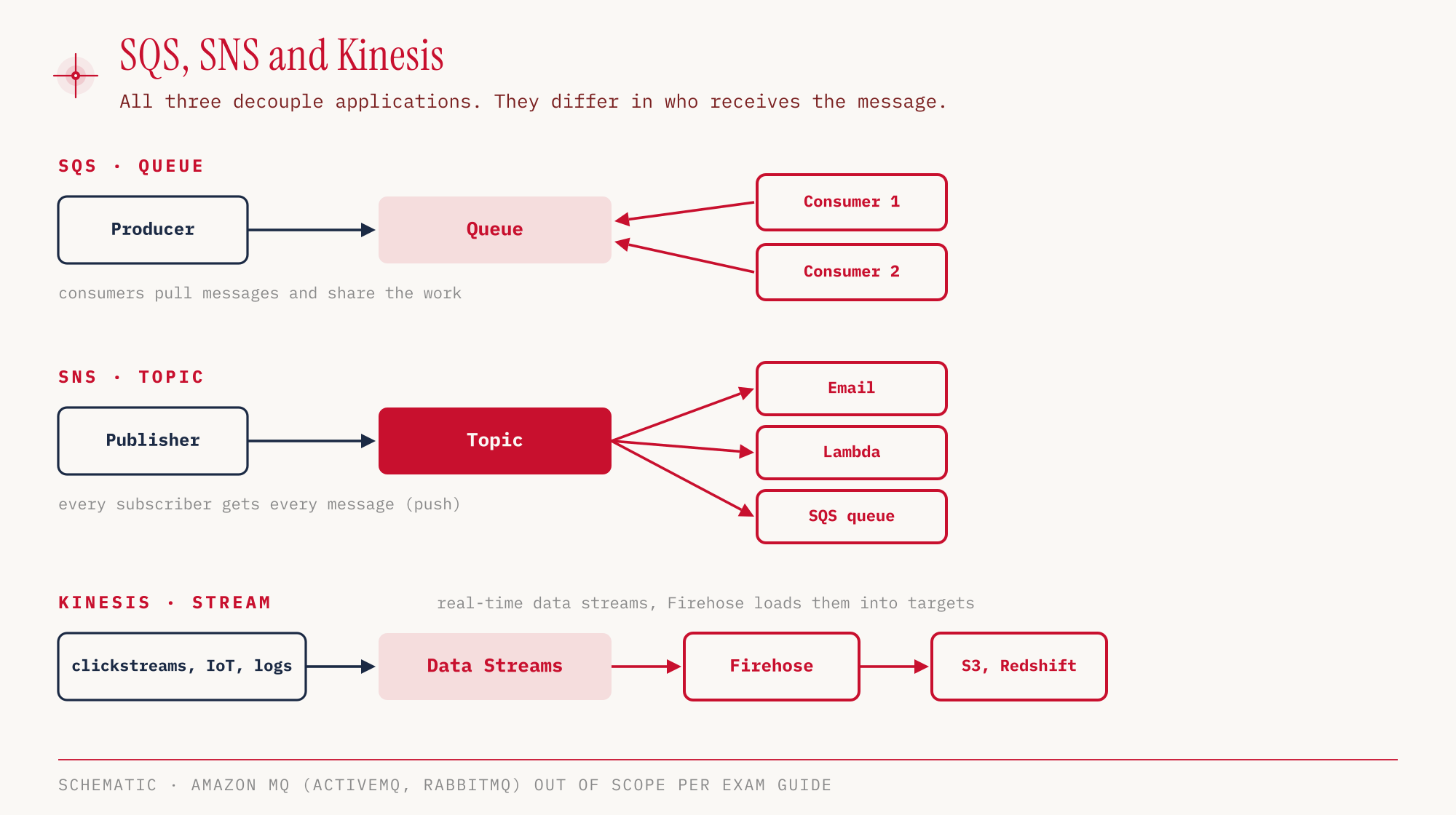
SQS, SNS and Kinesis decouple applications so that load spikes do not hit the next system directly. They differ in who moves the message, how many recipients get it and how long it stays around.
Queue, topic and data stream
Amazon SQS (Simple Queue Service) is a queue. A producer writes messages into it, and consumers poll the queue (pull) and each take one message. Several consumers share the work this way: each message is processed by only one of them and then deleted from the queue. By default, unprocessed messages stay for four days, configurable from one minute up to fourteen days (SQS FAQ). Anyone who needs a fixed order uses a FIFO queue.
Amazon SNS (Simple Notification Service) works the other way around. A publisher sends a message to a topic, and SNS actively pushes it to all subscribers. Subscribers can be email addresses, phone numbers for SMS, Lambda functions, HTTP endpoints or SQS queues. Everyone gets every message. SNS is not storage to pick things up from later. If a recipient is unreachable, SNS retries delivery according to a retry policy. Once that is exhausted, SNS discards the message unless a dead-letter queue is attached to the subscription (SNS docs).
This gives us the best-known pattern, fan-out. One SNS topic distributes every order to several SQS queues, for example one for shipping and one for accounting. SNS handles the distribution, SQS the buffering. We build exactly this combination in the hands-on below.
Amazon Kinesis is meant for data streams, not for individual jobs. Website clickstreams, readings from IoT devices or log data flow in real time into Kinesis Data Streams, and Firehose loads them into destinations such as S3 or Redshift.
| SQS | SNS | Kinesis | |
|---|---|---|---|
| Model | Queue | Pub/sub (topic) | Real-time streaming |
| Delivery | Consumers pull (pull) | Topic pushes (push) | Data stream, Firehose loads into destinations |
| Recipients per message | one | all subscribers | Analyses and destinations of the stream |
| Retention | 4 days default, max. 14 | none, only delivery attempts | not covered here |
| Typical use | Process jobs, buffer load | Notify, fan-out | Clickstreams, IoT, logs |
Amazon EventBridge reacts to events and schedules. A rule can, for example, send a message to an SNS topic on every root login, and a schedule starts a Lambda function at fixed times, like a cron job. EventBridge can archive events and replay them later (archive and replay). AWS Step Functions builds serverless workflows from several steps, typically Lambda functions, and can wait for human approval along the way. The exam guide explicitly names EventBridge next to SQS and SNS in Task 3.8, and Step Functions is in the in-scope list under application integration.
Amazon MQ is the managed message broker for ActiveMQ and RabbitMQ. It speaks open protocols such as MQTT or AMQP and is intended for existing applications that already use such a broker and are being migrated. It is not in the exam guide’s in-scope list.
Infrastructure as a template
Anyone who assembles an environment by clicking through the console can hardly build it identically a second time. AWS CloudFormation solves this with infrastructure as code. A template in JSON or YAML declaratively describes which resources should exist, and CloudFormation creates them as a stack, in the right order and with the necessary dependencies. The same template can be repeated in other Regions and accounts. If we delete the stack, all resources in it disappear.
The AWS CDK (Cloud Development Kit) sits one level higher. Infrastructure is written in a programming language such as TypeScript, JavaScript, Python, Java, C# or Go (CDK Developer Guide) and translated into a CloudFormation template. The CDK is not in the exam guide’s in-scope list, CloudFormation is.
AWS Elastic Beanstalk is the PaaS variant. We upload application code, and Beanstalk builds the environment for it by itself, with EC2 instances, an Auto Scaling group, a load balancer and, if needed, an RDS database. Beanstalk itself costs nothing, you only pay for the resources it creates. The difference from CloudFormation lies in responsibility. With CloudFormation we describe every resource ourselves, with Beanstalk the platform decides and we only deliver the code.
| Service | What we provide | What AWS makes of it | Relevant for the exam |
|---|---|---|---|
| CloudFormation | Template (JSON/YAML) | Stack with all resources | yes |
| CDK | Code in a programming language | CloudFormation template | not listed |
| Elastic Beanstalk | Application code | EC2, ASG, ELB, optionally RDS | yes |
Operations without SSH
AWS Systems Manager manages servers in operation, in AWS as well as in your own data center. It applies patches, runs commands on many machines at once with Run Command, and keeps configuration values in Parameter Store. The prerequisite is the SSM Agent on the machine, whether it is an EC2 instance or sits in your own data center.
Session Manager is part of it and opens a shell on the instance without SSH, without an open port 22 and without a bastion host. Sessions can be logged to S3 or CloudWatch. For the security group from Part 06, this means the SSH rule can go away.
For building and delivering software, the exam guide lists AWS CodeBuild (builds and tests code) and AWS CodePipeline (orchestrates the flow from repository to rollout) as relevant. AWS CodeDeploy, which rolls out applications to EC2 and your own servers, is on the out-of-scope list, as are CodeArtifact and CloudShell. For the keyword “hybrid”, Systems Manager is therefore the safe answer in the exam.
Desktops, devices, frontends and email
Besides messaging and developer tools, Task 3.8 of the exam guide names a set of further services. They bring desktops and applications to end-user devices, connect IoT devices, provide web and mobile frontends and send email (Exam Guide, Domain 3). In the exam they show up as matching questions, often with a neighboring service as the wrong answer.
Amazon WorkSpaces provides virtual desktops as a managed service, in other words desktop as a service. Employees get a Windows or Linux desktop that runs in AWS and access it from their own device (Amazon WorkSpaces). We use WorkSpaces when people need a complete workstation, for example for remote work, without shipping hardware. EC2 is close, but an EC2 instance is a server we operate ourselves, a WorkSpace is a ready-made workstation for end users.
Amazon AppStream 2.0 streams individual desktop applications to the browser. The application runs in AWS, and users only see its window. AWS now runs the service under the name Amazon WorkSpaces Applications, while the exam guide still says AppStream 2.0 (WorkSpaces Applications FAQ, What’s New on WorkSpaces Applications, Administration Guide). We use it when only one specific program needs to be provided rather than a whole desktop. The typical exam question targets exactly this boundary, whole desktop versus single application.
Amazon WorkSpaces Secure Browser gives employees browser access to internal websites and SaaS applications without company data ending up on the device (WorkSpaces Secure Browser). We use it when only web applications are involved. The risk of confusion here is AppStream 2.0, which streams any application, not just web pages. AWS no longer accepts new customers for WorkSpaces Secure Browser from October 29, 2026 (according to the product page), but the service remains relevant for the exam because the exam guide lists it.
AWS IoT Core connects devices such as sensors or machines to the cloud. The devices send their messages to IoT Core over MQTT or HTTPS, and rules route them on to other AWS services such as Lambda, S3 or Kinesis (AWS IoT Core, IoT rule actions). IoT Core gets confused with Kinesis. Kinesis ingests and processes data streams, while IoT Core is the connection point where the devices check in. Amazon MQ also speaks MQTT, but it is a broker for existing applications, not a service for device fleets.
AWS Amplify targets web and mobile frontends. It hosts web applications straight from a Git repository and wires up backend features such as sign-in, data and file storage without us setting up the services behind them one by one (AWS Amplify). We use Amplify when a frontend team wants to build and ship a web or mobile app. The counterpart is Elastic Beanstalk. Beanstalk runs server-side applications on EC2, Amplify is aimed at frontend and mobile development.
Amazon SES (Simple Email Service) sends email from applications, such as order confirmations, password reset links or newsletters, and can also receive email (Amazon SES). SES gets confused with SNS, because SNS can deliver email too. SNS sends the same notification to every subscriber of a topic, SES sends individual emails to customers, with your own sender address and your own design.
| Keyword in the question | Service | Not to be confused with |
|---|---|---|
| Whole virtual desktop for employees, DaaS | WorkSpaces | EC2 |
| Stream a single application to the browser | AppStream 2.0 (now WorkSpaces Applications) | WorkSpaces |
| Secure browser access to internal web apps and SaaS | WorkSpaces Secure Browser | AppStream 2.0 |
| Connect and manage IoT devices | IoT Core | Kinesis, Amazon MQ |
| Build and host a web or mobile frontend | Amplify | Elastic Beanstalk |
| Send email to customers | SES | SNS |
Monitoring and audit, sorted by question
The monitoring services are best told apart by the question each of them answers. The exam guide sums this up in Task 2.2: monitoring with CloudWatch, auditing with CloudTrail and Config.
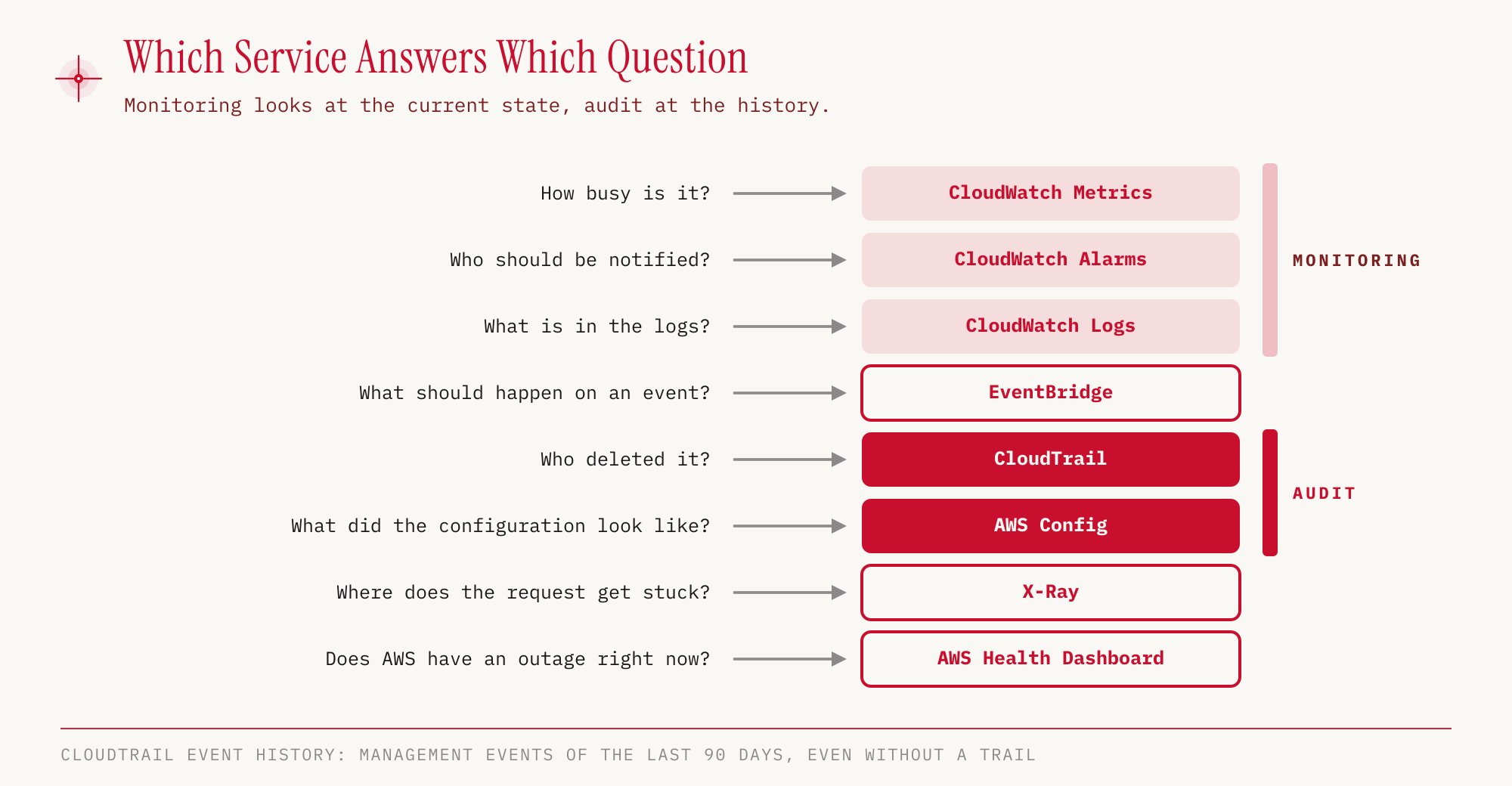
Amazon CloudWatch is the collection point for operational data and consists of several parts. Metrics deliver numbers over time. For EC2, Basic Monitoring provides the status check metrics at one-minute intervals and all others, such as CPU and network, at five-minute intervals. With paid Detailed Monitoring, those come at one-minute intervals too (EC2 User Guide). CloudWatch does not measure memory without an additional agent. The billing metric for estimated charges exists only in us-east-1.
Alarms watch a metric and know the states OK, INSUFFICIENT_DATA and ALARM. As an action they can scale an Auto Scaling group, stop, reboot or recover an EC2 instance, or send a message to an SNS topic. CloudWatch Logs collects logs from Lambda, ECS, Elastic Beanstalk or Route 53. Logs from an EC2 instance only arrive with the CloudWatch agent, and the same agent also delivers the missing RAM metric.
AWS CloudTrail records API calls in the account, that is, who performed which action and when. It is enabled by default. The event history holds the management events of the last 90 days, even if no trail was ever created. To keep the calls longer, we create a trail. It writes the events permanently to an S3 bucket and optionally to CloudWatch Logs as well. A trail created in the console always applies to all Regions. We create a single-Region trail exclusively through the CLI (CloudTrail User Guide). Where security-related logs are captured and stored is something the exam guide explicitly asks about in Task 2.2. CloudTrail Insights additionally detects unusual patterns in the calls.
AWS Config, by contrast, records the state of resources. We can see how a security group or a bucket was configured at a given point in time, and can use compliance rules to check whether resources meet certain requirements. Config works per Region.
The difference between the two is one of the most common exam traps. CloudTrail answers “who did what”, Config answers “what did it look like and is it compliant”. A deleted bucket is a case for CloudTrail, a security group that has been opening port 22 to everyone for three weeks is one for Config.
AWS X-Ray follows individual requests through distributed applications and shows in which service a request gets stuck. The AWS Health Dashboard reports problems on the AWS side. The service history is visible to everyone, and the “Your Account” view shows events that affect your own account. AWS merged the former Service Health Dashboard and Personal Health Dashboard into the AWS Health Dashboard (AWS blog). If one of the old names comes up, this service is meant.
Hands-on
If resources stay up longer or the Free Plan is exceeded, costs can arise. That is why deleting them is part of the hands-on.
For the hands-on we build the fan-out in miniature with CloudFormation. An SNS topic for orders, an SQS queue for shipping, a queue policy that allows only this topic to send, and a subscription that connects the two. RawMessageDelivery makes sure the message lands in the queue without the SNS envelope.
# messaging.yaml
AWSTemplateFormatVersion: "2010-09-09"
Description: CCP Teil 07, SNS-Topic mit SQS-Queue als Subscriber
Resources:
  Bestellungen:
    Type: AWS::SNS::Topic
    Properties:
      TopicName: ccp-demo-bestellungen
  Versand:
    Type: AWS::SQS::Queue
    Properties:
      QueueName: ccp-demo-versand
  VersandPolicy:
    Type: AWS::SQS::QueuePolicy
    Properties:
      Queues:
        - !Ref Versand
      PolicyDocument:
        Version: "2012-10-17"
        Statement:
          - Effect: Allow
            Principal:
              Service: sns.amazonaws.com
            Action: sqs:SendMessage
            Resource: !GetAtt Versand.Arn
            Condition:
              ArnEquals:
                aws:SourceArn: !Ref Bestellungen
  VersandAbo:
    Type: AWS::SNS::Subscription
    Properties:
      TopicArn: !Ref Bestellungen
      Protocol: sqs
      Endpoint: !GetAtt Versand.Arn
      RawMessageDelivery: true
Outputs:
  TopicArn:
    Value: !Ref Bestellungen
  QueueUrl:
    Value: !Ref Versand
Let’s create the stack and wait until it is finished.
aws cloudformation create-stack --stack-name ccp-demo-messaging \
  --template-body file://messaging.yaml --region eu-central-1
aws cloudformation wait stack-create-complete \
  --stack-name ccp-demo-messaging --region eu-central-1
aws cloudformation describe-stacks --stack-name ccp-demo-messaging \
  --region eu-central-1 --query 'Stacks[0].StackStatus' --output text
CREATE_COMPLETE
In the console: CloudFormation → Stacks → Create stack → With new resources (standard) → Upload a template file → Stack name → Next … Submit. The stack’s detail page lists the created resources in the Resources tab, and the Outputs tab shows TopicArn and QueueUrl.
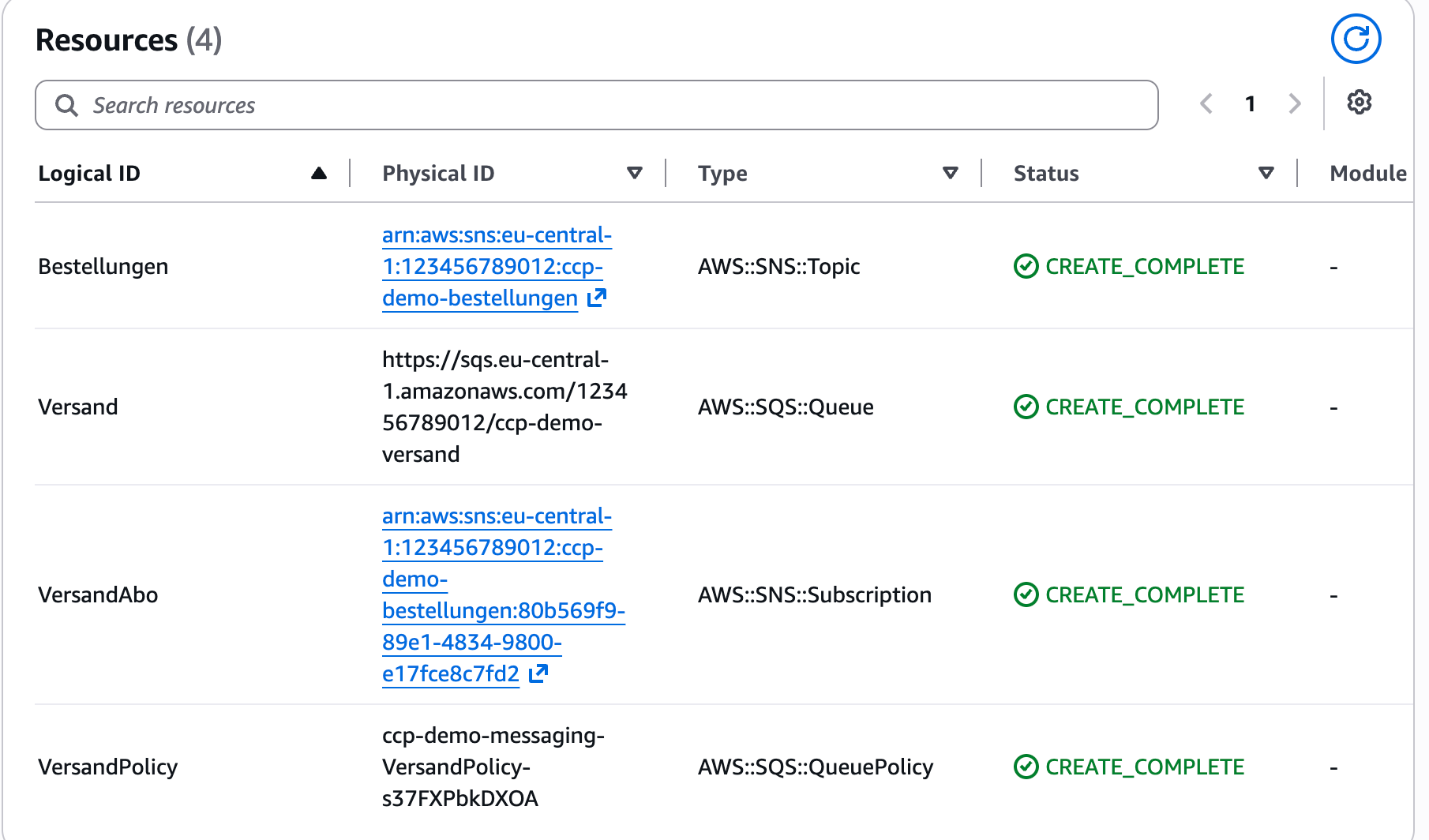
After 68 seconds the stack was up with four resources. Now we send an order to the topic and pick it up on the other side from the queue. The topic ARN and queue URL contain the account ID and differ in every account. That is why we read them from the stack outputs instead of typing them.
TOPIC_ARN=$(aws cloudformation describe-stacks --stack-name ccp-demo-messaging \
  --region eu-central-1 --output text \
  --query "Stacks[0].Outputs[?OutputKey=='TopicArn'].OutputValue")
QUEUE_URL=$(aws cloudformation describe-stacks --stack-name ccp-demo-messaging \
  --region eu-central-1 --output text \
  --query "Stacks[0].Outputs[?OutputKey=='QueueUrl'].OutputValue")

aws sns publish --topic-arn "$TOPIC_ARN" --region eu-central-1 \
  --message '{"bestellung": 4711, "artikel": "Lernkarten CLF-C02"}'

aws sqs receive-message --queue-url "$QUEUE_URL" --region eu-central-1 \
  --query 'Messages[0].Body' --output text
{"bestellung": 4711, "artikel": "Lernkarten CLF-C02"}
In the console: SNS → Topics → ccp-demo-bestellungen → Publish message, then Amazon SQS → Queues → ccp-demo-versand → Send and receive messages → Poll for messages; clicking the message ID opens the message.
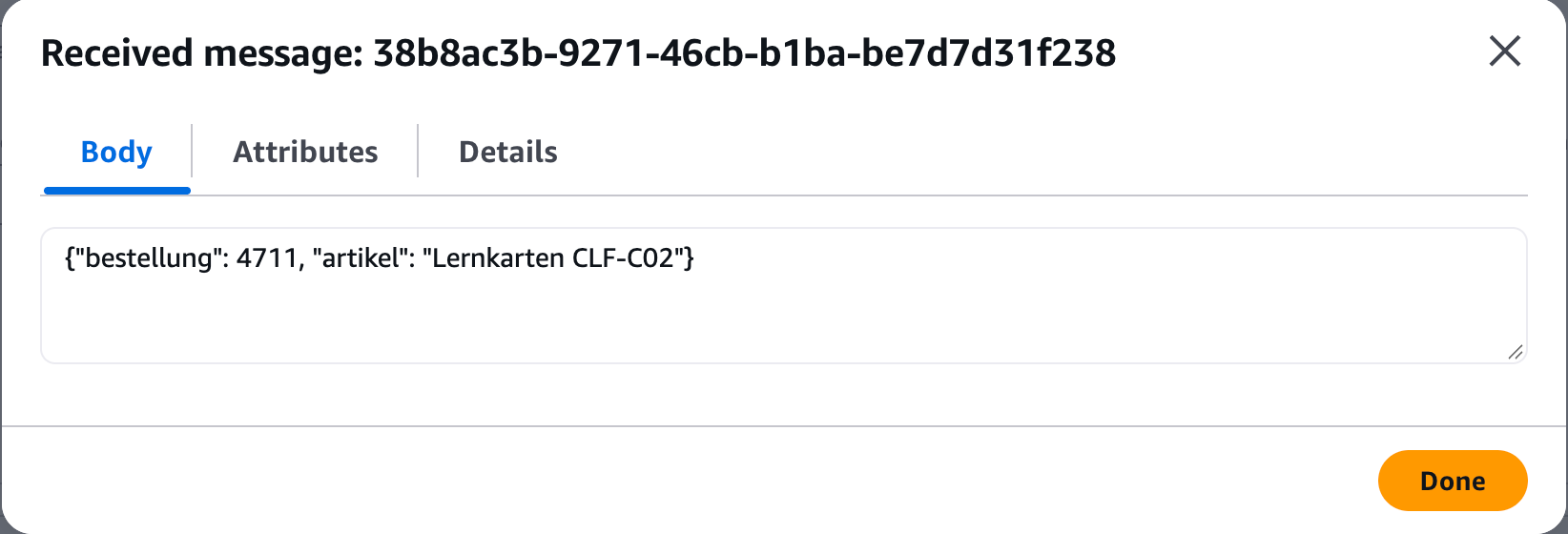
The queue held exactly the message we sent to SNS. The publisher knew nothing about the queue, it only knew the topic. In SQS, received does not mean deleted. After processing, the consumer removes the message using the ReceiptHandle from the receive-message response (run the query without --query to see it).
aws sqs delete-message --queue-url "$QUEUE_URL" --region eu-central-1 \
  --receipt-handle "<ReceiptHandle aus receive-message>"
In the console: select the message in the list of received messages → Delete.
At the end of Part 04 we deleted the bucket ccp-demo-edf11cfc. Let’s look for that call.
aws cloudtrail lookup-events --region eu-central-1 \
  --lookup-attributes AttributeKey=EventName,AttributeValue=DeleteBucket \
  --query 'Events[].[EventTime,Username,Resources[0].ResourceName]' --output text
2026-10-25T10:02:16Z demo-admin ccp-demo-edf11cfc
The output is reconstructed and shortened, the time format simplified and the IAM username masked. Time, IAM user and bucket name appear in one entry.
In the console: **CloudTrail → Event history → **, choose “Event name” under Lookup attributes and enter DeleteBucket.
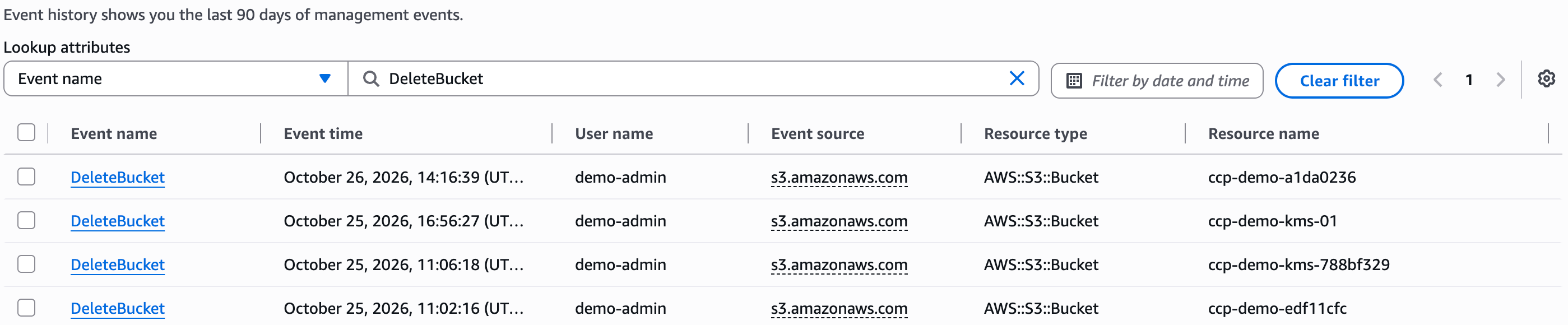
The screenshot comes from a later run and therefore contains further DeleteBucket entries from the series. The console shows the time in the configured time zone, here UTC+1, which is why the entry for ccp-demo-edf11cfc reads 11:02:16 instead of 10:02:16.
What is interesting is what the account lacks.
aws cloudtrail describe-trails --region eu-central-1
{
    "trailList": []
}
In the console: CloudTrail → Trails.
Not a single trail has been created. The event history with the management events of the last 90 days is there anyway, because CloudTrail keeps it by default for every account.
To clean up, deleting the stack is enough. CloudFormation removes topic, queue, policy and subscription together.
aws cloudformation delete-stack --stack-name ccp-demo-messaging --region eu-central-1
aws cloudformation wait stack-delete-complete \
  --stack-name ccp-demo-messaging --region eu-central-1
For the exam
| Keyword in the question | Answer |
|---|---|
| Decouple applications, buffer jobs, consumers pull | SQS |
| Messages in a fixed order | SQS FIFO |
| One message to many recipients, email or SMS | SNS |
| Real-time data stream from clickstreams or IoT | Kinesis Data Streams |
| Load a stream into S3 or Redshift | Firehose |
| Scheduled job, react to an event | EventBridge |
| Multi-step serverless workflow with approval | Step Functions |
| Infrastructure as code, template in JSON/YAML | CloudFormation |
| Upload code, platform builds the environment | Elastic Beanstalk |
| Patching and commands on EC2 and on-prem | Systems Manager |
| Shell without SSH and without port 22 | Session Manager |
| Whole virtual desktop for employees | WorkSpaces |
| Stream a single application to the browser | AppStream 2.0 (WorkSpaces Applications) |
| Provide internal web apps securely in the browser | WorkSpaces Secure Browser |
| Connect and manage IoT devices | IoT Core |
| Build and host a web or mobile frontend | Amplify |
| Send email to customers | SES |
| CPU utilization, alarm at threshold | CloudWatch Metrics and Alarms |
| Who deleted the resource? | CloudTrail |
| Keep API calls longer than 90 days | CloudTrail trail to S3 |
| Configuration history, compliance over time | Config |
| Trace a request through microservices | X-Ray |
| Outage or maintenance on the AWS side | Health Dashboard |
Typical traps:
- CloudTrail or Config. CloudTrail logs actions, Config the state of resources. “Who” points to CloudTrail, “how was it configured” to Config.
- Event history ends after 90 days. If API calls need to be traceable for longer, you need a trail that writes to S3.
- SNS is not a queue. If a message should stay until someone picks it up, the answer is SQS, and for multiple recipients SNS with SQS behind it.
- SNS or SES. A notification to all subscribers is SNS, an individual email to customers is SES.
- WorkSpaces or AppStream 2.0. A whole desktop is WorkSpaces, a single application in the browser is AppStream 2.0, which AWS now runs as WorkSpaces Applications.
- Beanstalk itself costs nothing. You only pay for the resources Beanstalk creates, such as EC2 instances and load balancers.
- Old names, same service. Service Health Dashboard and Personal Health Dashboard are now the AWS Health Dashboard.
- RAM is not a default metric. Memory and logs from EC2 only exist with the CloudWatch agent.
- Billing alarm only in us-east-1. The cost metric exists only in this Region.
- Hybrid does not mean CodeDeploy. CodeDeploy is out of scope according to the exam guide, and the exam-relevant hybrid answer in operations is Systems Manager.
Sources
- AWS Certified Cloud Practitioner (CLF-C02), Exam Guide: https://docs.aws.amazon.com/aws-certification/latest/cloud-practitioner-02/cloud-practitioner-02.html
- Exam Guide, Domain 2 (Task 2.2, monitoring and auditing): https://docs.aws.amazon.com/aws-certification/latest/cloud-practitioner-02/cloud-practitioner-02-domain2.html
- Exam Guide, Domain 3 (Task 3.8, application integration, developer tools): https://docs.aws.amazon.com/aws-certification/latest/cloud-practitioner-02/cloud-practitioner-02-domain3.html
- In-scope services: https://docs.aws.amazon.com/aws-certification/latest/cloud-practitioner-02/clf-02-in-scope-services.html
- Out-of-scope services: https://docs.aws.amazon.com/aws-certification/latest/cloud-practitioner-02/clf-02-out-of-scope-services.html
- Amazon SQS FAQ (retention): https://aws.amazon.com/sqs/faqs/
- Amazon SNS, delivery attempts and dead-letter queues: https://docs.aws.amazon.com/sns/latest/dg/sns-message-delivery-retries.html
- AWS CDK, supported languages: https://docs.aws.amazon.com/cdk/v2/guide/languages.html
- EC2 Basic and Detailed Monitoring: https://docs.aws.amazon.com/AWSEC2/latest/UserGuide/manage-detailed-monitoring.html
- AWS CloudTrail, creating a trail: https://docs.aws.amazon.com/awscloudtrail/latest/userguide/cloudtrail-create-and-update-a-trail.html
- AWS Health Dashboard, merging of the former dashboards: https://aws.amazon.com/blogs/mt/learning-about-aws-service-health-with-the-new-aws-health-dashboard/
- Amazon WorkSpaces: https://aws.amazon.com/workspaces/
- Amazon WorkSpaces Applications (formerly AppStream 2.0), FAQ: https://aws.amazon.com/workspaces/applications/faqs/
- Amazon WorkSpaces Applications, Administration Guide: https://docs.aws.amazon.com/appstream2/latest/developerguide/what-is-appstream.html
- What’s New, WorkSpaces Applications (AppStream 2.0) with IPv6: https://aws.amazon.com/about-aws/whats-new/2025/11/amazon-appstream-2-0-supports-ipv6/
- Amazon WorkSpaces Secure Browser: https://aws.amazon.com/workspaces/secure-browser/
- AWS IoT Core: https://aws.amazon.com/iot-core/
- AWS IoT, rule actions: https://docs.aws.amazon.com/iot/latest/developerguide/iot-rule-actions.html
- AWS Amplify: https://aws.amazon.com/amplify/
- Amazon SES: https://aws.amazon.com/ses/
- AWS Elastic Beanstalk, pricing: https://aws.amazon.com/elasticbeanstalk/pricing/
The next part covers security and compliance, from Shield and WAF to KMS, GuardDuty and Security Hub, in AWS Cloud Practitioner 08.