AWS Cloud Practitioner 08: Security and Compliance
At 30 percent, Security and Compliance is the second-largest domain of the CLF-C02 exam guide. We already know the framework from the shared responsibility model in Part 01: AWS secures the cloud, we secure what we put into it. This part covers the services we use to do our share. Most exam questions describe a problem and ask for the matching service, so we sort by task rather than alphabetically.
Protection at the edge with Shield, WAF and Firewall Manager
Attacks on web applications arrive on two levels. DDoS attacks at the network and transport level (layers 3 and 4) flood an application with packets, such as SYN or UDP floods. Application-level attacks (layer 7), on the other hand, look like normal HTTP requests and hide their effect in the content, for example SQL injection or cross-site scripting.
AWS Shield Standard protects against the first kind. It is active for all customers and costs nothing. Shield Advanced is the paid tier for organizations that need support during an attack. According to the Shield FAQ, the price is 3,000 USD per month per organization (as of October 2026, a snapshot), charged once for all accounts through consolidated billing, plus data transfer fees. In return you get round-the-clock access to the Shield Response Team, provided a Business or Enterprise Support plan is also in place (Shield docs). Shield Advanced also protects against cost spikes caused by scaling during an attack. The standard WAF costs for the protected resources are included.
AWS WAF works on layer 7. We attach a web ACL in front of an Application Load Balancer, an API Gateway or a CloudFront distribution and define rules in it: block SQL injection and XSS, block countries (geo-block), or throttle IP addresses that send too many requests (rate-based rules). For CloudFront, WAF is global and runs in all edge locations, for ALB and API Gateway it is regional (WAF FAQ).
The typical mix-up is Shield versus WAF. Exam questions with “DDoS” point to Shield, questions with “SQL injection”, “cross-site scripting” or “block certain countries” point to WAF.
AWS Firewall Manager centrally manages rules for security groups, WAF, Shield Advanced and Network Firewall across all accounts of an AWS Organization. It replaces none of these services, it distributes their rules. AWS Network Firewall filters the traffic of an entire VPC but, according to the exam guide, is not relevant for the exam.
| Service | Level | Against | Cost |
|---|---|---|---|
| Shield Standard | Layer 3/4 | DDoS at network and transport level | included |
| Shield Advanced | Layer 3/4 | DDoS with response team and cost protection, standard WAF costs included | 3,000 USD/month per org (as of 10/2026) |
| WAF | Layer 7 | SQLi, XSS, geo-block, rate limits | by usage |
| Firewall Manager | Management | consistent rules across all accounts | by usage |
Certificates and secrets do not belong in code
AWS Certificate Manager (ACM) issues TLS certificates and renews them automatically. Public certificates for integrated services are free, only exportable certificates for use outside AWS cost money (ACM pricing). We attach them to Elastic Load Balancing, CloudFront or API Gateway, and the expired certificate on Monday morning is no longer an issue.
AWS Secrets Manager stores credentials such as database passwords or API keys and, if wanted, rotates them automatically through a Lambda function. For RDS, rotation is integrated out of the box. In addition, the exam guide (Task 2.3) names AWS Systems Manager as a second place for credentials, where Parameter Store takes on this job. If rotation is mentioned, Secrets Manager is meant.
Anyone who wants to check whether a resource has accidentally been shared with another account or publicly uses IAM Access Analyzer, which we met in Part 02. It is part of IAM and falls under the “access reports” the exam guide mentions in Task 2.2.
KMS for everyday use, CloudHSM for full key control
Task 2.2 of the Exam Guide separates encryption at rest from encryption in transit. The first protects stored data, for example on EBS volumes, in S3, RDS, EFS or Redshift. This is where KMS comes in, and for S3 server-side encryption (SSE-S3 or SSE-KMS). The second protects data on its way through the network, usually with TLS and a certificate from ACM.
Some services encrypt without any action on our part, such as S3 for every new object with SSE-S3 (S3 docs), or CloudTrail for the log files a trail writes to a bucket (CloudTrail docs). For others we turn encryption on ourselves or choose an option with more control over the key, such as SSE-KMS instead of SSE-S3.
Almost all encryption in AWS runs through the AWS Key Management Service (KMS). AWS operates the hardware behind it, and the keys exist as separate resources in the account. Customer managed keys we create ourselves and control with our own key policy. AWS managed keys are created by a service for us, recognizable by the alias aws/<service>, such as aws/s3. AWS rotates them automatically every year, and we cannot change anything about them (KMS docs). AWS owned keys belong to AWS and do not appear in our account at all.
AWS CloudHSM is the alternative when requirements demand a dedicated hardware security module. AWS provides the device, and the customer alone manages the keys. The current HSMs of type hsm2m.medium are validated to FIPS 140-3 Level 3 (certificate #4703, CloudHSM docs). The 140-2 certificate of the older hsm1.medium has been on the historical list since January 4, 2026.
| KMS | CloudHSM | |
|---|---|---|
| Hardware | shared, operated by AWS | dedicated HSM, provided by AWS |
| Key management | AWS manages, access via key policy and IAM | the customer alone, FIPS 140-3 Level 3 (hsm2m.medium) |
| Typical case | Default for “encrypt data” | Requirement demands your own key control on your own hardware |
With S3 we meet KMS most often. As seen in Part 04, every new bucket encrypts with SSE-S3 by default, where S3 manages the keys entirely by itself. SSE-KMS is an opt-in. In that case S3 encrypts with a KMS key that we can see as a resource and, with a customer managed key, also control ourselves. We look at what both look like in practice in the hands-on below.
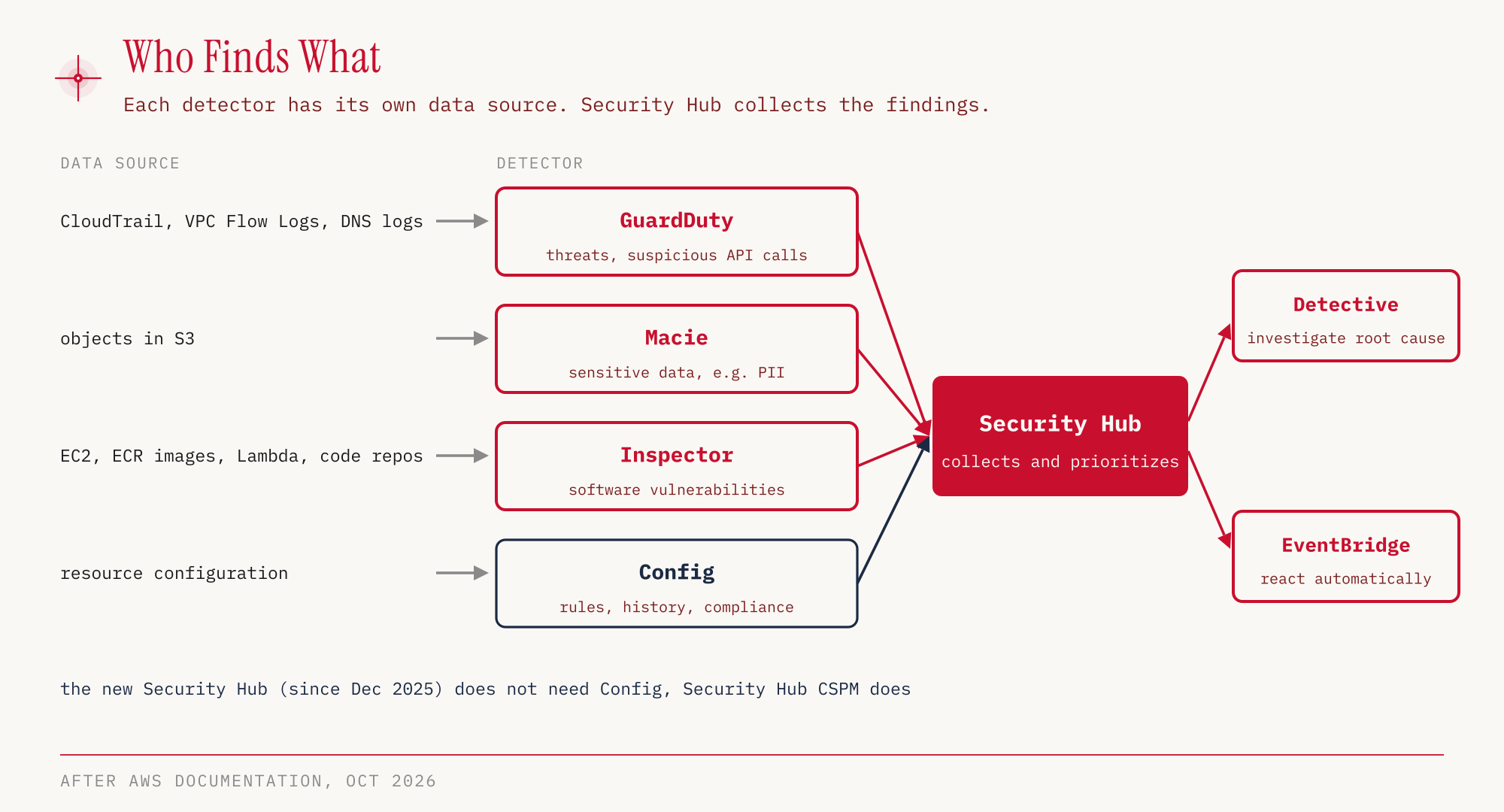
Each detector has its own data source
Most mix-ups in the exam happen with the services that find problems. They sound similar but look at different data.
Amazon GuardDuty detects threats in log data using machine learning. The basis is CloudTrail management events, VPC Flow Logs and DNS logs. On top come optional protection plans, including those for S3, EKS, runtime monitoring of ECS and EC2, malware, RDS, Lambda and now AI Protection for Bedrock and SageMaker. A well-known example of a finding is EC2 instances that mine cryptocurrency after being compromised (AWS Security Blog). So GuardDuty asks whether something in the account is behaving suspiciously.
Amazon Macie looks for sensitive data such as personally identifiable information (PII), and only in S3. Amazon Inspector scans EC2 instances, container images in ECR, Lambda functions and now also code repositories for vulnerabilities. For EC2 instances, Inspector also reports open network paths that make them reachable from outside the VPC, for example from the internet through an internet gateway (Inspector docs). This fits Task 3.5, where the Exam Guide names Inspector as a building block for VPC security.
AWS Security Hub collects the results (findings) in one place. Since December 2025 there are two products here (announcement). The previous Security Hub is now called Security Hub CSPM (Cloud Security Posture Management), checks the configuration against security standards and requires AWS Config to be enabled. The new Security Hub is generally available, correlates findings from GuardDuty, Inspector and CSPM, shows exposure findings and attack paths, and does not need Config. The classic exam answer “Security Hub needs Config” is therefore only correct for the CSPM part.
Amazon Detective comes afterwards. Once a finding exists, Detective helps with the investigation, that is, with the question of what exactly happened and which resources were involved. If something should happen automatically on a finding, such as a notification, EventBridge from Part 07 takes care of it. That is also where we met Config and CloudTrail, which are responsible for configuration history and API log.
| Service | Looks at | Finds |
|---|---|---|
| GuardDuty | CloudTrail, VPC Flow Logs, DNS logs, optional protection plans | suspicious behavior, threats |
| Macie | Objects in S3 | sensitive data (PII) |
| Inspector | EC2, ECR images, Lambda, code repositories | vulnerabilities, network reachability of EC2 |
| Security Hub CSPM | Configuration (via Config) | deviations from security standards |
| Security Hub | Findings from GuardDuty, Inspector, CSPM | correlated risks, attack paths |
| Detective | Findings and related data | course of an incident |
Compliance evidence and the rules for pentests
Many companies have to prove to auditors that their cloud provider meets certain standards. AWS Artifact is the portal for that. It provides compliance reports such as ISO, PCI or SOC and contains agreements, for example the Business Associate Addendum (BAA) for HIPAA. Artifact checks nothing itself, it supplies the documents for the part that AWS is responsible for. The exam guide (Task 2.2) also stresses that compliance requirements differ by Region, industry and individual service.
If someone uses AWS resources for spam, port scans, DDoS or malware, we report it to the AWS Trust and Safety team. That is the name of the contact point in the exam guide.
Your own penetration tests are allowed for a number of services without prior approval. The current policy page lists 16 entries: EC2 instances including WAF, NAT gateways and Elastic Load Balancing (one entry), RDS, CloudFront, Aurora, API Gateway, AppSync, Lambda and Lambda@Edge (one entry), Lightsail, Elastic Beanstalk, ECS, Fargate, OpenSearch Service, FSx, Transit Gateway, Bedrock AgentCore and Global Accelerator.
Still prohibited are DoS and DDoS attacks, port, protocol and request flooding, DNS zone walking, DNS hijacking, DNS pharming via Route 53, as well as S3 bucket takeover and subdomain takeover. Anyone who wants to simulate a DDoS attack needs a dedicated DDoS simulation policy for that.
According to the exam guide (Task 2.4), we find third-party security products in the AWS Marketplace. As sources of information the guide names the AWS Knowledge Center, the AWS Security Center and the AWS Security Blog.
Hands-on
Let’s create a bucket and write two objects into it, one without any encryption setting and one with SSE-KMS. We add our own suffix to the bucket name because S3 names must be globally unique. Our run took place on October 25, 2026 in eu-central-1. Requests to S3 and KMS can cause costs outside the Free Tier, so we clean up at the end.
aws s3api create-bucket --bucket ccp-demo-kms-<suffix> \
  --create-bucket-configuration LocationConstraint=eu-central-1 \
  --region eu-central-1

echo "Lernkarte Teil 08" > karte.txt

aws s3api put-object --bucket ccp-demo-kms-<suffix> \
  --key ohne-angabe.txt --body karte.txt \
  --region eu-central-1
{
    "ServerSideEncryption": "AES256"
}
The output is shortened, the ETag is missing. AES256 stands for SSE-S3, the default encryption of every new bucket. Now the same with SSE-KMS, without specifying a key.
aws s3api put-object --bucket ccp-demo-kms-<suffix> \
  --key mit-kms.txt --body karte.txt \
  --server-side-encryption aws:kms \
  --region eu-central-1
{
    "ServerSideEncryption": "aws:kms",
    "SSEKMSKeyId": "arn:aws:kms:eu-central-1:123456789012:key/…"
}
In the console: S3 → bucket → Upload → Properties → Server-side encryption when uploading; for an existing object S3 → bucket → click the object → Properties → Server-side encryption settings.

The screenshot comes from a second run on October 26, 2026.
This output is shortened too. Without a key ID of our own, S3 uses the AWS managed key alias/aws/s3. Let’s take a look at it.
aws kms describe-key --key-id alias/aws/s3 --region eu-central-1 \
  --query "KeyMetadata.{Manager:KeyManager,Spec:KeySpec,Usage:KeyUsage,Origin:Origin}"
{
    "Manager": "AWS",
    "Spec": "SYMMETRIC_DEFAULT",
    "Usage": "ENCRYPT_DECRYPT",
    "Origin": "AWS_KMS"
}
KeyManager: AWS marks an AWS managed key, for a key we created ourselves it would say CUSTOMER. The creation date of the key (CreationDate, omitted in the output above) was revealing. It matched the time of our put-object. So AWS created the key only on first use. The alias list names the predefined aliases of the AWS managed keys.
aws kms list-aliases --region eu-central-1 \
  --query "Aliases[?starts_with(AliasName, 'alias/aws/')].AliasName"
[
    "alias/aws/dynamodb",
    "alias/aws/ebs",
    "alias/aws/elasticfilesystem",
    "alias/aws/es",
    "alias/aws/glue",
    "alias/aws/kinesisvideo",
    "alias/aws/rds",
    "alias/aws/redshift",
    "alias/aws/s3",
    "alias/aws/ssm",
    "alias/aws/xray"
]
The list also contains aliases with no key behind them yet. AWS predefines these names, and they have no TargetKeyId. A key behind them only exists once the service uses it for KMS encryption for the first time. This way every service gets its own AWS managed key.
In the console: Key Management Service (KMS) → AWS managed keys; next to it are Customer managed keys and Custom key stores.

In the second run only aws/s3 appeared there, although the alias list names eleven aliases. The other aliases do not point to a key yet.
AWS Artifact is easiest to view in the console, where reports and agreements are available for download.
In the console: AWS Artifact → Reports or Agreements.
To clean up, we delete the objects and the bucket. Versioning is not enabled on this bucket, so a recursive delete is enough.
aws s3 rm s3://ccp-demo-kms-<suffix> --recursive --region eu-central-1
aws s3api delete-bucket --bucket ccp-demo-kms-<suffix> --region eu-central-1
rm karte.txt
For the exam
| Keyword in the question | Answer |
|---|---|
| DDoS, free, for everyone | Shield Standard |
| DDoS with 24/7 response team, cost protection | Shield Advanced |
| SQL injection, XSS, block countries, rate limit | WAF |
| Firewall rules across all accounts of the organization | Firewall Manager |
| TLS certificate, automatic renewal | ACM |
| Rotate a database password automatically | Secrets Manager |
| Resource shared with another account | IAM Access Analyzer |
| Encrypt stored data (at rest) | KMS |
| Encrypt data during transfer (in transit) | TLS with a certificate from ACM |
| Dedicated HSM, sole key control | CloudHSM |
| Suspicious behavior, log analysis with ML | GuardDuty |
| EC2 instance secretly mining cryptocurrency | GuardDuty |
| PII in S3 | Macie |
| Vulnerabilities in EC2, container images, Lambda | Inspector |
| EC2 instance unintentionally reachable from the internet | Inspector |
| Collect findings centrally | Security Hub |
| Investigate a security incident | Detective |
| ISO, PCI, SOC report for the auditor | Artifact |
| Report abuse from AWS resources | AWS Trust and Safety team |
| Third-party security products | AWS Marketplace |
Typical traps:
- Shield or WAF. DDoS means Shield, attacks in the HTTP content mean WAF.
- DDoS protection with multiple answers. If a DDoS question asks for two or more answers, CloudFront and Route 53 belong there alongside Shield. Both run at the edge locations and absorb attacks there before they reach the application in the Region. If the attack targets Layer 7, WAF is added (DDoS whitepaper).
- Macie or GuardDuty. Macie finds sensitive data in S3, GuardDuty finds suspicious behavior in the account.
- Inspector or GuardDuty. Inspector looks for vulnerabilities in software, GuardDuty detects ongoing threats.
- Security Hub and Config. The dependency applies only to Security Hub CSPM, the new Security Hub does not need Config.
- CloudHSM and FIPS. The current HSMs are validated to FIPS 140-3 Level 3.
Sources
- AWS Certified Cloud Practitioner (CLF-C02) Exam Guide, in particular Domain 2 and Domain 4
- In-scope services and out-of-scope services
- AWS Shield FAQs and Shield Response Team, prerequisites
- AWS WAF FAQs
- AWS Certificate Manager pricing
- AWS KMS keys
- AWS KMS API Reference, ListAliases
- CloudTrail, encrypting log files
- AWS Best Practices for DDoS Resiliency
- Amazon GuardDuty FAQs and Detecting and preventing crypto mining
- Amazon Macie: Automated sensitive data discovery
- Amazon Inspector features and Inspector, scanning EC2 instances and finding types
- AWS Security Hub FAQs and Security Hub announcement, December 2025
- AWS CloudHSM: FIPS validation
- AWS Penetration Testing Policy
The next part covers machine learning and generative AI, from Rekognition to Amazon Q.