AWS Cloud Practitioner 09: Machine Learning and Generative AI
Anyone who wants to use machine learning on AWS does not, in most cases, have to train a model. The AI services that appear in the CLF-C02 exam are mostly pretrained models behind an API that accepts text, images or audio and returns a result. For the exam, what counts is not how the models work but which service fits which task. Generative AI is also part of the current exam guide, but with Amazon Q and not with Amazon Bedrock.
Ready-made models instead of your own data science
AWS offers machine learning on two levels. The upper level is the pretrained AI services such as Rekognition, Transcribe or Comprehend. We send data with an API call and get a result back. Servers, training data or model choice are not our concern, AWS runs the model. We know the principle from Part 03 on Lambda. We use a capability and do not worry about the infrastructure underneath.
The lower level is Amazon SageMaker AI. Here we build, train and run our own models with our own data. That pays off when no ready-made service covers the task, for example a forecast based on a company’s own measurements.
Alongside stands generative AI as a group of its own. This means large language models that generate text instead of only classifying it. How such a model works in principle is explained in the article What is a language model. For the exam it is enough to know Amazon Q as the assistant AWS offers on this technology.
The rule of thumb for exam questions is therefore not “which model?” but “which input?”. Once it is clear whether an image, a recording, a text or a scanned form comes in, usually only one service remains.
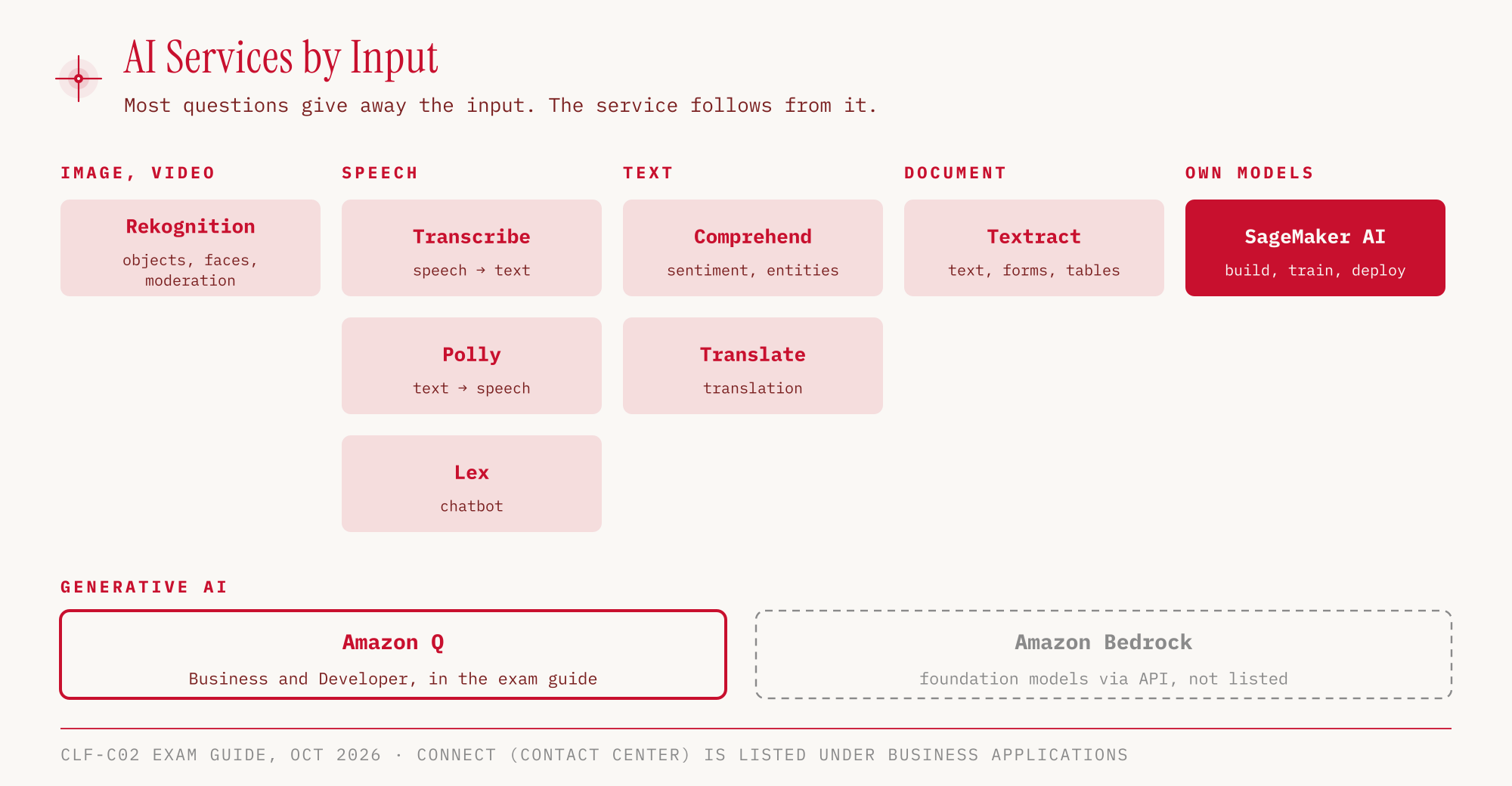
Image, speech, text and document as input
The pretrained services can be sorted almost entirely by their input. All services in the table are in the exam guide’s in-scope list, although Connect is under Business Applications rather than Machine Learning.
| Service | Input | Result | Typical use |
|---|---|---|---|
| Rekognition | Image, video | detected objects, faces, moderation flags | Tagging photos, detecting unwanted content |
| Transcribe | Audio | Text | Subtitles, call transcripts, redacting personally identifiable information (PII redaction) |
| Polly | Text | spoken language | Read-aloud features, voice announcements |
| Translate | Text | Text in another language | Delivering content in several languages |
| Comprehend | Text | sentiment, entities, topics, language | Analyzing customer feedback (NLP) |
| Lex | Text or speech in a dialog | chatbot responses | Chatbots and voice assistants, same technology as Alexa |
| Connect | Phone calls | Cloud contact center | Call center without your own phone system |
| Textract | Scan, PDF, photo of a document | text, form fields, tables | Digitizing invoices and forms |
Comprehend stands for natural language processing (NLP), that is, machine understanding of text. The service detects whether a text sounds positive, negative, neutral or mixed (sentiment), which people, organizations or dates appear in it (entities) and which language it is written in. We try exactly that in the hands-on below.
Lex and Connect like to appear together in exam questions. Connect is the contact center in the cloud, Lex provides the chatbot that guides callers or chat users through a dialog.
Similar names, different jobs
Most mistakes in this part of the exam come from mix-ups. The names only help to a degree, so it is worth putting the pairs side by side once.
| Mix-up | Difference |
|---|---|
| Transcribe vs. Polly | Transcribe turns speech into text, Polly turns text into speech. |
| Transcribe vs. Translate | Transcribe changes the medium (audio to text), Translate changes the language (text to text). |
| Textract vs. Comprehend | Textract pulls the text out of a document, Comprehend analyzes what is in the text. |
| Textract vs. Rekognition | Textract reads documents with forms and tables, Rekognition analyzes images and videos. |
| Lex vs. Connect | Lex is the chatbot, Connect is the complete contact center. |
| AI services vs. SageMaker AI | Ready-made model via API vs. your own model with your own data. |
In a typical pipeline, several services work one after another. Textract reads a scanned customer complaint, Translate converts it into German, Comprehend rates the sentiment. Each service handles one step. None replaces another.
Custom models with SageMaker AI
Amazon SageMaker AI is the platform for anyone who develops their own machine learning models. The service covers the path from preparing data through training to running the finished model. The exam guide explicitly uses the name “Amazon SageMaker AI”.
The difference from the AI services is a question of responsibility. With Rekognition, AWS has trained the model, and we get whatever it can do. With SageMaker AI we supply the data and the model choice ourselves and get a model that solves exactly our task. In exam questions the signal is usually a phrase like “own data”, “train your own model” or “data scientists”. If a standard task shows up instead, such as detecting faces or translating text, SageMaker AI is almost always the wrong answer.
Generative AI with Amazon Q, Bedrock only as context
Under Machine Learning, the exam guide’s in-scope list contains Amazon Q, but not Amazon Bedrock (as of October 25, 2026). For the exam this means knowing Amazon Q and its variants.
| Variant | Purpose |
|---|---|
| Amazon Q Business | answers questions about company data |
| Amazon Q Developer | helps with coding, troubleshooting and optimizing AWS resources; has taken over the functions of Amazon CodeWhisperer |
Q is thus a ready-made product with a user interface and integrations, comparable to the AI services in the section above. Anyone who reads a question about an AI assistant for developers or for searching company knowledge ends up at Q.
Amazon Bedrock sits one level deeper. The service provides foundation models, that is, large pretrained language and image models from various providers, through an API so that we can build our own generative applications. In practice Bedrock is the toolkit for custom AI applications, but according to the exam guide it is not in the in-scope list. We should know the name and be able to tell it apart from Amazon Q, but detailed questions about it are not to be expected in CLF-C02.
Services outside the exam scope
Some ML services are not relevant for CLF-C02. Amazon Personalize (real-time recommendations) is explicitly on the out-of-scope list, as are Fraud Detector, Lookout for Metrics and Panorama. Amazon Kendra (ML-powered document search) is missing from the in-scope list. According to the exam guide, this list is not exhaustive. So Kendra is not ruled out, but in questions it tends to show up as a distractor.
Conversely, Task 3.7 of the exam guide combines AI/ML and analytics into one task. As analytics examples it names Athena, Kinesis, Glue and QuickSight. We covered Athena, Glue and QuickSight in Part 05 and Kinesis in Part 07. A question from this block can just as well target an analytics service.
Hands-on
For Comprehend and Translate we do not need to create anything. Both services answer individual API calls directly, so no resources are created that we would have to delete later. Billing is by usage, so outside the free tiers even these few requests can incur costs.
First, the sentiment of a sentence that mixes praise and criticism. The test sentences stay in German, since we are testing the German language models. The sentence means: “The exam was fair, but the questions about the support plans were confusing.”
aws comprehend detect-sentiment \
  --language-code de \
  --text "Die Prüfung war fair, aber die Fragen zu den Support-Plänen waren verwirrend." \
  --region eu-central-1
{
  "Sentiment": "MIXED",
  "SentimentScore": {
    "Negative": 0.004,
    "Mixed": 0.996,
    ...
  }
}
Comprehend classifies the sentence as mixed, with a score of 0.996. Praise and criticism do not cancel out to “neutral” but form their own category, MIXED.
In the console: Amazon Comprehend → Launch Amazon Comprehend → Real-time analysis, Analysis type “Built-in”, enter the text, Analyze. The console shows tabs for Entities, Key phrases, Language, PII, Sentiment, Targeted sentiment and Syntax. “Application integration” shows the API call (DetectSentiment) and the response.
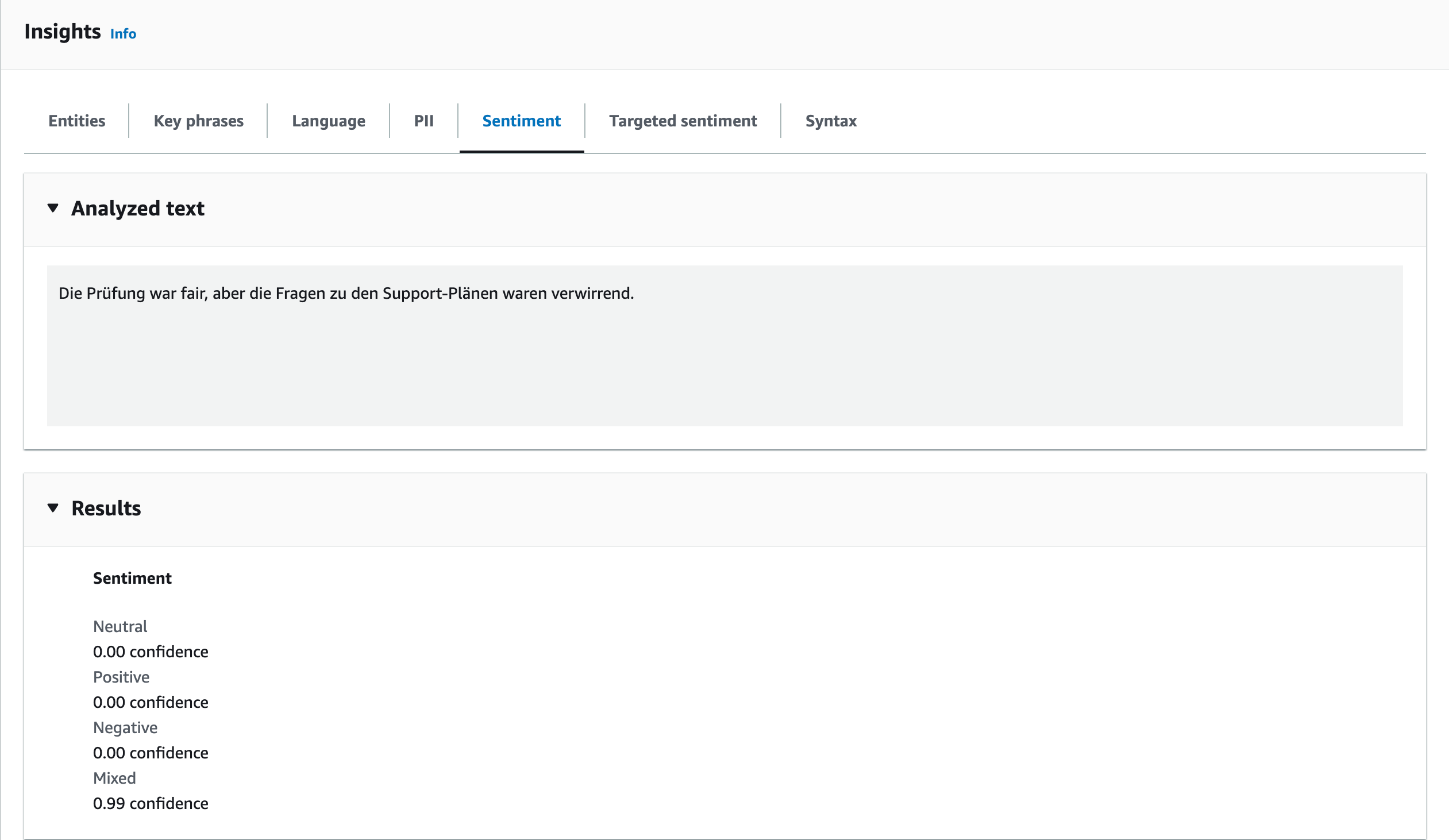
The console truncates to two decimal places, which is why it shows 0.99 instead of 0.996.
Next, the entities. The sentence says: “AWS offers the CLF-C02 exam in German only until December 31, 2026.” (The exam in German is offered only until December 31, 2026.)
aws comprehend detect-entities \
  --language-code de \
  --text "AWS bietet die Prüfung CLF-C02 nur noch bis zum 31. Dezember 2026 auf Deutsch an." \
  --region eu-central-1
{
  "Entities": [
    { "Text": "AWS",               "Type": "ORGANIZATION", "Score": 0.79 },
    { "Text": "CLF-C02",           "Type": "OTHER",        "Score": 0.74 },
    { "Text": "31. Dezember 2026", "Type": "DATE",         "Score": 0.99 },
    { "Text": "Deutsch",           "Type": "OTHER",        "Score": 0.97 }
  ]
}
Comprehend recognizes the date with 0.99 and AWS as an organization with 0.79. The exam name and the language end up in the catch-all category OTHER.
Language detection needs no language code, since it is supposed to determine one. The sentence means: “Elasticity means scaling automatically according to the load.”
aws comprehend detect-dominant-language \
  --text "Elasticity heißt, automatisch nach der Last zu skalieren." \
  --region eu-central-1
{
  "Languages": [
    { "LanguageCode": "de", "Score": 0.997 }
  ]
}
Despite the English technical term at the start of the sentence, Comprehend detects German with 0.997.
Finally, a translation with Translate. The German sentence says: “A subnet is public if its route table points to the internet gateway.”
aws translate translate-text \
  --source-language-code de \
  --target-language-code en \
  --text "Ein Subnet ist öffentlich, wenn seine Route Table zum Internet Gateway zeigt." \
  --region eu-central-1
{
  "TranslatedText": "A subnet is public when its route table points to the Internet gateway.",
  ...
}
Translate handles the technical terms correctly, only the capitalization (“route table”) follows English sentence structure instead of the AWS product name.
In the console: Amazon Translate → Real-time translation → Text tab, Source language “Auto (auto)”, Target language “English (en)”. The console detects the source language itself (“Detected language: German (de)”). The Document tab handles files.
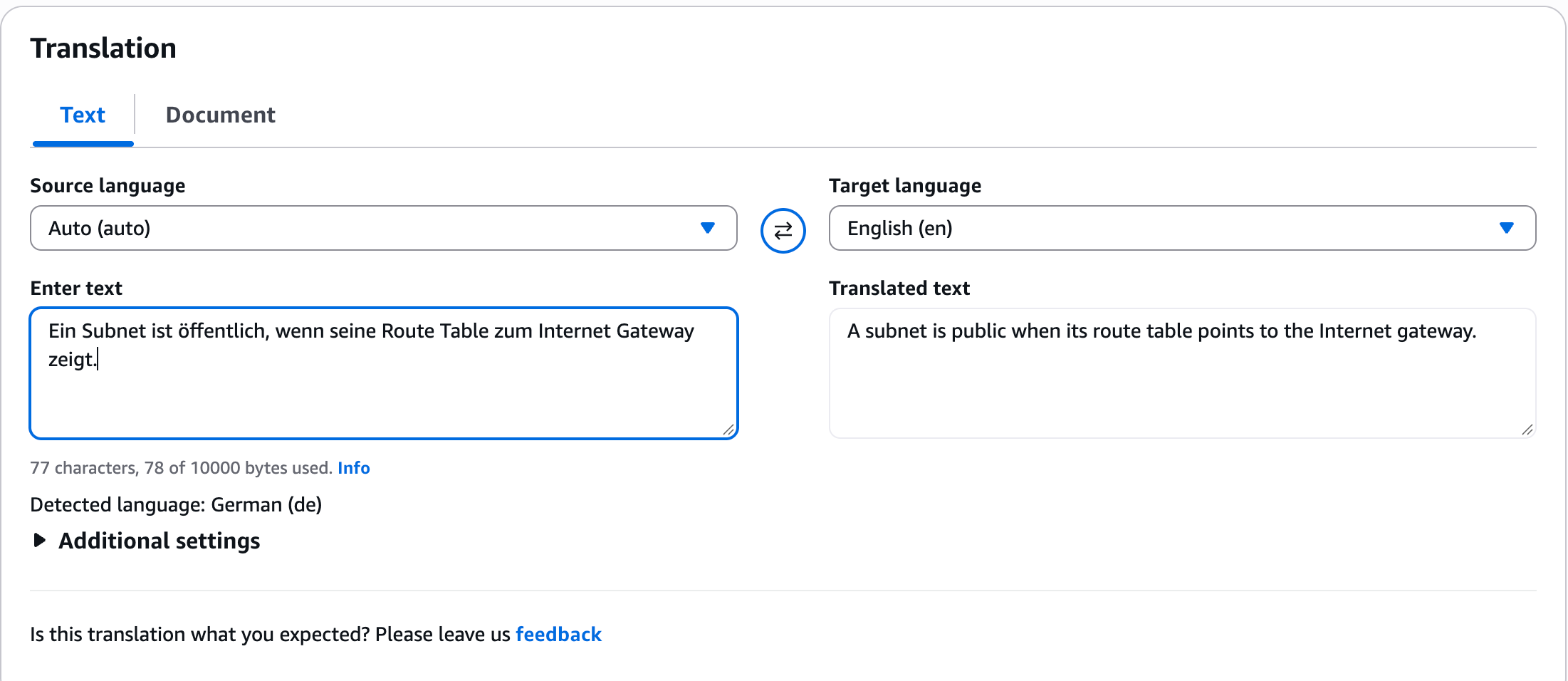
The result is identical to the CLI output.
The outputs are shortened, and the scores are rounded to two or three decimal places. There is nothing to clean up because none of the calls created a resource.
For the exam
| Keyword in the question | Answer |
|---|---|
| Objects or faces in images and videos, content moderation | Rekognition |
| Convert speech to text, subtitles, transcribe calls | Transcribe |
| Have text read aloud, speech output | Polly |
| Translate text into another language | Translate |
| Sentiment of customer reviews, entities, NLP | Comprehend |
| Chatbot, voice assistant, Alexa technology | Lex |
| Contact center in the cloud | Connect |
| Text, forms and tables from scanned documents | Textract |
| Build and train your own ML model | SageMaker AI |
| Generative AI assistant for developers or company data | Amazon Q (Developer or Business) |
Typical traps:
- Mixing up Transcribe and Translate. Transcribe converts audio to text, Translate translates text into another language.
- Choosing Textract instead of Comprehend. Textract reads out documents, Comprehend analyzes the meaning of the text.
- SageMaker AI for standard tasks. If a ready-made service covers the task, it is the answer, not a self-trained model.
- Bedrock as the answer to a Q question. The exam scope contains Amazon Q, Bedrock is not listed in the in-scope list.
- Picking Kendra or Personalize. Personalize is out of scope according to the exam guide, Kendra is not in the in-scope list. Both appear at most as distractors.
Sources
- AWS Certified Cloud Practitioner (CLF-C02) Exam Guide: https://docs.aws.amazon.com/aws-certification/latest/cloud-practitioner-02/cloud-practitioner-02.html
- Exam Guide, Domain 3 (Task 3.7, AI/ML and analytics): https://docs.aws.amazon.com/aws-certification/latest/cloud-practitioner-02/cloud-practitioner-02-domain3.html
- In-scope services: https://docs.aws.amazon.com/aws-certification/latest/cloud-practitioner-02/clf-02-in-scope-services.html
- Out-of-scope services: https://docs.aws.amazon.com/aws-certification/latest/cloud-practitioner-02/clf-02-out-of-scope-services.html
- Overview of Amazon Web Services, Machine Learning: https://docs.aws.amazon.com/whitepapers/latest/aws-overview/machine-learning.html
- CodeWhisperer and Amazon Q Developer: https://docs.aws.amazon.com/codewhisperer/latest/userguide/whisper-legacy.html
Part 10 is about money: Organizations, the Free Plan and network costs, the cost tools and the new support plans.