AWS Cloud Practitioner 10: Accounts, Billing and Support
Anyone who uses AWS professionally rarely works with just one account. Multiple accounts need a common umbrella, a shared bill and rules that cannot be bypassed in each account individually. That is what Domain 4 of the exam guide, “Billing, Pricing, and Support”, is about, together with the tools we use to estimate, monitor and limit costs. This part of the exam is especially tricky because AWS reshaped the support plans at the end of 2025.
AWS Organizations as the umbrella over many accounts
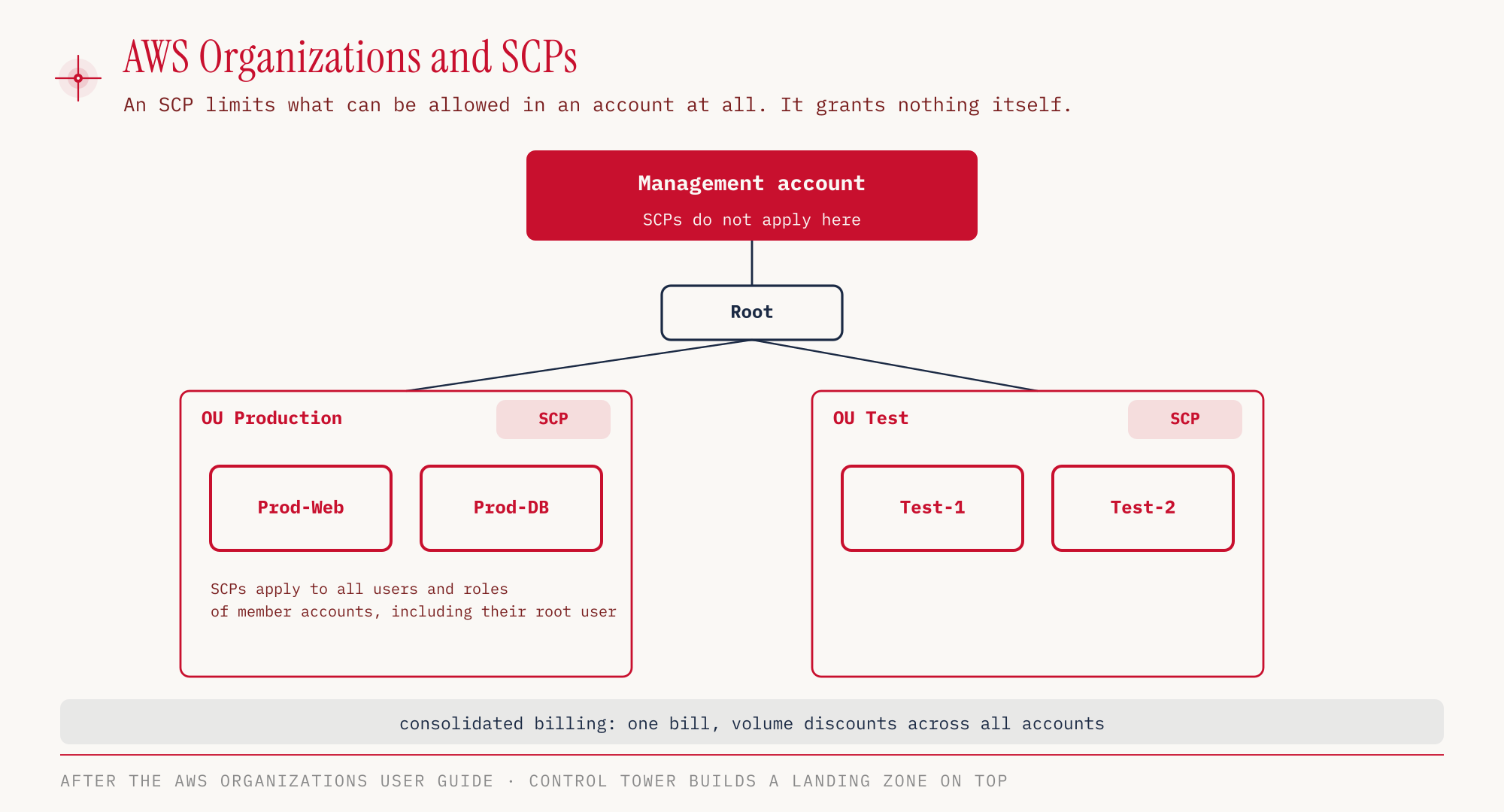
AWS Organizations groups several AWS accounts into one organization. At the top sits the management account, which creates and manages the organization. All the others are member accounts. They can be grouped into organizational units (OUs), for example by environment (production, test) or by department.
The most important economic effect is called consolidated billing. The organization receives a single bill, and costs can still be broken down per account. For volume discounts, the usage of all accounts is added up, for example for the S3 pricing tiers or for data transfer (consolidated billing). The discounts from Reserved Instances and Savings Plans can also be shared between accounts through consolidated billing. The management account can turn off this sharing for individual accounts (AWS docs on turning off discount sharing). We covered the purchase options themselves, Reserved Instances and Savings Plans, in part 3.
Organizations is also a security topic. With centralized root access management, the root credentials of member accounts can be removed centrally and privileged tasks can be performed from the management account. What the root user is and why it is so sensitive is explained in part 2, as is IAM Identity Center for signing in people.
Service control policies limit, they grant nothing
A service control policy (SCP) defines which actions are possible in an account at all. It is attached to the organization, to an OU or to a single account. An SCP does not grant a single permission, and that is the most common misconception. It sets an upper limit, and within that limit an IAM policy must still explicitly allow the action. Without an explicit allow, the action stays forbidden, even if the SCP permits it.
SCPs apply to all users and roles of a member account, including its root user. The exception is service-linked roles, which AWS services use to perform their own tasks in the account. The second exception is the management account itself. SCPs only affect member accounts (AWS docs on SCPs). Anyone who tries to protect the management account with SCPs protects nothing at all.
| Property | IAM policy | SCP |
|---|---|---|
| Applies to | users, groups, roles in one account | whole accounts, OUs, organization |
| Grants permissions | yes | no, only an upper limit |
| Applies to root user | no | yes, in member accounts |
| Applies to management account | yes | no |
Control Tower, RAM and Service Catalog
Three services build on Organizations, and all of them are on the in-scope list of the exam guide.
AWS Control Tower sets up a landing zone, a preconfigured multi-account environment based on AWS recommendations. It includes controls (formerly guardrails), predefined rules for whole OUs. They work preventively, detectively or proactively, with preventive controls using SCPs among other things (Controls in Control Tower). Control Tower is the answer when an exam question asks for many accounts to be set up quickly and consistently.
AWS Resource Access Manager (RAM) shares resources with other accounts instead of creating them a second time there. Typical examples are subnets or a transit gateway from part 6.
AWS Service Catalog is a self-service portal. A central team provides approved CloudFormation products, and other teams launch only these vetted templates. The keyword in the exam is usually “only approved resources”.
Four pricing models
AWS describes its pricing with four models (AWS Pricing, as of October 2026). They explain why the same service costs different amounts depending on how it is used.
| Model | Principle |
|---|---|
| Pay-as-you-go | we pay only for what we actually use |
| Flat rate | several services bundled at a fixed monthly price, with no overage charges |
| Save when you commit | committing to usage for one or three years earns a discount, for example through Savings Plans and Reserved Instances |
| Pay less by using more | tiered pricing, the price per unit drops as volume grows, for example for S3 storage |
Pay-as-you-go is the trade of fixed for variable expense from part 1. Cost Explorer recommends which commitment pays off under “Save when you commit” (see the cost tools below). With “Pay less by using more”, an organization helps because AWS adds up the usage of all accounts for the tiers.
Free Plan, Always Free and network costs
New accounts created on or after July 15, 2025 get the Free Plan. It provides 100 USD in credits at sign-up and up to 100 USD more in credits for activities, so up to 200 USD in total. The Free Plan ends after six months or as soon as the credits are used up. Without a switch to the Paid Plan, the account is closed afterwards.
AWS keeps the contents for another 90 days, during which the switch is still possible. Anyone who switches keeps remaining credits but has to use them within twelve months. If an account joins an organization or sets up a Control Tower landing zone, it switches to the Paid Plan automatically (AWS Free Tier, Free Tier plans, re:Post Knowledge Center). Older accounts keep the previous twelve-month model.
Independent of that, there are Always Free allowances that do not expire. Two examples (as of October 2026):
| Service | Always Free per month |
|---|---|
| Lambda | 1 million requests and 400,000 GB-seconds |
| DynamoDB | 25 GB storage, 25 WCU and 25 RCU (provisioned) |
Network costs are an exam classic because they are easy to overlook. Data transfer into AWS is free. Traffic within the same AZ over private IP addresses also costs nothing. Between two AZs, 0.01 USD per GB is charged in each direction, that is, for sending and for receiving (AWS docs on data transfer charges).
Out to the internet, 100 GB per month are free, aggregated across all services and Regions (EC2 pricing page). The price between Regions depends on the Region pair and is listed on the same pricing page. All prices are a snapshot (as of October 2026) and refer to us-east-1.
Cost tools, before and after
AWS offers a whole range of cost tools that tend to look alike in exam questions. The difference usually lies in timing. Some estimate before launch, others analyze what has already been incurred, and others warn.
| Tool | Purpose | Distinction |
|---|---|---|
| Pricing Calculator | estimate costs before launch | works without existing usage |
| Cost Explorer | analyze actual costs, forecast up to 18 months (monthly) or 3 months (daily), recommendations for Savings Plans and Reserved Instances | graphical, aggregated |
| Cost and Usage Report (CUR) | most detailed dataset on costs and usage | raw data for analysis, for example with Athena |
| Cost Allocation Tags | break down costs by tag | must be activated first; prefix aws: generated by AWS, user: assigned by you |
| Budgets | limits for cost, usage, reservations, Savings Plans with alerts | up to 5 alerts per budget |
| Billing Alarm | CloudWatch alarm on the bill, only in us-east-1 | actual costs only, simpler than Budgets |
| Cost Anomaly Detection | ML detects unusual spending | no threshold needed |
| Compute Optimizer | rightsizing recommendations, detects idle resources | basic functionality is free |
| Service Quotas | view limits, alarm before reaching them | limits, not costs |
With Budgets, each of the up to five alerts can go to up to ten email recipients and to an SNS topic. An account can have up to 20,000 budgets (Budgets FAQ).
Compute Optimizer has long covered more than EC2, Auto Scaling groups, EBS and Lambda. It also includes ECS on Fargate, RDS, Aurora, NAT Gateway, ElastiCache, DynamoDB and SageMaker endpoints, among others. Only the Enhanced Infrastructure Metrics option with a longer analysis period is paid (Compute Optimizer Pricing).
The Cost Explorer forecast reaches up to 18 months ahead (Cost Explorer FAQ). Cost Explorer also provides recommendations for Savings Plans and Reserved Instances (AWS Pricing, reservation recommendations).
Cost Allocation Tags do not take effect on their own. A tag only shows up as its own breakdown in Cost Explorer and the CUR once it has been activated as a cost allocation tag (activating cost allocation tags).
AWS Trusted Advisor checks an account against best practices in six categories, namely Cost Optimization, Performance, Security, Fault Tolerance, Service Limits and Operational Excellence (Trusted Advisor). How many checks we see depends on the support plan. With the Basic plan, these are six security checks plus the service limit checks (Support FAQ).
The new scheme of support plans
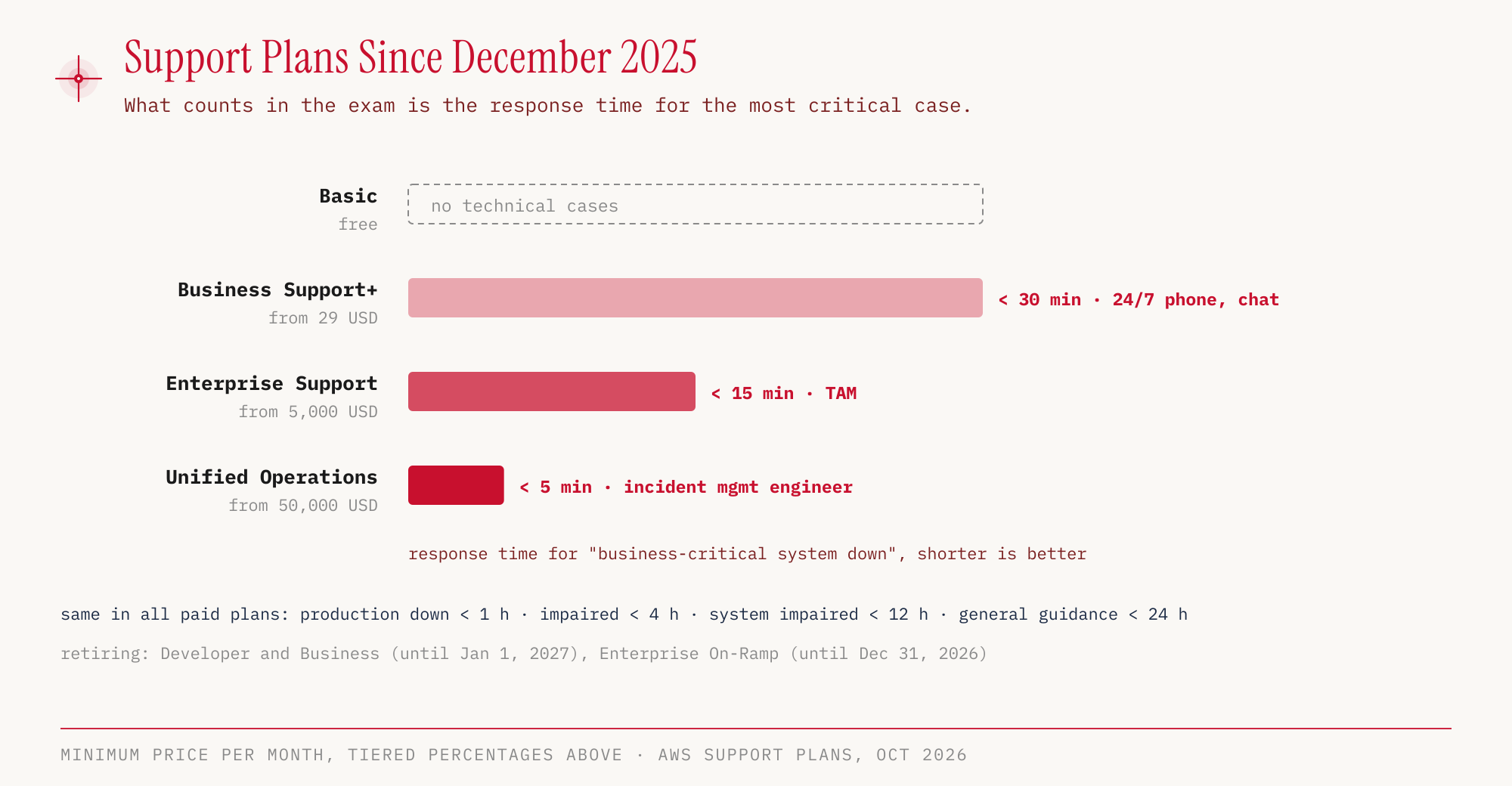
AWS has restructured the support plans. Since December 2, 2025, Developer and the classic Business plan can no longer be newly purchased, and both end on January 1, 2027. Enterprise On-Ramp is supported until December 31, 2026. In Task 4.3, the exam guide mentions only the new scheme with Basic, Business Support+, Enterprise Support and Unified Operations.
| Plan | Price per month (as of October 2026) | fastest response time | Special features |
|---|---|---|---|
| Basic | free | no technical cases | account and billing questions, docs, re:Post, Trusted Advisor core checks (security, service limits), AWS Health |
| Business Support+ | from 29 USD, above that tiered 9/7/5/3 % of AWS costs | under 30 minutes (business-critical system down) | 24/7 by phone, web and chat, over 500 Trusted Advisor checks, Support API, third-party software support, AI-assisted answers |
| Enterprise Support | from 5,000 USD, tiered 10/7/5/3 % | under 15 minutes | designated Technical Account Manager (TAM), Security Incident Response included, event support, Strategic Business Reviews |
| Unified Operations | from 50,000 USD, tiered 10/6/5 % | under 5 minutes (Incident Management Engineer) | designated domain specialists, application architecture guidance |
The remaining tiers are the same in all three paid plans. AWS answers cases about a production system that is down within one hour, about an impaired production system within four hours, about an impaired system within twelve hours and about a general question within 24 hours (support plans, pricing). The plans therefore differ mainly in the top tier and in the amount of personal support.
In Task 4.3, the exam guide also asks about help outside the plans. This includes customer service, the communities with re:Post, the Knowledge Center and AWS Prescriptive Guidance. For third-party support there is the AWS Partner Network with independent software vendors (ISVs) and system integrators. Among other things, partners get access to programs and funding, training and certification, and partner events (AWS Partner Network). Third-party software can be purchased, billed and managed through the AWS Marketplace. AWS Professional Services and solutions architects are AWS’s own consulting. The AWS Health API delivers the events of the Health Dashboard from part 7 in machine-readable form.
We open support cases in the AWS Support Center in the console. Even with the Basic plan, cases about the account and billing as well as service quota increase requests can be created there, while technical cases require a paid plan (support plans in the docs).
The root user no longer has to change the support plan. The task is no longer on the list of root-only tasks.
Hands-on
Let’s create a budget, check it and delete it again. AWS Budgets and Cost Explorer are global services with an API endpoint in us-east-1. That is why this part uses --region us-east-1 instead of eu-central-1, as an exception. We read our own account ID with aws sts get-caller-identity.
ACCOUNT_ID=$(aws sts get-caller-identity --query Account --output text)

aws budgets create-budget \
  --account-id "$ACCOUNT_ID" \
  --budget '{"BudgetName":"ccp-demo-monatsbudget","BudgetLimit":{"Amount":"5","Unit":"USD"},"TimeUnit":"MONTHLY","BudgetType":"COST"}' \
  --region us-east-1

aws budgets describe-budget \
  --account-id "$ACCOUNT_ID" \
  --budget-name ccp-demo-monatsbudget \
  --region us-east-1
Shortened output of describe-budget:
{
  "Budget": {
    "BudgetName": "ccp-demo-monatsbudget",
    "BudgetLimit": { "Amount": "5.0", "Unit": "USD" },
    "TimeUnit": "MONTHLY",
    "BudgetType": "COST"
  }
}
In the console: Billing and Cost Management → Budgets and Planning → Budgets → Create budget. Under “Budget setup” we choose between “Use a template (simplified)” and “Customize (advanced)”. Unlike the CLI, the console requires at least one email recipient when creating the budget.
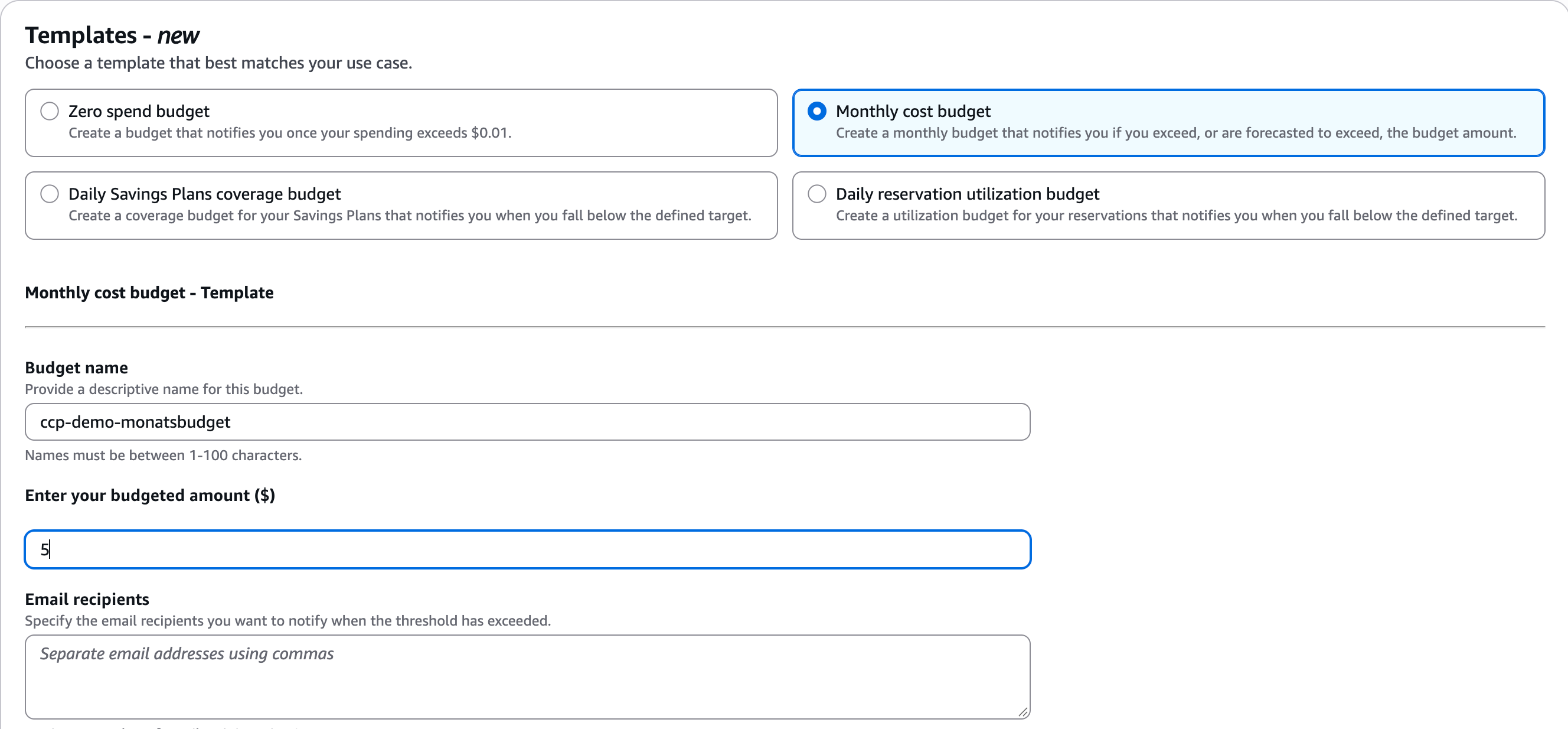
The screenshot shows the template selection; we did not submit the form.
In our run, the budget had no notification, since we only wanted to create and delete it. In real use, we attach an email alert directly when creating it, for example at 80 percent of actual costs:
aws budgets create-budget \
  --account-id "$ACCOUNT_ID" \
  --budget file://budget.json \
  --notifications-with-subscribers '[{"Notification":{"NotificationType":"ACTUAL","ComparisonOperator":"GREATER_THAN","Threshold":80,"ThresholdType":"PERCENTAGE"},"Subscribers":[{"SubscriptionType":"EMAIL","Address":"kosten@example.com"}]}]' \
  --region us-east-1
Next we ask Cost Explorer for the costs of the current month, grouped by service. Every Cost Explorer API request costs 0.01 USD. The end date in --time-period is exclusive, so October 25 is no longer counted.
aws ce get-cost-and-usage \
  --time-period Start=2026-10-01,End=2026-10-25 \
  --granularity MONTHLY \
  --metrics UnblendedCost \
  --group-by Type=DIMENSION,Key=SERVICE \
  --region us-east-1
In the console: Billing and Cost Management → Cost and Usage Analysis → Cost Explorer. The Free Tier is under Billing and Cost Management → Free Tier, Cost Allocation Tags under Billing and Cost Management → Cost Organization → Cost Allocation Tags.
The query worked. We are not publishing the amounts from the demo account, but the structure of the response looks like this, shortened:
{
  "ResultsByTime": [
    {
      "TimePeriod": { "Start": "2026-10-01", "End": "2026-10-25" },
      "Groups": [
        {
          "Keys": ["<Servicename>"],
          "Metrics": { "UnblendedCost": { "Amount": "<Betrag>", "Unit": "USD" } }
        }
      ]
    }
  ]
}
Finally, we clean up:
aws budgets delete-budget \
  --account-id "$ACCOUNT_ID" \
  --budget-name ccp-demo-monatsbudget \
  --region us-east-1
A budget itself is deleted quickly. Resources left over from this series consume credits in the Free Plan and incur costs in the Paid Plan.
For the exam
| Keyword in the question | Answer |
|---|---|
| many accounts, one bill | AWS Organizations, consolidated billing |
| forbid actions in member accounts, even for root | service control policy |
| quickly set up a multi-account environment following best practices | AWS Control Tower |
| share a subnet or transit gateway with another account | AWS RAM |
| only approved CloudFormation templates for teams | AWS Service Catalog |
| estimate costs before launch | Pricing Calculator |
| analyze and forecast costs | Cost Explorer |
| recommendation for Savings Plans or Reserved Instances | Cost Explorer |
| discount in exchange for a one- or three-year usage commitment | Save when you commit |
| price per unit drops as volume grows | Pay less by using more |
| break down costs by project or department | Cost Allocation Tags, activated first |
| most detailed cost dataset | Cost and Usage Report |
| warning when an amount is exceeded | Budgets |
| unusual spending without a fixed threshold | Cost Anomaly Detection |
| instances sized too large | Compute Optimizer |
| best practice checks in six categories | Trusted Advisor |
| critical case under 15 minutes, TAM | Enterprise Support |
| cheapest plan with 24/7 technical support | Business Support+ |
| open a support case | AWS Support Center |
Typical pitfalls:
- SCPs grant nothing. Without an explicit allow in an IAM policy, an action stays forbidden.
- The management account is exempt from SCPs. The same applies to service-linked roles.
- Cost Explorer forecasts 18 months, not twelve.
- Developer, Business and Enterprise On-Ramp are being phased out. Answers that name these plans do not match the current exam guide.
- Billing Alarm lives in CloudWatch in us-east-1 and only knows actual costs.
- RI and Savings Plans discounts are shared within an organization, but the management account can turn off sharing for individual accounts.
- Cost Allocation Tags only appear in Cost Explorer and the CUR after activation. Setting a tag alone is not enough.
Sources
- Exam Guide CLF-C02, in particular Domain 4
- In-scope services CLF-C02
- Service control policies
- Controls in Control Tower
- Root user and centralized root access management
- Turning off RI and Savings Plans discount sharing
- AWS Pricing (pricing models)
- Activating cost allocation tags
- Consolidated billing
- Reservation recommendations in Cost Explorer
- AWS Partner Network
- AWS Free Tier and Free Tier start and end
- Lambda Free Tier, DynamoDB
- Data transfer costs in the CUR, EC2 On-Demand pricing
- Cost Explorer FAQ, Budgets FAQ
- Compute Optimizer Pricing
- Trusted Advisor
- Support plans, support pricing, Support FAQ, Support plans in the docs
In the final part, we put everything together, with the Well-Architected Framework, disaster recovery strategies, migration and the most common exam pitfalls.