AWS Cloud Practitioner 11: Architecture, Migration and the Exam
For ten parts, the focus was on individual services. The last part is about architecture: how AWS describes good workloads, how to protect them against failures and how existing systems get into the cloud in the first place. The exam covers the Well-Architected Framework, the Cloud Adoption Framework and migration strategies in Domain 1 of the exam guide (Cloud Concepts, 24 % of the score), while disaster recovery appears in Domain 3 in the context of using multiple Regions (Task 3.2). At the end come the most common pitfalls in exam questions and a strategy for the exam itself.
The Well-Architected Framework with six pillars
The AWS Well-Architected Framework is a catalog of questions and best practices against which an architecture can be measured. It is not a service you book but an assessment grid. Task 1.2 of the exam guide names all six pillars, and the exam expects us to assign a statement to the right pillar.
| Pillar | Core idea | typical keywords |
|---|---|---|
| Operational Excellence | operations as code, small and reversible changes | operations as code, learn from failures |
| Security | protection at all layers | strong identity, traceability, encrypt data at rest and in transit |
| Reliability | tolerate failures and recover from them | test recovery, heal automatically, scale horizontally |
| Performance Efficiency | use resources to match the load | serverless, go global in minutes, experiment more often |
| Cost Optimization | pay only for what you need | consumption model, attribute costs via tags, managed services |
| Sustainability | reduce environmental impact | maximize utilization, efficient hardware such as Graviton, managed services |
The pillars do not compete with each other, they complement each other. There are also general design principles that apply across all pillars (General Design Principles). Capacity is not guessed but scaled automatically. Testing happens at production scale, decisions are based on data, and the worst case is rehearsed in game days. Automation and an architecture that is allowed to evolve complete the list. Anyone who has read the parts on compute and integration already knows the tools for this, from Auto Scaling to CloudFormation.
The Well-Architected Tool in the console turns the framework into a questionnaire for a specific workload. It is free and on the in-scope list. In the hands-on below, we create a workload and count the questions.
Disaster recovery in four tiers
Disaster recovery is measured by RPO and RTO. The recovery point objective (RPO) states how much data loss we accept, measured as the time span back to the last usable state. The recovery time objective (RTO) states how long the service may be down until it runs again. Both values can be reduced, but every improvement costs money on an ongoing basis because more infrastructure has to be on standby.
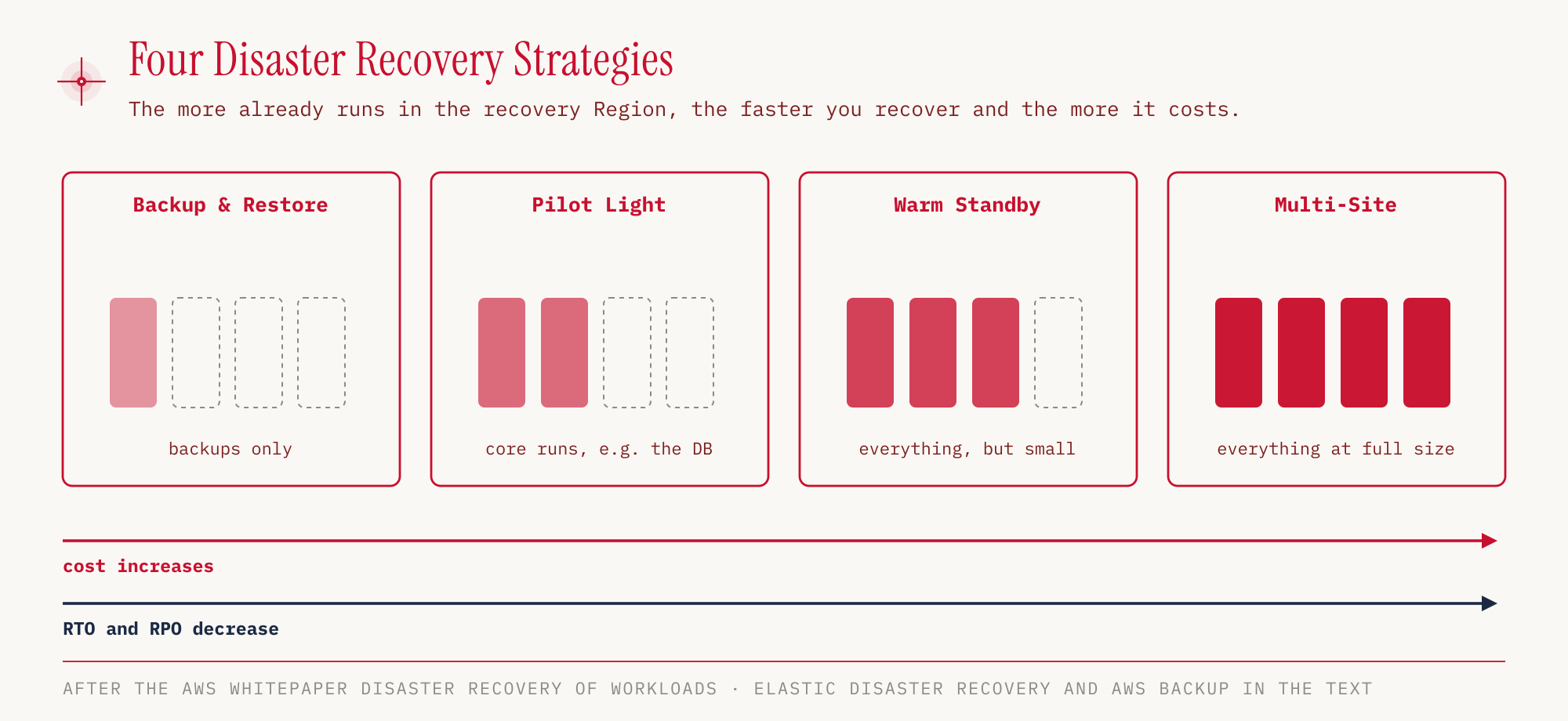
| Strategy | What happens in an emergency |
|---|---|
| Backup & Restore | the infrastructure is rebuilt from the backups |
| Pilot Light | the rest is started around the running core, typically the replicated database |
| Warm Standby | the scaled-down but complete copy scales up |
| Multi-Site (active/active) | the second environment already runs in parallel and takes over almost instantly |
The mapping follows from the requirement. If the question says “lowest cost, downtime of hours is acceptable”, Backup & Restore is the answer. If it says “no downtime tolerable”, the choice ends up at Multi-Site.
AWS Elastic Disaster Recovery (formerly CloudEndure Disaster Recovery) replicates servers continuously at block level into AWS. AWS cites an RPO in the range of seconds and an RTO of minutes (AWS Guidance, vendor claim). AWS Backup manages backups centrally across services, Regions and accounts, instead of each service maintaining its own snapshots. Both are on the in-scope list.
Migration by the 7 Rs
Not every application moves to the cloud in the same way. AWS distinguishes seven strategies, all starting with R (Prescriptive Guidance). They range from “do not migrate at all” to “rewrite”, and with each step both the effort and the benefit from the cloud increase.
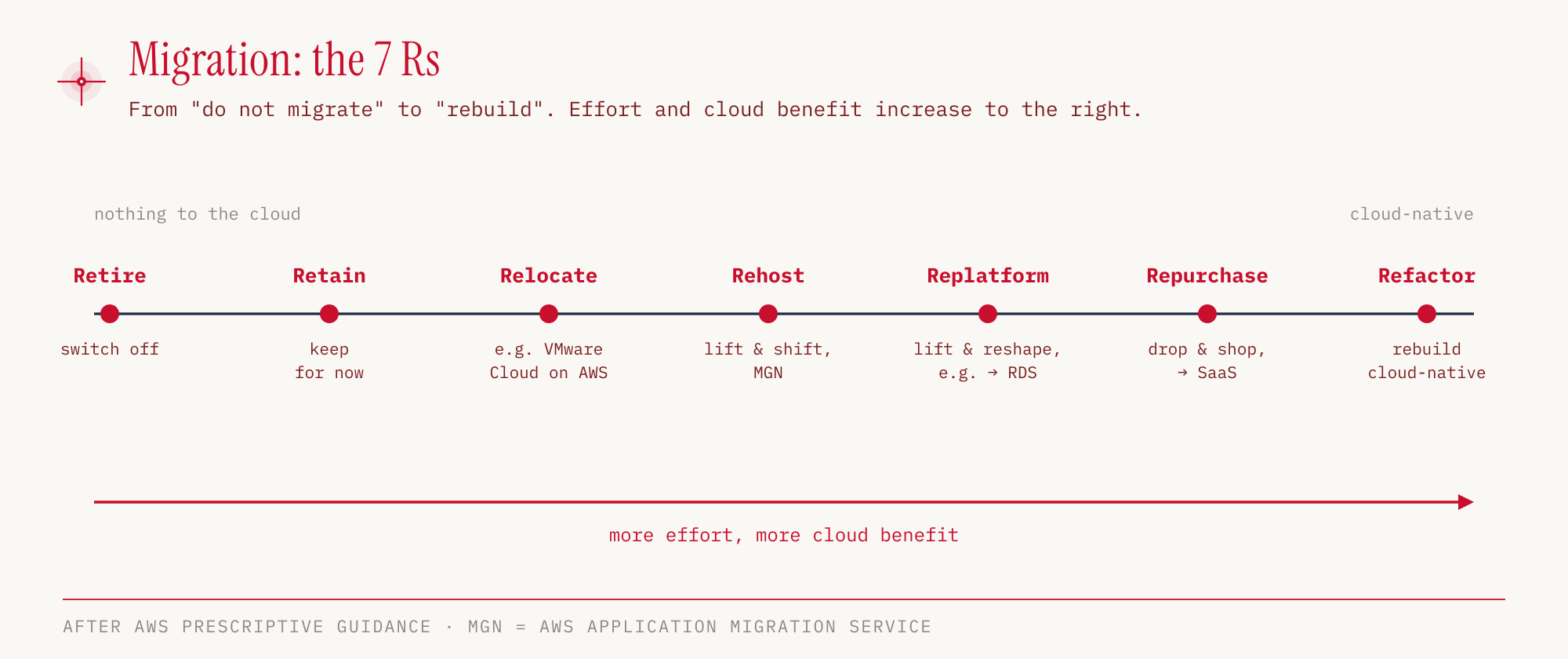
| Strategy | Meaning | Example |
|---|---|---|
| Retire | switch off because nobody needs the application anymore | legacy system without users |
| Retain | leave on-premises for now | system with an ongoing maintenance contract |
| Relocate | move without changing the operating model | VMware Cloud on AWS |
| Rehost | lift & shift, the server runs unchanged on EC2 | Application Migration Service |
| Replatform | lift & reshape, small optimizations during the move | own database → RDS |
| Repurchase | drop & shop, switch to a SaaS product | own CRM → SaaS CRM |
| Refactor | re-architect, rebuild cloud-native | monolith → Lambda and DynamoDB |
Rehost and replatform are confused most often. If the operating system and database stay unchanged and merely run on different hardware, it is rehost. If the self-managed database is replaced by a managed service during the move, it is replatform.
Migration tools and their status
There is a service for each phase of a migration. Application Discovery Service and Migration Hub no longer accept new customers but are still in the exam guide.
| Service | Task | Status (as of October 25, 2026) |
|---|---|---|
| Migration Evaluator | business case, what operating on AWS costs | in scope |
| Application Discovery Service | inventory of servers and their dependencies, agentless or with an agent | in scope, no new customers since November 7, 2025, successor AWS Transform |
| Application Migration Service (MGN) | rehost with continuous replication | in scope |
| Migration Hub | central tracking of all migrations | in scope, no new customers since November 7, 2025 |
| Database Migration Service (DMS) | migrate and replicate databases | in scope, see part 05 |
For the exam, the exam guide is what counts, so both services remain exam material even though a new account can no longer use them. Task 1.3 also explicitly names database replication as part of migration strategies. DMS is the answer for that, together with the Schema Conversion Tool when the database engine changes.
The Snow Family (Snowball and relatives) was long the solution for offline transfer of large amounts of data. AWS no longer offers Snow devices to new customers, and the family is not on the in-scope list, so it is hardly relevant for the exam. As alternatives, AWS names DataSync for online transfer, the AWS Data Transfer Terminal for physical transport and Outposts for edge scenarios (AWS).
Cloud Adoption Framework for the organization
The Well-Architected Framework reviews a workload. The AWS Cloud Adoption Framework (CAF) works one level higher and describes what has to change in a company so that the cloud is actually used. It divides this work into six perspectives (AWS CAF).
| Group | Perspectives |
|---|---|
| Business perspectives | Business, People, Governance |
| Technical perspectives | Platform, Security, Operations |
The path runs in four phases: Envision → Align → Launch → Scale (AWS). In Envision, the target picture emerges, in Align, gaps between the stakeholders are clarified, in Launch, first pilot projects go live, and in Scale, the effort is expanded. Task 1.3 also asks about the benefits of the CAF, and the exam guide names four: reduced business risk, improved ESG performance, increased revenue and higher operational efficiency.
Both are called a framework, which makes them easy to confuse. If a question is about staff, training or organizational change, the CAF is meant. If it is about reliability or cost of a single application, it is Well-Architected.
Hands-on
Let’s create a workload in the Well-Architected Tool and check how many questions the default lens wellarchitected asks. The tool is free, but we clean up anyway. As in the whole series, the Region is eu-central-1.
WL=$(aws wellarchitected create-workload \
  --workload-name ccp-demo-lernkarten-app \
  --description "Demo-Workload fuer die CLF-C02-Serie" \
  --environment PREPRODUCTION \
  --aws-regions eu-central-1 \
  --lenses wellarchitected \
  --review-owner "demo-admin" \
  --region eu-central-1 \
  --query WorkloadId --output text)
In the console: Well-Architected Tool → Workloads → Define workload. We enter name, description, Review owner, Environment and Regions and select “AWS Well-Architected Framework” under Lenses.
The lens review lists, per pillar, how many questions are still open. The output is aligned in columns for readability.
aws wellarchitected get-lens-review \
  --workload-id "$WL" \
  --lens-alias wellarchitected \
  --region eu-central-1 \
  --query 'LensReview.PillarReviewSummaries[].[PillarName,RiskCounts.UNANSWERED]' \
  --output text
Operational Excellence   11
Security                 11
Reliability              13
Performance Efficiency    5
Cost Optimization        11
Sustainability            6
That adds up to 57 questions across six pillars. Reliability has the most, Performance Efficiency the fewest.
In the console: Well-Architected Tool → Workloads → select the workload → Lens AWS Well-Architected Framework → Overview. “Continue reviewing” starts the questionnaire, “Generate report” produces a PDF.
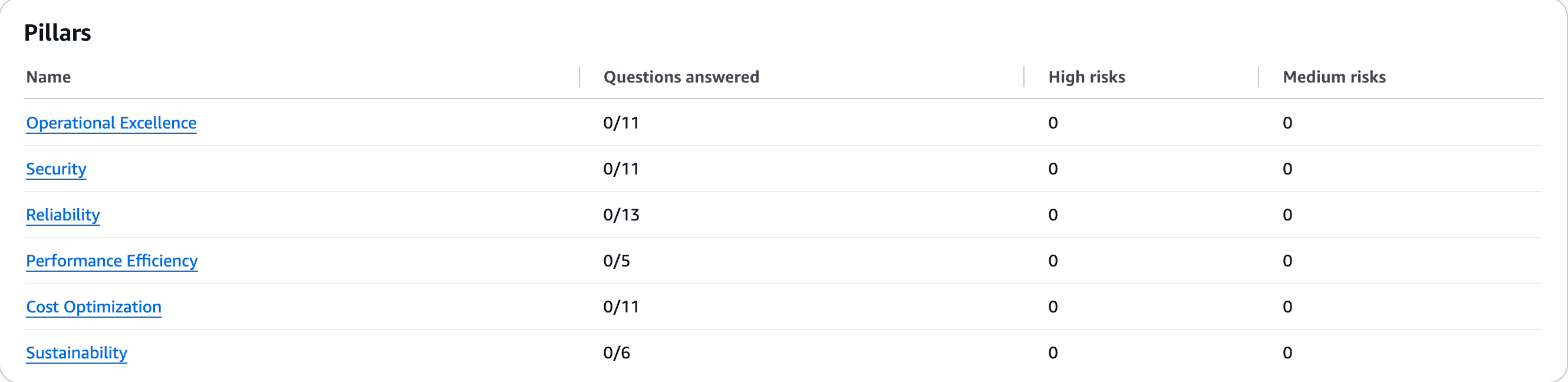
The values match the CLI output.
A look at the Cost Optimization questions shows how concrete the questionnaire gets. The output is shortened.
aws wellarchitected list-answers \
  --workload-id "$WL" \
  --lens-alias wellarchitected \
  --pillar-id costOptimization \
  --region eu-central-1 \
  --query 'AnswerSummaries[].QuestionTitle'
"How do you implement cloud financial management?"
"How do you govern usage?"
"How do you monitor your cost and usage?"
...
The questions do not ask for configuration but for answers about processes and responsibilities. That is exactly what distinguishes the tool from Trusted Advisor in part 10, which checks the account automatically.
Cleaning up:
aws wellarchitected delete-workload \
  --workload-id "$WL" \
  --region eu-central-1
The Well-Architected Tool itself incurs no costs. For all other hands-ons in the series, resources still consume credits in the Free Plan and cost money in the Paid Plan.
For the exam
The following table collects the keywords by which exam questions give away the service being sought.
| Keyword in the question | Answer |
|---|---|
| Who deleted the resource? | CloudTrail |
| Configuration history, compliance over time | Config |
| SQL on files in S3, serverless | Athena |
| Data warehouse, OLAP | Redshift |
| Microsecond cache for DynamoDB | DAX |
| Find personal data in S3 | Macie |
| Threats, suspicious API calls | GuardDuty |
| Software vulnerabilities on EC2, in container images, Lambda, code repositories | Inspector |
| Investigate a security incident | Detective |
| Own keys on own, dedicated hardware (FIPS 140-3 Level 3) | CloudHSM |
| Download an ISO or SOC report from AWS | Artifact |
| Estimate costs before building | Pricing Calculator |
| Forecast future costs (up to 18 months) | Cost Explorer |
| Static IP, no caching | Global Accelerator |
| Hybrid (on-premises and AWS) | Systems Manager, Storage Gateway, Outposts |
| Virtual desktop, stream an application to the end device | WorkSpaces, AppStream 2.0 |
| Frontend for web and mobile | Amplify |
| Connect IoT devices | IoT Core |
| Send emails | SES |
| Contact center | Connect |
| Review a workload against best practices | Well-Architected Tool |
| Protect servers with minimal RPO/RTO | Elastic Disaster Recovery |
| Lift & shift of servers | Application Migration Service |
WorkSpaces, AppStream 2.0, WorkSpaces Secure Browser, Amplify, IoT Core and SES belong to Task 3.8 of the exam guide. How they differ is covered in part 07.
Typical pitfalls in this part:
- Well-Architected or CAF. Workload and technology → Well-Architected. Organization, people, phases → CAF.
- Rehost or replatform. If a managed service is used during the move, it is replatform.
- Pilot light or warm standby. If only the data core runs, it is pilot light. If a scaled-down but complete environment runs, it is warm standby.
- Snow Family. Not in the exam guide and discontinued for new customers.
- Status is not scope. Migration Hub and Application Discovery Service no longer accept new customers but remain exam material.
Strategy for the 90 minutes
The basic facts are already in part 01, repeated here compactly with a view to tactics (Exam Guide, certification page, after-testing policy, Certification FAQ, during-testing policy, as of October 25, 2026).
| Item | Status |
|---|---|
| Questions | 65, of which 50 scored and 15 unscored, which are not marked |
| Time | 90 minutes |
| Passing | 700 on a scale from 100 to 1,000, compensatory |
| Fee | 100 USD, plus taxes where applicable |
| Retake | after 14 calendar days, full fee per attempt |
| Location | test center (Pearson VUE) or online proctored |
| German language | offered only until December 31, 2026 |
| Result | within five business days in the AWS Certification Account under Exam History |
Guessing always pays off. There is no deduction for wrong answers, while an unanswered question counts as wrong. The compensatory model means that not every domain has to be passed individually. A weak billing domain (12 %) can be offset by Security (30 %) and Cloud Technology and Services (34 %). In multiple-response questions, two or more of five or more options are correct.
The most effective technique is elimination. First we strike the answers that are certainly wrong, and often only two remain. If a solution seems feasible but conspicuously complicated, it is usually wrong. Spot Instances are never the answer for databases or critical jobs that must not be interrupted. If a question remains unclear, we still pick a provisional answer, mark the question with the “Flag for Review” button and return to it at the end via the review screen. That way no question stays blank, and no time is lost on a single item.
The series in retrospect
Eleven parts cover the material of the CLF-C02. Anyone who wants to review individual topics will find them here.
| Part | Topic |
|---|---|
| 01 | Cloud basics, exam format, global infrastructure, shared responsibility |
| 02 | IAM, roles, MFA, STS, Identity Center |
| 03 | EC2, purchase options, load balancers, Auto Scaling, Lambda, containers |
| 04 | EBS, EFS, FSx, S3 and its storage classes |
| 05 | RDS, Aurora, DynamoDB, Redshift, analytics, DMS |
| 06 | VPC, security groups and NACLs, Direct Connect, Route 53, CloudFront |
| 07 | Messaging, infrastructure as code, monitoring and audit, desktops, IoT, Amplify and SES |
| 08 | Shield, WAF, KMS, GuardDuty, Security Hub, Artifact |
| 09 | AI services, SageMaker AI, Amazon Q |
| 10 | Organizations, Free Plan and network costs, cost tools, support plans |
| 11 | Well-Architected, disaster recovery, migration, CAF, exam pitfalls |
The exam almost never asks how a service is configured, but which service fits a described problem. Anyone who can reliably match the keywords from the “For the exam” tables has done most of the work. The rest is elimination.
Sources
- AWS Certified Cloud Practitioner (CLF-C02) Exam Guide: https://docs.aws.amazon.com/aws-certification/latest/cloud-practitioner-02/cloud-practitioner-02.html
- Exam Guide, Domain 1 (Task 1.2 and 1.3): https://docs.aws.amazon.com/aws-certification/latest/cloud-practitioner-02/cloud-practitioner-02-domain1.html
- Exam Guide, Domain 3 (Task 3.2): https://docs.aws.amazon.com/aws-certification/latest/cloud-practitioner-02/cloud-practitioner-02-domain3.html
- In-scope services: https://docs.aws.amazon.com/aws-certification/latest/cloud-practitioner-02/clf-02-in-scope-services.html
- Out-of-scope services: https://docs.aws.amazon.com/aws-certification/latest/cloud-practitioner-02/clf-02-out-of-scope-services.html
- Certification page CLF-C02: https://aws.amazon.com/certification/certified-cloud-practitioner/
- After-testing policy: https://aws.amazon.com/certification/policies/after-testing/
- During-testing policy (Flag for Review): https://aws.amazon.com/certification/policies/during-testing/
- AWS Certification FAQ: https://aws.amazon.com/certification/faqs/
- Well-Architected Framework, General Design Principles: https://docs.aws.amazon.com/wellarchitected/latest/framework/general-design-principles.html
- Disaster recovery strategies (whitepaper): https://docs.aws.amazon.com/whitepapers/latest/disaster-recovery-workloads-on-aws/disaster-recovery-options-in-the-cloud.html
- Elastic Disaster Recovery (Guidance): https://docs.aws.amazon.com/guidance/latest/deploying-cross-region-disaster-recovery-with-aws-elastic-disaster-recovery/getting-started.html
- Migration strategies (7 Rs): https://docs.aws.amazon.com/prescriptive-guidance/latest/large-migration-guide/migration-strategies.html
- Application Discovery Service, availability: https://docs.aws.amazon.com/application-discovery/latest/userguide/setting-up.html
- Migration Hub, availability change: https://docs.aws.amazon.com/migrationhub/latest/ug/migrationhub-availability-change.html
- Snowball Edge, availability change: https://docs.aws.amazon.com/snowball/latest/developer-guide/snowball-edge-availability-change.html
- AWS Cloud Adoption Framework: https://aws.amazon.com/cloud-adoption-framework/
- What is the Cloud Adoption Framework: https://aws.amazon.com/what-is/cloud-adoption-framework/
- Cost Explorer FAQ (18-month forecast): https://aws.amazon.com/aws-cost-management/aws-cost-explorer/faqs/