Claude Code Mods: Extensions Running Inside Claude Code
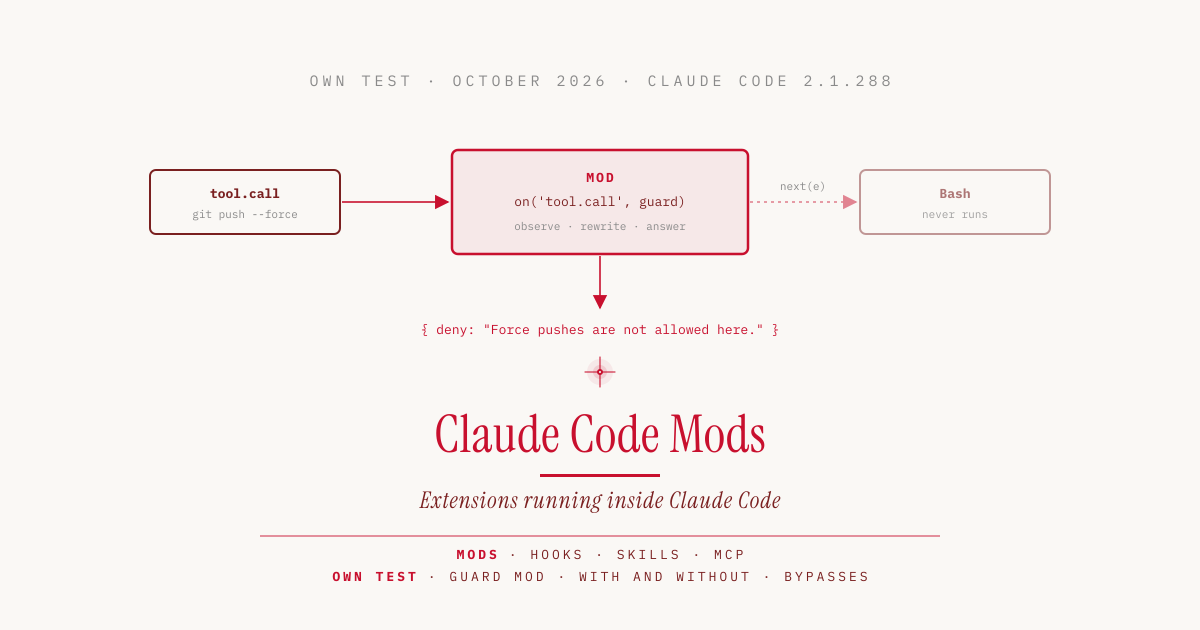
Until now, Claude Code could only be extended from the outside. Hooks start a shell script, skills give Claude instructions, MCP servers provide additional tools. Version 2.1.287 from October 1, 2026 adds mods. A mod is JavaScript or TypeScript that runs inside Claude Code, can see and change every tool call, and draws its own elements in the interface. Parts of Claude Code itself are now built as mods.
I wrote a small guard mod and tested it in real sessions, each time with a control run without the mod.
A Plugin with Its Own Code
Technically, a mod is a plugin whose hooks/hooks.json points to a code file. Three files are enough.
guard-mod/
├── .claude-plugin/
│   └── plugin.json
└── hooks/
    ├── hooks.json
    └── register.js
The hooks.json only contains the reference to the code.
{
  "description": "guard-mod hooks module",
  "modules": ["./register.js"]
}
The code file exports a function called register. Claude Code calls it on load and passes in a function on, which the mod uses to subscribe to events: a tool call, a submitted prompt, the start of a session, or a part of the interface being drawn. There is no build step, Claude Code loads .js and .ts directly.
Every handler receives three arguments. $ is the interface to Claude Code, through which the mod draws, registers commands, reads files, or calls a model. e is the event, such as the shell command Claude wants to run. next passes the event on to the next mod and finally to Claude Code itself.
The mod either observes and calls next(e) unchanged, rewrites the event and calls next with a modified copy, or answers itself and never calls next. In the last case, the tool never runs.
The Difference from Hooks
The official docs distinguish the four kinds of extension as follows.
| Mod | Settings hook | Skill | MCP server | |
|---|---|---|---|---|
| What it is | Functions inside Claude Code’s process | Shell command, HTTP request, or prompt per event | Markdown with instructions | External process with tools |
| What it can change | Tool calls, prompts, commands, turns, and the interface | Whether a tool call or prompt proceeds, arguments, result, context | What Claude knows and does | Which tools Claude has |
| Can it draw | yes | no | no | no |
| Written in | JavaScript, TypeScript | any script | Markdown | any language |
The decisive difference is lifetime. A settings hook starts a script for each event, and the script ends afterwards. A mod is loaded once and runs for the whole session.
So it can count what happened, share values between different events, and show the current state in a panel next to the transcript or in a bar above the input box. It can hold a tool call, ask the user, and only then decide. It can also add slash commands that run its own code immediately, without a model answering.
Anthropic uses this itself. The /diff panel and loading AGENTS.md are built-in mods whose source code lives in the Claude Code repository. Also shipped as a mod is “You should know”, a side agent that reads along during longer tasks and shows notes above the prompt. It is off by default.
A Guard Mod Put to the Test
For the test, I built a mod that intercepts two risky commands and counts tool calls. It always refuses force pushes. For recursive deletes, it asks the user and refuses if nobody answers.
let calls = 0

async function guard($, e, next) {
  if (/\bgit\s+push\b.*(--force|\s-f\b)/.test(e.command)) {
    return { deny: 'Force pushes are not allowed here. Push to a new branch instead.' }
  }
  if (/\brm\s+-[a-zA-Z]*r/.test(e.command)) {
    let answer = 'Refuse'
    try {
      answer = await $.ui.ask('Run this command? ' + e.command, ['Run it', 'Refuse'])
    } catch {
      // claude -p or dismissed: nobody can answer, so keep the safe default
    }
    if (answer !== 'Run it') {
      return { deny: 'The user did not approve this recursive delete. Ask before trying again.' }
    }
  }
  return next(e)
}

export function register(on) {
  on('session.start', async ($, e, next) => {
    await $.command.register({ name: 'tally', description: 'Show how many tool calls Claude has made' })
    return next(e)
  })
  on('tool.call', async ($, e, next) => {
    calls += 1
    return next(e)
  })
  on('tool.call', { tool: 'Bash' }, guard).catch(async ($, e, next) => {
    return { deny: 'The command guard failed, so this command was not run: ' + next.error.kind }
  })
  on('command.run', { command: 'tally' }, async () => {
    return { text: 'Claude has made ' + calls + ' tool calls since this mod loaded' }
  })
}
The .catch handler makes the guard refuse the command if it fails itself, instead of letting it through. Without it, Claude Code would skip a crashed handler and run the command.
Before the first start, claude plugin validate shows what the mod does without running it.
❯ ./register.js hooks: session.start, tool.call, tool.call{tool=Bash}, command.run{command=tally}
❯ ./register.js calls: $.command.register, $.ui.ask

✔ Validation passed
The first line lists the events, the second every call into Claude Code. Network access, process starts, or model calls show up here, because a mod can only reach them through $. On top of that, claude plugin test runs unit tests without a session and without network. My three tests passed in 0.22 seconds.
For the actual test, Claude Code 2.1.288 ran in non-interactive mode claude -p with Haiku 4.5 in a throwaway repository with a local remote. Bash was explicitly allowed, and the prompt confirmed the action so the model would not ask back on its own.
| Command | Without mod | With mod |
|---|---|---|
rm -rf build | executed, directory deleted | refused, directory kept |
git push --force origin main | executed, remote overwritten | refused, remote unchanged |
/tally | n/a | “Claude has made 0 tool calls since this mod loaded” |
Claude receives the deny message as the tool’s result and passes it on. For the recursive delete, the fallback applies, because nobody can answer the question in claude -p, so the mod refuses. In an interactive session, the dialog with “Run it” and “Refuse” appears instead.
Two Bypasses That Get Through
A second set of unit tests checked bypasses. The mod catches git push -f, --force-with-lease, rm -r -f, and rm -fr. Two commands get through.
| Command | Effect | Mod |
|---|---|---|
git push origin +main | force push via the plus before the branch | not detected |
find build -delete | recursive delete without rm | not detected |
This is not a flaw in the mod interface but a property of any guard that matches command text against patterns. The docs say so themselves in one place and call such checks a reminder for Claude. If you really want to prevent force pushes to main, protect the branch on the Git server. A guard mod is an extra brake for the common cases, not a security boundary.
Full User Permissions, No Sandbox
A mod runs without a sandbox, with the user’s permissions. According to the docs, it can read and write files, start programs, make network requests, read environment variables including API keys, see every prompt and every tool call, and approve tool calls before the user is asked. According to the docs, Claude Code’s sandbox does not help either, because it only isolates Claude’s Bash commands, not the processes a mod starts.
There is one limit. A mod cannot restyle the permission prompt, so it cannot change what that prompt shows. For organizations, managed settings can turn off user-installed mods or restrict them to approved ones. For a single session, --safe-mode turns off all installed mods, while the built-in ones keep running.
In practice, that means installing someone else’s mod is like installing an npm package with write access to your whole home directory. Read the code first and run claude plugin validate. A mod that shows a counter does not need network calls.
Letting Claude Write Mods
You don’t need to know the interface by heart to build your own mods. Claude Code ships a built-in plugin-authoring skill that knows which events and methods the installed version supports. You describe the mod you want in the chat, Claude writes it into a session-specific folder under ~/.claude/dev-mods/, and after a confirmation Claude Code loads it via hot reload, that is, into the running session without a restart. On every save, the mod reloads and starts with empty state, so a counter goes back to zero.
Anthropic provides three examples in the playground repository. token-weather shows how full the context window is as a weather forecast above the prompt, blast-radius holds risky commands and shows what they would change, and replay-theater replays the file edits from the last turn.
I did not test panels, bars, or reloading via hot reload myself, because my test ran in non-interactive mode. In the VS Code extension and in claude -p, a mod’s hooks run, but nothing is drawn.
A Mod for Display, Memory, and Questions
A mod is worth it when something should be visible, when something needs to be remembered across the session, or when a tool call should wait for a decision. For a simple block with an existing script, a settings hook is enough, for instructions a skill, for access to other systems an MCP server. Mods and the other kinds are not mutually exclusive, and one plugin can contain all four.
The interface is three days old. The docs point out that events and methods can change between versions and recommend naming the tested version in the mod’s README. Each time a mod loads, Claude Code writes matching TypeScript types into the mod’s folder. In my test, they were under .claude-plugin/types/, with the note “Written by Claude Code 2.1.288” on the first line.
Sources
- Claude Code Docs, Mods overview: code.claude.com/docs/en/plugins/mods
- Claude Code Docs, Create a mod: code.claude.com/docs/en/plugins/mods/create
- Claude Code Docs, React to events: code.claude.com/docs/en/plugins/mods/events
- Addy Osmani, Getting started with Claude Code mods (October 1, 2026): claude.dev/blog
- Claude Code changelog, version 2.1.287: github.com/anthropics/claude-code
- Built-in mods, source code: github.com/anthropics/claude-code/tree/main/mods
- Sample mods: github.com/anthropics/claude-code-playground
- Own test: Claude Code 2.1.288, Haiku 4.5, macOS 27.2, MacBook Pro M3 Max, October 4, 2026