colibri Tested: A 744B Model on a Mac with 64 GB
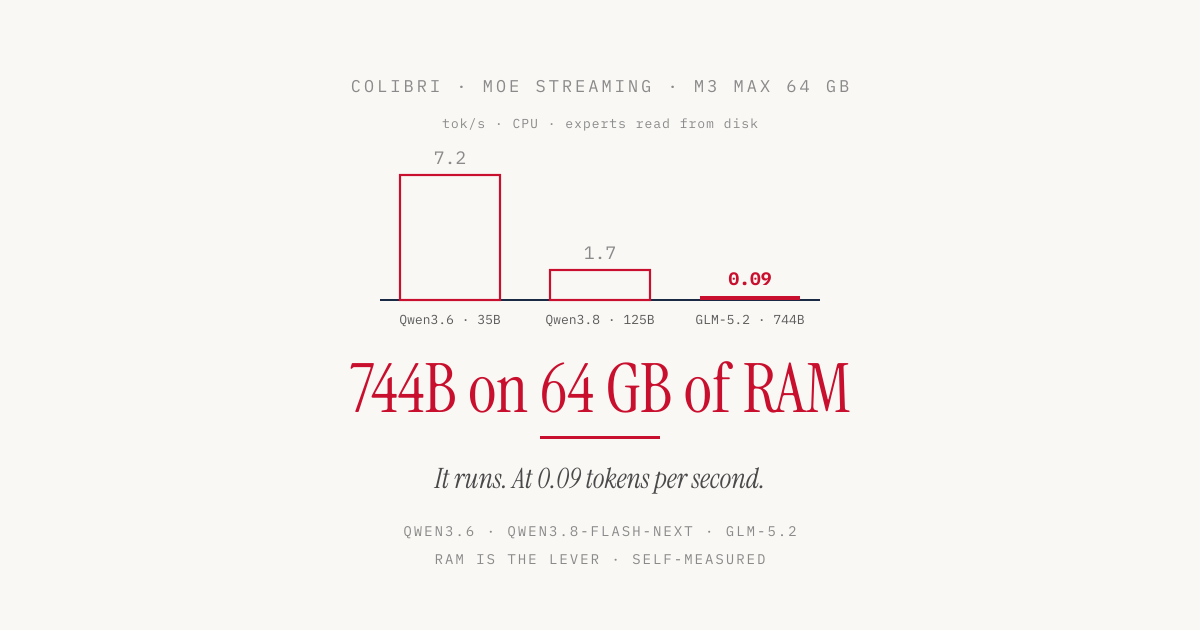
GLM-5.2 has 744 billion parameters. Even in int4 that would be about 370 GB, and the download in colibri format is 429 GB. My MacBook Pro has 64 GB of RAM. colibri, an inference engine in pure C by Vincenzo Fornaro, runs such a model anyway, according to its README even on a laptop with 25 GB of RAM. The trick is simple. In a mixture-of-experts model only a small part of the weights takes part in each token, and colibri loads exactly that part from disk when it is needed.
I wanted to know what that feels like on a MacBook Pro with an M3 Max and 64 GB. The internal SSD was too full, so all models lived on an external USB SSD. I tested three models in three sizes plus a comparison with MLX. For the two smaller models I later made room and measured again from the internal SSD.
Experts on disk, the rest in RAM
A mixture-of-experts model (MoE) splits its feed-forward layers into many small subnetworks, the experts. A router picks a few of them per token and layer. According to the README, GLM-5.2 has 744 billion parameters, uses about 40 billion per token, and only around 11 GB of those change from one token to the next. Those are the routed experts.
colibri keeps the dense part in RAM, meaning attention, embeddings and the shared experts. The routed experts stay on disk and are read as soon as the router asks for them. An LRU cache keeps the most recently used experts per layer in memory and evicts the ones unused the longest first, and a usage history (.coli_usage) pins the most frequent ones permanently. Each model family has its own C file. The engine itself needs nothing but OpenMP, while the launcher and the API server run in Python.
So the model does not have to fit in fast memory. It only has to be placed well. That also defines the bottleneck. Every expert that is not in the cache comes from disk.
Setting it up on the Mac
The project is licensed under Apache 2.0, and I tested version 2.0.0 (commit bf244291). For macOS, the README lists five commands:
xcode-select --install
brew install libomp git python
git clone https://github.com/JustVugg/colibri
cd colibri
./start-here.sh
The setup script checks RAM, free disk space and GPU, recommends a model that fits, builds the engine and downloads the model with progress display and resume. I called it directly to choose the model and the target directory:
c/coli setup --yes --model qwen36-35b \
  --dir "/Volumes/Extreme SSD/models/colibri" --no-start --no-browser
With the Python from python.org, the download failed with CERTIFICATE_VERIFY_FAILED, because that installer does not set up its certificates automatically. Prefixing the call with SSL_CERT_FILE=/etc/ssl/cert.pem fixes it. Do not skip the libomp from the command list, because without it the engine builds single-threaded only.
The setup reports “GPU none found” and builds every engine for the CPU. There is a Metal backend for the Mac’s GPU anyway. According to the Makefile, it can be built into the GLM-5.2 and Qwen3.6 engines among others, but not into the Qwen3.8 engine. When building from source, you have to build with METAL=1 yourself and set COLI_METAL=1 at runtime. The prebuilt macOS release archive already includes the GLM engine with Metal. I only tested Metal with GLM-5.2, and all Qwen measurements ran on the CPU.
Reading eight times slower
Before turning to the models, I used the bundled iobench to measure how fast both drives read random blocks of expert size:
| Drive | Block size | Read speed |
|---|---|---|
| Internal SSD (M3 Max) | 0.75 MB | 6.25 GB/s |
| Internal SSD (M3 Max) | 19 MB | 6.66 GB/s |
| SanDisk Extreme SSD (USB) | 2.64 MB | 0.84 GB/s |
| SanDisk Extreme SSD (USB) | 4.69 MB | 0.86 GB/s |
The internal SSD stays above 6 GB/s for small and large blocks alike, which makes it seven to eight times faster. According to the colibri documentation, such measurements on macOS can be inflated by the file cache, but the gap is large either way. For an engine that waits on the disk at every cache miss, this looked like the most important number of the whole test. How little of it shows up in speed is covered by the cross-check further down. Until then, all numbers are for the USB SSD.
Qwen3.6-35B-A3B: the small entry point
For my Mac, the setup recommended Qwen3.6-35B-A3B with 35 billion parameters, about 3 billion of them active per token. The download is 23 GB, and the model already comes in an int4 format for colibri. The setup planned with 85 experts per layer in the cache and a hit rate of 33 percent. I measured with a small script against the OpenAI-compatible API, using the German prompt “Erkläre in fünf Sätzen, was ein Mixture-of-Experts-Modell ist.” (“Explain in five sentences what a mixture-of-experts model is.”), each answer around 165 tokens.
In the tables, decode means the speed after the first token. The time to the first token includes the prefill, that is, reading in the prompt.
| Configuration | Decode | First token |
|---|---|---|
coli serve without --cap, 8 experts per layer | 2.1 to 2.4 tok/s | 15 to 20 s |
--cap 256, all experts in RAM | 4.6 tok/s (1st run) to 7.3 tok/s (from 3rd run) | about 4 s (warm) |
coli serve does not adopt the setup’s plan. Without --cap, the server starts with 8 of 256 experts per layer, so colibri has to reload constantly. With --cap 256, all 256 experts per layer fit in the cache, and after the third run the speed settles at about 7.2 tokens per second. That matches the 6.0 tok/s the README reports for a Ryzen desktop on the CPU. A coding prompt (a prime-number function in Python, 317 tokens) reached 5.4 tok/s. The answers were correct in both cases.
The launcher does not pass the --ram parameter on to the Qwen engine, so in my runs the cache stayed at 8. Only --cap enlarged it.
The comparison with MLX
In 4 bit, Qwen3.6-35B-A3B fits entirely into the memory of a 64 GB Mac. That allows a direct measurement against MLX with the model mlx-community/Qwen3.6-35B-A3B-4bit, started via mlx_lm.server (mlx-lm 0.32.2).
| Engine | Decode | First token (warm) | Coding prompt |
|---|---|---|---|
| colibri, CPU, all experts in RAM | 7.2 tok/s | about 4 s | 5.4 tok/s |
| MLX 4-bit, GPU | 73.5 to 75.7 tok/s | 0.04 to 0.10 s | 71.8 tok/s |
MLX is ten times faster. Most of that is probably the GPU, which colibri did not use in this test because the setup only builds for the CPU. I did not measure the Qwen engine with Metal. Different kernels and a different quantization format add to it. For a model that fits into RAM, there is little reason to use colibri on the Mac. Anyone who wants MLX even faster will find the measurements in the article on MTPLX.
colibri is built for the other case, for models that do not fit into RAM.
Qwen3.8-Flash-Next: 186 GB from the USB drive
Qwen3.8-Flash-Next has 125 billion parameters, 48 layers with 512 experts each, and activates ten of them per token. The download in FP8 format is 186 GB and no longer fits into 64 GB of RAM. By default the model thinks before it answers, and it uses multi-token prediction, a built-in form of speculative decoding. According to the log, each pass through the model produced 2.1 to 2.4 tokens on average.
I measured again with the script, this time with several short explanatory prompts in German (mixture of experts, SSD versus hard drive, hash table, compiler) and 200 tokens each including the thinking phase. The prompts differed between configurations, so the numbers are only roughly comparable.
| Configuration | Decode | First token |
|---|---|---|
FP8, coli serve without --cap (1 expert per layer), 2 runs | 1.1 to 1.2 tok/s | 48 s (1st run) |
FP8, --cap 96 | 0.8 to 1.1 tok/s | 42 to 50 s |
int4 experts, --cap 170 | 1.6 to 1.8 tok/s | 29 to 40 s |
With --cap 96, FP8 was not faster. I cannot say why, and the two runs without --cap also used a different prompt. 48 layers times 10 experts times 4.7 MB comes to about 2.3 GB per pass through the model, which at 0.85 GB/s means almost three seconds of reading when no expert is in the cache. At 2.1 to 2.4 tokens per pass, that would be 0.8 to 0.9 tok/s. I measured a bit more, presumably because some experts came from the macOS file cache.
The biggest lever was a converter that ships with colibri. convert_qwen38_experts_int4.py writes all experts a second time in int4 format with group size 64 next to the model. On the M3 Max this took 5.5 minutes and uses an extra 63 GiB.
An expert shrinks from 4.69 to 2.64 MiB, so colibri has to read 44 percent less from disk per token. Speed rose by about half, which matches the README (1.91 to 2.56 tok/s in FP8, 3.99 with int4 on a Ryzen with NVMe).
The converter reports a relative error per layer of typically 0.11. The answers stayed correct and in German.
1.7 tokens per second is slow. For an answer with a thinking phase and 500 tokens, you wait five minutes.
GLM-5.2: 744 billion parameters
GLM-5.2 by Z.ai is colibri’s reference model. The download is 429 GB, which at just under 40 MB/s took a little over three hours. On disk the model takes up 400 GiB, of which 11.9 GB of dense weights stay in RAM. coli plan predicted a cache hit rate of 2 percent and named disk misses as the limiting factor.
For Metal, I rebuilt the engine with make colibri METAL=1 and took the settings from the documentation’s Apple Silicon example configuration:
COLI_METAL=1 DIRECT=1 COLI_NO_OMP_TUNE=1 PIPE=1 PIPE_WORKERS=6 MTP=0 \
  c/coli serve --model "/Volumes/Extreme SSD/models/colibri/glm-5.2" \
  --port 8001 --ram 30 --no-think --ctx 4096
Unlike the Qwen engine, the GLM engine honors --ram. According to the log, it lowers the cache to 6 or 7 experts per layer because of the 30 GB limit.
The prompt was “Erkläre in drei Sätzen, was ein Compiler macht.” (“Explain in three sentences what a compiler does.”), with the answer capped at 40 tokens. From the second run on, colibri loaded the prompt’s saved KV cache from disk, so the 14 to 15 seconds to the first token there include no prefill.
| Configuration | First token | Decode | 40 tokens total |
|---|---|---|---|
| CPU, first start | 143 s | 0.09 tok/s | 592 s |
| CPU, second run | 14 s | 0.07 tok/s | 550 s |
| Metal, two runs | 15 s | 0.09 tok/s | 453 and 455 s |
The answer was identical and correct in all four runs: “Ein Compiler ist ein Übersetzungsprogramm, das den Quellcode einer Programmiersprache in eine maschinenlesbare Form umwandelt.” (“A compiler is a translation program that converts the source code of a programming language into a machine-readable form.”) For that sentence and the start of the next one, the Mac needs seven and a half to ten minutes.
The Metal runs save about a fifth of the total time, and decode speed rises from 0.07 to 0.09 tok/s compared with the second CPU run. That is not Metal alone, because along with the Apple configuration I also adopted direct reads, pipelining and disabling MTP. The first CPU run was also at 0.09, so the spread between runs is as large as the effect. More is not possible anyway. Around 11 GB of experts change per token, and with a hit rate close to zero they come almost entirely from the USB drive. At 0.85 GB/s that is about 13 seconds per token, or 0.08 tok/s. That is exactly where the measurements land. Faster compute units help little when they are waiting on the disk.
The figure matches the README, which gives 0.05 to 0.1 tok/s cold for a laptop with 25 GB of RAM. The benchmark table shows what more RAM and a faster drive can do: 1.83 to 2.06 tok/s on an M5 Max with 128 GB, internal SSD and Metal, 1.06 to 1.17 tok/s on an M4 Max with 128 GB and a Gen5 SSD over Thunderbolt 5. In both cases the hit rate was above 60 percent, because these machines keep 40 to 90 GB of experts permanently in RAM.
The internal SSD helps less than expected
After the first measurements, I made room on the internal SSD and copied two models there. Qwen3.6 fit completely. From Qwen3.8 I copied the int4 experts and all files with dense weights, 164 GB in total. The files containing only FP8 experts stayed on the USB drive as symlinks. According to the log, colibri reads the main experts from the int4 folder, and according to the model index all MTP weights sit in copied files. I could not record accesses to the USB drive, so they cannot be ruled out entirely. All settings and prompts were the same as before.
| Measurement | USB SSD | Internal SSD |
|---|---|---|
| Qwen3.6, 8 experts per layer | 2.1 to 2.4 tok/s | 2.8 to 2.9 tok/s |
| Qwen3.6, all experts in RAM (from 3rd run) | 7.1 to 7.3 tok/s | 7.0 to 7.1 tok/s |
Qwen3.8 int4, --cap 170 | 1.6 to 1.8 tok/s (avg. 1.7) | 1.5 to 2.3 tok/s (avg. 2.0) |
| Qwen3.8 int4, first token | 29 to 40 s | 19 to 25 s |
The internal SSD reads seven to eight times faster, but the models only get 18 to 25 percent faster. The difference is most noticeable up to the first token. With all experts in RAM, it disappears entirely after warm-up. For Qwen3.8, the usage history had also collected more entries before the local runs, which may have slightly favored pinning.
So the drive’s read speed is not the only bottleneck. Presumably a large share of accesses already hits the cache, and the rest of the time goes into computation and bookkeeping on the CPU. Qwen3.6 adds some uncertainty. At 22 GB the model fits into the macOS file cache, so after copying, some accesses probably came from RAM. With Qwen3.8 at 164 GB this effect disappears. GLM-5.2, at 400 GiB, did not fit on the internal SSD. Since far more experts change per token there, the drive probably matters more, but I did not measure it.
API and Claude Code
Besides the OpenAI-compatible API, colibri also offers an Anthropic-compatible one at /v1/messages. With Qwen3.6, I tested a tool call, a function get_weather with a city parameter. The response contained a correct tool_use block with Hamburg as the city. With 277 input tokens, this took 66 seconds cold.
The obvious next step is to run Claude Code against colibri via ANTHROPIC_BASE_URL=http://127.0.0.1:8001. With Qwen3.6, all experts in RAM and a 64k context, I stopped the attempt after 20 minutes without a single line of output. The log does not show how large Claude Code’s prompt was. The tool-call test needed 66 seconds for 277 input tokens, cold and including the answer. At that pace, the engine manages only 5,000 to 10,000 tokens of prefill in 20 minutes. As a backend for a coding agent, colibri is therefore not usable on the Mac, and MLX remains the better choice.
Conclusion
A model with 744 billion parameters answers on a laptop with 64 GB of RAM from a USB SSD, correctly and in German. colibri delivers on its promise. The engine was set up after one small fix, the documentation is thorough, and my measurements fit the figures in the README.
On my hardware, though, it is not usable. At 0.09 tokens per second you wait a quarter of an hour for a paragraph. Qwen3.8-Flash-Next at 1.7 tok/s is also too slow for a conversation, and Qwen3.6 ran ten times faster with MLX than with colibri on the CPU.
A faster drive helps less than expected, 18 to 25 percent in my cross-checks. The bigger lever is RAM, because every expert in the cache never has to be read at all. Even with an internal SSD, Metal and 128 GB of RAM, GLM-5.2 reaches 1.8 to 2.1 tok/s according to the benchmark table. That is about twenty times faster than on my machine and still not a conversational pace. What colibri mainly shows is this: a giant model on your own computer fails not for lack of space, but for lack of patience.
Sources
- colibri on GitHub (JustVugg/colibri), README, version 2.0.0
- colibri: Benchmarks
- colibri: Environment variables and Apple Silicon configuration
- colibri: Metal backend
- Qwen3.6-35B-A3B in colibri format (Hugging Face)
- Qwen3.8-Flash-Next-FP8 (Hugging Face)
- GLM-5.2 in colibri format (Hugging Face)
- Qwen3.6-35B-A3B 4-bit for MLX (Hugging Face)