The Emperor's New Clothes: f451 Templates
Unlike in the fairy tale, these new clothes are real. With releases 1.2.5 to 1.2.9, f451 gets a new look within two days, from how tables are built to margin notes next to the text. Underneath, nothing changes. Every page is still an ordinary Markdown file in Git, and no new feature needs a syntax that only f451 understands.
Building Blocks Built Differently
Since 1.2.0, colours, typefaces, and spacing can be set per instance, per space, and per user. That made a Werkbank template look differently coloured from an Editorial one, but not differently built. Version 1.2.5 changes that with twelve switches in a new group called “Bausteine” (building blocks). Each switch defines how an element is built, not how it is coloured.
| Switch | Values | Building block |
|---|---|---|
table-style | open, framed | table open with a rule under the head, or framed |
callout-style | bar, box | callout with a bar on the left, or as a box |
toc-style | numbered-progress, bar | table of contents numbered with a progress line, or hanging on a bar |
code-header | off, on | header strip naming the language on code blocks |
list-marker | dash, disc | bullet of unordered lists |
This is an excerpt, the full list is in the Admin Guide. Technically, a switch creates no CSS variable but a data- attribute on the page’s root element, and only when its value differs from the Editorial default. The five built-in templates set every switch explicitly and so take on the construction of their designs, not just their colours.
With 1.2.5, the look without a theme changed as well. Without a theme of your own, you now see the Editorial design, with open tables, dashes as list markers, and a numbered table of contents. The previous look lives on as the template rotecodefraktion. A single line use: rotecodefraktion in _meta/theme.yaml brings it back.
The Frame Around the Page
Version 1.2.6 applies the same principle to the page frame, with five switches in the group “Rahmen” (frame).
| Switch | Decides |
|---|---|
topbar | whether there is a top bar |
page-head | whether a title row or a toolbar sits above the page |
pane-controls | how the page tree and info rail open and close |
rail-scroll | whether the info rail scrolls along |
status-bar | whether a status bar appears at the bottom |
Unlike the building-block switches, some frame switches change the markup, not just the styling. Without a top bar, brand, space switcher, and search move into the head of the page tree, while language, light and dark mode, and account move into its foot. Here too, the Editorial design is now the default, and the rotecodefraktion template keeps the old frame. A filter field in the page tree came along for all templates.
A Stylesheet of Your Own per Repository
Switches and tokens cover what f451 anticipates. For everything else, 1.2.7 adds a stylesheet of your own, _meta/theme.css, in the instance repository and in every space repository, plus fonts in the WOFF2 web font format under _meta/fonts/. It loads after the operator stylesheet, first the instance’s, then the space’s.
f451 checks the stylesheet on upload and on read, for example for @import, URLs, forbidden constructs, and size. There is no design check. To view a page without the stylesheet, add ?ohne-stylesheet to the address. Because the stylesheet lives in the repository like everything else, permissions, history, and review come from Git here too.
Footnotes in the Margin
Version 1.2.8 completes the redesign. The Editorial design places margin notes next to the text, as in a well-set book. Markdown, however, has no margin notes. The obvious solution would have been a syntax of its own, a block with a keyword that only f451 understands.
Instead, f451 uses ordinary footnotes from GitHub Flavored Markdown (GFM), GitHub’s variant of Markdown.
Kernel updates need a reboot.[^reboot]

[^reboot]: Live patching covers security fixes only, not new features.
A new building-block switch, marginalia, decides where the note appears. With margin, it sits in the margin next to the paragraph that first refers to it. With list, all notes form a styled list at the end of the page. The Editorial, Fokus, and Klar & Warm templates use margin notes, System / Raster, Werkbank, and Rotecodefraktion the list.
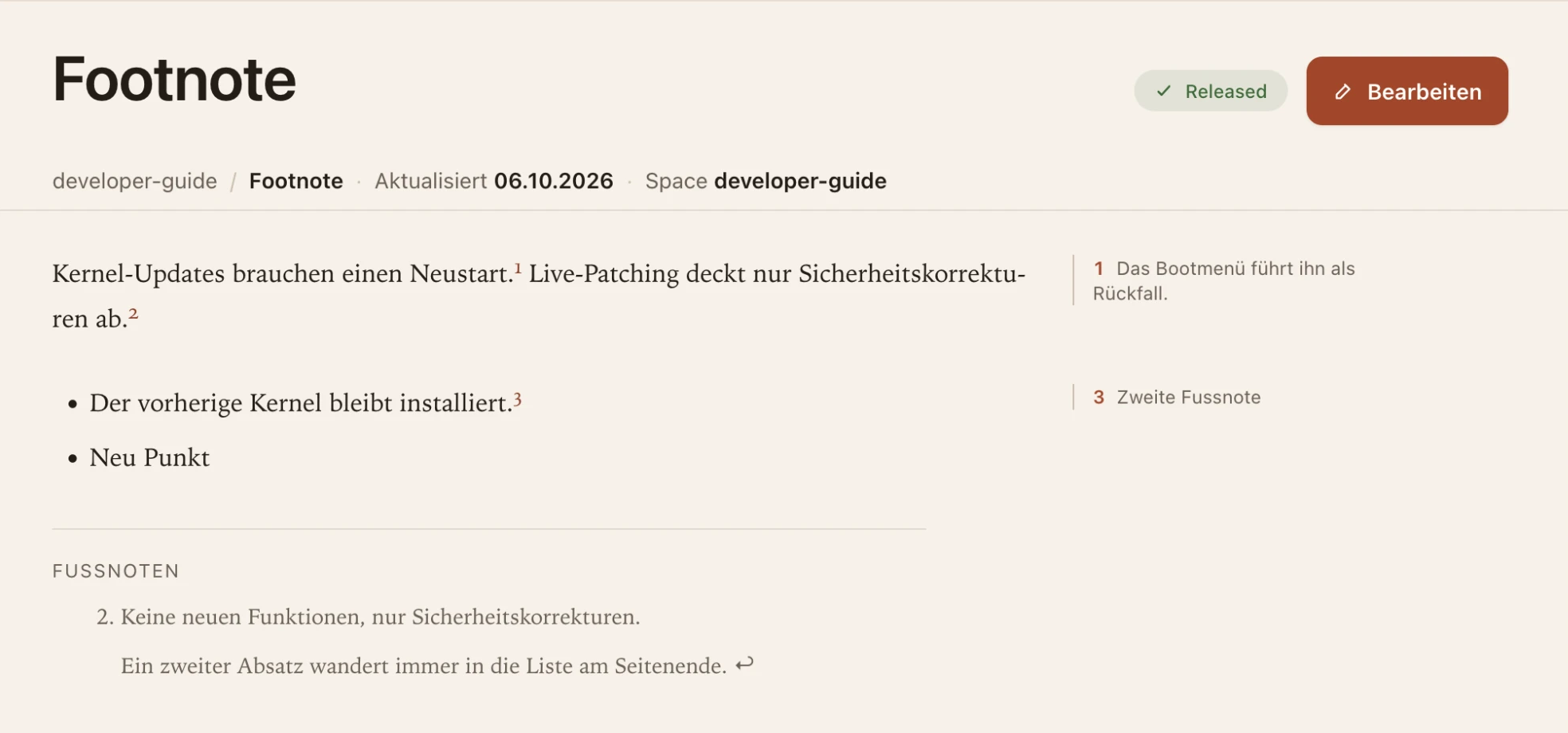
Footnotes 1 and 3 sit in the margin next to the paragraph that refers to them. Footnote 2 has two paragraphs and therefore stays in the list at the end of the page.
The note depends on the width of the reading column, not of the window. If the column is narrower than 32 rem, for example with the page tree and info rail open, or on a phone, the same note appears as a small block below its paragraph. The number in the text jumps to the note, and the number at the note jumps back. Width and gap of the margin note can be set with layout-note-w (10 to 20 rem) and layout-note-gap (0 to 2 rem). Both tokens had been locked since 1.2.5, because margin notes did not exist yet.
Footnotes with more than one paragraph, a list, or a code block do not fit into a narrow margin. They always stay in the list at the end of the page.
No Syntax of Its Own, on Principle
The choice of GFM footnotes follows the principle f451 started with. Pages are CommonMark, the formal standard for Markdown, with the GitHub extensions and no vendor syntax. Every other renderer shows a footnote correctly, Forgejo, GitHub, Obsidian, Hugo, at the end of the page. f451 merely puts it somewhere else when the theme asks for it.
So anyone who later takes a page out of f451 loses nothing. The note moves from the margin to the end, and its content stays. A margin-note syntax of its own would have done the opposite and left files that are littered with incomprehensible blocks outside f451.
Technically, the HTML stored in the index is the same standard HTML for both switch values. The note is moved into the margin only when the page is delivered, because the switch can differ per instance, space, and user.
Working on margin notes surfaced two bugs that existed without them too. The heading of the footnote list was in English, got a numeral with numbered chapters, and lost its ID, so the references pointed nowhere for screen readers. The review diff also showed footnote references as the raw string [^1] and their definitions as empty blocks. Both are fixed in 1.2.8.
Footnotes in the WYSIWYG Editor Too
Up to 1.2.8, the editor opened a page with footnotes in Markdown mode only. Version 1.2.9, released the same evening, closes that gap. In WYSIWYG mode, a reference now appears as a superscript number and a definition as a bordered block where it stands in the source.
A new footnote is created via the “Footnote” item in the slash menu, a button in the toolbar, or ⌘⇧F, Ctrl+Shift+F on Windows and Linux. The reference gets the next free number, an empty definition appears at the end of the page, and the cursor is placed in it. Clicking a reference jumps to its definition, and clicking the definition’s number jumps back to the first reference.
The editor is not quite finished. Word labels such as [^reboot] cannot be renamed in WYSIWYG mode, which still needs Markdown mode. Deleting a reference leaves its definition in the text, and definitions without a reference do not appear on the page.
For existing installations, the same applies to all five releases. There are no breaking changes to the API, MCP tools, page format, or configuration. Only the default look without a theme changed with 1.2.5 and 1.2.6, and use: rotecodefraktion restores the old one.
Everything can be tried in the live demo. Users switch templates for themselves under “Settings, Appearance”, without affecting anyone else.
Sources
- f451 releases 1.2.5 to 1.2.9: github.com/rotecodefraktion/f451/releases
- Changelog: CHANGELOG.md
- User Guide, editor reference, “Footnotes and margin notes”: editor-reference/index.md
- Admin Guide, Theming: theming/index.md
- Developer Guide, Theme templates: theme-templates/index.md
- GitHub Docs, footnotes in Markdown: docs.github.com
- Previous release: f451 1.1, Classifications and Frozen Releases