Observability and Linux Deployment — From swift run to systemd
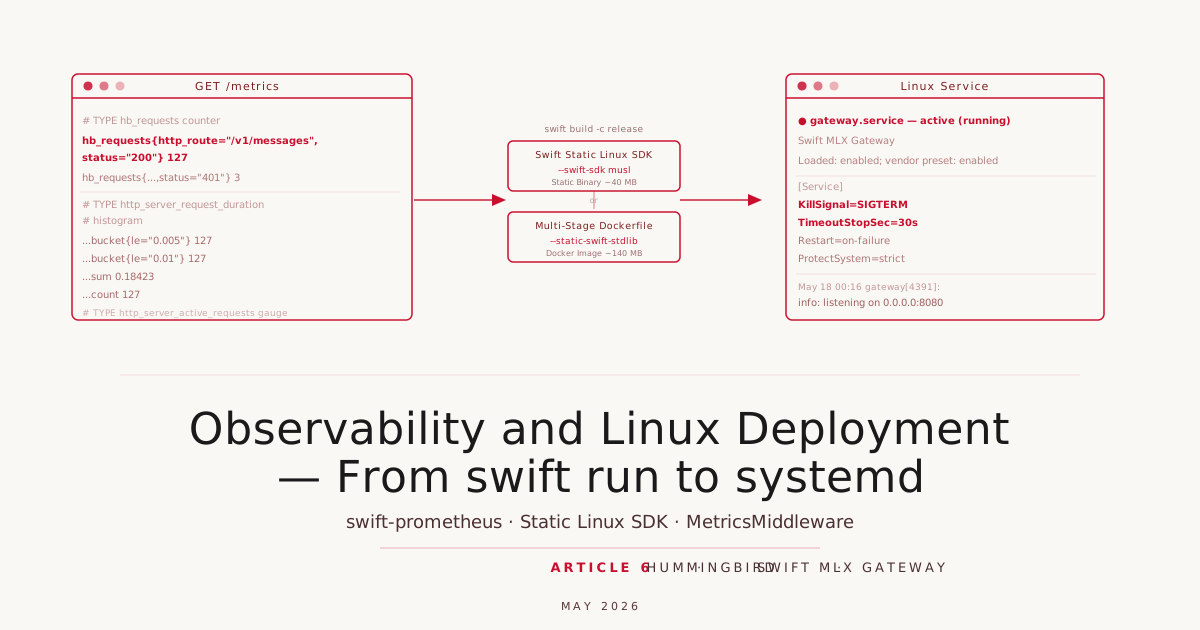
The gateway from Article 5 authenticates, rate-limits, and answers requests. Three things are still missing: visibility into production behavior (is the rate limit firing? how long does a backend call take?), a portable deployment artifact that does not depend on a particular macOS toolchain version, and a clearly defined shutdown path that does not abruptly drop running streams. This article addresses all three — and in the process we discover that Hummingbird has supported graceful shutdown since Article 1 without us ever needing it.
Metrics with swift-metrics and swift-prometheus
Swift-Metrics is an abstraction: library authors create Counter, Gauge, Histogram, and Timer instances without knowing where the data lands. Application code makes that decision at startup. We use swift-prometheus as the backend because Prometheus is the standard tool for server metrics on Linux and its text format is understood by every monitoring stack.
Both packages go into Package.swift as dependencies:
.package(url: "https://github.com/apple/swift-metrics.git", from: "2.4.1"),
.package(url: "https://github.com/swift-server/swift-prometheus.git", from: "2.0.0"),
We bootstrap the backend exactly once. Hummingbird’s Application.runService() runs in an asynchronous service loop, but MetricsSystem.bootstrap() may only be called once per process. A global let with a static initializer is the simplest safeguard:
import Metrics
import Prometheus

private let metricsRegistry: PrometheusCollectorRegistry = {
    let registry = PrometheusCollectorRegistry()
    let factory = PrometheusMetricsFactory(registry: registry)
    MetricsSystem.bootstrap(factory)
    return registry
}()

func buildApplication(_ args: some AppArguments) async throws -> some ApplicationProtocol {
    let registry = metricsRegistry  // runs the initializer exactly here
    ...
    let router = buildRouter(
        mlxClient: mlxClient,
        modelID: args.mlxModel,
        keyPairs: keyPairs,
        limiter: limiter,
        metricsRegistry: registry
    )
    ...
}
We pass the registry explicitly to the router rather than reading it from a global singleton, because the dependency is then visible in the type system. A router that takes a registry as a parameter can be instantiated in tests with a fresh registry without touching any process-level state.
MetricsMiddleware and the /metrics Endpoint
Hummingbird ships MetricsMiddleware() as a built-in. It hooks into request processing, measures duration, and writes four metrics:
hb_requests(Counter) — every completed request, labeled byhttp_route,http_request_method,http_response_status_codehb_request_errors(Counter) — only for requests that end with an error statushttp_server_active_requests(Gauge) — currently in-flight requestshttp_server_request_duration(Histogram) — latency in seconds, with standard buckets up to 10 seconds
The critical detail is http_route: Hummingbird writes the route template, not the raw path. A request to /v1/messages yields http_route="/v1/messages", not /v1/messages?stream=true&model=qwen3. This keeps cardinality bounded — Prometheus would quickly accumulate millions of label combinations from raw paths with query strings.
We add MetricsMiddleware() and TracingMiddleware() outside the /v1 group so that /healthz and /metrics themselves appear in the counters:
router.addMiddleware {
    LogRequestsMiddleware(.info)
    MetricsMiddleware()
    TracingMiddleware()
    GatewayErrorMiddleware()
}
The /metrics endpoint sits at the root, without auth, without rate limiting — Prometheus scrapes over plain HTTP, and access control belongs at the network layer:
router.get("metrics") { _, _ -> Response in
    let body = metricsRegistry.emitToString()
    return Response(
        status: .ok,
        headers: [.contentType: "text/plain; version=0.0.4; charset=utf-8"],
        body: .init(byteBuffer: ByteBuffer(string: body))
    )
}
After a few requests, a scrape looks like this:
# TYPE hb_requests counter
hb_requests{http_route="/v1/models",http_request_method="GET",http_response_status_code="200"} 5
hb_requests{http_route="/v1/models",http_request_method="GET",http_response_status_code="401"} 1
# TYPE http_server_request_duration histogram
http_server_request_duration_bucket{http_route="/v1/models",http_request_method="GET",http_response_status_code="200",le="0.005"} 5
...
http_server_request_duration_sum{http_route="/v1/models",...} 0.001463
http_server_request_duration_count{http_route="/v1/models",...} 5
With a scrape_config entry in prometheus.yml, that is enough to build a Grafana panel showing rate(hb_requests[5m]) broken down by route and status code, or histogram_quantile(0.95, rate(http_server_request_duration_bucket[5m])) as the P95 latency.
Tracing — Middleware without a Backend
TracingMiddleware() opens a span per request according to swift-distributed-tracing. As long as no tracer is activated via InstrumentationSystem.bootstrap(), the span goes to a NoOpTracer — it costs nothing and goes nowhere. The middleware chain has the same shape as it would in a production environment with real OTLP export. Anyone who later connects swift-otel with an OpenTelemetry Collector changes only the bootstrap call in buildApplication; the rest of the code stays untouched.
Graceful Shutdown
Application.runService() registers the app with ServiceLifecycle, as it has since Article 1. What that means in practice: SIGINT or SIGTERM trigger gracefulShutdown() on every registered service. Hummingbird then stops accepting new connections, lets all running requests finish — including the SSE streams from Article 4 — and only then exits cleanly.
You can observe this by running curl -N against a live stream and sending SIGTERM to the process mid-generation: the stream finishes only when the last token returns from mlx_lm.server or the backend request is cancelled, not immediately on signal receipt.
No custom code required. The systemd unit shown below sets KillSignal=SIGTERM and TimeoutStopSec=30s, which matches exactly what ServiceLifecycle expects.
Release Build on macOS
For anyone running the gateway on the same Mac as mlx_lm.server — the most common development and single-machine scenario — no cross-compilation is needed. A native release build is enough:
swift build -c release
.build/release/gateway \
  --host 0.0.0.0 \
  --port 8080 \
  --mlx-url http://localhost:8081 \
  --api-keys "alice:sk-prod-key"
For auto-start at login, macOS provides launchd. A minimal plist at ~/Library/LaunchAgents/de.rotecodefraktion.gateway.plist:
<?xml version="1.0" encoding="UTF-8"?>
<!DOCTYPE plist PUBLIC "-//Apple//DTD PLIST 1.0//EN"
  "http://www.apple.com/DTDs/PropertyList-1.0.dtd">
<plist version="1.0">
<dict>
  <key>Label</key>
  <string>de.rotecodefraktion.gateway</string>
  <key>ProgramArguments</key>
  <array>
    <string>/Users/alice/.build/release/gateway</string>
    <string>--host</string><string>127.0.0.1</string>
    <string>--port</string><string>8080</string>
    <string>--mlx-url</string><string>http://localhost:8081</string>
  </array>
  <key>EnvironmentVariables</key>
  <dict>
    <key>GATEWAY_API_KEYS</key><string>alice:sk-prod-key</string>
  </dict>
  <key>RunAtLoad</key><true/>
  <key>KeepAlive</key><true/>
  <key>StandardOutPath</key>
  <string>/tmp/gateway.log</string>
  <key>StandardErrorPath</key>
  <string>/tmp/gateway.err</string>
</dict>
</plist>
Load it:
launchctl load ~/Library/LaunchAgents/de.rotecodefraktion.gateway.plist
macOS and Linux deployment differ only in the deployment artifact — the binary itself is the same Hummingbird program. The difference lies in how the process is started and supervised: launchd on macOS, systemd on Linux.
Cross-Compiling with the Swift Static Linux SDK
The Swift Static Linux SDK builds against musl libc instead of glibc and links everything statically. The result is a single binary that runs on any x86_64 Linux without glibc version requirements and without an installed Swift runtime. The binary itself is 30-50 MB — familiar to Go developers, a pleasant surprise for anyone coming from Java or Python deployments.
One-time SDK installation (must match the Swift toolchain version; here 6.3.2):
swift sdk install \
  https://download.swift.org/swift-6.3.2-release/static-sdk/swift-6.3.2-RELEASE/swift-6.3.2-RELEASE_static-linux-0.1.0.artifactbundle.tar.gz \
  --checksum 3fd798bef6f4408f1ea5a6f94ce4d4052830c4326ab85ebc04f983f01b3da407
The build itself:
swift build -c release --swift-sdk x86_64-swift-linux-musl
That is all. swift build --show-bin-path reveals the path to the finished binary, which can be copied directly to a Linux host and run:
scp .build/x86_64-swift-linux-musl/release/gateway user@host:/usr/local/bin/gateway
ssh user@host '/usr/local/bin/gateway --host 0.0.0.0 --port 8080 --mlx-url http://mlx-host:8081'
For ARM64 hosts — Raspberry Pi 5, Ampere servers, AWS Graviton — only the triple changes:
TRIPLE=aarch64-swift-linux-musl swift build -c release --swift-sdk "$TRIPLE"
Caveat: Packages that use macOS frameworks (Network.framework, CoreFoundation specifics, AppKit) do not compile under musl. All our dependencies — Hummingbird, swift-crypto, swift-prometheus, swift-metrics — are platform-agnostic and build without modification. This is not accidental: server-side Swift packages in the SSWG ecosystem are designed with Linux compatibility in mind.
Running as a systemd Service
On a Linux host without containers, the service runs most naturally as a systemd unit. The unit file at deploy/gateway.service:
[Unit]
Description=Swift MLX Gateway
After=network-online.target
Wants=network-online.target

[Service]
Type=simple
User=gateway
Group=gateway
ExecStart=/usr/local/bin/gateway \
    --host 0.0.0.0 \
    --port 8080 \
    --mlx-url http://backend.internal:8081 \
    --mlx-model qwen3-8b \
    --api-keys "${GATEWAY_API_KEYS}" \
    --rate-limit-per-minute 120 \
    --rate-limit-burst 20

Restart=on-failure
RestartSec=2s
EnvironmentFile=-/etc/gateway/env

TimeoutStopSec=30s
KillSignal=SIGTERM

NoNewPrivileges=true
ProtectSystem=strict
ProtectHome=true
PrivateTmp=true
PrivateDevices=true

[Install]
WantedBy=multi-user.target
API keys come from /etc/gateway/env (GATEWAY_API_KEYS=alice:sk-prod-key,bob:sk-other-key) rather than being embedded in the unit file, because env files are easier to protect with restrictive permissions. The leading - on EnvironmentFile means the service starts without error even if the file is absent.
Setup:
sudo useradd --system --no-create-home --shell /usr/sbin/nologin gateway
sudo install -m 755 ./gateway /usr/local/bin/gateway
sudo install -m 644 deploy/gateway.service /etc/systemd/system/
sudo mkdir -p /etc/gateway
printf 'GATEWAY_API_KEYS=alice:sk-prod-key\n' | sudo tee /etc/gateway/env
sudo chmod 600 /etc/gateway/env
sudo systemctl daemon-reload
sudo systemctl enable --now gateway
systemctl status gateway shows request logs and rate-limit warnings like any other systemd service. journalctl -fu gateway streams logs live.
Alternative: Multi-Stage Dockerfile
If containers are the deployment target, a multi-stage build works well. The build stage uses the official Swift Docker image; the runtime stage uses only Ubuntu Noble without any Swift toolchain:
FROM swift:6.3-noble AS build
WORKDIR /build
COPY Package.swift Package.resolved ./
RUN swift package resolve
COPY Sources Sources
RUN swift build -c release --static-swift-stdlib
WORKDIR /staging
RUN cp "$(swift build --package-path /build -c release --show-bin-path)/gateway" ./
RUN cp /usr/libexec/swift/linux/swift-backtrace-static ./

FROM ubuntu:noble
RUN apt-get -q update \
    && apt-get -q install -y --no-install-recommends ca-certificates tzdata \
    && rm -rf /var/lib/apt/lists/*

RUN useradd --user-group --create-home --system --home-dir /app gateway
WORKDIR /app
COPY --from=build --chown=gateway:gateway /staging /app

ENV SWIFT_BACKTRACE=enable=yes,sanitize=yes,threads=all,images=all,interactive=no,swift-backtrace=./swift-backtrace-static

USER gateway:gateway
EXPOSE 8080
ENTRYPOINT ["./gateway"]
CMD ["--host", "0.0.0.0", "--port", "8080"]
Package.swift and Package.resolved are copied before the source files so that swift package resolve forms its own layer, which gets reused across pure source-code changes. This saves several minutes per iteration during the write-and-test cycle.
--static-swift-stdlib avoids Swift runtime .so dependencies in the runtime stage — the final image requires no Swift runtime libraries. Final image size lands around 140 MB; using gcr.io/distroless/cc-debian12 as the runtime base instead of Ubuntu Noble brings it down to roughly 60 MB.
Container startup:
docker build -t swift-mlx-gateway .
docker run -p 8080:8080 \
  -e GATEWAY_API_KEYS="alice:sk-prod-key" \
  swift-mlx-gateway
Static SDK vs. Docker: Both approaches produce a working binary on Linux. The Static SDK binary is smaller (~40 MB versus ~140 MB image) and requires no container runtime. The Docker image is more portable across deployment environments (Kubernetes, Fly.io, ECS) and carries the familiar abstraction layer. For a single Linux host without an existing container setup, the Static SDK is the simpler path; for anything running on an orchestrator, the Docker build is the natural choice.
Streaming and Backend Stay Untouched
All changes in this article are additive. Auth, rate limiting, streaming, the Anthropic and OpenAI protocols from earlier articles all run unchanged through the extended middleware chain. MetricsMiddleware and TracingMiddleware measure silently alongside without altering any request path. mlx_lm.server remains the macOS backend; the gateway runs as a Linux service and talks to the model over the network. For Linux setups, Ollama remains the alternative — the gateway only needs --mlx-url http://localhost:11434.
Next: Benchmarks and Hugo Companion
Article 7 will run benchmarks — Hummingbird against FastAPI and Node with the same gateway pattern — to see what Swift on the server actually delivers when raw throughput is what counts.
