Four Macs as a Cluster: Distributed Inference and Training with MLX
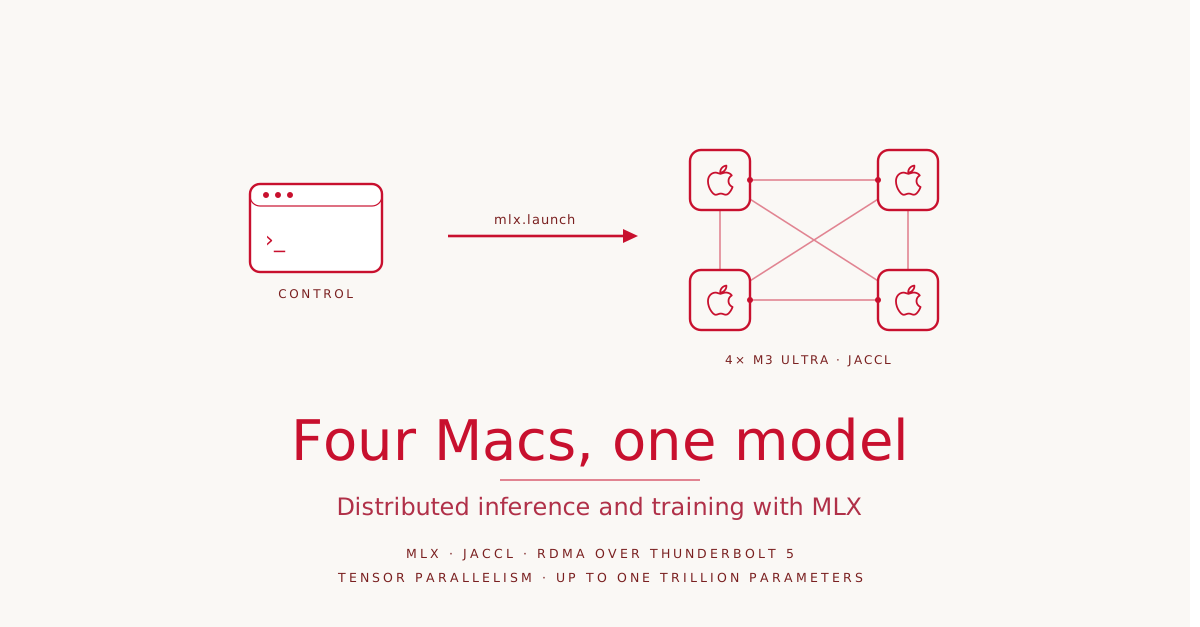
Local language models keep getting larger, and at some point the memory of a single machine is no longer enough. At WWDC26, Apple’s MLX team showed how to push that limit: by connecting several Macs into a cluster and distributing a model across them. The demo runs on four M3 Ultras, executes a model with one trillion parameters locally, and accelerates inference to nearly three times that of a single device. What is remarkable is not the raw performance, but how little the code changes.
The Stack: From RDMA to MLX
Distributed workloads on Apple Silicon rest on three layers. At the bottom sits the physical connection. For two machines to exchange data quickly, they need an interconnect and a transport protocol that pushes bytes from one machine’s memory into another’s. Starting with macOS 26.2, Apple supports Remote Direct Memory Access, RDMA for short, over Thunderbolt 5. RDMA moves data directly between the memories of two machines, bypassing most of the overhead of the CPU and operating system. That yields exactly the combination distributed workloads demand: high bandwidth at low latency.
On its own, however, RDMA only provides raw data transfer between two machines. A distributed program needs something higher level, a communication backend with primitives for sending data between individual machines and for combining results across the whole group. These two operations are the building blocks of distributed training and inference.
This is where JACCL comes in. JACCL is an open-source collective communication library from Apple. The name stands for “Jack and Angelos’ Collective Communication Library” and is a play on NVIDIA’s NCCL. The library uses RDMA over Thunderbolt and provides primitives for collective communication, without you having to manage the low-level transport yourself. JACCL is not limited to machine learning. Any distributed workload on Apple Silicon can build on it, even outside ML.
The top layer is the ML framework that uses this backend for distributed inference and training, and that is MLX. MLX is Apple’s open-source ML library for Apple Silicon. It uses JACCL for low-latency communication and provides the tools to orchestrate distributed jobs across the cluster. If you are new to MLX, the WWDC25 session “Get started with MLX for Apple silicon” is the place to begin.
The Cluster: Wiring Four M3 Ultras
The three layers become a cluster, a group of machines working together on the same task. In the demo these are four M3 Ultras, connected with Thunderbolt 5 cables. There are different ways to wire them, and the topology directly affects communication time.
That time has two components. Latency is the fixed cost paid per communication operation, independent of the amount of data. Transfer time is the cost of moving the data through the link; it grows with message size and depends on the bandwidth of the link. For small messages latency dominates, for large ones transfer time does. Depending on whether communication is latency-bound or bandwidth-bound, a different topology fits better.
JACCL supports two of them. In a full mesh, every machine connects directly to every other, so any group communication has the lowest possible latency. In a ring, each node connects only to its two neighbors. Communication between non-adjacent nodes has to travel through intermediate machines, which increases latency. In return, the ring needs fewer cables and ports per machine and scales more easily to more nodes. Because each node has only two connections, the remaining Thunderbolt ports can be used to run two or three cables per neighbor. That increases bandwidth per link and lowers transfer time.
| Topology | Latency | Bandwidth per link | Wiring |
|---|---|---|---|
| Mesh | lowest | standard | every machine to every other, many ports |
| Ring | higher for distant nodes | high (multiple cables per neighbor) | neighbors only, scales more easily |
The practical trick: when the machines are physically wired as a mesh, JACCL can route each communication over either the mesh or the ring path. The library automatically picks the best option depending on message size and operation, mesh when latency matters, ring when bandwidth matters. That is exactly why the demo connects all four M3 Ultras into a full mesh.
After that, RDMA has to be enabled on every machine. This happens in System Settings: search for “RDMA”, click “Enable RDMA over Thunderbolt”, enable it, and reboot.
Launching Jobs with mlx.launch
Distributed programs have to be started on all nodes. From a machine with SSH access to the cluster, such as a MacBook, you connect to each Mac, start the program, and from that point on all machines communicate directly over the Thunderbolt links. MLX provides a launch helper that does exactly this.
mlx.launch --hostfile "m3-ultra-jaccl.json" -- \
    /remote/path/to/mlx_lm.chat --model "Qwen/Qwen3.6-27B" --max-tokens 2048
mlx.launch takes the program to run and a JSON hostfile describing the cluster. From there the helper SSHes into each node and starts the executable on every machine. The hostfile is a JSON array with one entry per node. Each entry has three fields: ssh is the hostname mlx.launch uses to reach the machine, ips is the machine’s IP on the local network that JACCL uses for initial coordination, and rdma is the list of RDMA device names for each Thunderbolt connection.
You can write the hostfile by hand, but MLX ships a helper script, mlx.distributed_config, that generates it:
mlx.distributed_config \
    --hosts m3-ultra-0,m3-ultra-1,m3-ultra-2,m3-ultra-3 \
    --output "m3-ultra-jaccl.json" \
    --env MLX_METAL_FAST_SYNCH=1 \
    --auto-setup \
    --backend jaccl
--env lets you embed environment variables that get set on every node at launch. MLX_METAL_FAST_SYNCH=1 enables faster GPU-to-CPU synchronization and matters for distributed tasks because computation runs on the GPU while communication runs on the CPU. The --backend argument decides whether mesh or ring is used: jaccl for the mesh, jaccl-ring for the ring. With --auto-setup the script configures the Thunderbolt network itself. It first checks that all hosts are reachable over SSH, then probes the Thunderbolt ports to map the physical topology, disables the Thunderbolt Bridge on all machines, sets up each link for RDMA, and finally writes the hostfile. Without --auto-setup the script only prints the configuration commands so you can review and run them yourself.
Distributed Inference: Qwen3.6 Three Times Faster, Kimi K2.6 at All
With the cluster ready, the interesting part begins. The easiest entry point is the command line and MLX LM, an open-source Python package built on MLX with CLI tools and a Python API for local language models.
On a single machine you chat with a model through mlx_lm.chat, specifying the model and the maximum number of tokens. For the cluster the same command is wrapped in mlx.launch, with --hostfile pointing at the cluster configuration and the identical mlx_lm.chat call after the double dash, but using the remote path to the executable on each node. MLX LM shards the model and coordinates the distributed inference itself. The prerequisite is that all required libraries are installed on every Mac and the executables are reachable on all machines.
Side by side, Qwen/Qwen3.6-27B, a model with 27 billion parameters, runs on a single M3 Ultra on the left and distributed across four machines on the right. Both get the same prompt. According to Apple, the cluster generates tokens at nearly three times the rate of the single device. The exact speedup depends on the size and architecture of the model.
Speed, though, is not the only reason to go distributed. Sometimes a model is simply too large for one machine. Kimi-K2.6 has one trillion parameters. Even with 8-bit quantization, the weights alone occupy around one terabyte of memory. That does not fit on a single M3 Ultra, but it does across four. With a single command such a model runs locally across the Macs and answers queries.
Pipeline and Tensor Parallelism
How are weights and computation split across the machines? MLX and MLX LM know two approaches.
Pipeline parallelism splits the model by depth. Each machine holds a group of layers, and data moves sequentially through the machines. It does not speed up inference, because each token still passes through one layer group after another. The benefit is simple communication: machines exchange activations only at the boundaries between layer groups.
Tensor parallelism splits the model by width. Each machine holds part of every layer, and all machines process the same token at once. It speeds up inference through parallelized per-layer computation. The cost is far more frequent communication, at every layer and for every token. Low latency becomes critical, and that is exactly why the mesh topology matters here, because every machine reaches every other in a single hop.
| Strategy | Split | Inference speedup | Communication |
|---|---|---|---|
| Pipeline | by depth (layer groups) | none | rare, only at group boundaries |
| Tensor | by width (part of each layer) | yes, parallel per layer | frequent, per layer and token |
Tensor parallelism is the default strategy in MLX LM. You enable pipeline parallelism by appending --pipeline to the command, though not every model supports it. Chatting with the trillion-parameter Kimi passes no --pipeline, so it runs tensor parallelism.
Distributed Fine-Tuning via Data Parallelism
With MLX and MLX LM you can distribute not just inference but fine-tuning too, fast, efficient, and fully private, because the data never leaves your own machines.
When training on a single machine, the training data is split into batches. For each batch the Mac computes gradients and updates the weights, and this repeats over one or more passes through the dataset until the model reaches the desired quality. The faster the data is processed, the sooner fine-tuning finishes.
Multiple machines speed this up on a simple principle. The model is replicated on every Mac. Each machine receives a different batch and computes its gradients locally. The gradients are then averaged, so the update draws on information from all batches. This is called data-parallel training, because the model is replicated while the data is processed in parallel across machines. With N machines the data can be processed up to N times faster.
The only difference from a single device is again launching through mlx.launch, this time with the path to mlx_lm.lora on the remote machines. MLX LM handles the data sharding and the command is nearly identical. Only --batch-size is multiplied by the number of devices, so each machine still processes the same number of samples per step as before.
In the demo, Qwen/Qwen3.5-9B, a model with 9 billion parameters, is fine-tuned once on a single device and once on the cluster. According to Apple, the single M3 Ultra processes around 180 tokens per second, the cluster around 600, which amounts to a more than threefold speedup for fine-tuning.
Four Ways into the Code: CLI, Python, Swift, C++
All examples so far ran through the command line within MLX LM. Underneath sits fine-grained control over sharding and distributed operations, available through flexible APIs in Python, Swift, and C++. This lets you experiment with models in Python and C++ or embed them directly into an app with Swift.
Distributed inference with the Python API and MLX LM takes three steps: first initialize the distributed group for communication, then define the kind of parallelism, for example tensor parallelism, and finally shard the model with sharded_load. After that you use the model exactly as on a single device, and MLX LM takes care of the distributed communication.
For more control, you reach for the low-level primitives of MLX itself. A simple linear layer can be sharded with shard_linear using tensor parallelism, and basic distributed operations such as all reduce are directly available. In Python, Swift, or C++ you initialize the distributed group through JACCL and then run a collective sum across all Macs with the matching MLX primitives.
Because JACCL is available on its own, it can also be used for non-ML workloads. It can be built without MLX and offers a C++ API with communication primitives, with which you run the same collective sum directly through JACCL instead of through MLX.
Putting It in Context
The session walks through the whole stack that makes distributed training and inference on Apple Silicon possible, from RDMA over Thunderbolt up to MLX and MLX LM. The consistent finding: moving from a single device to a cluster requires minimal changes to code written for a single device. The same mlx_lm.chat call, merely wrapped in mlx.launch, distributes a 27-billion model across four machines. The same mlx_lm.lora call scales the fine-tuning.
In practice this means two things. First, you can run models locally that fit on no single machine, up to one trillion parameters. Second, existing work, inference as well as fine-tuning, speeds up by roughly threefold with four devices. Both happen on hardware sitting on your own desk, without data ever leaving your machines.
At the time of the WWDC demo in June 2026, the cost calculation looked tempting. A Mac Studio with M3 Ultra starts in Germany at around 4,800 euros in its base configuration with 96 GB of unified memory and a 1 TB SSD (Apple DE, June 2026). Four of them come to about 19,000 euros at the base, and more in the mid five figures with the memory needed for large models. Against this stands an NVIDIA system with comparable memory: a DGX H200 with eight H200 cards offers around 1.1 TB of HBM3e combined and costs around 393,000 euros from a German retailer, including three years of support (smicro.eu, June 2026). Single H200 cards with 141 GB run around 30,000 to 40,000 US dollars (IntuitionLabs, 2026).
| Setup (as of WWDC demo) | Total memory | Indicative price (DE, June 2026) |
|---|---|---|
| 4× Mac Studio M3 Ultra | up to ~1 TB unified memory | from ~19,000 euros (base), more with large RAM |
| NVIDIA DGX H200 (8× H200) | ~1.1 TB HBM3e | ~393,000 euros |
The comparison is not one of performance. NVIDIA’s HBM3e delivers many times the memory bandwidth of unified memory, and a DGX system is built for throughput and multi-user operation, not for a desk. It is only about the ability to hold a model of this size locally at all. On that point, an acquisition in the low five figures stands against one in the low six figures, roughly an order of magnitude apart.
This calculation, however, is already out of date by the time this article appears, for two reasons. First, the configuration used in the demo no longer exists. Apple cut the high memory tiers of the M3 Ultra over the course of 2026, first the 512 GB option in March, then 128 GB and 256 GB in May. Since then the M3 Ultra can only be ordered with 96 GB of unified memory (MacRumors, 9to5Mac, May 2026). That removes exactly the memory the four machines in Apple’s example had to hold a trillion-parameter model. Second, even the remaining configurations are hard to get quickly. For the high-RAM models still orderable, Apple quotes delivery times of many weeks to months, with in-store pickup in some cases only from September.
The cause is a global shortage of memory chips, driven by the same AI demand that has companies building RAM-heavy servers for exactly such models. Apple expects relief no earlier than the third quarter of 2026 (Apple forecast, 2026). The hardware that could save you the expensive GPU servers has become scarce because the same demand is tying up the memory chips.
The mechanism remains untouched by this. RDMA over Thunderbolt, JACCL, and MLX turn several Macs into a cluster with minimal changes to the code, one that holds a model locally that fits on no single machine and speeds up inference as well as fine-tuning by roughly threefold. What is missing in 2026 is not the technology, but the memory at yesterday’s price.
