n8n in Overview — Architecture, Item Model, and Demo Repo
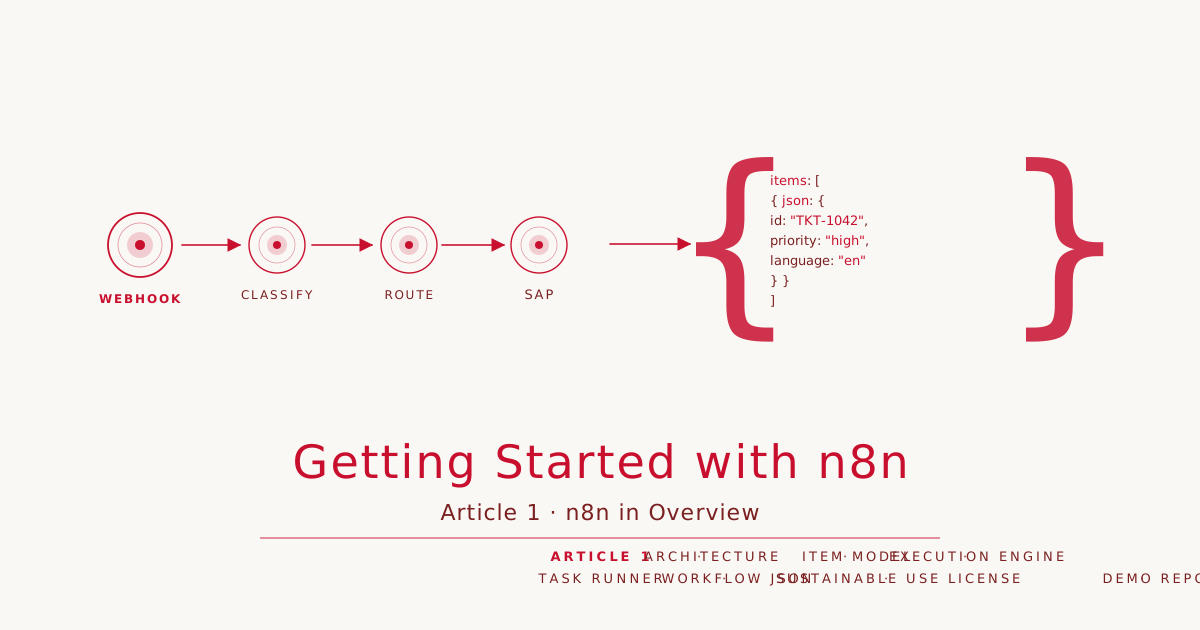
Article 1 · Series: Getting Started with n8n
The prologue covered the why: SAP investment, Mercedes rollout, sovereignty as a selection criterion. This article begins the how. What runs where when a workflow executes? What does it mean in practice that data flows as items? Where does n8n sit in the integration landscape, and what does the Sustainable Use License mean for productive self-hosters? At the end, the demo repo on Codeberg is initialized, tag v0.1.
Editor, Engine, Task Runner
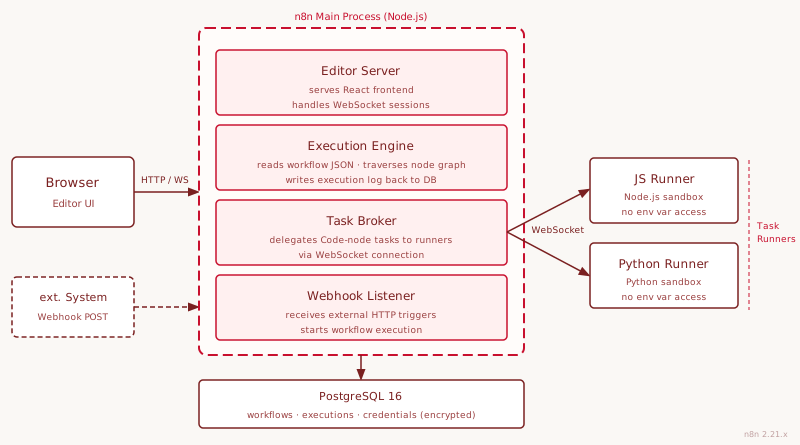
n8n is a Node.js application. A docker compose up starts a single process that handles multiple roles simultaneously.
The editor is a React frontend that the n8n process serves as static files. Opening a browser shows a canvas with nodes and connections. Every interaction there communicates with the running n8n process via HTTP and WebSocket. The editor is not a standalone system but an interface for the engine.
The execution engine takes over once a workflow is triggered. It reads the workflow JSON from the database, traverses the node graph, coordinates data flow between nodes, and writes the execution history back to the database. The entire workflow model, including nodes, connections, parameters, and credential references, lives as JSON in Postgres. There are no workflow configuration files.
Task runners have been a distinct architectural component since n8n 2.0. When a Code node executes JavaScript or Python, this does not happen directly in the main process but in an isolated runner. The main process contains a task broker that delegates tasks to runner processes via WebSocket. In the default configuration, n8n starts the runner as a child process (internal mode). In production setups with multiple parallel executions, the runner can run as a sidecar container (external mode). The isolation has concrete consequences: Code nodes have no access to the host process’s environment variables.
Workflows live as JSON in Postgres. This has a practical consequence: they are exportable, versionable, and traceable in Git. Opening a workflow JSON reveals JSON objects for each node with parameters and canvas positions. Credential contents are encrypted in a separate table; the workflow JSON contains only references.
Since n8n 2.0, workflows have draft and publish states. A workflow can be modified without touching the active live version. Only after the publish step does it go live. Article 7 revisits this mechanism in the context of error handling and versioning.
The n8n version this series builds on is 2.21.x (current: 2.21.4, May 2026).
Workflow, Nodes, Trigger, Connections
Four terms form the core vocabulary:
A workflow is a named, versioned processing unit. It has exactly one starting point, consists of any number of nodes, and ends either implicitly at the last node or explicitly at a Response node. The entire workflow lives as JSON in the database and can be exported at any time.
A node is the fundamental unit of processing. Every node has inputs, outputs, and parameters. The main node categories:
| Category | Examples |
|---|---|
| Integration nodes | GitHub, Slack, Postgres, SAP via HTTP |
| Generic nodes | HTTP Request, Webhook, Code |
| Transformation nodes | Set, Switch, Merge, Loop Over Items |
| AI nodes | AI Agent, Chat Model, Memory, Tool |
A trigger is the starting node of a workflow. Every workflow has exactly one. Possible triggers: webhook (incoming HTTP request), schedule (cron), database event, manual call, or chat message. The trigger determines when the workflow starts and delivers the first items into the flow.
Connections link the output of one node to the input of the next. A node can have multiple outputs (a Switch node branches by condition) and receive multiple inputs (a Merge node waits for multiple paths).
The Item Array
This is the conceptual peculiarity of n8n that beginners reliably stumble over.
Every node receives an array of items and outputs an array of items. Not a single JSON object. An array.
An item has this structure:
{
  "json": {
    "id": "TKT-1042",
    "subject": "SAP login fails after password reset",
    "priority": "high",
    "language": "en"
  },
  "binary": {},
  "pairedItem": { "item": 0 }
}
When a Webhook trigger receives an incoming HTTP request, it produces an array containing one item. The request body goes into json. Binary data (file uploads) goes into binary. pairedItem tracks which input item the output item was derived from.
When an HTTP Request node fetches a list of ten tickets from an API, the node produces ten items in its output. The next node, say a Set node to enrich the tickets, automatically processes all ten. No explicit loop needed. That is the intent: nodes operate on collections.
The typical failure mode: in a Code node, a developer writes return items[0].json. This works for the first item and breaks the workflow for all subsequent ones. The correct approach:
return items.map(item => ({
  json: {
    ...item.json,
    category: "sap-basis"
  }
}));
For expressions in {{ }}: n8n automatically accesses the current item. {{ $json.subject }} returns the subject value of the current item. This is not a contradiction to the array model but a shorthand that the editor evaluates for each passing item.
In the Integration Landscape
The prologue placed n8n in four categories. For this series, two boundaries are practically relevant.
Upper boundary: Cloud Integration Suite. Where B2B protocols (AS2, EDIFACT), multi-tenant environments, message-level compliance audit logs, or transactional recovery with status tracking are required, n8n is the wrong tool. SAP CPI or Edge Integration Cell handle those cases. Article 9 covers the decision criteria in detail.
Lower boundary: direct code. Whoever needs complex algorithms, custom libraries, or specific data processing reaches for Python, Swift, or TypeScript directly. The Code node in n8n has constraints: no access to the local filesystem, no arbitrary npm packages, no network access outside n8n credentials.
Between these two boundaries lies a large territory: event-driven data flows between systems, AI agent orchestration, automations that are too complex for SaaS tools and too operational for pure code projects. That is where n8n belongs.
Sustainable Use License in Practice
n8n uses the Sustainable Use License (since 2022, successor to Apache 2.0 with Commons Clause). The term “fair-code” is n8n’s own description of the model, not an official license type.
For productive self-hosters, the relevant statement is brief:
| Use case | Allowed |
|---|---|
| Self-hosting for internal business use | Yes, free |
| Building and running workflows internally | Yes |
| Modifying n8n code and deploying internally | Yes |
| Distributing n8n as part of a commercial SaaS product | No (Enterprise License required) |
| Using n8n code in a competing product | No |
The restriction applies exclusively to the n8n server code itself. The workflows you build, the data flowing through n8n, and the services you connect are not affected.
The Community Edition is sufficient for all articles in this series. Enterprise features (SSO, external secret management, RBAC with custom roles) are not covered here.
The Demo Repo
The Codeberg repo rotecodefraktion/n8n-einstieg accompanies the series. Each article corresponds to a tag. Article 1 ends with tag v0.1.
git clone https://codeberg.org/rotecodefraktion/n8n-einstieg.git
cd n8n-einstieg
git checkout v0.1
Tag v0.1 contains:
README.mdwith series context, tag overviewv0.1tov1.0, and setup prerequisitesCLAUDE.mdwith repo conventions (language, branch schema, commit style, test requirements).gitignorefor Python, Docker, n8n volumes, and IDE filesLICENSE(MIT; the demo repo itself is MIT-licensed; n8n falls under the Sustainable Use License)
The actual stack arrives in Article 2.
Next Article: Self-Hosting with Docker Compose
Article 2 covers the complete self-hosting setup: n8n with PostgreSQL as the database, Caddy as a reverse proxy with automatic HTTPS, all production-relevant environment variables, and a first smoke test routine. The main reason for Postgres over SQLite is not performance but avoided migration: starting with SQLite and switching later costs time. Article 2 sets up Postgres from the start, tag v0.2.
→ Prologue: Why n8n, Why Now → Article 2: Self-Hosting with Docker Compose (coming soon)
