Nodes, Expressions, and the First Workflow Without AI
Article 4 · Series: Getting Started with n8n
This is the first article in the series where a workflow actually runs. We receive an HTTP POST, process the body, classify a ticket, and return a JSON response. The workflow uses three core node types: Set, Code, and Switch. Understanding what each can do — and what it can’t — is the primary learning goal.
The secondary goal: by the end of this article, a rule-based classifier is running against the pinned dataset from Article 3, and its structural limits are explicitly documented — not as a design flaw, but as the deliberate argument for switching to AI classification in Article 6.
The code for this article is on Codeberg, tag v0.4: codeberg.org/rotecodefraktion/n8n-einstieg.
The Item Model in Motion
Article 1 introduced the item model theoretically: n8n passes data between nodes as arrays of items. Each item is a JSON object. A workflow processes each item individually or as a batch, depending on node configuration.
In practice, this distinction matters at two specific places.
In Expressions — anything between {{ }} — the variable $json refers to the current item’s JSON object. This works as expected:
{{ $json.body.subject }}
evaluates to the value at body.subject in the current item.
In the Code Node, $json is not available. The runtime environment inside the Code Node is JavaScript with its own scope — not the Expression evaluator. The equivalent access is:
const itemData = $input.item.json;
The Monaco editor in n8n 2.21.4 underlines $json in red inside the Code Node. During the build of this workflow, I dismissed that warning twice as a TypeScript type-check issue. It wasn’t. The runtime error was:
json is not defined [line 55]
The linter was right.
The documentation is consistent on this point: $json is described for Expressions; $input.item.json is listed explicitly in the Code Node API spec. The editor underline maps directly to this boundary.
Rule for this workflow: In Expressions: $json.field. In the Code Node body: $input.item.json.field. No exceptions.
Expressions — Syntax and Pitfalls
Expressions in n8n follow template literal syntax: {{ expression }}. The Expression engine evaluates JavaScript-like code inside the double curly braces.
Three failure modes come up regularly.
Undefined fields. If $json.body.language doesn’t exist, the expression evaluates to undefined, not to an empty string. A downstream node expecting a string receives undefined and may behave unexpectedly. Defensive: {{ $json.body.language ?? 'de' }}.
Type mismatches. $json.body.sla_hours may arrive as the string "8" rather than the number 8 if the upstream node set it as a Fixed String. Math operations then fail silently or produce NaN. The Set Node has separate type options for strings and numbers in Fixed mode — picking the wrong one is easy to miss.
Fixed vs. Expression in the Set Node. The Set Node has a per-field toggle between Fixed (literal value) and Expression (evaluated {{ }}). In n8n 2.21.4, this toggle only appears on hover and doesn’t persist visually after moving the cursor. The reliable way to set a field as Expression: drag it from the INPUT panel on the left directly into the target field. This only works after the predecessor node has executed at least once and produced data.
Sequence for the Normalize node in this workflow:
- Create the Webhook node, click “Listen for Test Event”
- Send a test POST via curl
- Open the Normalize node — the INPUT panel now shows the real webhook payload
- Drag fields from INPUT into the Set Node fields to set them as Expressions
Without a prior test execution, the INPUT panel is empty and drag-and-drop doesn’t work.
Set Node or Code Node?
Both nodes transform data. The decision criterion is straightforward:
| Situation | Choice |
|---|---|
| Rename, merge, or filter fields | Set Node |
Compute a single value, e.g. .toLowerCase() | Set Node with Expression |
Conditional logic, loops, reduce, map | Code Node |
| Keyword matching across multiple categories | Code Node |
| Call an external library | Code Node |
The Set Node is declarative: you define what the output should look like, not how to compute it. This is readable directly in the canvas without opening the node. The Code Node is imperative: you write JavaScript, and the canvas only shows the node label.
For the Normalize step — extracting fields from the webhook body and building text_normalized — the Set Node is the right choice. Five field assignments, one of them a simple string concatenation with .toLowerCase(). No conditions, no loops.
For the Classify Keywords step — matching text_normalized against 30+ keywords across six categories, scoring each category, selecting the top match — the Code Node is the right choice. This is a reduce operation over a list. The Set Node can’t express that.
Routing with the Switch Node
The Switch Node routes each item to one of several outputs based on conditions. Mode Rules: each rule is an if branch. The node evaluates rules in order and sends the item to the first matching branch.
Configuration for this workflow:
- Rule 1:
{{ $json.category }}equalssap-basis→ Output:sap-basis - Rule 2:
{{ $json.category }}equalssap-functional→ Output:sap-functional - Rule 3:
{{ $json.category }}equalsinfrastruktur→ Output:infrastruktur - Rule 4:
{{ $json.category }}equalscloud→ Output:cloud - Rule 5:
{{ $json.category }}equalssecurity-pki→ Output:security-pki
The left field of each rule must be in Expression mode. The same hover-toggle behavior applies here — verify the field shows {{ ... }} syntax, not the literal string $json.category.
Fallback branch. A Switch Node without a default branch silently drops items that match none of the rules. The option is called “Extra Output” in n8n 2.21.4’s UI (the documentation calls it “Fallback Output” — same function, different label). With Extra Output active, a sixth output handles anything not matched by the five rules — in this workflow, tickets with category: sonstiges.
The “Extra Output” option is at the bottom of the node’s settings panel. Enable it. A sixth output appears. Connect it to the Label: Sonstiges Set Node.
UI note: “Convert types where required” in n8n 2.21.4 corresponds to “Less Strict Type Validation” in the documentation. Same effect, different label.
The Workflow Step by Step
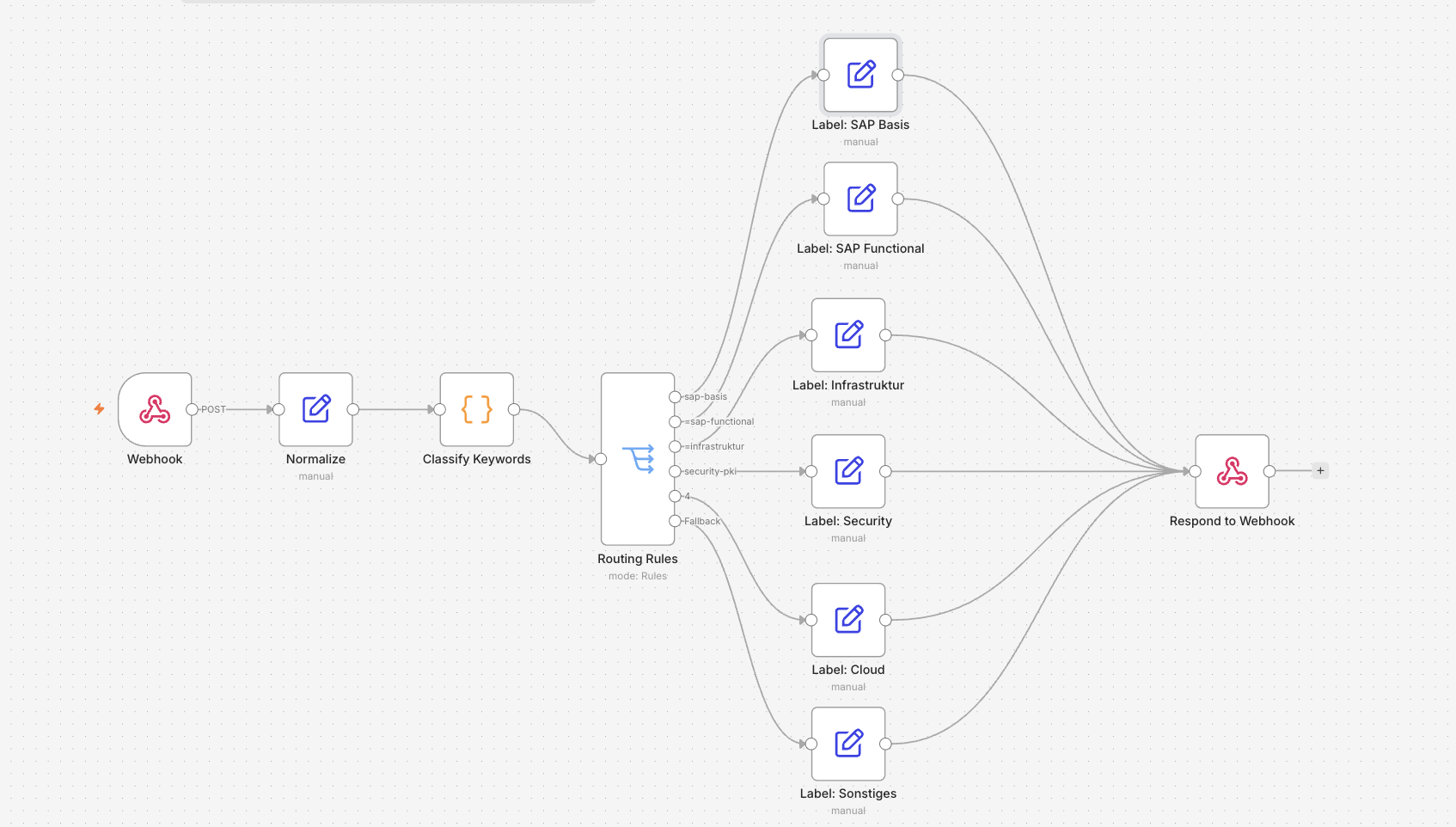
The workflow has 11 nodes. Build them in this order.
Node 1 — Webhook
Node type: “Webhook”
- HTTP Method:
POST - Path:
ticket-classify - Respond:
Using Respond to Webhook Node - Authentication:
None
Production URL after publishing: https://<host>/webhook/ticket-classify. Test URL: https://<host>/webhook-test/ticket-classify. The test URL is only active while the workflow is in “Listen for Test Event” mode.
Node 2 — Normalize
Node type: “Edit Fields (Set)”
- Mode:
Manual Mapping - “Include in Output: All Input Fields” → off
Five fields, all in Expression mode:
| Field | Expression |
|---|---|
id | {{ $json.body.id }} |
subject_raw | {{ $json.body.subject }} |
body_raw | {{ $json.body.body }} |
language | {{ $json.body.language }} |
text_normalized | {{ ($json.body.subject + ' ' + $json.body.body).toLowerCase() }} |
Rename the node to Normalize by double-clicking the name in the panel header.
Node 3 — Classify Keywords
Node type: “Code”
- Mode:
Run Once for Each Item - Language:
JavaScript
const itemData = $input.item.json;
const text = itemData.text_normalized || '';

const CATEGORIES = [
  {
    id: 'sap-basis',
    keywords: [
      'sm50', 'stms', 'abap-dump', 'transport', 'rfc-verbindung',
      'rfc connection', 'kernel', 'basis', 'sap-gui', 'workprozess',
      'work process', 'sap login', 'sap-login',
    ],
  },
  {
    id: 'sap-functional',
    keywords: [
      'buchungsbeleg', 'me21n', 'bestellung', 'lieferung', 'abrechnung',
      'purchase order', 'vendor', 'material', 'sd', 'fi', 'mm', 'hr',
      'delivery', 'invoice',
    ],
  },
  {
    id: 'infrastruktur',
    keywords: [
      'server', 'raid', 'nfs', 'backup', 'latenz', 'netzwerk', 'storage',
      'sicherung', 'disk', 'network', 'bandwidth', 'outage',
    ],
  },
  {
    id: 'cloud',
    keywords: [
      'azure', 'kubernetes', 'pod', 'terraform', 'aks', 'subscription',
      'pipeline', 'container', 'devops', 'cloud', 'deployment',
    ],
  },
  {
    id: 'security-pki',
    keywords: [
      'zertifikat', 'certificate', 'cve', 'su53', 'berechtigung',
      'penetration', 'pki', 'ssl', 'tls', 'auth', 'permission',
      'vulnerability',
    ],
  },
];

const scored = CATEGORIES.map(c => ({
  id: c.id,
  matches: c.keywords.filter(kw => text.includes(kw)).length,
}));

const best = scored.reduce((a, b) => (b.matches > a.matches ? b : a));

const scores = {};
scored.forEach(s => { scores[s.id] = s.matches; });

return {
  json: {
    ...itemData,
    category: best.matches > 0 ? best.id : 'sonstiges',
    match_count: best.matches,
    scores,
  },
};
$input.item.json, not $json. Rename the node to Classify Keywords.
Node 4 — Routing Rules
Node type: “Switch”, mode: Rules
Five rules, each:
- Value 1:
{{ $json.category }}(Expression mode) - Operation: “is equal to”
- Value 2: category ID (Fixed mode)
Enable “Extra Output” at the bottom of the settings panel. Rename each output via “Rename Output”: sap-basis, sap-functional, infrastruktur, cloud, security-pki. The fallback is the sixth output. Rename the node to Routing Rules.
Nodes 5a–5f — Label Nodes
Six Set Nodes, one per Switch output:
| Node | label | sla_hours | response_text |
|---|---|---|---|
| Label: SAP Basis | SAP Basis | 8 | Ticket category: SAP Basis. Handled by Basis team within 8 hours. |
| Label: SAP Functional | SAP Functional | 16 | Ticket category: SAP Functional. Handled by Functional team within 16 hours. |
| Label: Infrastruktur | Infrastruktur | 12 | Ticket category: Infrastructure. Handled by Infra team within 12 hours. |
| Label: Cloud | Cloud | 12 | Ticket category: Cloud. Handled by Cloud team within 12 hours. |
| Label: Security | Security / PKI | 4 | Ticket category: Security/PKI. Escalation within 4 hours. |
| Label: Sonstiges | Sonstiges | 24 | No category match. Manual review within 24 hours. |
Each Set Node: “Include in Output: All Input Fields” → on. Three additional fields as Fixed String: label, sla_hours (as number), response_text.
Node 6 — Respond to Webhook
Node type: “Respond to Webhook”
- Response Mode:
First Incoming Item - Response Code:
200
All six Label Nodes connect to this single node. n8n allows multiple incoming connections because the Switch ensures only one branch fires per item.
Publishing. After all nodes are connected: Cmd+S to save, then click “Publish”. The production URL is only active after publishing — Cmd+S alone does not activate it.
Smoke test against the production URL:
curl -k -X POST https://localhost/webhook/ticket-classify \
  -H 'Content-Type: application/json' \
  -d '{
    "id": "TKT-9999",
    "subject": "SAP-Login nach Passwortreset",
    "body": "SM50 meldet Verbindungsausfall, RFC-Verbindung tot",
    "language": "de"
  }'
Expected response (excerpt):
{
  "id": "TKT-9999",
  "category": "sap-basis",
  "match_count": 2,
  "label": "SAP Basis",
  "sla_hours": 8
}
Feeding Tickets In
The scripts/seed-tickets.py script loads tickets from testdata/tickets.parquet and POSTs each one to the production webhook. Output: accuracy and per-category statistics.
cd n8n-einstieg
uv run scripts/seed-tickets.py \
  --webhook-url https://localhost/webhook/ticket-classify \
  --limit 30 \
  --insecure
--insecure skips TLS verification for the self-signed Caddy certificate. --limit 30 uses the first 30 tickets from the pinned dataset.
The script uses PEP 723 inline dependencies: httpx and pyarrow are declared in the script header and installed by uv run on first execution. No separate requirements.txt needed.
On 30 tickets from the pinned dataset: 29 of 30 classified correctly — 97%. Latency: p50 around 10 ms, max under 120 ms, well within the 500 ms spec limit.
Replay Test
The pytest suite in tests/ runs the same 20 tickets through the live workflow and checks both category correctness and response latency.
cd n8n-einstieg/tests
uv run --with pytest --with httpx --with pyarrow pytest
The webhook URL defaults to https://localhost/webhook/ticket-classify. Override with N8N_WEBHOOK_URL=https://... if the n8n instance runs elsewhere.
40 test cases total:
- 20×
test_classifier_category_matches_ground_truth— category against ground truth fromtickets.parquet - 20×
test_classifier_latency_under_500ms— response time under 500 ms
TKT-0005 is marked xfail(strict=True). The test is expected to fail. If it doesn’t fail, pytest reports an error — because a known miss suddenly being correct is a regression in reverse. On a correctly running classifier: 39 passed, 1 xfailed.
The Limits of Keyword Matching
TKT-0005 is the documented instructional case.
Ticket (English, category sap-basis, persona admin-precise):
- Subject: “SAP GUI connection timeout after VPN change”
- Body: “Since the VPN gateway migration, SAP GUI shows timeout after 2 minutes idle. RFC destination PRD_RFC is affected.”
Classification result: sonstiges, match_count: 0.
The classifier finds zero keywords. Why:
| In the ticket | Keyword in the list | Match? |
|---|---|---|
SAP GUI (space) | sap-gui (hyphen) | ✗ |
RFC destination | rfc connection / rfc-verbindung | ✗ |
VPN gateway | vpn-verbindung / vpn connection | ✗ |
The keyword list is German-centric with hyphenated tokens. The ticket writes the same concepts with spaces and slightly different vocabulary. Substring matching without semantic understanding fails.
This is not a design flaw in the classifier — it’s the property that separates rule-based classification from AI classification. A language model recognizes that “SAP GUI”, “SAP-GUI”, and “SAPgui” refer to the same thing. The keyword classifier cannot do this without an explicit entry.
Three further patterns that hit it in practice:
Abbreviations. “Berechtigungsproblem” matches su53. “User kann T-Code nicht aufrufen” matches nothing — even though the underlying issue is identical. The connection between description and code only exists if it’s explicitly in the keyword list.
Vocabulary drift. English tickets in SAP domains write work process instead of Workprozess, transport request instead of Transportauftrag. Every deviation from the list is a potential miss. The dataset from Article 3 is intentionally 60% German, 40% English — precisely so this weakness becomes visible.
Missing entries. “Dump in SM37” doesn’t match sm37 because sm37 isn’t in the keyword list. Anyone maintaining the list is essentially maintaining a second system alongside the ticket system. Every new SAP transaction, every new cloud product, every new abbreviation variant requires a manual entry.
These gaps could be partially closed by expanding the keyword lists. But the effort scales with domain depth: for every language variant, dialect, and abbreviation form, the list grows. That’s the structural limit of rule-based classification.
Article 5 comes next: the webhook is currently open — no API key, no IP restriction. Authentication comes before the step to AI.
→ Article 3: Test Data, Because Real Data Won’t Work → Article 5: Securing the Webhook (coming soon)
