Webhooks, HTTP, and Credentials — the Production Entrance
Article 5 · Series: Getting Started with n8n
The workflow from Article 4 accepts every request without verification and classifies tickets reliably as long as the keywords match. What it lacks is a production-ready entrance: authentication, payload validation, and a response structure that tells the calling system what happened to the ticket. That’s what we’ll build in this article.
The code for this article is on Codeberg, tag v0.5: codeberg.org/rotecodefraktion/n8n-einstieg.
Test URL and Production URL
n8n provides two URLs for every webhook node, and the difference between them causes more confusion than any other concept in this series.
The Test URL (/webhook-test/<path>) is only active while the workflow is open and the node is in “Listen for Test Event” mode. It lets you test the workflow interactively: incoming data lands directly in the execution view, every node shows its inputs and outputs. Useful during development.
The Production URL (/webhook/<path>) becomes active once the workflow is published via “Publish.” It processes requests even when the workflow canvas is closed, and it returns the response body produced by the Respond to Webhook node.
Pointing an external system’s webhook at the Test URL, then wondering why responses are empty in production, is one of the most common early mistakes. The Test URL executes the workflow and logs it — but it does not return the response body from the Respond to Webhook node.
Consequence for this article: all curl examples and tests use the Production URL. The workflow must be explicitly published via “Publish” after every change. Cmd+S alone is not enough.
Header Authentication
n8n supports several authentication modes on the webhook node: Basic Auth, Header Auth, JWT, and Bearer Token. For internal-system-to-n8n paths, Header Auth is the simplest option that holds up in production.
The principle: the caller sends an agreed header with a token. n8n checks the value. On mismatch: HTTP 403.
Generate a token:
openssl rand -hex 32
# Example: 9d016c979dd36af7c08a23cebf5ea41e5815f6af717fae43acad69cab792ecb1
Create a credential in n8n: Credentials → Add credential → Header Auth
| Field | Value |
|---|---|
| Name | Ticket Ingest Token |
| Header Name | X-Ingest-Token |
| Header Value | Token from the openssl command |
The credential then appears in the webhook node configuration under “Authentication.” Select it and save.
One observation from the build: n8n responds to a request with a missing or invalid token with HTTP 403 and the header WWW-Authenticate: Basic realm="Webhook" — even when the node is configured for Header Auth. This is a known quirk. The 403 status code is unambiguous; the header only confuses when treated as a configuration statement.
Credentials in n8n — Storage and Backup
Credentials are stored in n8n AES-encrypted in the Postgres database. The key for this encryption is the N8N_ENCRYPTION_KEY environment variable from Article 2.
This has a concrete consequence for backups: a Postgres dump alone is not sufficient to fully restore an instance. Without the matching encryption key, the dump can be imported, but all credentials are unreadable. n8n reports Mismatching encryption keys in this case. There is no recovery without the original key.
Recommendation: store the Postgres dump and encryption key in separate backup locations with different access permissions. Anyone with both can decrypt everything.
# Postgres dump
docker compose -f docker/docker-compose.yml exec postgres \
  pg_dump -U n8n n8n > backup-$(date +%Y%m%d-%H%M%S).sql
When restoring on a new machine: start Postgres, import the dump, enter the encryption key in docker/.env, then start n8n. Order matters — n8n tries to access credentials immediately on startup.
One more detail on workflow export: when a workflow is downloaded as JSON, the JSON contains a reference to the credential (credentials.<type>.name), but not the credential content itself. On import to a different instance, the reference is initially invalid. The node must be reconnected to the credential in the UI.
HTTP Request Node
The HTTP Request node is the counterpart to the webhook: it sends requests out of the workflow to external APIs, internal services, or other systems.
Basic configuration for a POST with a JSON body:
| Field | Value |
|---|---|
| Method | POST |
| URL | Target URL |
| Authentication | Select credential (Basic, Bearer, OAuth2, Header) |
| Body | JSON |
Query parameters can be written directly into the URL or entered via the “Query Parameters” section — the latter has the advantage that n8n URL-encodes the values correctly.
Pagination is configured in the “Pagination” section. n8n supports offset-based pagination and cursor-based pagination. The node then automatically issues multiple requests until no more pages are available, returning all items in a single array.
Error behavior. The default behavior of the HTTP Request node on an HTTP error (4xx, 5xx): the workflow stops. This is acceptable for development and testing. For production workflows, two options are relevant.
“Retry on Fail” (under “Options” in the node): automatic retry on network error or 5xx response, with configurable number of attempts and wait time between retries. Appropriate for transient failures — a service is briefly unavailable, the next attempt succeeds.
“Continue on Fail” (node setting, accessible via the three-dot menu on the node): when enabled, an error is not treated as a workflow abort but as an output item with an error object. The next node receives this item and can react accordingly. This is the approach when you want to handle each request error individually — for example, to write failed tickets to a dead-letter queue.
Configure timeouts under “Options → Timeout.” The default is no timeout — the node waits indefinitely for a response. For external APIs with occasionally long response times, set an explicit value (e.g., 10 000 milliseconds) so a hanging request does not block the entire workflow.
Sub-Workflows
A sub-workflow in n8n is a standalone workflow that can be called from other workflows — similar to a function. The calling workflow passes items, the sub-workflow processes them and returns items.
Why extract logic into a sub-workflow? When the same logic is needed in multiple workflows, the choice is clear. In this case, the classifier logic from Article 4 now lives in its own sub-workflow (v0.5 Sub-Classifier). Both workflows — v0.4 Rule-Based Classifier and v0.5 Webhook Ingest — call it. Changes to the keyword list happen in one place.
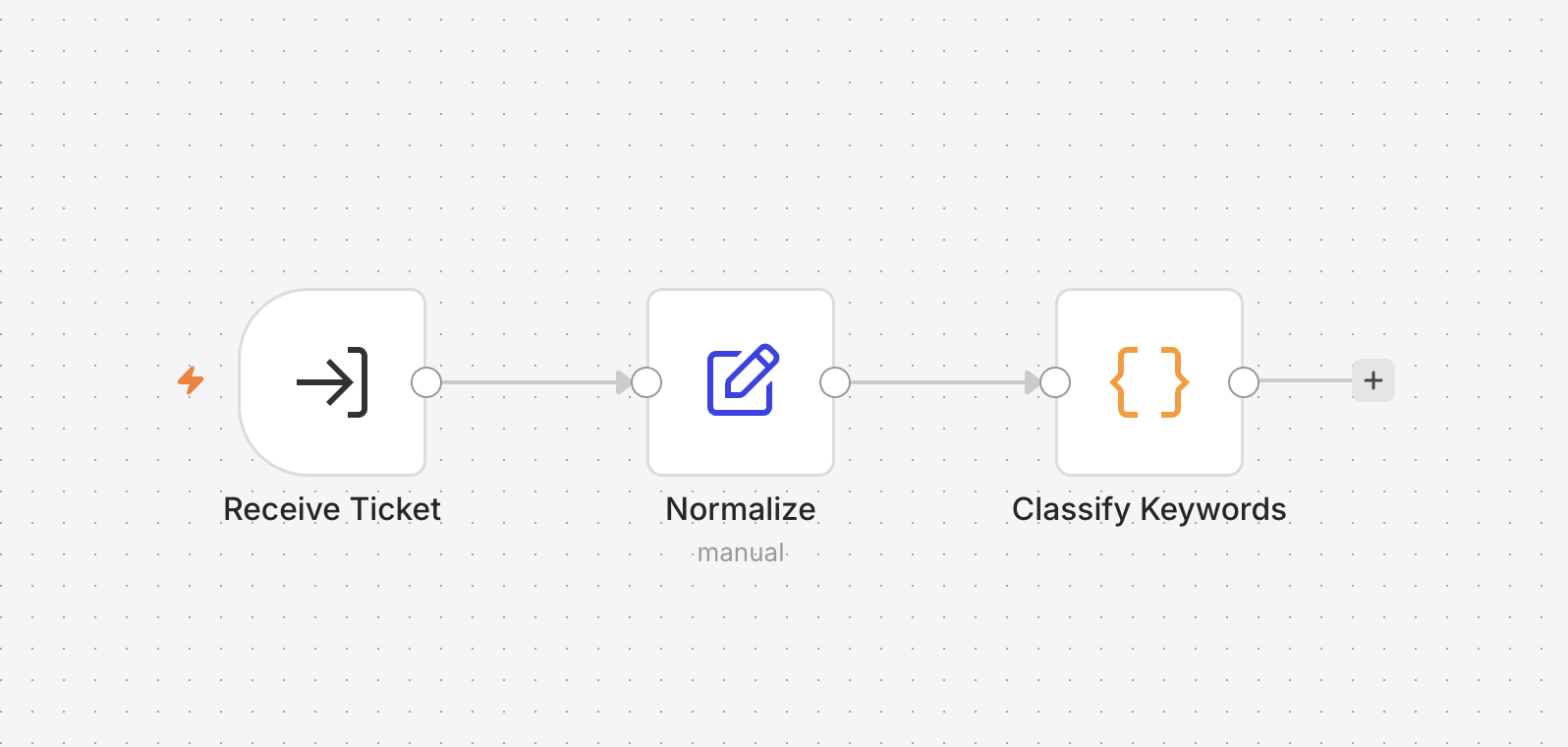
The sub-workflow has three nodes. The trigger node (Execute Workflow Trigger) receives the passed fields, the Set node Normalize builds text_normalized, and the Code node Classify Keywords runs the keyword matching and returns the result.
The refactored v0.4 Rule-Based Classifier calls the sub-workflow and routes the result:
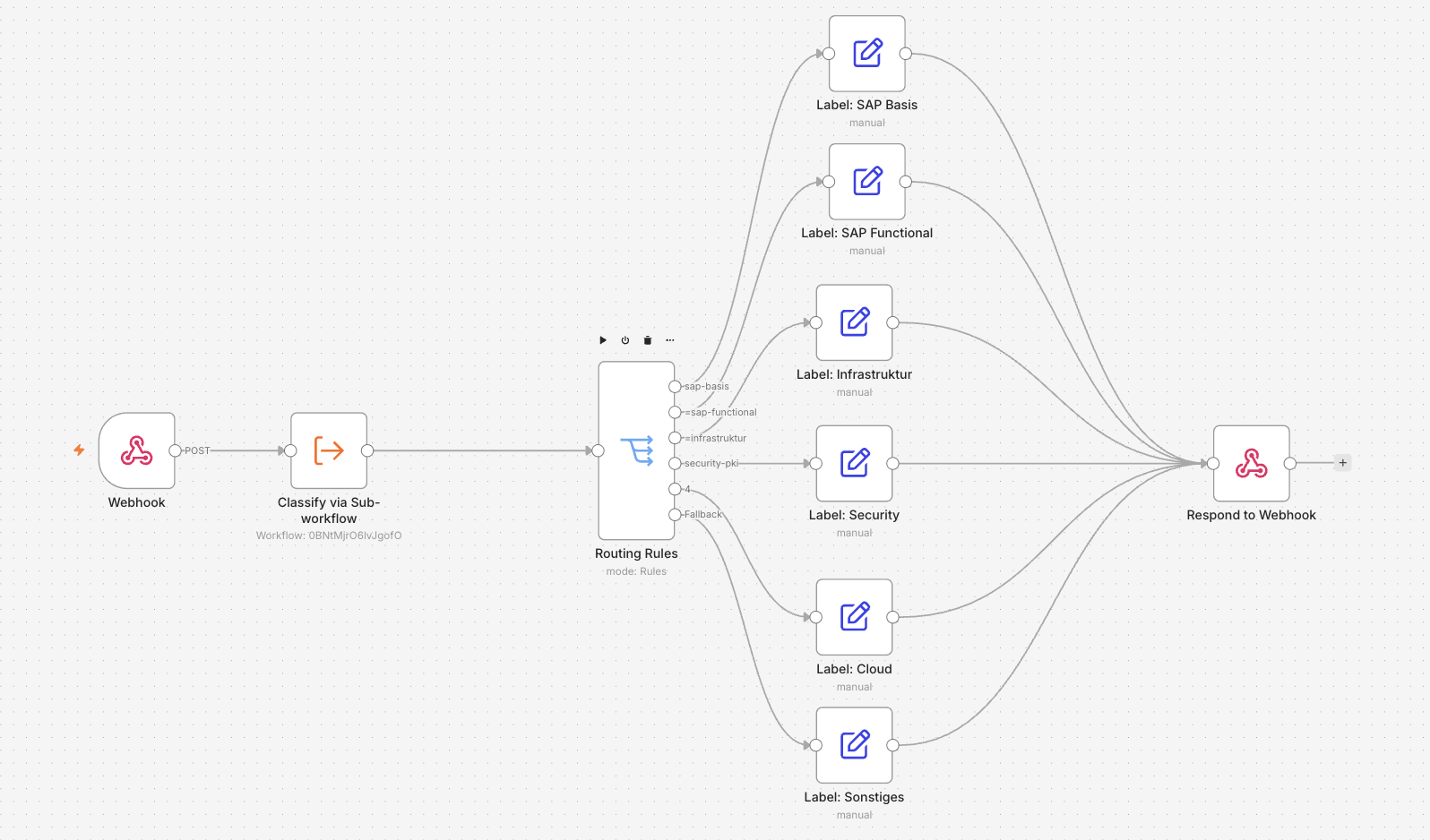
Caller node configuration:
| Field | Value |
|---|---|
| Source | Database |
| Workflow | Select sub-workflow from dropdown |
| Workflow Inputs | appear automatically |
The workflow ID in the configuration is instance-specific. When the JSON is exported and re-imported on a different instance, the ID is invalid — the node shows “Workflow not found” and must be reconnected. Import order: sub-workflow first, then caller workflows.
Sub-workflow failure. If a sub-workflow aborts, the calling workflow hangs in a pending state. To handle this, add an error branch on the caller side — or, for critical operations, configure a dedicated Error Workflow in n8n’s settings under “Settings → Error Workflow.”
The Workflow Step by Step
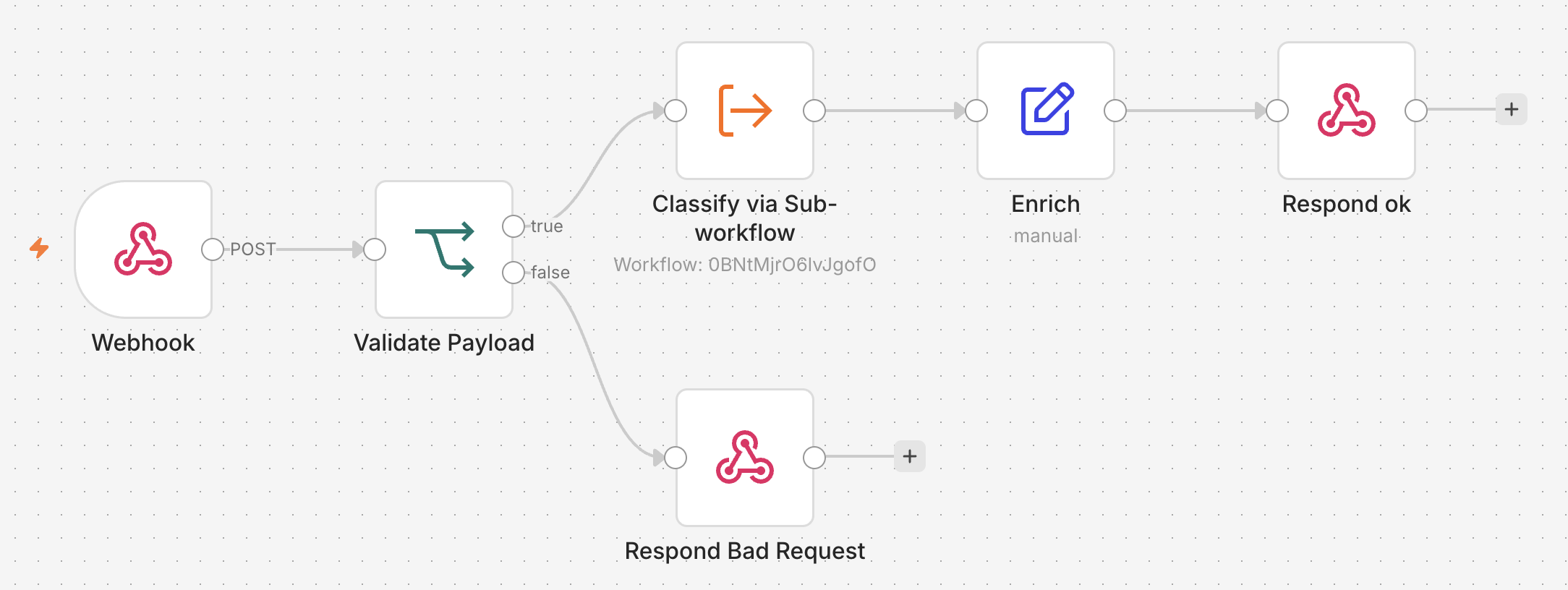
v0.5 Webhook Ingest has six nodes. Build in this order.
Node 1 — Webhook
- HTTP Method:
POST - Path:
ticket-ingest - Authentication:
Header Auth→ credentialTicket Ingest Token - Respond:
Using Respond to Webhook Node
Production URL after publish: https://<host>/webhook/ticket-ingest.
Node 2 — Validate Payload (If)
Node type: “If”, combinator: AND, four conditions:
| Field | Operator | Value |
|---|---|---|
{{ $json.body.id }} | String is not empty | — |
{{ $json.body.subject }} | String is not empty | — |
{{ $json.body.body }} | String is not empty | — |
{{ $json.body.language }} | String is not empty | — |
All four conditions must be in expression mode ({{ ... }}). The If node has the same hover-toggle as the Set node. Make sure each field shows curly braces.
Node 3 — Classify via Sub-workflow (True output)
Node type: “Execute Sub-workflow”
- Source:
Database - Workflow:
v0.5 Sub-Classifier
Workflow inputs (appear after selecting the sub-workflow):
| Input | Expression |
|---|---|
id | {{ $json.body.id }} |
subject | {{ $json.body.subject }} |
body | {{ $json.body.body }} |
language | {{ $json.body.language }} |
Node 4 — Enrich
Node type: “Edit Fields (Set)”
- Include in Output:
All Input Fields→ on
Three additional fields:
| Name | Mode | Value |
|---|---|---|
ingested_at | Expression | {{ $now.toISO() }} |
source | Fixed | webhook |
status | Fixed | accepted |
Node 5 — Respond OK
Node type: “Respond to Webhook”
- Respond With:
First Incoming Item - Response Code:
200
Node 6 — Respond Bad Request (False output of the If node)
Node type: “Respond to Webhook”
- Respond With:
JSON - Response Body:
{"error":"validation_failed"} - Response Code:
400
Publish. Test against the Production URL.
post-ticket.sh
The script scripts/post-ticket.sh in the demo repo loads token, header name, and URL from .env.local and sends an example ticket:
source .env.local

curl -k -sS -i \
  -X POST "$N8N_INGEST_URL" \
  -H 'Content-Type: application/json' \
  -H "$N8N_INGEST_HEADER: $N8N_INGEST_TOKEN" \
  -d '{
    "id": "TKT-0001",
    "subject": "SAP HANA backup failing",
    "body": "Backint interface reports timeout, /hana/data nearly full.",
    "language": "en"
  }'
Expected response:
{
  "id": "TKT-0001",
  "category": "infrastruktur",
  "match_count": 1,
  "scores": {"sap-basis": 0, "sap-functional": 0, "infrastruktur": 1, "cloud": 0, "security-pki": 0},
  "ingested_at": "2026-05-27T08:13:49.703+02:00",
  "source": "webhook",
  "status": "accepted"
}
Negative cases:
# Missing required field → 400
curl -k -sS -X POST "$N8N_INGEST_URL" \
  -H 'Content-Type: application/json' \
  -H "$N8N_INGEST_HEADER: $N8N_INGEST_TOKEN" \
  -d '{"id": "TKT-X", "subject": "only subject"}'
# → HTTP 400, {"error":"validation_failed"}

# No token → 403
curl -k -sS -X POST "$N8N_INGEST_URL" \
  -H 'Content-Type: application/json' \
  -d '{"id": "TKT-X", "subject": "x", "body": "x", "language": "en"}'
# → HTTP 403
HTTP Smoke Test
tests/test_ingest_webhook.py tests the ingest webhook with 14 test cases: auth failure (missing and incorrect token), validation failure (missing required field), valid request with verification of all response fields, and ten tickets from the pinned Parquet dataset.
cd tests && uv run pytest test_ingest_webhook.py -v
The fixtures in conftest.py load token, header, and URL from .env.local — no credentials hardcoded in test code.
Result after the completed build: 53 passed, 1 xfailed in 1.21 s. The 39 replay tests from Article 4 continue to pass — TKT-0005 remains the documented xfail.
What’s Next
Article 4 built a classifier based on keyword matching that fails for English tickets with variant spelling. Article 5 gave that classifier a production-ready entrance. Article 6 replaces keyword matching with an AI classifier that recognizes semantic proximity rather than exact strings — and resolves the xfail on TKT-0005.
← Article 4: Nodes, Expressions, and the First Workflow Without AI
