n8n in Queue Mode — Main, Worker and Redis
Article 11 · Series: Getting Started with n8n
Up to here the pipeline runs in a single process. One n8n container behind Caddy accepts the ticket, classifies it over two AI backends, enriches it from the SAP backend and routes it, all in the main process. For a demo that is enough. For production operation the step that separates acceptance from execution is missing: queue mode. This article builds it in and at the same time clarifies when it is worth it and what it explicitly does not do.
The code for this article is on Codeberg, tag v0.11: codeberg.org/rotecodefraktion/n8n-einstieg.
Queue mode separates acceptance from execution
In the default (regular) mode the main process runs every execution itself. In queue mode the main process stays responsible for acceptance but writes the execution into a Redis queue, from which one or more workers pull it and run it. Main becomes the dispatcher, the workers become the actual compute capacity.
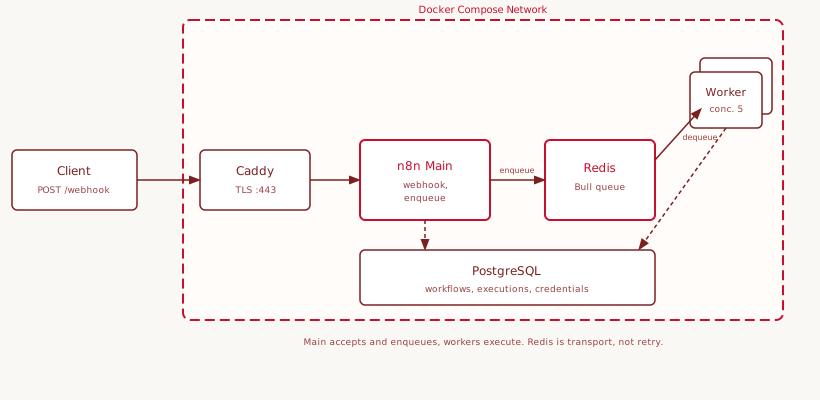
Three processes share the same Postgres database and the same N8N_ENCRYPTION_KEY. The encryption key is not optionally shared: without an identical key the worker cannot decrypt stored credentials, and every execution that needs a credential fails.
The switch is a third compose override, stacked on the base setup and the observability extension from Article 7. It adds a redis service, an n8n-worker service, and flips main into queue mode:
services:
  redis:
    image: redis:7-alpine
    command: ["redis-server", "--appendonly", "yes"]

  n8n:
    environment:
      EXECUTIONS_MODE: queue
      QUEUE_BULL_REDIS_HOST: redis
      N8N_METRICS_INCLUDE_QUEUE_METRICS: "true"

  n8n-worker:
    build: .
    command: worker --concurrency=5
    environment:
      EXECUTIONS_MODE: queue
      QUEUE_BULL_REDIS_HOST: redis
      # DB env + identical N8N_ENCRYPTION_KEY as main
The stack comes up by appending the queue override to the existing files:
docker compose \
  -f docker-compose.yml \
  -f docker-compose.observability.yml \
  -f docker-compose.queue.yml \
  up -d
That the worker is ready shows in its log right after start:
n8n worker is now ready
 * Version: 2.21.4
 * Concurrency: 5
The smoke test checks what matters: main accepts the webhook, the worker executes. A ticket to the entry point from Article 10, then a look at both logs:
docker-n8n-1        Enqueued execution 267 (job 1)
docker-n8n-worker-1 Worker started execution 267 (job 1)
docker-n8n-worker-1 Worker finished execution 267 (job 1)
Main enqueues, the worker pulls and executes. The response came back with HTTP 200, including the SAP enrichment from Article 10, which now ran in the worker process.
When queue mode is worth it
Queue mode is not a free upgrade. It brings Redis as an additional dependency, a second class of process to manage, and debugging that spans main and worker logs. For most self-hosted setups the regular mode is the right choice. The switch is worth it when one of these holds:
- Concurrent executions regularly saturate the main process, the UI gets sluggish during runs.
- Individual executions run long, such as large HTTP calls or heavy Code nodes, so a burst would otherwise queue up behind the editor.
- Execution capacity should scale independently of main, or a worker restart should not drag the editor down with it.
Below that, stay on regular mode. Complexity you do not need is a cost, not a feature. The article names this threshold deliberately, because queue mode is presented as universally superior in many guides.
Workers scale horizontally
The real gain is scaling. Workers are independent processes that all pull from the same queue. More throughput means more workers:
docker compose -f docker-compose.yml \
  -f docker-compose.observability.yml \
  -f docker-compose.queue.yml \
  up -d --scale n8n-worker=3
Two levers set the capacity: the number of workers and the --concurrency per worker, that is how many executions a single worker holds in parallel. Which setting fits is told by the queue metrics. With N8N_METRICS_INCLUDE_QUEUE_METRICS=true the main /metrics endpoint exposes the relevant values:
n8n_scaling_mode_queue_jobs_waiting    0
n8n_scaling_mode_queue_jobs_active     0
n8n_scaling_mode_queue_jobs_completed  1
n8n_scaling_mode_queue_jobs_failed     0
jobs_waiting is the backlog. If it stays above zero under normal load, that is the signal to add workers or raise the concurrency. jobs_active near workers × concurrency means capacity is exhausted. From these two values follow three zones that the scaling decision hangs on:
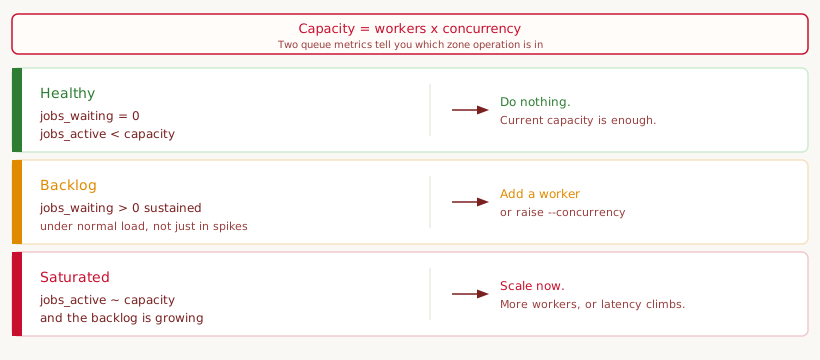
Both values sit in the bundled Grafana dashboard next to the metrics from Article 7: a “Jobs Waiting” stat with traffic-light thresholds and two time series for backlog and active jobs.
Scaling is not retry
A clarification is needed here, because it is often told wrong. Queue mode scales execution, it does not retry. Earlier n8n versions had an automatic retry for stalled jobs via the Bull library. With n8n 2.0 this mechanism was removed, the corresponding variable QUEUE_WORKER_MAX_STALLED_COUNT no longer exists. The n8n documentation justifies this on the grounds that the feature often caused confusion and did not function reliably.
For operation that means: a failed execution is not automatically retried in queue mode. Resilience against failure stays with the layers from Article 7. The node retryOnFail with a wait between tries catches transient errors, the global error workflow alerts and records. Where possible, externally visible side effects should be idempotent, so a re-run after a failure does not create anything twice. Queue mode solves a scaling problem, not a reliability problem.
Task runners run internally, separated in production
On startup the worker logs a warning that opens a final production aspect:
Failed to start Python task runner in internal mode. because Python 3 is missing
n8n does not run the code from Code nodes directly in the main process but in a task runner. It comes in two modes. In internal mode, the default and what this demo uses, n8n starts the runner as a child process with the same uid and gid. That is simple and needs no configuration, but it does not isolate the runner from the n8n process. In external mode the runner runs in its own container (n8nio/runners) that connects to n8n through a broker and a shared N8N_RUNNERS_AUTH_TOKEN, version-pinned to n8n. The n8n documentation recommends external mode for production because it cleanly separates n8n from the runner.
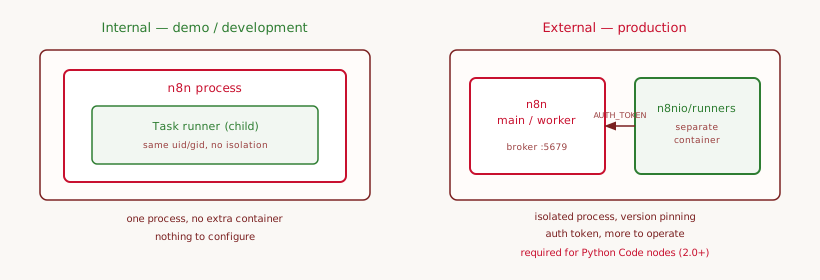
The Python warning is harmless in this setup. Internal mode also tries to start a Python runner that the n8n image does not bundle. The pipeline uses only JS Code nodes, and the JS runner registers right after. External mode is deliberately not built in here, because it is overkill for a development or demo system. The isolation it brings only pays off once foreign or untrusted workflow code runs. On a single-dev localhost where I write every node myself, it costs an extra container, a token to manage and version pinning, with no real gain.
There is, however, a second and harder reason for external mode. n8n 2.0 removed the old in-process Python Code node (based on Pyodide) and replaced it with a task-runner implementation using native Python. According to the n8n documentation, Python Code nodes since then only function with task runners in external mode. So anyone who wants to use Python in the Code node on 2.x cannot avoid external mode, together with N8N_NATIVE_PYTHON_RUNNER and, for third-party libraries, an allowlist in the runner image. For pure JS pipelines like this one, internal mode stays the right choice. In a production setup with several authors, a need for Python, or stricter security requirements the trade-off flips, and external mode becomes the right choice.
For exactly this case the repo ships an optional override, docker-compose.external-runners.yml, that places an n8nio/runners container with native Python next to n8n. While building it, one quirk surfaced that you have to know: native Python denies every import by default, including from the standard library. A plain import sys already fails with “Security violations detected” until you allowlist the modules in the launcher config via N8N_RUNNERS_STDLIB_ALLOW. With that allowlist a Python Code node returns its result cleanly, in my test CPython 3.13 over the external runner. The details are in the repo under docs/external-runners.md.
Production checklist
An n8n instance that handles real tickets needs more than a running container. The most important points, ordered by what hurts most when missed:
- Backup. Postgres holds all workflows, credentials and executions. Back it up on a schedule and test the restore, not just the backup. An untested backup is a guess.
- Encryption key. Store
N8N_ENCRYPTION_KEYoutside the repo in a secrets vault. In queue mode main and every worker must carry the same key. A rotation means re-entering all credentials, so a planned migration, not a routine. - HTTPS. Terminate TLS in front of n8n, in this series via Caddy. Set
WEBHOOK_URLto the public HTTPS URL,https://localhostis only a local value. Do not publish n8n’s port to the host. - Access control. Every externally reachable webhook needs auth, the entry point uses header auth. Keep the editor and Grafana behind authentication, both are admin surfaces.
- Updates. Pin the n8n image version, do not track
latest. Before an update read the release notes and the 2.x breaking changes, back up Postgres, bring main and workers to the same version together. - Observability. Keep the stack from Article 7 running and alert on the error-workflow signal as well as on a growing queue backlog.
This list leaves out three points that already have their own sections in this article: scaling, resilience against failure, and the task-runner mode. The detailed version in the repo under docs/production-checklist.md carries them as regular checklist items, so nothing is missing there.
Transition to Article 12
The pipeline is now close to production: it accepts resiliently, classifies over two backends, enriches from SAP, scales over workers and is secured behind HTTPS and auth. Over eleven articles this has become a complete system. That raises the question deliberately left open at the start: where is n8n the wrong tool? Article 12 takes on the limits, along concrete cases where code, a message queue or a dedicated integration framework is the better choice.
Start queue mode locally
Queue mode builds on the stack from Article 7. From the docker/ directory, append the queue override to the existing files:
docker compose \
  -f docker-compose.yml \
  -f docker-compose.observability.yml \
  -f docker-compose.queue.yml \
  up -d
Redis, one worker and main reconfigured to queue mode start up. Without generating load the queue metrics sit at zero, which is correct. For the smoke test send a ticket to https://localhost/webhook/ticket-ingest (header auth as in Article 5) and check the Worker started/finished execution lines in docker logs docker-n8n-worker-1. Details in docs/queue-mode.md.
