n8n Authenticates Against SAP BTP — OAuth Against a CAP Service
Article 13 · Series: Getting Started with n8n
Article 10 showed the SAP binding over a single APIKey header and deliberately deferred the real token flow. The series finale catches up on that step: n8n authenticates with real OAuth against a service on SAP BTP, using the Client Credentials flow against the xsuaa token endpoint. The auth mechanic is real and transfers one-to-one to a productive S/4 OData target; only the URL and paths differ.
One more thing up front, because it is easily misread: I am not binding a productive S/4 here, but my own small service on BTP. What is real is the auth and deployment layer: xsuaa, Client Credentials, JWT, service key, Cloud Foundry deploy. The target system is a stand-in. On-premise scenarios, Cloud Connector and principal propagation stay out of scope.
The code for this article is on Codeberg, tag v1.0: codeberg.org/rotecodefraktion/n8n-einstieg.
Cloud auth runs over OAuth, not header keys
In SAP cloud worlds OAuth is the standard auth path. Instead of a static key, the caller exchanges a client identity for a short-lived token and calls the service with it. n8n fetches the token from the xsuaa token endpoint and attaches it as a bearer to the actual request.
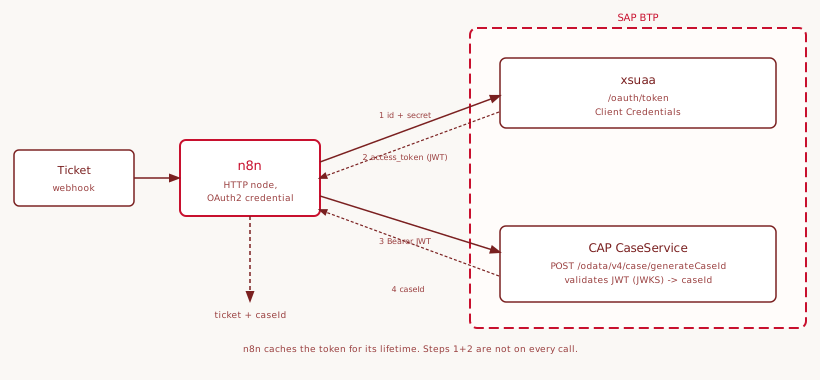
Of the OAuth flows I use Client Credentials, because n8n speaks as a backend service: no user involved, no interactive login. n8n exchanges Client ID and Secret for a token. The Authorization Code flow would be for browser and user contexts, SAML Bearer for on-premise principal propagation. Neither belongs in this scenario.
The CAP service as a stand-in for S/4
For the target system I deliberately did not pick a FastAPI service but one built with the SAP Cloud Application Programming Model. CAP is the native development model for business services on BTP: you describe a service in CDS, expose it as OData and secure it with xsuaa. Exactly the three properties a productive S/4 OData endpoint also brings.
The service does one thing: on request it generates a random, 10-digit case ID. In CDS that is a service with an unbound action:
service CaseService @(requires: 'authenticated-user') {
  type CaseResult { caseId : String(10); }
  action generateCaseId() returns CaseResult;
}
The annotation @(requires: 'authenticated-user') is the gate: without a valid token no call gets through. The logic behind it is three lines of JavaScript that generate a random ID and return it. Locally the service runs with mocked auth, on BTP with real xsuaa, controlled solely through the cds.requires.auth configuration.
BTP trial as a playground
For the real run a free BTP trial with Cloud Foundry enabled is enough. The concept is always the same: a subaccount, a space inside it, an xsuaa instance inside that, to which the deployed service is bound. From that binding comes the service key that provides the credentials for n8n.
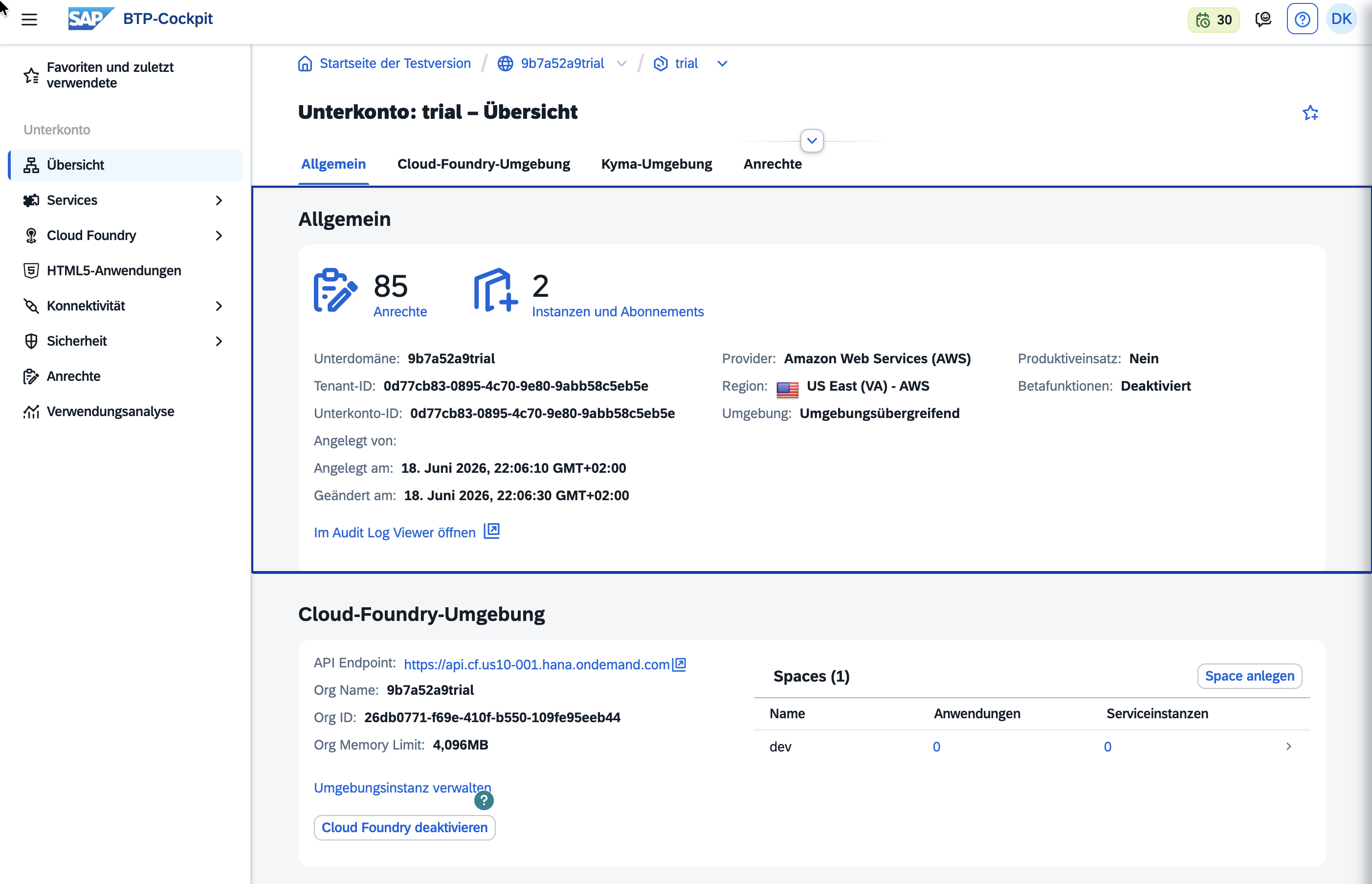
The concrete click paths in the BTP console change every few months. So I explain the concept here and point to docs/sap-auth-deployment.md in the repo for the exact steps. The deploy itself is short: create the xsuaa instance, cds build, cf push. One quirk of the trial worth knowing: apps and the dev space are stopped automatically after inactivity, so night owls who pick it up again the next morning may have to restart the services. A cf app case-service shows the status, a cf start wakes it again. Whoever gets a 404 from the Cloud Foundry router checks first whether the app is even running.
xsuaa binding and service key
An xsuaa binding provides a service key with several fields. Three of them go into the n8n credential:
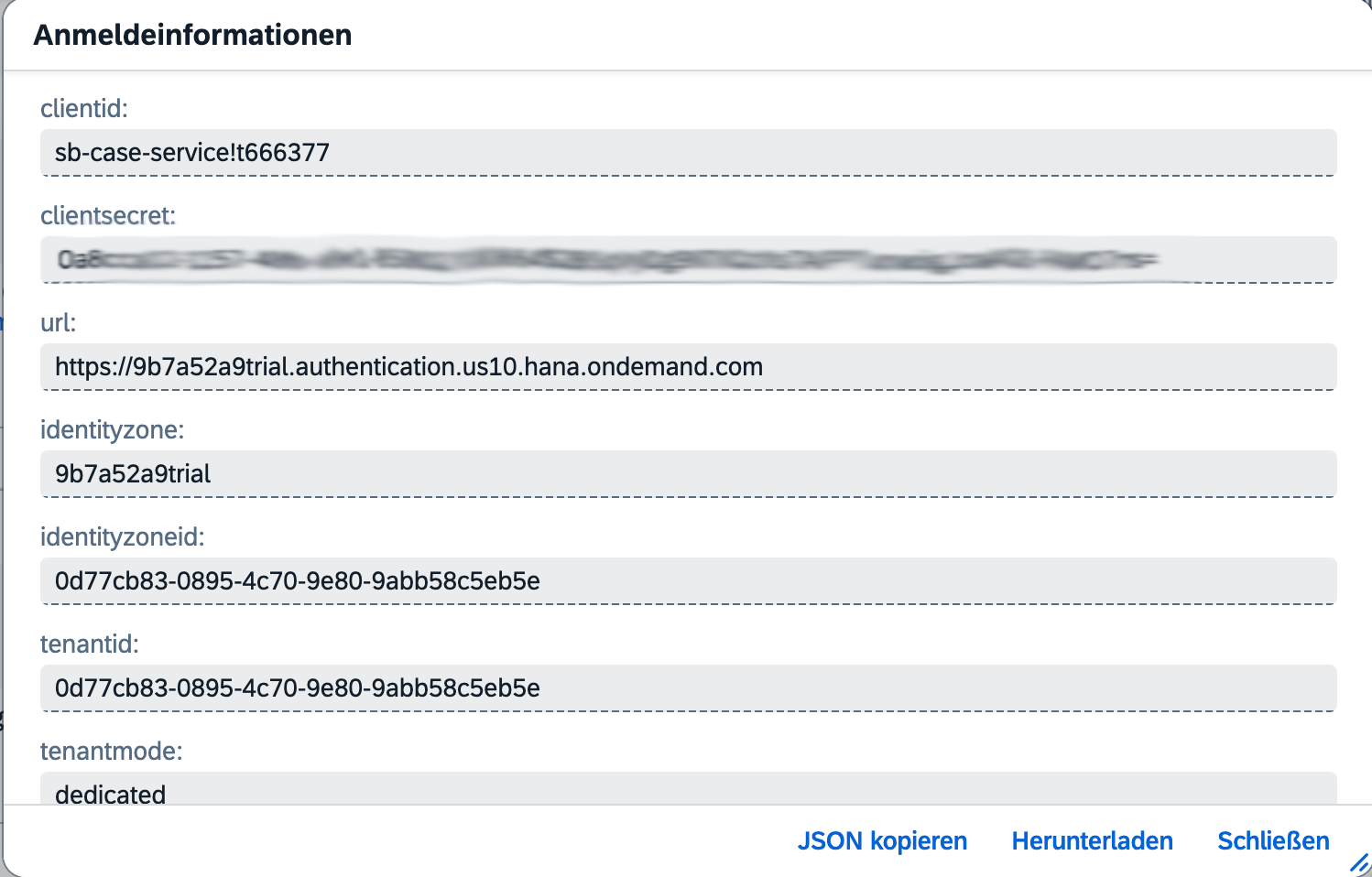
urlis the base for the token endpoint (<url>/oauth/token) and the key endpoint (<url>/token_keys).clientidis the client identity.clientsecretis the secret that belongs only in the n8n credential and never in the repository. The.gitignoreexcludes*-service-key.jsonand.envexplicitly. This is the most common BTP beginner mistake, and it is avoidable with one line.
Everything else in the service key, such as verificationkey or xsappname, is metadata and does not belong in the credential. You do not need the verificationkey if the service validates the signature dynamically over the JWKS endpoint, which the CAP service does.
The OAuth2 credential is created at the HTTP node
So far I have created my credentials separately; with the generic OAuth it is different. The generic OAuth2 authentication is not found as a separate entry in the credentials list but is created from within the HTTP Request node: set Authentication to Generic Credential Type, then Generic Auth Type to OAuth2, then Create New Credential. Whoever searches the credentials overview for “OAuth2 API” searches in vain.
For Client Credentials four fields suffice:
Grant Type:        Client Credentials
Access Token URL:   <url>/oauth/token
Client ID:          <clientid>
Client Secret:      <clientsecret>
Scope:              (empty)
Authentication:     Header
I leave the scope empty, because the service only requires an authenticated caller, not a particular scope. With “Client Credentials” n8n does not show a token test on save, by the way, unlike the Authorization Code flow with its Connect button. The token is fetched only on the first real call. No visible result on save is therefore normal, not an error.
The workflow fetches the token and the case ID
The workflow v1.0-sap-oauth-lookup does three steps. A webhook accepts the classified ticket. An HTTP Request node calls the CAP action with the OAuth2 credential, a POST to /odata/v4/case/generateCaseId. A Code node attaches the returned caseId to the ticket and passes it on.
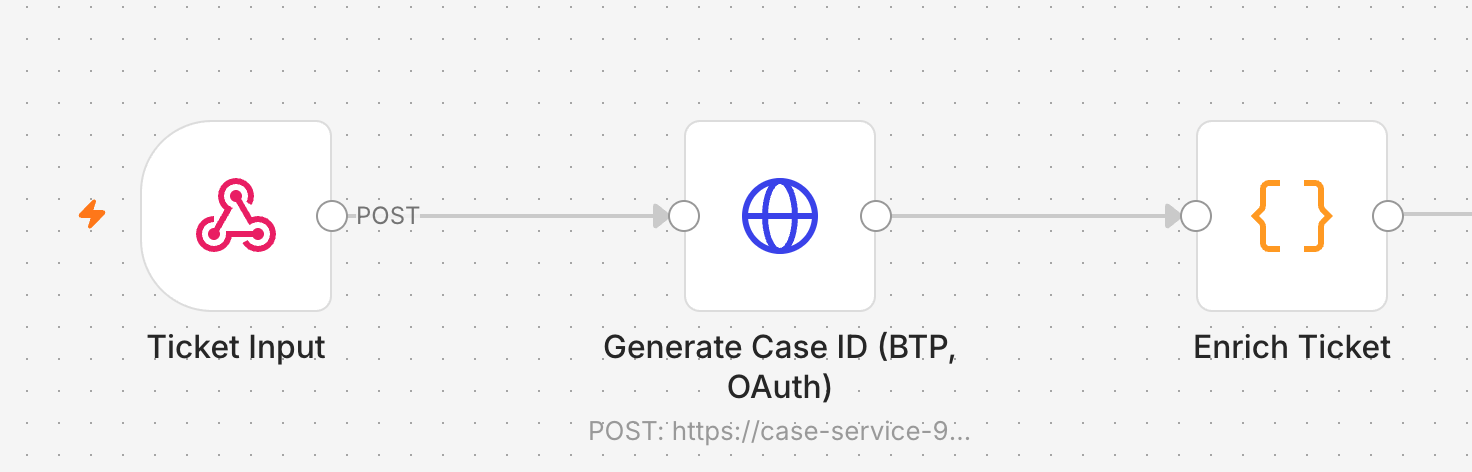
The token caching n8n handles itself: it stores the bearer token for its lifetime and automatically fetches a new one when it expires. The token exchange therefore does not happen on every call. In the test run the enriched ticket came back cleanly:
{"id":"TKT-OAUTH-1","subject":"Test OAuth gegen BTP",
 "category":"sap-basis","caseId":"5195126423","caseIdSource":"btp-cap"}
That is the proof of the whole stage: n8n authenticated against real xsuaa, called the CAP service on BTP and processed the result.
Locally without BTP: CAP with mocked auth
The CAP service runs locally with cds serve and mocked auth, without any BTP access. That suits developing the service logic: an anonymous call bounces off with 401, an authenticated mock user gets its case ID. What the local mode does not model is the real OAuth flow, because that needs a real xsuaa token endpoint. You prove the auth mechanic against the trial, the service logic locally.
A dated snapshot
This guide is a snapshot with a date. BTP is a cloud service without a version number, console and click paths change. The version states at the time of writing are in docs/sap-auth-snapshot.md in the repo. If the trial expires, the series stays valid: a fresh trial and the steps from the deployment doc restore the live proof.
Whoever went further would reach principal propagation for on-premise S/4 next, and the SAML Bearer flow for user-context scenarios. Both are a story of their own and lie outside this series.
The whole pipeline in one workflow
Across the series the pipeline grew modular, with many stages living as their own subworkflows. For this one overview I dissolved them into a single workflow and replaced every subworkflow call with its steps. The big picture shows the whole path from left to right: the webhook accepts the ticket, a check catches empty payloads, then a round-robin distributes across two AI backends with failover, Anthropic first, OpenAI as the reserve, and the rule-based classifier as the last safety net. After that come the post-classifier pipeline with language detection and routing, the enrichment and the SAP bridge with the business partner lookup, up to the response.

The OAuth step from this article comes in as one more lookup; above it stands as its own workflow. That is how the finale fits into a path running from the incoming ticket to the SAP-backed enrichment.
Series conclusion: thirteen articles
With that the arc closes. Over thirteen articles a first container has become a production-grade pipeline: self-hosting with Docker, Postgres and Caddy, a synthetic test dataset, rule-based and AI-driven classification over two backends with round-robin and failover, error handling and observability, the SAP bridge over OData, queue mode for production operation, the placement against Cloud Integration and Edge Integration Cell from Article 12, and finally the OAuth binding against BTP. The code is open on Codeberg, one tag per article, the finale under v1.0.
The CAP service in this article was only a stand-in, but it opened up a problem space of its own. CAP as the native SAP development model deserves its own series, “Getting Started with CAP”, in which the service is not a means to an end but the subject: data model in CDS, OData services, business logic, deployment on BTP. That is not a promise with a date, but the obvious next step. Until then, what stands here is a pipeline you can rebuild, understand and adapt to your own SAP landscape.
