WWDC26 for Developers: Foundation Models, Core AI, and an Agentic Xcode
The Platforms State of the Union is the developer counterpart to the WWDC keynote. Less stage, more frameworks. This year Apple sorts everything into three blocks: Apple Intelligence, platform improvements, and developer productivity. The thread running through all three is the same as last year, only more pronounced: generative models move from the demo into the foundation of development, and the tool you build them with becomes agentic itself.
Apple Intelligence: Three Routes to a Model
At the center are the Apple Foundation Models. How they came to be is already notable. Apple puts it this way in the session:
Working together with Google and leveraging the technologies behind their Gemini family of models, we created the latest Apple Foundation models to power our Apple Intelligence experiences.
These models run on-device and on Private Cloud Compute. How exactly the Gemini technology feeds in is portrayed differently across outlets. Several reports suggest Gemini flows mainly into post-training, with Apple refining its own models using Gemini outputs rather than running Gemini in production (AppleInsider, MacRumors, June 2026). Apple itself gives no details on the training method in the session. What matters for developers is what the frameworks build on top, and this year there are three tiers of that.
The Foundation Models Framework Grows
The Foundation Models framework is Apple’s native Swift API onto the on-device model that also powers Apple Intelligence. Introduced last year, it gains three tangible additions this year.
First, multimodal prompts. You attach an image to the prompt and the model understands it. The Vision framework is integrated alongside, giving the model ready-made tools such as OCR for precise text extraction and barcode readers, all on-device.
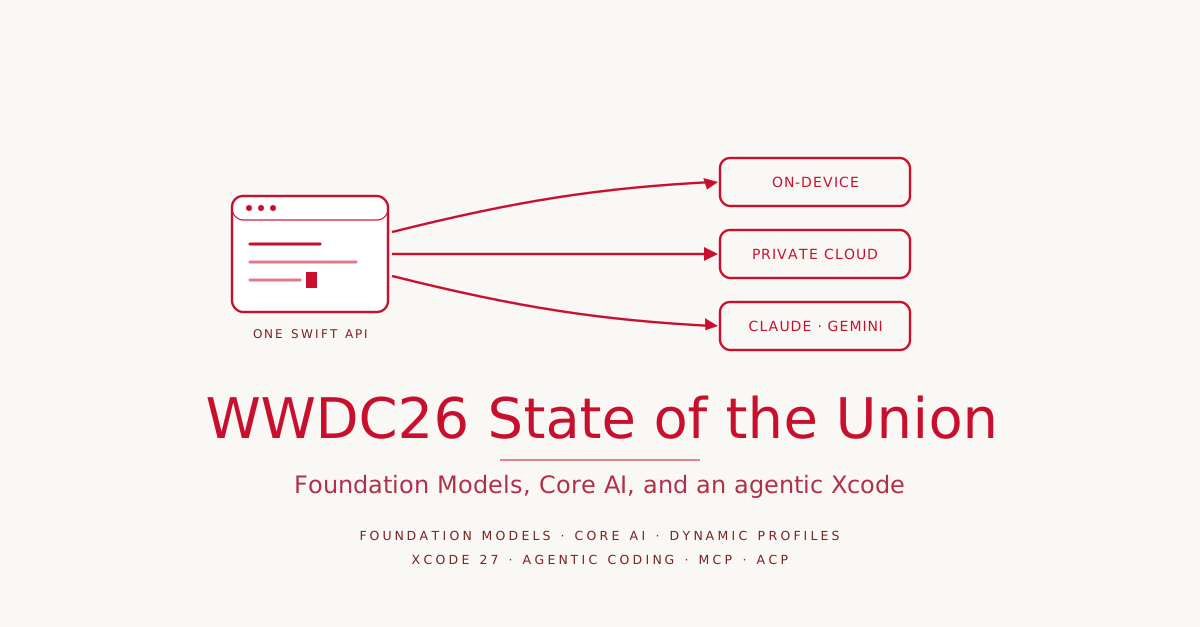
Second, server models. When the local model is not enough for a complex workflow, the same API can now call a cloud model, such as Claude or Gemini, with tool calling and guided generation. Any provider can ship a Swift package that conforms to the Language Model protocol, and you swap the model in with a single line. Apple frames this as a consequence: the framework is thereby the best way to run any large language model in an app.
Third, a cost model that lowers the barrier to entry. Developers with fewer than two million first-time App Store downloads can use the Apple Foundation Models on Private Cloud Compute with no cloud API cost. That is access to frontier-level intelligence without infrastructure costs holding back a prototype.
| Model tier | Where it runs | Typical use |
|---|---|---|
| On-device model | locally on Apple Silicon | small, frequent tasks, no server cost |
| Private Cloud Compute | Apple servers, private | more complex tasks, free under 2M downloads |
| Server models (Claude, Gemini) | third-party cloud | frontier tasks, tool calling, guided generation |
Around all this comes tooling: an Evaluations framework for testing and validating prompts, an upgraded Foundation Models instrument for debugging model behavior, an FM command line tool, a Python SDK, and a RAG tool based on Core Spotlight that stays private to the app. And the biggest point last: the framework goes open source this summer and then runs with the same Swift APIs on the server too. That lets you run an end-to-end AI workflow anywhere Swift is deployed.
Dynamic Profiles Instead of Fixed Sessions
The most interesting addition in the framework is Dynamic Profiles. Until now you create a LanguageModelSession with a fixed model, fixed tools, and fixed instructions. Dynamic Profiles break that open. Using the familiar Swift result builder syntax, you define multiple profiles in one session, and the body resolves to exactly one active profile at any given time.
In the demo, an Origami app runs three profiles in one session: a brainstorming profile on Private Cloud Compute with high temperature for creativity, a tutorial profile with deep reasoning for the hardest task, and a small profile that explains jargon like “valley fold” using the on-device model to save server calls. Models, instructions, and tools can be swapped during the run, but they all share the same continuous transcript. That yields more contextual intelligence with less prompting.
The key line falls at the end of the demo: the three profiles look like three AI agents, and that is by design. Dynamic Profiles are meant as adaptable building blocks from which you can build agents, skills, or any higher-level abstraction. Apple ships an open-source Swift package alongside, with pre-built tools for skills and context management.
Core AI for Your Own Models
If you bring your own model and want to run it on-device, Core AI is a new framework for that. The tech press positions it as the successor to Core ML (MacRumors, June 2026). Core AI is built right into the platform and optimized for Apple Silicon, with a modern, memory-safe Swift API and tuning down to custom GPU kernels. Python-based tools convert and optimize PyTorch models for the Core AI runtime, and a new toolchain brings ahead-of-time compilation, dedicated Core AI instruments, and a visual debugger that traces tensor values back to the original Python source code.
The ambition is scaling across device classes. Apple names two poles: a compact vision model in an iPhone app for real-time camera queries, and at the other end a multi-billion-parameter LLM in a Mac app for an agentic assistant. Both with no server dependency and no token costs.
For enthusiasts who train, research, or fine-tune models, MLX remains the choice. Apple confirms in the session that MLX now supports Metal 4 and the GPU Neural Accelerators and scales training across multiple Macs via RDMA over Thunderbolt. That is exactly the mechanism from the dedicated MLX cluster session, mentioned here as a one-liner.
App Intents Brings the App Back to Siri
The second half of Apple Intelligence is not about models in the app, but about the app in the system. Through the App Intents framework an app becomes visible to Siri and system intelligence. Two schema types carry this: entity schemas describe an app’s content and concepts, intent schemas its actions.
If you contribute content to the Spotlight semantic index via IndexedEntity and let the entities conform to an entity schema, Siri can reason over the app’s content. In the demo the presenter asks outside the app, “Hey Siri, who’s coming to origami night?”, and Siri answers based on the messages in the app. Through an intent conforming to the sendMessage schema, the finding then becomes actionable: Siri writes a reply back. The new View Annotations API links views to entities so users can reference what is on screen, such as “the second message” or “this photo”.
Because the schemas are system-defined, the intents benefit from future updates. As Siri’s language understanding grows or new languages arrive, the existing intents work there too, with no code change.
Platform: Liquid Glass, SwiftUI, and Swift Down to the Kernel
The second block is the foundations apps run on. Build anew with the new SDK and you get faster launches and more responsiveness with no effort of your own.
The Liquid Glass design from last year is being refined. Liquid Glass now diffuses complex content behind it more cleanly, a darkened edge and brighter specular highlights add depth, and a slider in settings allows any gradation from ultra clear to fully tinted. Apps already using Liquid Glass get these improvements automatically, without recompiling. macOS 27 now supports the “show borders” value like iOS, sidebars extend to the edges, and icons in the sidebar regain their color via the app’s accent color.
A practical point for iOS developers is resizability. iOS apps show up in more and more places, on iPad and on Mac through iPhone Mirroring. This year they can be resized there. After a rebuild with the current SDK, an app is automatically opted in. If you use SwiftUI, Auto Layout, or size-class changes, you are close. For custom views there is a resizable iOS simulator, previews across many screen sizes, and a skill for coding agents that finds and fixes common resizability issues.
SwiftUI: Less Code, More Speed
SwiftUI gets the usual annual package of interactions, speed, and new capabilities. Among the interactions, drag-to-reorder and swipe actions stand out. What used to be a lot of code is now .reorderable() on the ForEach and .reorderContainer() on the parent, and it works in any container, not just lists. Swipe actions work analogously through .swipeActions() plus .swipeActionsContainer().
For speed, what matters most is what happens automatically. SwiftUI, AppKit, and UIKit increasingly share a common foundation, so improvements apply everywhere. Nested stack layouts scale up to twice as fast because redundant repeated measurements are dropped. State is now only initialized on first load, because State is lazy under the hood and was converted from a dynamic property to a macro. AsyncImage caches via standard HTTP caching, so images load only once.
| SwiftUI addition | What it brings |
|---|---|
.reorderable() / .reorderContainer() | drag-to-reorder in any container, with little code |
Lazy State (now a macro) | no more redundant state-object instances |
AsyncImage HTTP caching | images load once, not repeatedly |
| Document infrastructure | partial reading and writing of large files |
visibilityPriority / overflow menu | toolbars reflow in order at dynamic sizes |
Among the new capabilities, two stand out. The new document infrastructure gives document-based apps first-class access to the file URL, so you can read only the parts of a file you need and write only the pieces that changed, not the whole file. And the Spatial Preview framework lets Mac apps turn a 3D model spatial when streaming to an Apple Vision Pro.
Swift 6.4 and a Piece of Kernel in Swift
Swift 6.4 targets the everyday. Warnings can be suppressed in individual parts of the code and promoted to errors elsewhere. Instead of listing every Apple platform with the same version number, anyAppleOS now suffices. The restriction on async calls inside a defer block is gone. And the notorious error “The compiler is unable to type check this expression in reasonable time” no longer applies in many cases, because the code either compiles through or yields a more actionable error.
Behind the language updates sits a larger movement. Apple is increasingly writing its own layers in Swift. The TrueType font engine replaces decades-old, hand-optimized C with Swift that is not only memory safe but faster. WebKit is replacing security-critical C++ components with Swift incrementally. The QUIC transport layer was rewritten in Swift and goes open source this month. And for the 27 releases, Apple is starting to write parts of the operating system kernel in Swift. Swift is thus no longer just the app language, but reaches down to bare metal.
A cut goes with it. macOS Tahoe was the final version with Intel support, and the migration to Apple Silicon is complete. That allows Apple-silicon-only binaries on the Mac App Store, smaller downloads, and testing on a single architecture. At the same time, the option to force the old design goes away. Once an app is recompiled with Xcode 27, it automatically uses Liquid Glass.
Xcode 27: Agentic Coding at the Center
The third block is the workbench. Xcode has two stories this year: the daily feel and the intelligence.
On the everyday side, Xcode 27 is thirty percent smaller, Apple-silicon-only, and downloads agents, documentation, and other components in the background. Settings sync via iCloud, including Git configuration. A new project is open immediately, with no file name, bundle ID, or setup, all of which can be filled in later. The toolbar is customizable, and themes pull color through the whole app rather than just the editor, different per project. More noticeable is the new Device Hub, which replaces the Simulator and does more: change device properties like dark mode or font size at runtime, resize dynamically, and control physical devices from the same surface. Xcode Cloud builds up to twice as fast and now supports Apple Vision Pro and Metal apps.
The real leap is in agentic development. Agents are woven into every layer of Xcode and get tools to check their work: run tests, try ideas in isolation in playgrounds, check previews in light and dark and across localizations. New is that an agent can operate the app in the simulator itself, that is tap, swipe, and type, and deliver a test report with screenshots at the end.
The demo workflow shows the arc. The presenter describes a feature, appends /plan to the prompt, and asks for a diagram. The agent explores the project with Xcode tools, asks clarifying questions, and lays out a plan in rendered markdown next to the conversation, which can be reviewed and refined. Only after that is code written. The same machinery localizes the app into French, context-aware rather than word for word, and pulls the most frequent crashes of the latest release via the Organizer, reproduces one, fixes it, and validates the fix.
Plugins form the underpinning. Xcode 27 brings the knowledge of Apple’s engineers and designers as a corpus of skills, documentation, and MCP tools, meant as specialists, for example for SwiftUI, accessibility, or performance. Your own can be added in the same format. A plugin can contain skills, that is markdown files that teach the agent new tasks, plus tools over the Model Context Protocol. New is that a plugin can bring an agent of your choice over the Agent Client Protocol. Xcode already integrates agents from Anthropic, OpenAI, and now Google, and ACP support plus Gemini integration arrive in an Xcode 26 update shipping the same day.
Conclusion
Three developments shape this year’s State of the Union. First, Apple decouples the framework from the model. Foundation Models addresses on-device, Private Cloud Compute, and third parties like Claude or Gemini through the same Swift API, and Dynamic Profiles make switching between them at runtime the norm. Whoever builds an AI feature picks the model by task, not the other way around.
Second, Swift becomes the through-line language, from the app surface down to the kernel, and the Foundation Models framework follows by going open source and running on the server. That is the consistent continuation of a line Apple has been drawing for years.
Third, the work in Xcode itself changes. Xcode 27 treats the agent not as an accessory beside the editor, but as an actor that plans, builds, tests, and fixes errors, grounded in Swift and the Apple frameworks. That Apple adopts open protocols like MCP and ACP for this, rather than going a closed proprietary route, is the real news for everyone already working with coding agents today. Demos are demos, and how well the agentic day-to-day really holds up is something only practice will show. But the direction is unambiguous, and it matches what has long become everyday outside Apple’s garden.
For me, Xcode remains the best IDE for Apple platforms and the first choice everywhere I am not already working with Neovim and Claude Code in the terminal. The only hope is that it stays closed enough not to end up in the same security-plagued extension hell as VS Code.
